"I was pleased with RaftLabs team's quality, consistency and execution."

Dr.J. Ayo Akinyele
President, Co-Founder, Yeletech Security Inc & Bolt
Document Automation Services
Sales, legal, finance, and operations teams should not rebuild the same proposal, agreement, statement, or report from scattered data each time. RaftLabs creates document automation systems that use approved templates and rules, pull from the systems you already run, route the right approvals, and preserve a clear version history.
Bring one high-volume document, its current template set, and the people who approve it. We will tell you whether to configure a product, connect your existing tools, create a focused custom workflow, narrow the scope, or wait.
The brief
Good software decisions begin with the constraint, not a list of features or a preferred technology.
Does your team copy customer, pricing, policy, or project data into the same documents every week?
Do local template copies and old clause packs make it hard to know which version people should use?
Are approvals, signatures, delivery, and storage still tracked through email and follow-up messages?
Plain answer
Document automation creates, checks, approves, delivers, and stores business documents from governed templates, rules, and system data. RaftLabs creates custom document workflows for established teams when a ready-made product cannot support their logic, integrations, security, or ownership needs. It selects the right template, inserts approved content, and routes review, signature, delivery, and storage.
What to remember
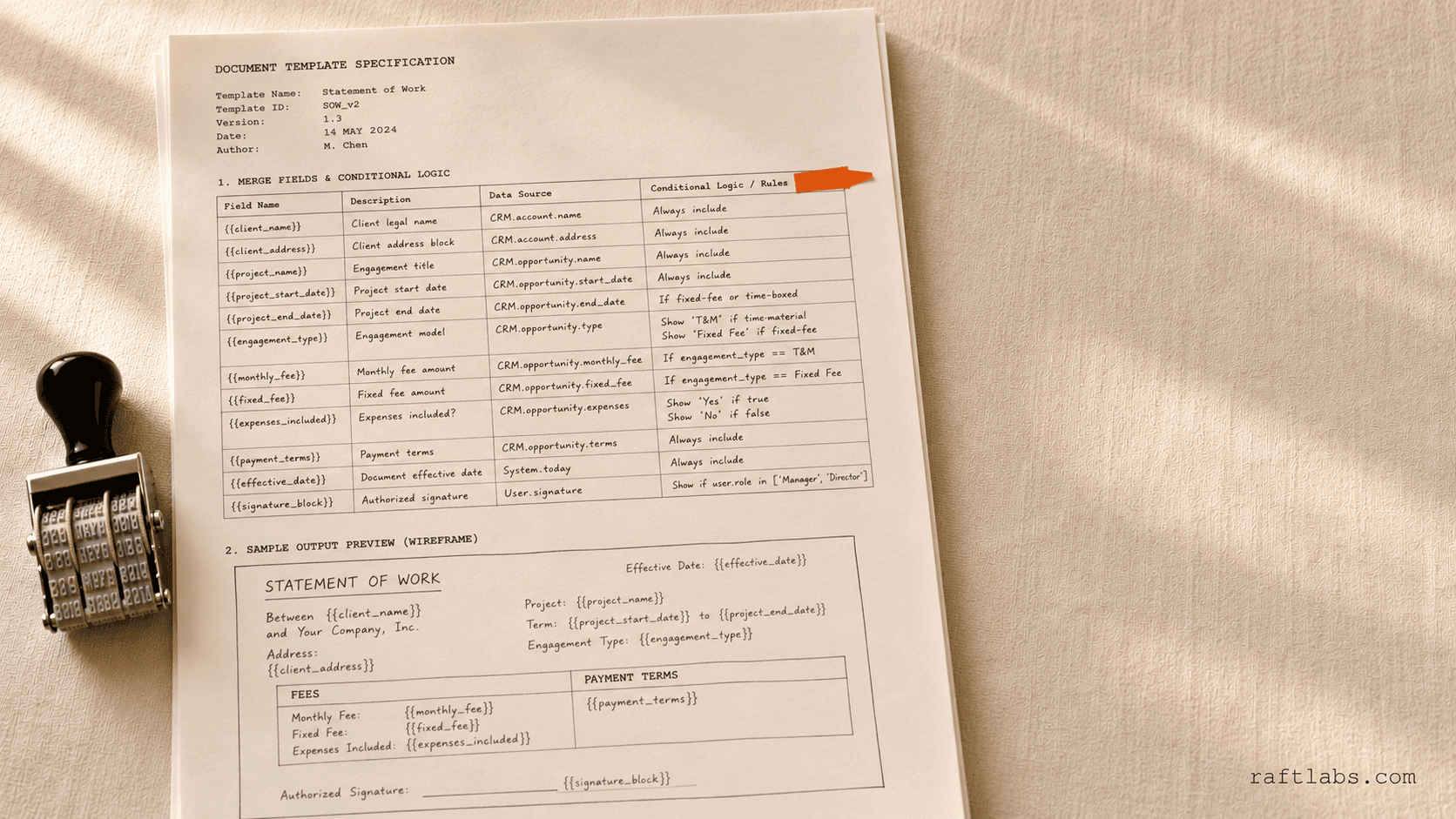
A sales team needs a proposal. The customer data sits in the CRM, the current pricing lives in another system, the approved wording is buried in a shared folder, and legal wants to review one exception. Someone copies it all into last quarter's Word file and hopes the right version went out.
That process works until volume rises. Then the team pays twice: once for the hours spent assembling documents and again for the delay, rework, or risk created by an old template or missed approval.
Document automation turns those repeatable decisions into a controlled route. System data fills known fields. Rules choose approved sections. People review the exceptions. The final document leaves with its source, version, approval, signature, and storage history attached.
These categories touch the same files but solve different operating problems. Choose by the result your team needs after the file arrives or before it leaves.
| Scenario | Recommendation | Reason |
|---|---|---|
| You need to create repeatable proposals, agreements, statements, reports, notices, or document packs. | Document automation | Templates, source data, conditional content, approval, signature, delivery, storage, and version history belong in one route. |
| You need incoming PDFs, scans, or attachments to become checked records in another system. | Intelligent document processing | Classification, extraction, validation, human review, write-back, and reconciliation define the job. |
| You need to manage contracts from request through negotiation, obligation, renewal, and expiry. | Contract automation | The contract lifecycle, playbook, negotiation, obligations, and renewal controls matter more than document assembly alone. |
| You mainly need controlled filing, search, retention, permissions, and records disposal. | Document management | A maintained document management system may solve the problem without a custom generation workflow. |
Use intelligent document processing when extraction is the main constraint. Use contract automation when negotiation, obligations, and renewals define the work. If several systems cannot pass state and data between them, start with business systems integration.
Fit
The case is strongest when the document repeats, the decisions are explainable, and the missing piece is specific to your data, rules, systems, or control boundary.
The same document family is produced often enough that copy-paste, review, and follow-up consume measurable time.
A business owner can name the approved templates, variable content, decision rules, reviewers, and final record.
A product has been tested and the remaining gap is a proprietary rule, user experience, connection, security boundary, or ownership need.
A maintained product already covers the templates and workflow with reasonable configuration.
Every document is a one-off that needs expert judgment and free-form drafting from beginning to end.
Different teams still disagree on the approved version, rule, owner, or result for the same scenario.
A useful recommendation may be to keep Word, configure an existing product, add one connector, clean the template library first, or create a focused custom route. Custom work must earn the support burden it adds.
Production scope
Start with the maintained option. A custom route makes sense only when a product cannot support the decision that makes your documents valuable or safe.
| Buy or configure | Create a custom route | |
|---|---|---|
| Best fit | Common templates and standard approval flows | Proprietary logic, experience, integrations, or control boundary |
| Time to first use | Usually faster when the product fits | Longer because rules, connections, testing, and support belong to you |
| Business change | Adapt the process to the product where needed | Model the workflow around the approved operating decision |
| Ownership | Vendor product, roadmap, and licence terms | Client-owned templates, rules, project code, accounts, and operating notes |
| Ongoing work | Configuration, licences, and vendor releases | Template governance, regression tests, monitoring, and software support |
The test is not whether custom software can do more. It is whether the extra control changes cost, turnaround time, risk, or customer experience enough to justify owning it. For standard mail merge, common Salesforce proposals, or ordinary e-signature routing, a product will often win.
Do not judge a pilot by how quickly it generates the clean example. Judge it by whether the team can trust, change, and recover the route.
Buyer discussions repeat the same pattern: the technical merge is rarely the hardest part. Teams have several "approved" versions, rule logic hidden inside Word or macros, and no owner for the update that arrives six months later. When the workflow changes, staff fix the generated document by hand. The automation still runs, but trust has gone.
Write down the trigger, inputs, decision rules, output shape, owners, and approval boundary first. Keep deterministic assembly for the parts the business has standardised. Use AI only where judgment or language variation adds value, then keep a person at the release point for high-risk documents.
The goal is not zero human touch. It is zero avoidable rework and a clear place for judgment.
How it works
Start with one document family that has visible volume, clear owners, and a result the business can measure.
Follow one document from trigger to final record. Name the source of every field, the rule behind every variable section, each approval, the release condition, and the failure paths. Compare products before approving custom scope.
Choose the authoritative templates and content packs. Remove duplicate versions, assign owners, define required data, and create a representative test set with ordinary, rare, and high-risk outputs.
Create the smallest working route. Test conditional sections, calculations, edits, approvals, failed connections, duplicate triggers, and template changes. Business owners approve the output and acceptance checks.
Link the source system, editor, e-signature, delivery channel, storage, and status reporting. Release to a controlled group, track completion and corrections, then add another document only after the first route removes more work than it creates.
RaftLabs has published evidence for document intake and high-volume operational workflows, not for a directly comparable enterprise document-generation programme. We will not turn OCR metrics into a claim about template or clause accuracy.
The Musgrave workflow shows that RaftLabs can connect document intake, decision states, duplicate control, human review, and operator reporting. It does not prove the accuracy of a future generation system. Your acceptance test must use your own templates, rules, data, difficult variants, and reviewers.
The first engagement should settle one decision: can one document family move from trigger to final record without hidden repair work? Bring the current templates, source systems, approval path, monthly volume, and one awkward example. We will help you decide whether to configure a product, add a connection, create a focused custom route, or wait until the process is ready.
If custom work is the sensible route, the written scope will name the acceptance examples, responsibilities, dependencies, support boundary, timeline, and price before development starts. Project-specific code, templates, rules, data, accounts, and operating notes remain under your control.
Scope and price
Begin with one document family that has visible volume, clear owners, and a result the business can measure.
Pricing follows a fit review and is set in writing before development starts.
Starting investment
Starts at $15,000
A focused first workflow usually takes 8 to 14 weeks. A multi-department platform grows in phases and can grow toward $60,000.
Proof
Three-year average engagement. Founders and operators describing the work in their own words. No marketing varnish.
"I was pleased with RaftLabs team's quality, consistency and execution."
Dr.J. Ayo Akinyele
President, Co-Founder, Yeletech Security Inc & Bolt
Work with us
We will map how one document moves from trigger to final record, where people repair it today, and whether you should configure a product, connect existing tools, create a focused workflow, or wait. If custom work fits, we will put the first scope, assumptions, timeline, and price in writing.
Document automation uses governed templates, business data, and rules to create and manage repeatable documents. A complete workflow can select the right template, insert approved content, generate a Word or PDF file, route review and signature, deliver the final version, and store its history.
Document automation mainly creates and manages outgoing documents. Intelligent document processing turns incoming PDFs, scans, images, or attachments into checked records for another system. Use document automation for proposals, agreements, statements, reports, and notices; use IDP when extraction and validation are the main job.
Strong candidates recur often, draw from known data, use approved sections, and follow rules a process owner can explain. Proposals, policy documents, customer letters, statements, reports, agreements, compliance packs, and onboarding packs often fit. A rare document that needs free-form expert judgment from beginning to end may not.
Buy or configure a maintained product when its templates, rules, approvals, integrations, security, and editing experience fit without major workarounds. Consider custom work when your source systems, document logic, deployment boundary, or user experience are the reason products keep failing. The first phase should test those options rather than assume custom work.
Agree the authoritative templates, content or clause owners, required inputs, decision rules, approval roles, and final system of record. Different outputs for different scenarios are manageable. Several unofficial versions for the same scenario create a policy problem that software alone cannot settle.
Yes, when those systems expose a supported API, event, import route, add-in, or controlled data connection. The scope should name the source of each field, duplicate and retry behaviour, approval state, signature status, final storage location, and what happens when a connection fails.
Use AI for bounded tasks such as classifying a request, finding missing facts, suggesting approved content, summarising changes, or drafting a clearly marked section. Use deterministic templates and rules for required language, calculations, formatting, and repeatable assembly. A person should approve high-risk outputs before release.
Keep templates, approved content, and decision rules versioned separately from personal document copies. Record the source data, template and rule version, generated output, reviewer, approval, signature, delivery, and later changes. Business owners need a safe way to review and publish updates without editing hidden macros.
RaftLabs prices document automation after a fit review because the scope depends on the number of document families, conditional logic, editing experience, integrations, permissions, deployment boundary, acceptance testing, and support needs. Any proposed first phase is defined and priced in writing before development starts.
A focused first workflow usually takes 8 to 14 weeks after the source templates, rules, owners, and system access are available. A multi-department platform takes longer and should grow in phases. The main schedule risks are unresolved template policy, unavailable integration access, and edge cases found late.
The client should control project-specific templates, rules, code, data, accounts, and operating notes. Third-party products and libraries remain subject to their own licences. The handover should also name who approves future template changes, how releases are tested, and who responds when a workflow fails.