Short answer
RaftLabs built Pause, a mindful screen time iOS and Android app that reduces unconscious app opens by 40% (client-reported) without blocking or time restrictions. Pause inserts a brief intentional prompt (a calm question with two options) before a flagged app opens. Users who want to proceed do; users who pause avoid a session they would have regretted. The mechanism targets the habit loop rather than restricting access, which is why it works where blockers and timers fail. Pause earned a 4.6/5 App Store rating and reached active users in 15+ countries within 60 days of launch. Built in 12 weeks using React Native, a native Swift extension for iOS Screen Time API access, Node.js, and AWS Lambda with DynamoDB.
The situation
Screen time blockers do not work because restriction and control provoke resentment. Timers do not work because most people override them as soon as the friction gets inconvenient. Neither approach addresses the actual mechanism: the habit loop that opens Instagram before you have consciously decided to.
Pause is a different intervention. It does not block. It does not restrict. It inserts a single moment between the impulse and the action: one brief prompt that asks whether you actually want to be there. The client reported that the prompt is enough to interrupt the automatic reflex in 4 out of 10 sessions.
Every screen time tool faces the same structural problem: the person who set the rule is also the person who can turn it off. Set a limit, tap remind me in 15 minutes, do that four times in a row, and you have an illusion of control. A lot of phone use is instinctive, almost a reflex, not something done mindfully. The half-second between the pickup and the tap is everything.
We built Pause for people who do not want to be controlled by an app, but do want to stop using their phone on autopilot.
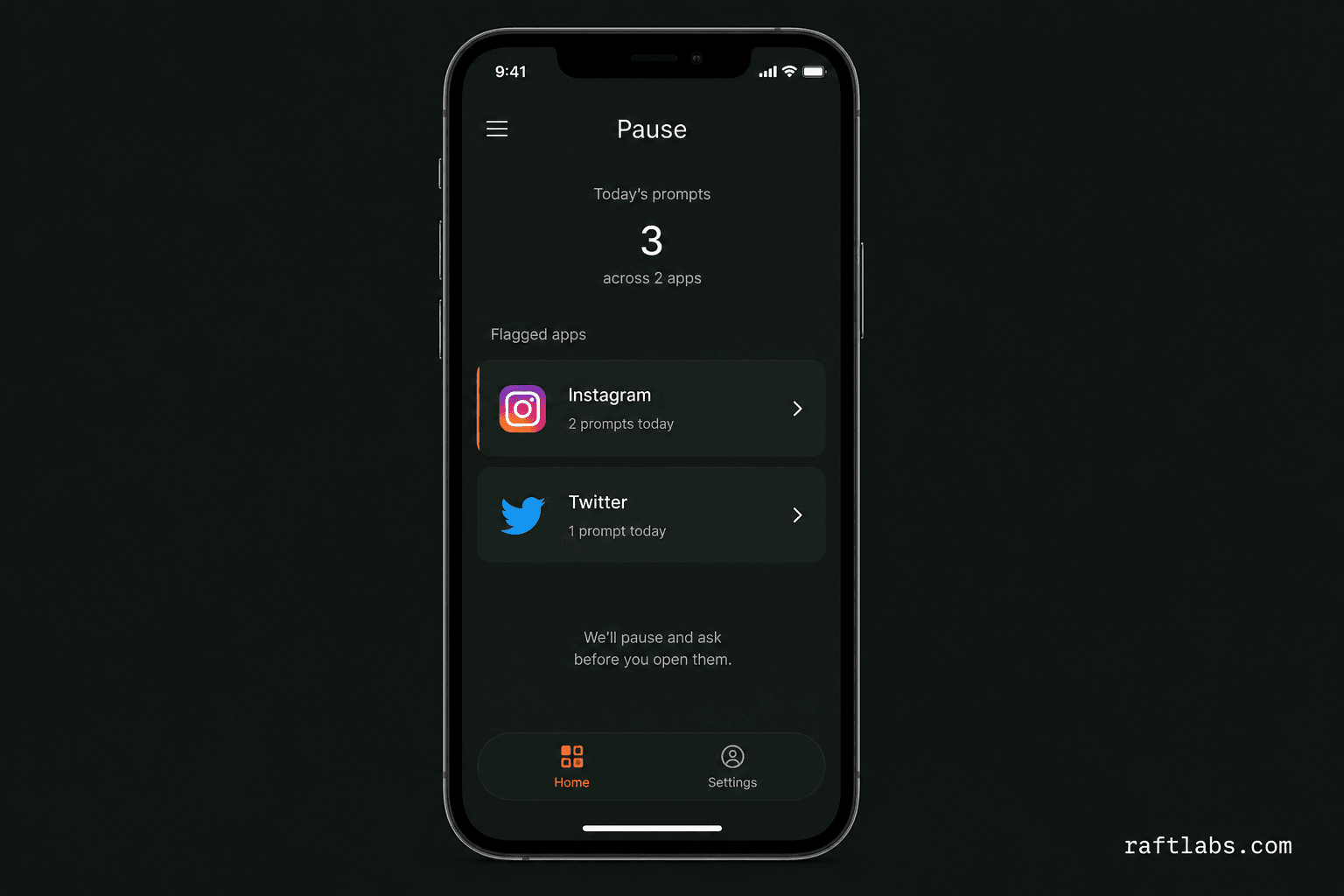
Engagement
The Pause engagement
- Product
- Pause, a screen time app that interrupts the autopilot reflex instead of blocking apps
- What we built
- A native iOS and Android app: a calm 3-second prompt before flagged apps open, user-defined schedules, a weekly actual-vs-intended summary with no shame scoring, and adjustable friction that never locks
- Stack
- Native iOS Screen Time API extension and Android interception, React Native app
- Status
- Live. The client reported 40% fewer mindless opens, a 4.6 App Store rating, and users in 15+ countries in the first 60 days
Before and after
What we set out to solve
- Screen time blockers treat users like they cannot be trusted with their own devices; users bypass them within days, then feel guilt for doing so, which is the opposite of the intended effect
- Daily time limits are arbitrary and disconnected from actual sessions; the moment a limit fires at an inconvenient moment, it gets disabled and stays disabled
- Both blocker and timer approaches target the outcome (the session) without ever addressing the mechanism: the unconscious reflex that opens Instagram before the decision to is ever made
- Usage dashboards in competing apps rely on shame mechanics (streak counters, failure scores, comparison data) that produce guilt rather than behavior change
- Users who want to use their phone less had no tool that respected their autonomy while still providing a meaningful intervention
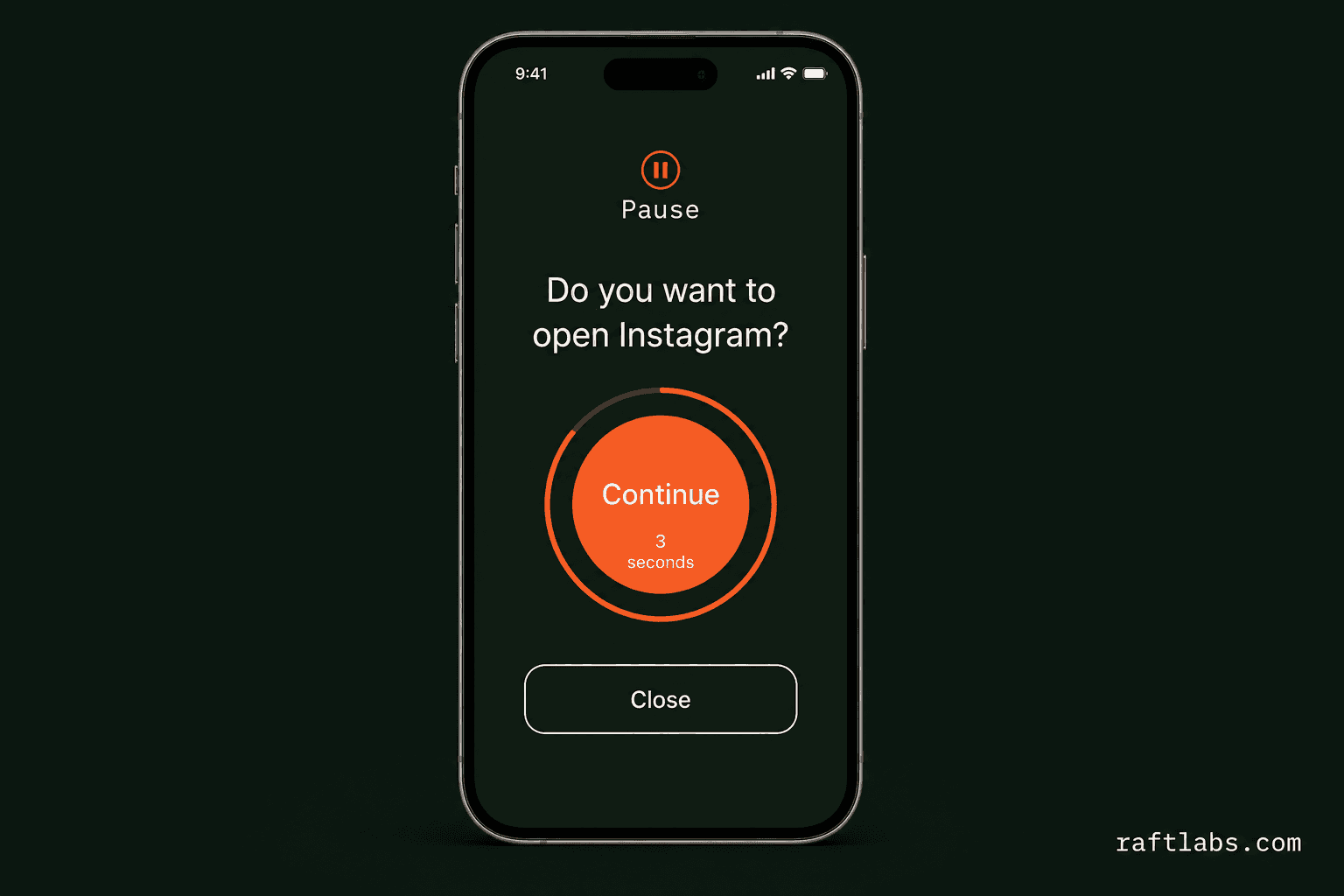
- Before a flagged app opens, Pause displays a 3-second prompt (a calm question, two options) that interrupts the reflex without blocking access for users who choose to proceed
- Users who want to open the app do; users who pause avoid a session they would have regretted; neither outcome is judged or scored
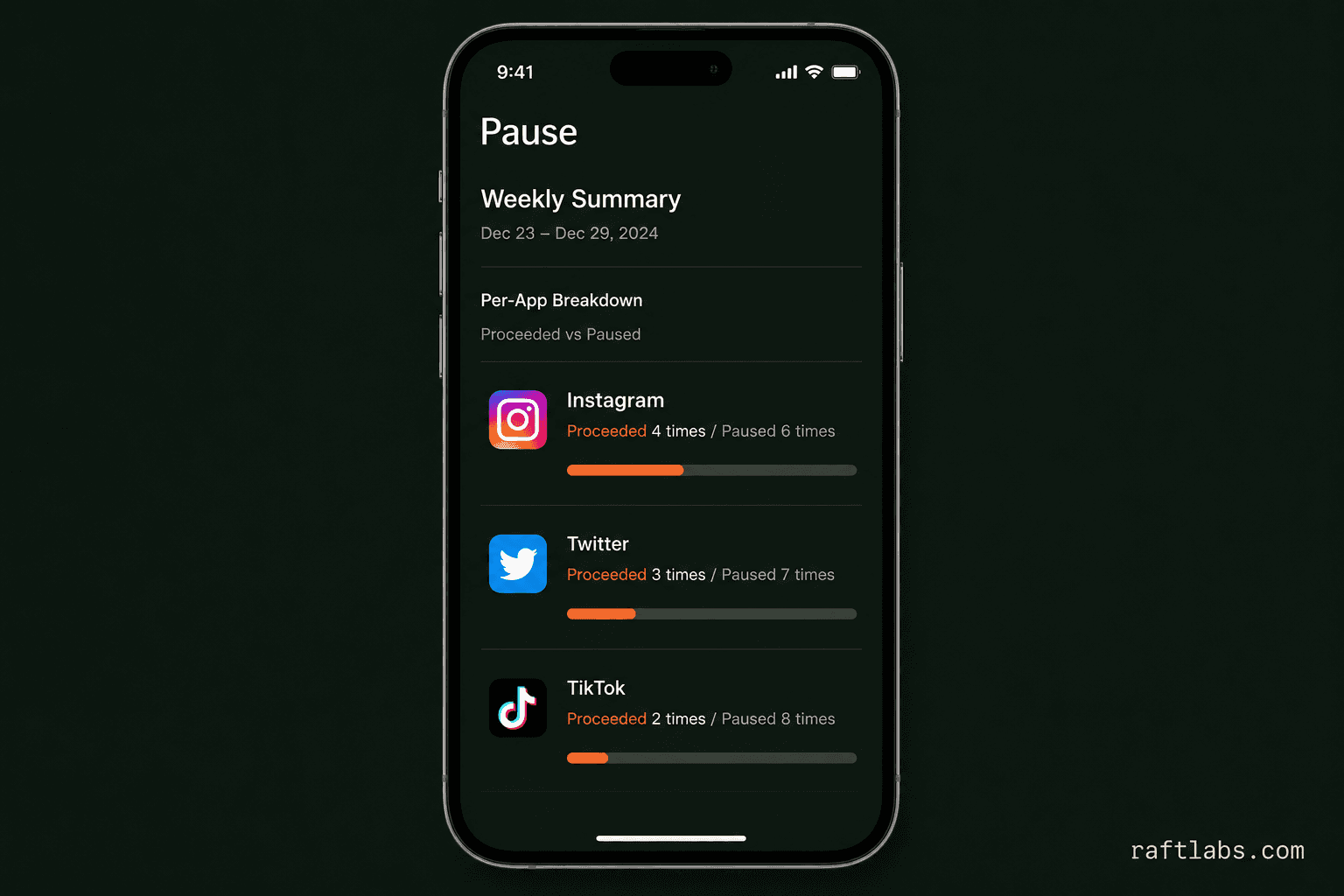
- A weekly summary shows actual versus intended sessions per app without streak pressure or failure framing, just data about the user's own behavior
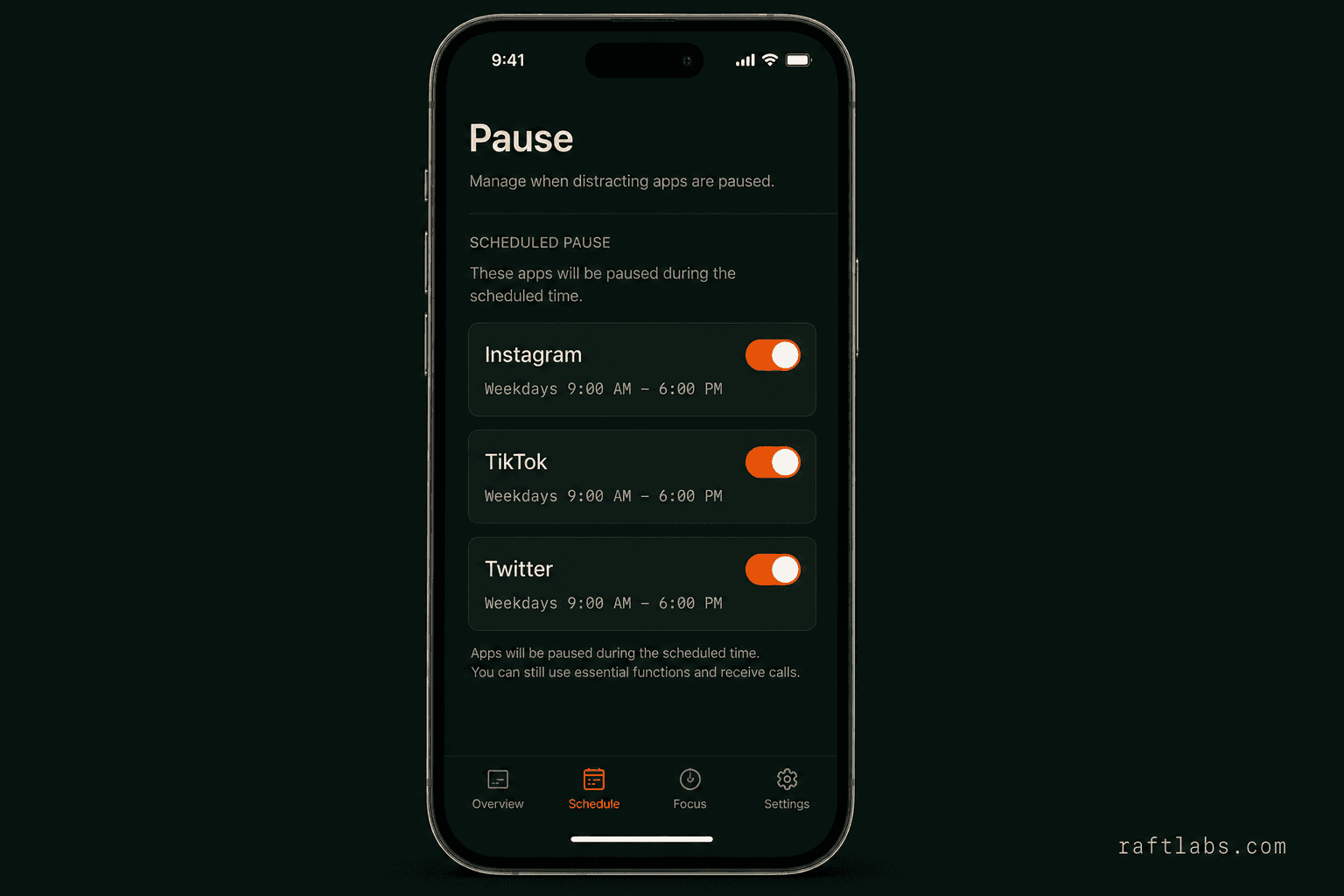
- Users choose which apps to flag and when, setting rules that reflect their own priorities without Pause imposing or overriding outside those windows
- Users who want more friction can increase the pause duration or add a brief reflection; Pause never locks
What we had to solve
Intercepting app launches at the OS level on iOS and Android without requiring device management profiles
iOS provides a Screen Time API for app interception, but accessing it requires a native Swift extension that cannot be called directly from React Native: the bridge has to be built deliberately and tested across iOS versions. Android's equivalent requires a different set of permissions. Building an interception mechanism that worked reliably on both platforms, stayed within the permission model each OS defines, and did not require enterprise MDM enrollment was the core technical challenge. A prompt that fires inconsistently is worse than no prompt at all.
Designing the prompt to feel like a pause, not a gate
If the prompt reads as judgmental, even slightly, users disable it. The interaction had to be genuinely neutral: no shame language, no progress-tracking framing, no comparison to other users. The 3-second window, the copy, the two-option design, and the non-preachy tone were all decisions made to keep the prompt feeling like a moment of choice rather than an obstacle. Getting that balance right required multiple rounds of user testing because the difference between a pause and a gate is entirely in the emotional register of the interaction.
Proof
What the client reported, and what this page can't claim
Adoption and rating figures reported by the client. These are operator reports, not independently audited measurements.
| Result | What changed | Period or context | Evidence and limitation |
|---|---|---|---|
| Reflex interruption | 40% fewer mindless app opens | The client reported that the 3-second prompt interrupts the automatic reflex in 4 out of 10 sessions. Before: users opened Instagram, YouTube, or TikTok on reflex 15 to 20 times per day without deciding to | Client-reported |
| Store reception | 4.6 out of 5 App Store rating | Competing screen time apps averaged 3.2 out of 5, per the client, with reviews citing the same complaint: too restrictive, too preachy, too easy to bypass | Client-reported |
| Early reach | Active users in 15+ countries in the first 60 days | The problem is universal. The client reported users from the US, UK, India, Germany, Australia, and Brazil in the first cohort | Client-reported |
the build
What we built
Pause is minimal by design. Every feature decision was filtered through one question: does this add friction or reduce it?
Users who close the prompt avoid a session they would have regretted; those who proceed aren't penalized
When the user opens a flagged app, Pause displays a brief interstitial for 3 seconds: a simple question and two options, continue or close. The prompt is calm, non-judgmental, and takes less than 5 seconds. Users who proceed are not penalized. Users who close avoid a session they would have regretted.
Users set their own rules: Pause holds the prompt only at the times they defined
Users choose which apps to flag and when. A professional might flag Instagram only on weekdays between 9am and 6pm. Pause respects the schedule without overriding it: the user sets their own rules, and Pause holds the prompt at the times they defined.
Weekly data shows actual versus intended sessions, no shame score, just behavior to act on
A weekly summary shows actual versus intended sessions per app: how many times the user proceeded after the prompt versus how many times they chose to pause. No shame score, no streak pressure, just data about their own behavior that helps them decide whether to adjust their settings.
Users who want more friction can increase it: the default is light-touch, the maximum never locks
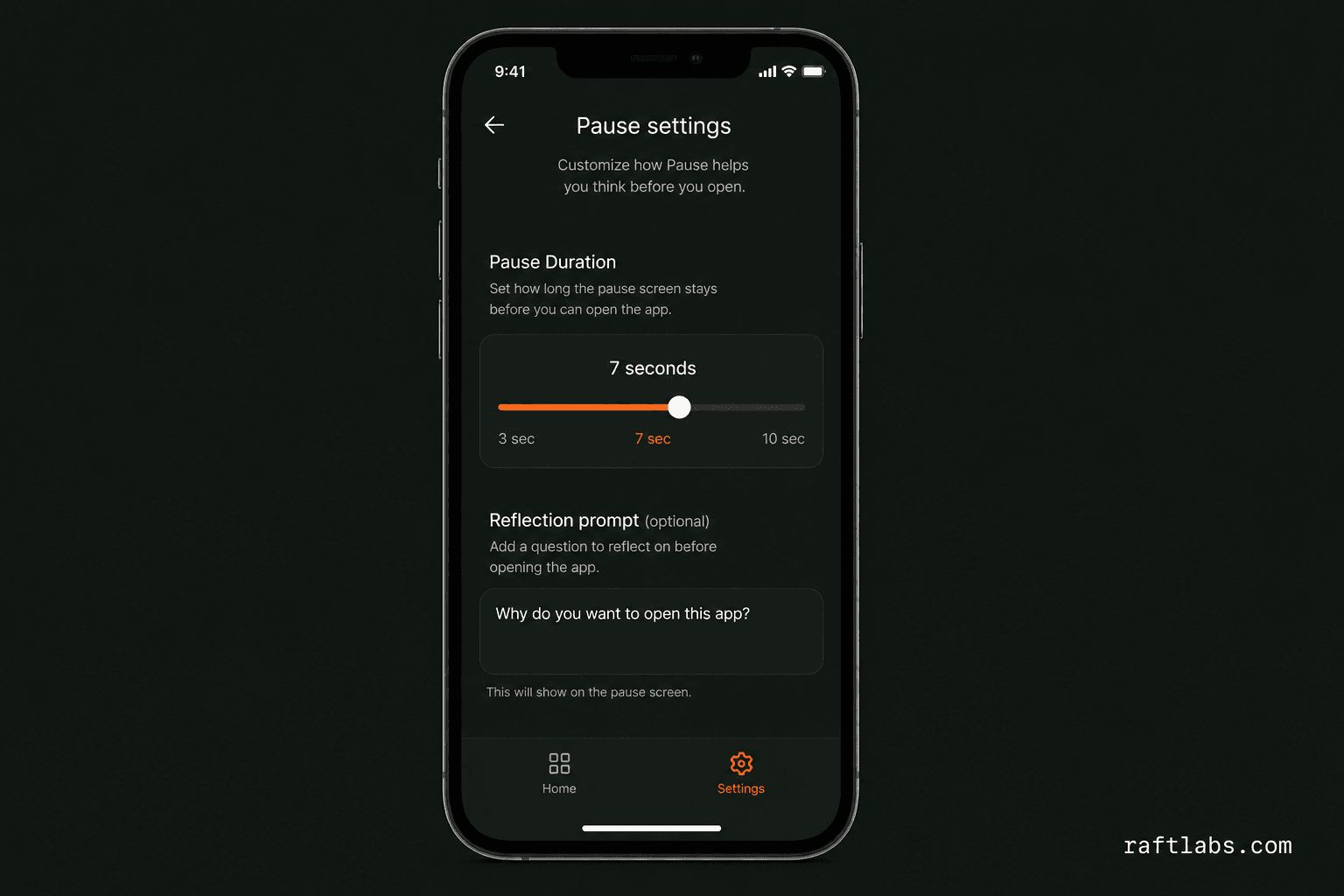
Users who want more friction can increase the pause duration or add a brief reflection prompt before proceeding. The default is light-touch; the maximum is a 10-second window with a one-sentence intention prompt. Pause never locks.
The lesson
Restriction provokes resentment. A question provokes a choice.
Screen time blockers treat users like they cannot be trusted with their own devices. Users bypass them within days, then feel guilt for doing so, which is the opposite of the intended effect. Timers fail the same way: the person who set the rule is also the person who can turn it off.
Pause's answer is a question, not a wall. The prompt is genuinely neutral: no shame language, no streak pressure, no comparison to other users. If the prompt reads as judgmental, even slightly, users disable it. The difference between a pause and a gate is entirely in the emotional register of the interaction. Ask the question, respect the answer, and the reflex loses.
How it runs
- React Native
- A single codebase for iOS and Android was the right call for a product where the core UI is minimal (the prompt, the dashboard, and the settings). React Native's bridge to native modules let us access the platform-specific interception APIs without maintaining two entirely separate codebases.
- Swift
- iOS Screen Time API integration requires a native Swift app extension: React Native cannot access it directly. The Swift extension handles the interstitial display and reports back to the React Native layer. This is the piece that makes the iOS interception actually work.
- Node.js
- A minimal backend handles user accounts, cross-device usage sync, and the anonymous cohort analytics that inform the weekly usage summary. Node's async model fit the lightweight, event-driven usage data pipeline.
- AWS
- Usage events are stored in DynamoDB for low-latency reads. Lambda runs the weekly summary computation on schedule without provisioning a dedicated server for a job that runs once per user per week.
Common questions
Pause shows a prompt: it does not block. You can always proceed. The mechanism is behavioral: the prompt interrupts the automatic reflex. Users who want harder controls can enable the longer delay options, but Pause never permanently restricts access to an app. The design decision to never block is intentional: blocking provokes resentment; prompting provokes reflection.
Any app installed on the device can be flagged. Common choices are social media (Instagram, TikTok, YouTube, X), news apps, and games. Pause does not pre-select apps for the user: you flag what you personally want to be more intentional about, and set the time windows where the prompt should appear.
Pause uses the platform's native Screen Time and app lifecycle APIs rather than running a persistent background process. Battery impact is minimal, below the threshold of what most users notice. The permission model is also narrower than most screen time apps: Pause does not require device management enrollment, location access, or contact data.
Yes. White-label versions of Pause have been built for corporate wellness programs and health insurance partners. The core prompt mechanism, scheduling, and analytics are configurable per deployment. The product's non-judgmental positioning makes it a better fit for employer wellness programs than enforcement-based alternatives, which typically see high opt-out rates when mandated. Contact us to discuss.
Users can increase the pause duration from the default 3 seconds up to 10 seconds, and can add a one-sentence intention prompt that requires the user to state why they are opening the app before proceeding. These settings can be applied per app and per time window. The intention prompt is the strongest intervention Pause offers: it requires a moment of articulation that most reflexive opens cannot satisfy. Users who need full blocking are better served by a dedicated parental control or focus app; Pause is designed for self-directed behavior change, not enforcement.
Related work
More of our work
Draftly helps professionals post consistently
Draftly helps professionals post consistently on LinkedIn without the grind
AI LinkedIn content tool for post creation, collaboration, and scheduling.
Call Eva cuts inbound call
Call Eva cuts inbound call costs by 80% with voice AI
Voice AI assistant that handles 24/7 calls, bookings, and follow-ups.