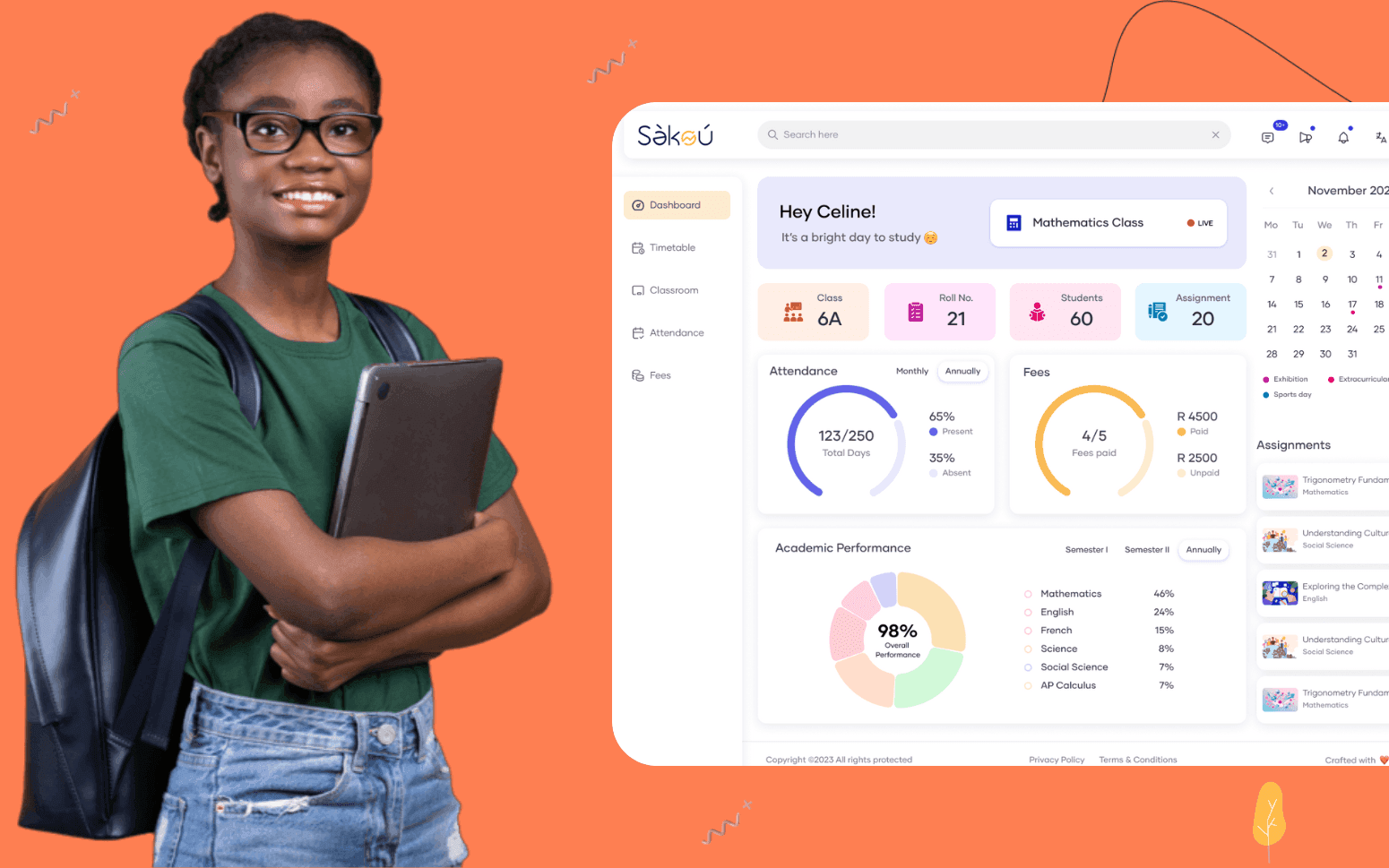
Purpose Built EdTech LMS SaaS Platform Disrupting African K-12 Schools
- 4000+
- 25%
- 16 weeks
Custom parent portal software for tutoring centres who need to replace WhatsApp updates and end-of-term reports with a structured system that shows parents what their child is doing and how they're progressing, in real time.
Parents who can see session notes, upcoming bookings, and progress data in one place ask fewer ad hoc questions and re-enrol at higher rates. We build the portal that makes that visibility possible without adding to the tutor's workload.
Session notes submitted by tutors and immediately visible to parents
Configurable progress reports generated from structured tutor input
Direct messaging between parents and the centre, no personal WhatsApp required
Payment history, upcoming charges, and package balance visible in one place
Recognition
Parents texting tutors directly on WhatsApp for progress updates because there is no central place to see what happened in last night's session?
Progress reports assembled by hand at the end of term because session notes were never collected in a format that could be compiled automatically?
In short
A parent portal for a tutoring centre gives parents a single place to see their child's session notes, progress reports, upcoming sessions, homework and study resources, and payment history, without contacting the centre over WhatsApp or email. RaftLabs builds custom parent communication and reporting portals for tutoring centres, replacing ad hoc messaging with a structured system that improves parent retention and reduces admin time.
Companies we've built for








Most tutoring centres communicate with parents the same way: a tutor sends a brief update over WhatsApp after a session, a parent replies with a question, and the conversation lives on the tutor's personal phone with no record the centre can access. When a tutor leaves, that history disappears. When a parent asks how their child has progressed since September, no one can answer the question with data.
Parents have a reasonable expectation: they're paying for their child's education and they want to know it's working. A centre that can't show progress in a structured, consistent format is harder to justify at renewal time than one that sends a clear monthly report with session notes attached. The parent portal isn't just a communication tool, it's a retention tool. Parents who can see their child's progress in one place, at any time, without chasing a tutor on WhatsApp are far more likely to stay enrolled.
A custom portal replaces ad hoc messaging with a system that works for the centre as much as it works for the parent. Tutors submit notes through a structured form after each session. Parents see those notes the same day. Progress reports generate from the accumulated session data on a schedule the centre sets: weekly, monthly, or at assessment points. The centre owns the communication record, the parent has the visibility they need, and the tutor's personal messaging stays out of it entirely.
After each session the tutor completes a structured note form covering topics covered, homework set, areas of difficulty, and a brief progress rating per subject area. The form is designed to be completed in under two minutes on a mobile device so tutors do it consistently rather than skipping it. The completed note publishes to the parent portal immediately and is visible to the parent, the student (if the portal supports student access), and the centre's admin team. Notes store against the session record in full so a substitute tutor stepping in can read the history before the session begins. The centre can set required fields so notes can't be submitted without the information that matters for reporting: topics covered and homework set are the minimum; centres with structured curricula can add more. Over time the session notes become a complete record of the student's tutoring history, available to the parent and the centre at any point.
Progress reports generate on a schedule the centre configures: weekly for intensive programmes, monthly for standard enrolments, or at defined assessment points in the academic calendar. The report pulls from the session notes submitted during the period: topics covered, homework completion rate, tutor progress ratings per subject area, and any assessment results logged during that period. The system compiles the tutor's structured input into a parent-readable report formatted consistently across every student. Parents receive a notification when a new report is available and can read it in the portal. Goal tracking sets at enrolment, the student's target score, exam date, or skill objectives, and the progress report shows movement against that goal rather than generic commentary. Centres can review and add to the report before it publishes if they want to include a message from the director or a summary recommendation.
The portal shows the parent every upcoming session for their child: date, time, tutor, subject, and location or video link. Parents can see the full schedule at a glance rather than having to contact the centre to find out when the next session is. If the parent needs to request a change, a cancellation, a reschedule, or a temporary suspension, they can do so through the portal using a request form that goes to the centre's admin team rather than directly to the tutor. The admin team handles the rescheduling in the booking system and the parent sees the updated session in the portal. Session status updates in real time: confirmed, rescheduled, cancelled, or completed. When a session is cancelled by the centre, the parent receives a notification with the cancellation reason and a prompt to rebook through the portal.
When a tutor assigns homework or wants to share a worksheet, practice test, or study guide, they attach the file to the session note rather than sending it to the parent over WhatsApp or email. The attachment stores against the session record and is accessible to the parent and student from the portal at any time, not lost in a message thread or deleted from a personal phone. The resource library in the portal holds every file shared with the student over the course of their enrolment, searchable by subject and session date. For centres that provide standardised materials, the admin team can upload resources to the portal directly and make them available to all students in a given subject or level. Parents no longer need to ask the tutor to resend a worksheet that was misplaced, they find it in the portal and the tutor's time is not spent on file retrieval.
Parents can send messages to the centre through the portal using a structured messaging interface that routes to the admin team or a designated point of contact rather than to the tutor's personal device. The full conversation history stores in the portal against the student record so any team member can pick up the thread with full context. Tutors aren't expected to respond to parent messages outside session time: the centre owns the communication and routes questions to the appropriate person. For centres that want tutors to communicate with parents directly, the messaging can configure to allow tutor responses within the portal while keeping the conversation in the system rather than on personal phones. Message templates cover the most common parent queries, session time changes, homework queries, progress questions, so responses are consistent and can be sent quickly. The centre has a record of every parent communication for the life of the enrolment.
Parents can see their full payment history, upcoming charges, current package balance, and any pending invoices in the portal without contacting the centre. Session packages show how many sessions have been used and how many remain, so parents know when they're approaching a renewal point rather than being surprised by an invoice. Payment receipts store in the portal and are downloadable by the parent for their records. When a new invoice generates, for a session block, a monthly subscription, or an assessment fee, the parent receives a notification and can view and pay the invoice through the portal. The centre's admin team sees which invoices are outstanding from the admin dashboard without chasing payments through WhatsApp. For centres that offer multiple billing formats, per session, monthly plan, term payment, the portal shows the parent the correct structure for their enrolment type.
Yes, and replacing ad hoc WhatsApp messaging is the primary reason most tutoring centres commission a portal. The portal gives parents a single place to see session notes, progress reports, homework resources, and upcoming sessions, without contacting the tutor directly. The messaging system within the portal routes parent questions to the centre's admin team rather than to the tutor's personal device, which means tutors aren't fielding questions outside session time and the centre owns the communication record. Tutors who previously sent updates from personal numbers are replaced by a system where the note submits through a form after each session and publishes to the parent automatically. The centre controls the format, the timing, and the record. WhatsApp can still be used for truly urgent matters if the centre chooses, but the day-to-day communication and progress visibility that currently flows through personal messaging threads moves into the portal.
Report frequency is configurable by the centre and can be set per programme type if needed. Standard options are weekly, fortnightly, and monthly. Centres running intensive exam preparation programmes often send weekly reports during peak periods. Centres with standard ongoing enrolments typically send monthly reports or reports at defined points in the academic term. Reports generate from the session notes submitted during the period, so report quality depends on the consistency of tutor note submission: the portal is built to make note submission fast enough that tutors do it every session. The centre can review progress reports before they're sent if an approval step is required, or configure them to publish automatically on the scheduled date. Ad hoc reports can generate at any time for a specific student if a parent requests an update between scheduled reports.
Yes. The portal shows the full session history for the student: every completed session with the date, tutor name, subject, and the tutor's session note. Attendance records against each session: present, absent with notice, or absent without notice. Parents can see at a glance how many sessions their child has attended, how many were missed, and whether missed sessions were cancelled in advance. The session history stores for the life of the enrolment and doesn't disappear when a tutor leaves. For centres where demonstrating value to parents at renewal time is a challenge, the session history and progress trend data are the primary tools. A parent looking at 40 completed sessions with improving progress ratings across the term has a concrete record of what their investment has produced.
A focused parent portal covering session notes, progress reports, direct messaging, and payment visibility typically runs $20,000 to $35,000 depending on the number of user types, integration with an existing booking or billing system, and whether native mobile apps are required alongside the web portal. If the portal is being built as part of a broader tutoring centre platform that includes scheduling, tutor matching, and payment processing, the portal component adds $15,000 to $25,000 to the overall build. Cost is fixed and agreed before development starts: we scope every project before pricing. Contact us with your current communication setup and the number of students the portal needs to support.
What clients say
Three-year average engagement. Founders and operators describing the work in their own words. No marketing varnish.

 Ivory Coast
RaftLabs has been an exceptional partner. From the start, they became more than just a service provider, they embraced our vision with their expertise and dedication.
01 / 02
Tell us how parents currently receive progress updates and what you want them to see. We'll tell you what we'd build and how.