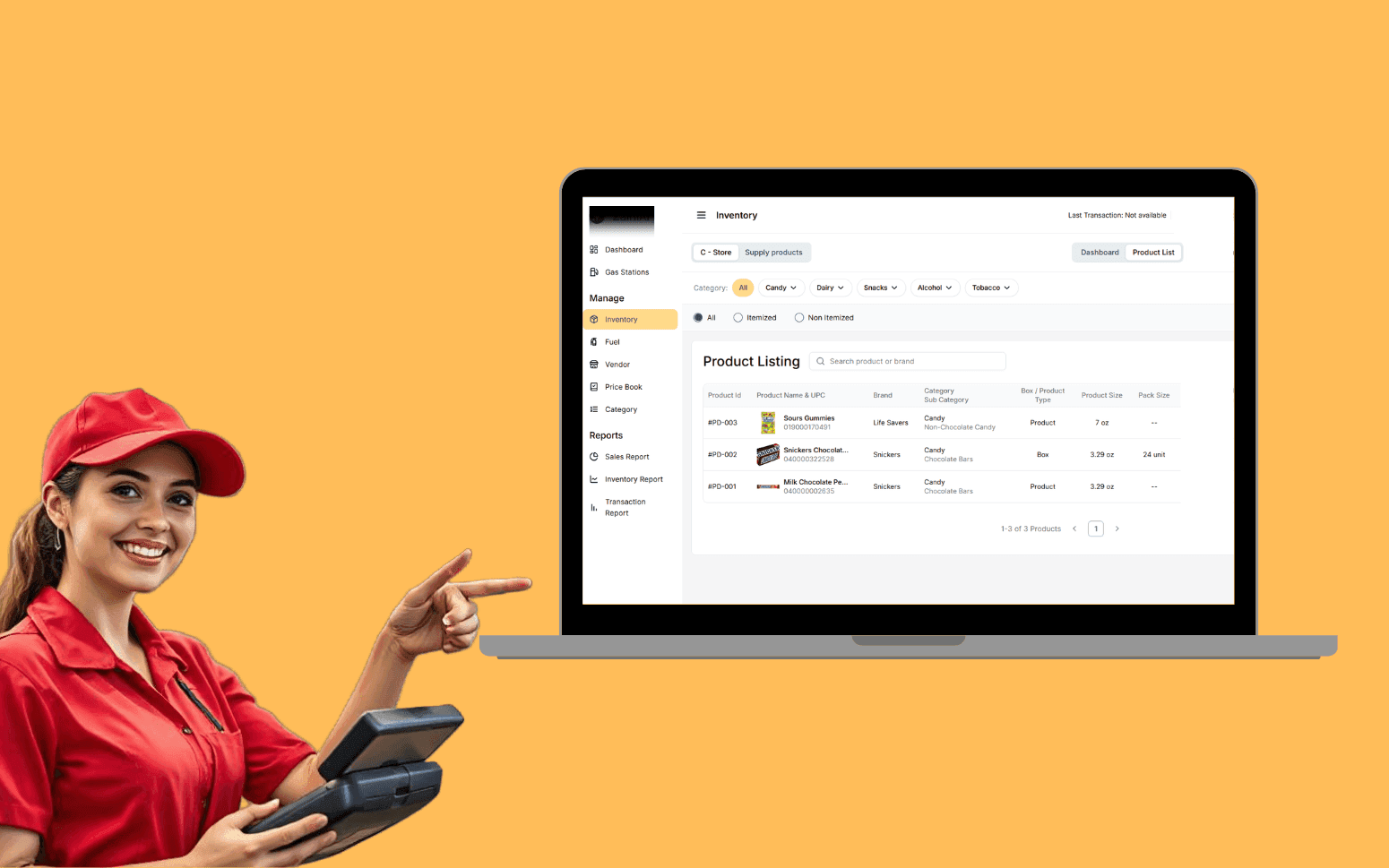
AI OCR Software Scales Gas Station Operations With 20K+ Transactions
- 20K+
- 40+
- 70%
Custom estimating software for contractors, estimating departments, and quantity surveyors who need quantity takeoff, cost database management, bid assembly, and historical benchmarking in one place. Not a collection of disconnected Excel files.
Built for estimating teams that win work on price and margin. Quantity takeoff from drawings, live cost databases, bid assembly with margin and overhead calculation, and bid comparison tools that tell you where your competitors are pricing.
Quantity takeoff from digital drawings with automatic link to cost line items
Cost database with your own labour rates, material prices, and subcontractor rates, maintained in one place
Bid assembly with margin, overhead, and contingency calculation built into the workflow
Historical cost benchmarking to check new estimates against comparable past projects
Recognition
Building estimates in Excel that can't be updated quickly when scope changes and you're re-entering the same rates every time?
No historical cost database, so your estimators rebuild rates from scratch on every project and hope the numbers are right?
In short
RaftLabs builds custom construction estimating software for contractors and estimating departments. We deliver quantity takeoff from digital drawings, a centralised cost database with labour and material rates, bid assembly with overhead and margin calculation, bid levelling for subcontractor quotes, historical cost benchmarking, and accounting system integration. Most platforms ship in 10 to 14 weeks at a fixed cost with full source code ownership.
Companies we've built for








Most construction estimating departments run on spreadsheets. One estimator has a rate sheet saved locally. Another has a different version from six months ago. When a scope change comes in on a live tender, updating the estimate means finding the right cells, updating them one by one, and hoping the formula range still covers the new rows.
The bigger problem is the cost database. Without a maintained database of labour rates, material costs, and subcontractor prices tied to real project history, estimators rely on experience and gut feel. Experience is valuable, but it doesn't scale when you're running five tenders at once with different estimators and different assumptions.
Construction estimating software gives your team a shared system: a cost database that everyone uses and that gets updated from real project data, quantity takeoff tools that link directly to cost line items, and bid assembly workflows that apply your overhead, margin, and contingency consistently every time.
Digital quantity takeoff tools that work from PDF or CAD drawings, measuring lengths, areas, and counts directly on screen and linking measurements to cost line items in the estimate. Takeoff layers organised by trade and CSI MasterFormat division so you can check coverage by specification section: Division 03 Concrete, Division 05 Metals, Division 09 Finishes, and so on. Bluebeam Revu-style PDF markup allows estimators to colour-code measurements by trade package and export calibrated takeoff sheets. For BIM-based projects, Autodesk Revit API integration extracts quantity data directly from the model: element counts, surface areas, and linear lengths pulled from the model schedule without manual re-measurement. Manual takeoff entry for items that need engineering judgment, such as temporary works or complex formwork. Takeoff sheets exportable and auditable so a second estimator can check the measurement basis against the drawings. The alternative to printing drawings and measuring with a scale rule, and the step that eliminates the most common source of estimating error: missed quantities from drawings that changed after the last print run.
Centralised cost database holding your labour rates by trade and skill level, carpenter journeyman, electrician foreman, plumber apprentice, with adjustments for union jurisdiction and local wage agreements where applicable. Material prices stored by supplier, region, and unit of measure, with supplier price update workflows so rates reflect current quotes rather than last year's purchase orders. Equipment cost tracking covers owned plant depreciation rates and hire rates for rented equipment, crane day rates, scaffolding weekly rental, concrete pump shifts. Indirect cost allocation built into the database structure: overhead percentage, contingency allowance, and profit markup applied consistently at the estimate level so no estimator sets different margins depending on how they feel about the job. Rates tied to effective dates so historical estimates use the rates that applied at the time. Database updated from final account data on completed projects so your rates reflect what things actually cost, not what you thought they'd cost two years ago. Shared across your estimating team so every estimator uses the same source. No more local rate sheets that drift out of date. No more re-entering the same trade rates on every new tender.
Bid assembly workflows that pull quantities and rates from the cost database and build the estimate structure: materials, labour, plant, subcontract, preliminaries, overhead, margin, and contingency. Cost lines assembled against your own cost code structure or the client's bill of quantities format, often a CSI MasterFormat or NRM2 elemental breakdown. Indirect cost allocation applied at the summary level: overhead loaded as a percentage of direct cost, contingency as a risk-adjusted percentage of the total, and profit margin locked to the bid strategy approved by senior management. Alternate pricing for different specification options or contract structures is included in the same estimate: bid the base scope and the alternate in one file, not two separate spreadsheets. E-bid submission formatting for procurement portals that require structured data rather than a PDF: cell-by-cell export to the client's Excel template, or direct API submission where the portal supports it. Final bid document generated automatically in PDF and Excel, with no manual reformatting before the 4pm tender deadline. The workflow that takes an estimate from takeoff to tender-ready document without the late-night manual assembly session the day before bids close.
Subcontractor bid comparison matrix that puts multiple quotes side by side, normalises them to the same scope, and flags gaps in coverage. Line-item levelling adjusts for scope differences, qualifications, and exclusions so you're comparing equivalent packages, not assuming the lowest number is the best price. A subcontractor who excludes excavation and shoring from a groundworks quote is not cheaper than one who includes it; the bid levelling matrix makes that visible before award, not after. Qualifications log captures each sub's stated exclusions, assumptions, and caveats alongside the dollar value so the estimator can assess which exclusions are acceptable and which require clarification or a separate provisional sum. Price comparison by line item shows where a cheap bid is genuinely low and where a higher bid reflects better scope coverage. ProEst, Sage Estimating, and PlanSwift are common reference platforms for commercial subcontractor bid management. A custom system integrates with your existing procurement workflow rather than requiring a separate login. Awarded rates and scopes captured against the winning subcontractor for cost database update and future tendering reference. The structured comparison that reduces the risk of awarding to a subcontractor who priced something materially different from what you asked for.
Benchmarking tools that compare a new estimate against completed projects of a similar type, size, and specification, using your own project data, not industry averages that don't reflect your cost base, trade mix, or geographic market. Parametric estimating uses historical unit costs to generate a high-level estimate before detailed takeoff is complete: cost per square metre by building type, cost per bed for residential, cost per seat for fit-out. These parametric benchmarks let the estimating manager sense-check a detailed estimate in five minutes rather than reviewing it line by line. Trade-by-trade comparison against historical final account data shows which trades in a new estimate are priced above or below your historical range. Outlier flags where a new estimate differs significantly from the historical range prompt a check before the tender goes out, not a conversation after you win at a margin that was never achievable. Change order cost impact calculation: when a scope change arrives mid-project, the benchmarking database shows what similar change events cost on past projects, giving the project manager a data-backed starting position for the variation negotiation. The benchmark library that gets more accurate and more useful with every project that reaches final account.
Integration with your accounting system, Xero, QuickBooks, Sage 300 Construction, or a construction-specific ERP such as Viewpoint Vista or Foundation Software, means that when a tender is awarded, the estimate flows into the project budget without manual re-entry. Cost codes from the estimate mapped to your accounting cost code structure: CSI MasterFormat divisions mapped to your general ledger accounts, or your own internal cost code hierarchy. Subcontract values flowing from the awarded bid comparison directly into purchase order creation in the ERP. Actual costs from the accounting system flowing back into the estimating platform at project completion to update the cost database with real final account data. Labour productivity actuals compared against estimated labour hours by trade to identify where estimates were optimistic and by how much. The data loop makes your estimates more accurate over time because they're informed by what projects actually cost: not what you thought they'd cost at tender, not what the published price book says, but your own team on your own projects in your own market.
Custom construction estimating software is built around your estimating process: your cost code structure, your trade breakdown, your overhead and margin model, and your tender format. It typically includes quantity takeoff tools (linked to PDF drawings via Bluebeam-style markup or to BIM models via Autodesk Revit API), a centralised cost database with labour rates by trade and union jurisdiction, material prices by supplier and region, equipment rates, and subcontractor rates, bid assembly with overhead and margin calculation, bid comparison and levelling for subcontractor quotes, historical benchmarking against your own project data, and integration with your accounting system. Off-the-shelf estimating tools like ProEst, Sage Estimating, or PlanSwift handle common workflows, but contractors with unusual contract structures, specific CSI MasterFormat cost code requirements, or the need to integrate with a proprietary ERP often find custom software fits their process better than adapting a generic tool.
The cost database stays accurate through a feedback loop from completed projects. When a project reaches final account, the actual costs by trade and line item are compared against the estimate and captured back into the cost database. Labour productivity rates, material prices, and subcontractor rates are updated based on what they actually cost on site, not what the estimator thought they'd cost at tender stage. Suppliers can also update material rates directly in the system, with an approval step before rates go live. The result is a database that gets more accurate with each project rather than drifting further from reality as the market moves.
Yes. Handling scope changes is one of the core reasons contractors move away from Excel-based estimating. When a scope change comes in, an addendum to the bill of quantities, a revised specification, or a drawing change, the estimating software lets you update the affected quantities and line items without rebuilding the entire estimate. The change is tracked, the affected cost lines are flagged, and the updated total is calculated automatically. Multiple tender revisions can be managed in parallel, with version comparison showing the cost impact of each addendum. This is the workflow that, in Excel, means finding the right cell in a file that's grown to forty-seven tabs and hoping the SUM range still covers the new rows.
A construction estimating platform with quantity takeoff, a cost database, bid assembly, and subcontractor comparison typically runs $30,000 to $65,000. A more complete platform with drawing-linked takeoff, historical benchmarking, accounting integration, and multi-tender management typically runs $65,000 to $130,000. Cost depends on the complexity of your takeoff requirements, the number of accounting integrations, and the scope of your reporting and benchmarking requirements. We scope every project before pricing it. You receive a fixed cost covering an agreed scope before development starts.
What clients say
Three-year average engagement. Founders and operators describing the work in their own words. No marketing varnish.

 USA
USAAll of the sprints were completed on schedule and on budget. We highly recommend RaftLabs!
01 / 02
Tell us how your team estimates today: the tools you use, the volume of tenders you run, and where the process breaks down. We'll scope the right platform and give you a fixed cost.