What is retrieval augmented generation (RAG)? Complete guide
Fine-tuning an LLM costs months and six figures. RAG gives you the same domain accuracy in days by connecting models to your data at query time - here is how the architecture actually works.

In this article
Short answer
RAG improves LLM responses by retrieving relevant documents at query time, avoiding fine-tuning costs for 80% of enterprise use cases. Architecture: document chunking, vector embedding, semantic retrieval, context injection. RaftLabs implements production RAG systems for enterprise clients.
Key takeaways
- RAG combines LLM capabilities with your proprietary data by retrieving relevant documents at query time, eliminating the need for expensive fine-tuning for most use cases.
- The RAG architecture: document chunking and embedding, vector database storage, semantic retrieval at query time, and context injection into the LLM prompt.
- RAG beats fine-tuning when data changes frequently, you need source attribution, or you want to avoid the cost and complexity of model training - which covers 80% of enterprise use cases.
- Common RAG failures: wrong chunk sizes (too large loses precision, too small loses context), poor embedding model selection, and not including source metadata for attribution.
Retrieval Augmented Generation (RAG) is the most practical pattern for making large language models (LLMs) useful with your own data. Instead of training or fine-tuning a model on your documents (expensive, slow, and hard to update), RAG retrieves relevant information at query time and feeds it to the LLM as context. The model generates answers grounded in your actual data rather than its training data.
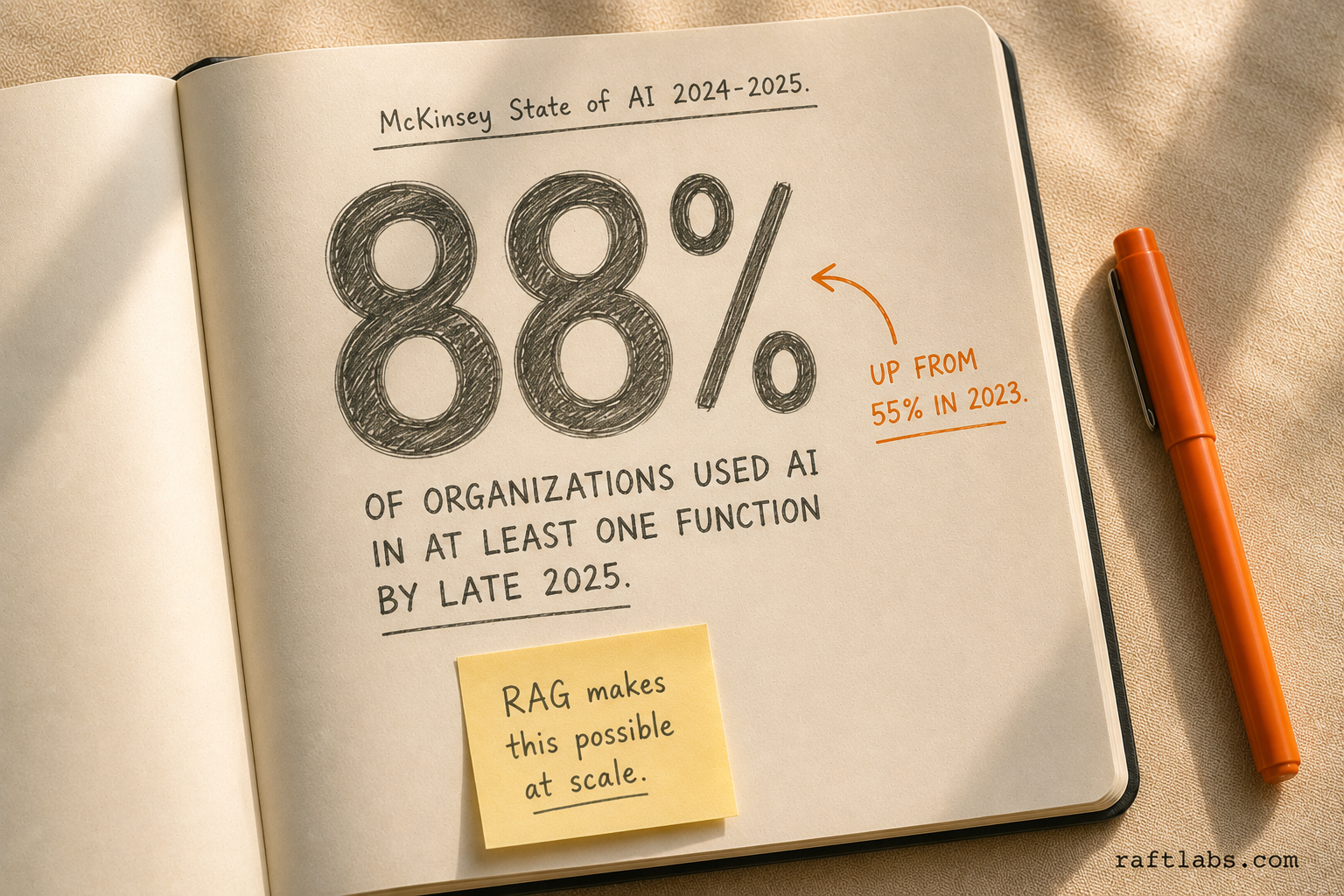
Enterprise adoption of AI is accelerating fast. McKinsey's 2024 State of AI report found that 78% of organizations used AI in at least one business function in 2024, up from 55% in 2023 - and by late 2025, that figure had climbed to 88%. RAG is the architecture that makes most of those deployments practical, because it lets companies use their own data without expensive model retraining.
How RAG works
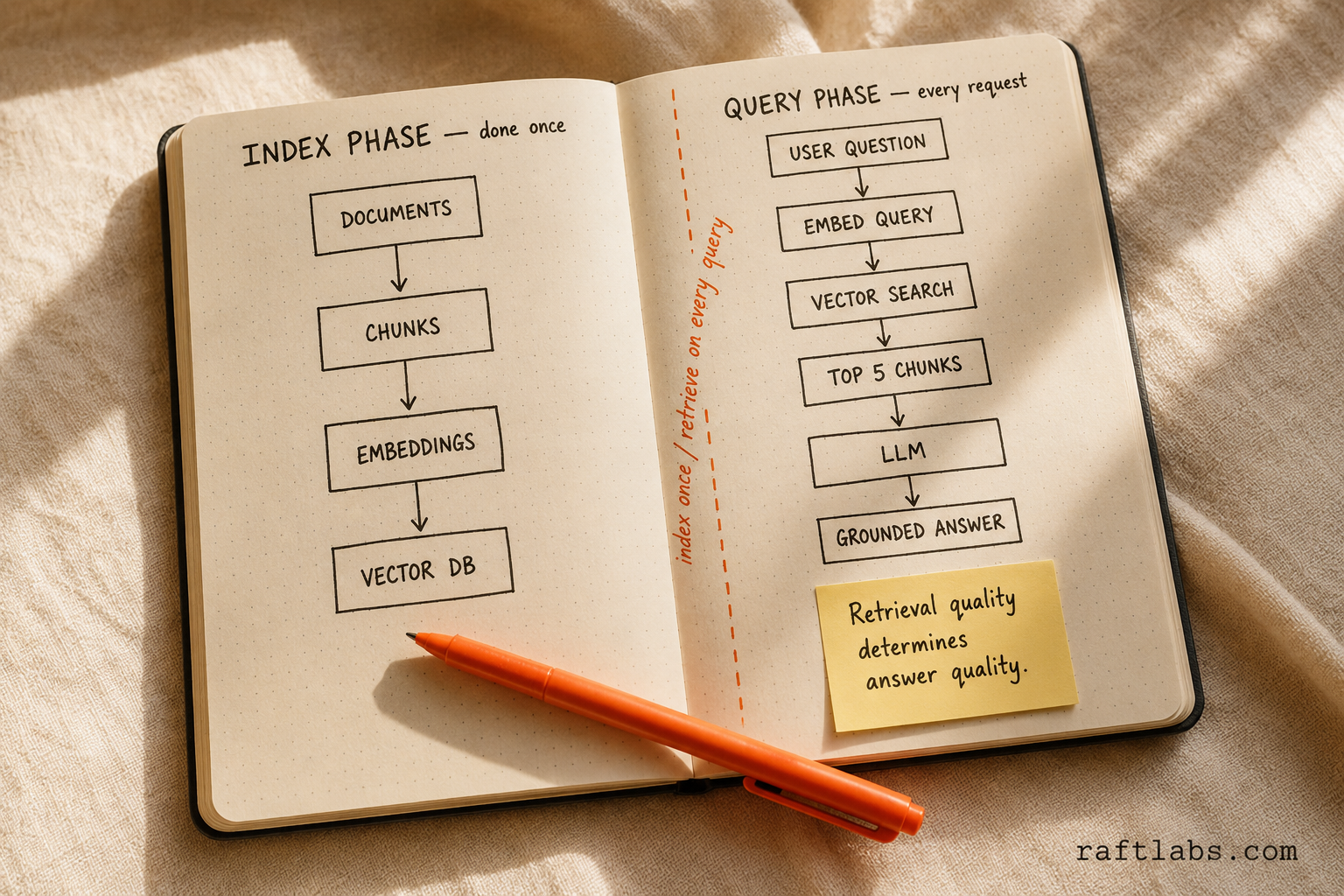
The RAG pipeline has two phases: indexing (done once, updated periodically) and retrieval + generation (done on every query).
Indexing phase
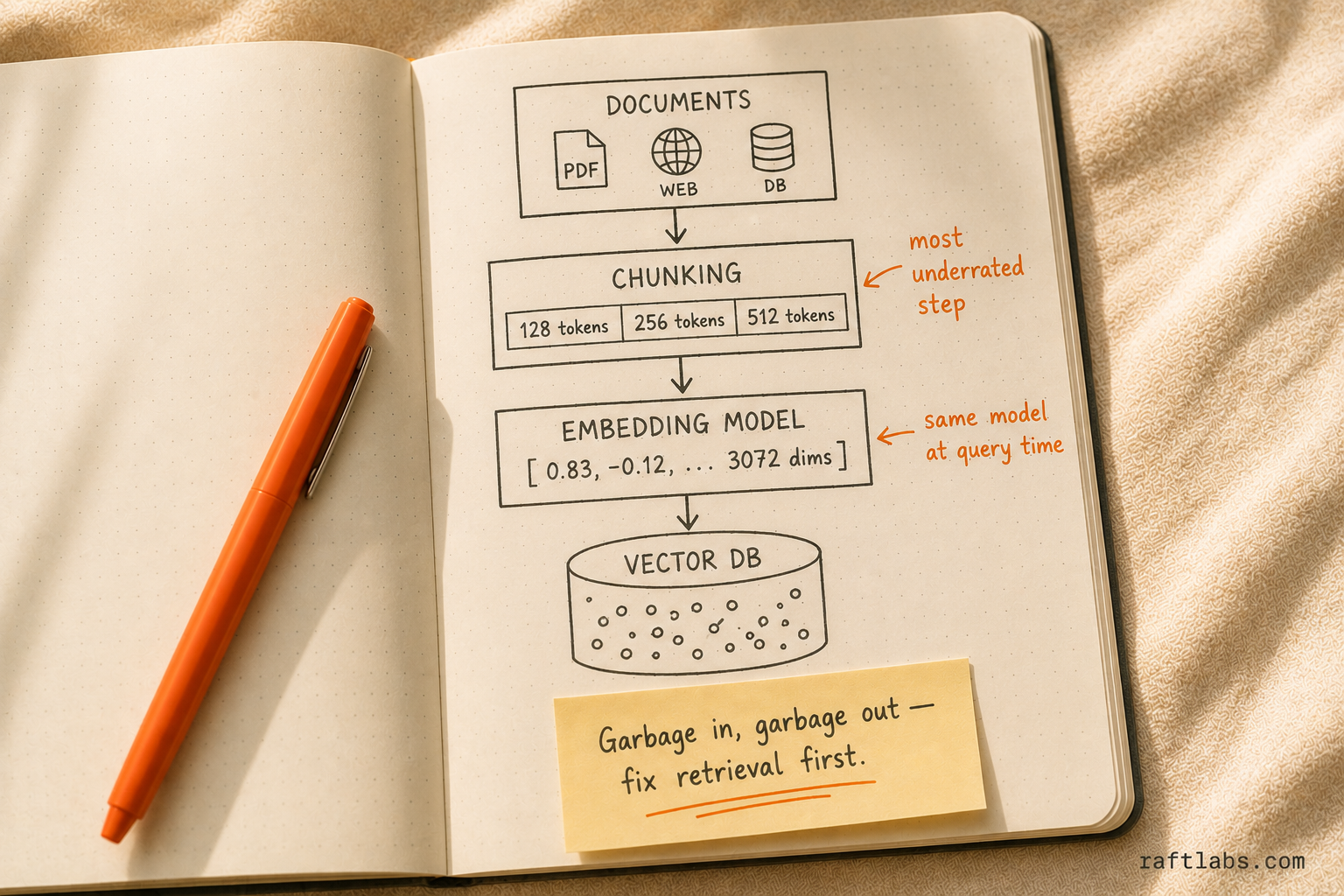
Step 1: Document ingestion Collect your source documents - PDFs, web pages, database records, Confluence pages, Slack messages, whatever contains the knowledge you want to make queryable.
Step 2: Chunking Split documents into smaller pieces (chunks). This is the most underrated step in RAG and the one that most affects quality. Common strategies:
Fixed-size chunks: split every 500 tokens with 50-token overlap. Simple, works okay for homogeneous content.
Semantic chunking: split at paragraph or section boundaries. Preserves meaning better than fixed-size.
Hierarchical chunking: create chunks at multiple levels (document summary, section summary, paragraph). Retrieve at the appropriate level based on query specificity.
Sentence-window chunking: embed individual sentences but retrieve surrounding sentences as context. Best for precise retrieval.
Chunk size matters more than most teams expect.
Most RAG quality problems trace back to chunk size, not the LLM. A 512-token chunk works well for general Q&A. Dense technical documentation - API references, compliance manuals, clinical protocols - does better at 128 tokens, because larger chunks dilute the specific fact the model needs to find. When chunk size is wrong, retrieval returns the wrong context, and the model hallucinates even though the correct answer is in your corpus. The LLM isn't the problem; the retrieval is.
Chunk size trade-offs:
| Smaller chunks (100-200 tokens) | Larger chunks (500-1000 tokens) |
|---|---|
| More precise retrieval | More context per chunk |
| May miss surrounding context | May include irrelevant content |
| Need more chunks per query | Fewer chunks needed |
| Better for factual Q&A | Better for summarization |
Step 3: Embedding Convert each chunk into a vector (a numerical representation of its meaning) using an embedding model. Popular choices:
OpenAI text-embedding-3-large: 3072 dimensions, strong performance across domains
Cohere embed-v3: good multilingual support
BGE-large: open source, self-hostable, competitive performance
Voyage AI: strong for code and technical content
The embedding model determines how well your system understands semantic similarity. Choose based on your content type and language requirements.
Embedding model drift is a silent accuracy killer.
One thing most RAG articles skip: if you update your embedding model - say, from text-embedding-ada-002 to text-embedding-3-large - you must re-embed your entire corpus. Every vector in your database was generated by the old model. The new model produces a different vector space. If you update the model but not the stored embeddings, queries and documents no longer live in the same space. Similarity scores become meaningless. Teams that don't know this ship a "better" embedding model and wonder why accuracy got worse. Re-embedding a large corpus takes hours to days. Plan for it.
Step 4: Vector storage Store the vectors in a vector database for fast similarity search. Options:
Pinecone: fully managed, easy to start, good at scale
Weaviate: open source, supports hybrid search natively
Qdrant: open source, fast, good filtering capabilities
pgvector: PostgreSQL extension, good if you're already using Postgres
Chroma: lightweight, great for prototyping
The vector database market is growing alongside RAG adoption. MarketsandMarkets projects the global vector database market will grow from $2.65 billion in 2025 to $8.95 billion by 2030 - a 27.5% annual growth rate driven by enterprise AI deployments that need fast semantic search at scale.
RAG indexing pipeline
- 01
Document ingestion
Collect source documents - PDFs, web pages, database records, Confluence pages, Slack messages - whatever contains the knowledge you want queryable.
- 02
Chunking
Split documents into smaller pieces using fixed-size, semantic, hierarchical, or sentence-window strategies. The most underrated step in RAG and the one that most affects quality.
- 03
Embedding
Convert each chunk into a vector using an embedding model (OpenAI text-embedding-3-large, Cohere embed-v3, BGE-large, or Voyage AI). Determines how well the system understands semantic similarity.
- 04
Vector storage
Store vectors in a vector database for fast similarity search. Options include Pinecone (managed), Weaviate (hybrid search), Qdrant (fast filtering), pgvector (Postgres), or Chroma (prototyping).
Retrieval + generation phase
Step 1: Query embedding When a user asks a question, embed their query using the same embedding model.
Step 2: Similarity search Find the K most similar chunks in your vector database (typically K = 5-20). This is an approximate nearest neighbor search - fast even over millions of chunks.
Step 3: Context assembly Combine the retrieved chunks into a context window. Order matters - put the most relevant chunks first. Include metadata (source document, page number, date) for attribution.
Step 4: Prompt construction Build a prompt that includes:
System instructions (role, tone, constraints)
Retrieved context (the relevant chunks)
The user's question
Output format instructions (if needed)
Step 5: Generation Send the prompt to an LLM (GPT-4, Claude, etc.). The model generates an answer grounded in the provided context. Tell it to cite sources and acknowledge when the context doesn't contain enough information to answer.
Naive RAG vs. advanced RAG
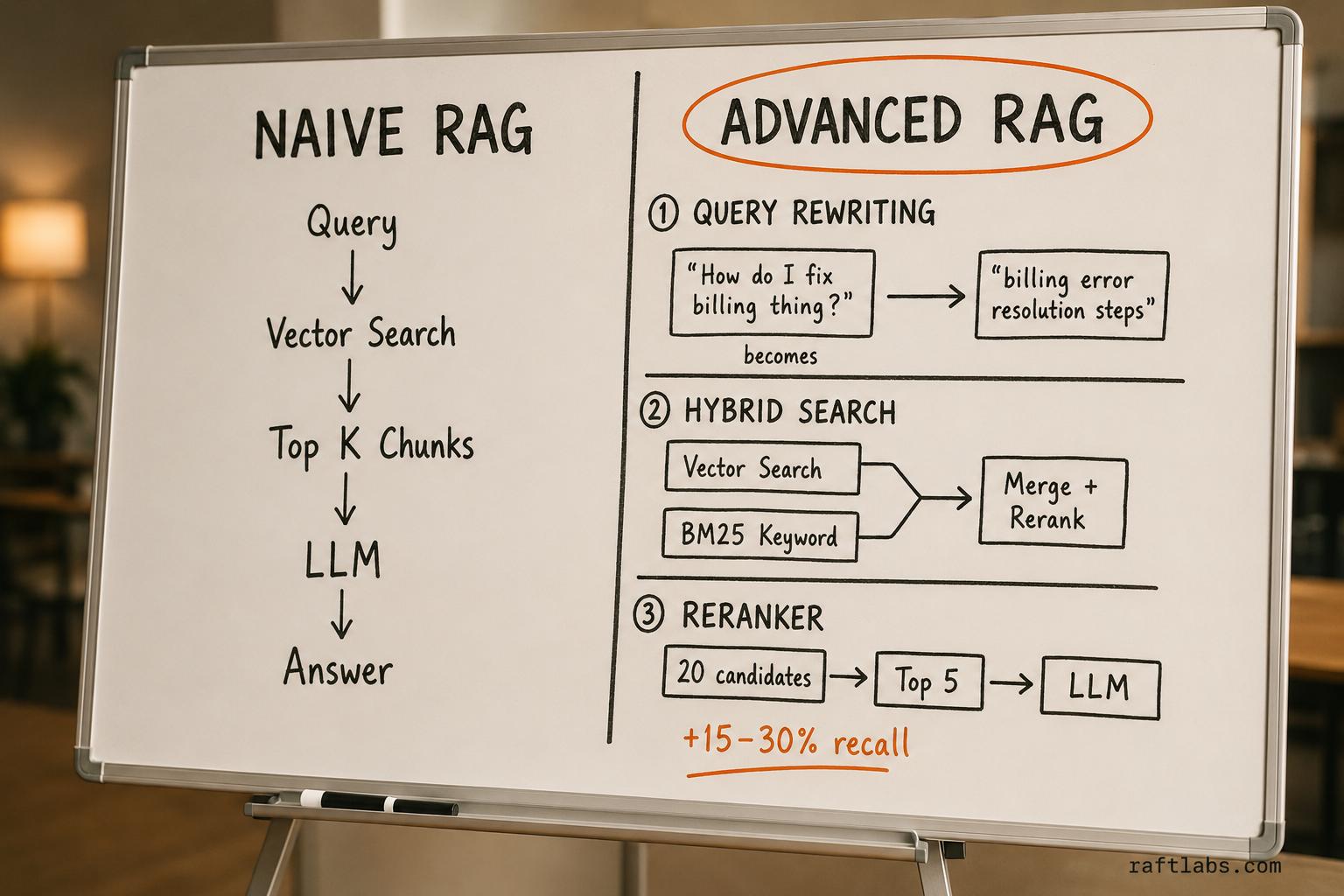
Most tutorials show you naive RAG: query goes in, vector search runs, top chunks go to the LLM, answer comes out. That's a fine prototype. It's not production.
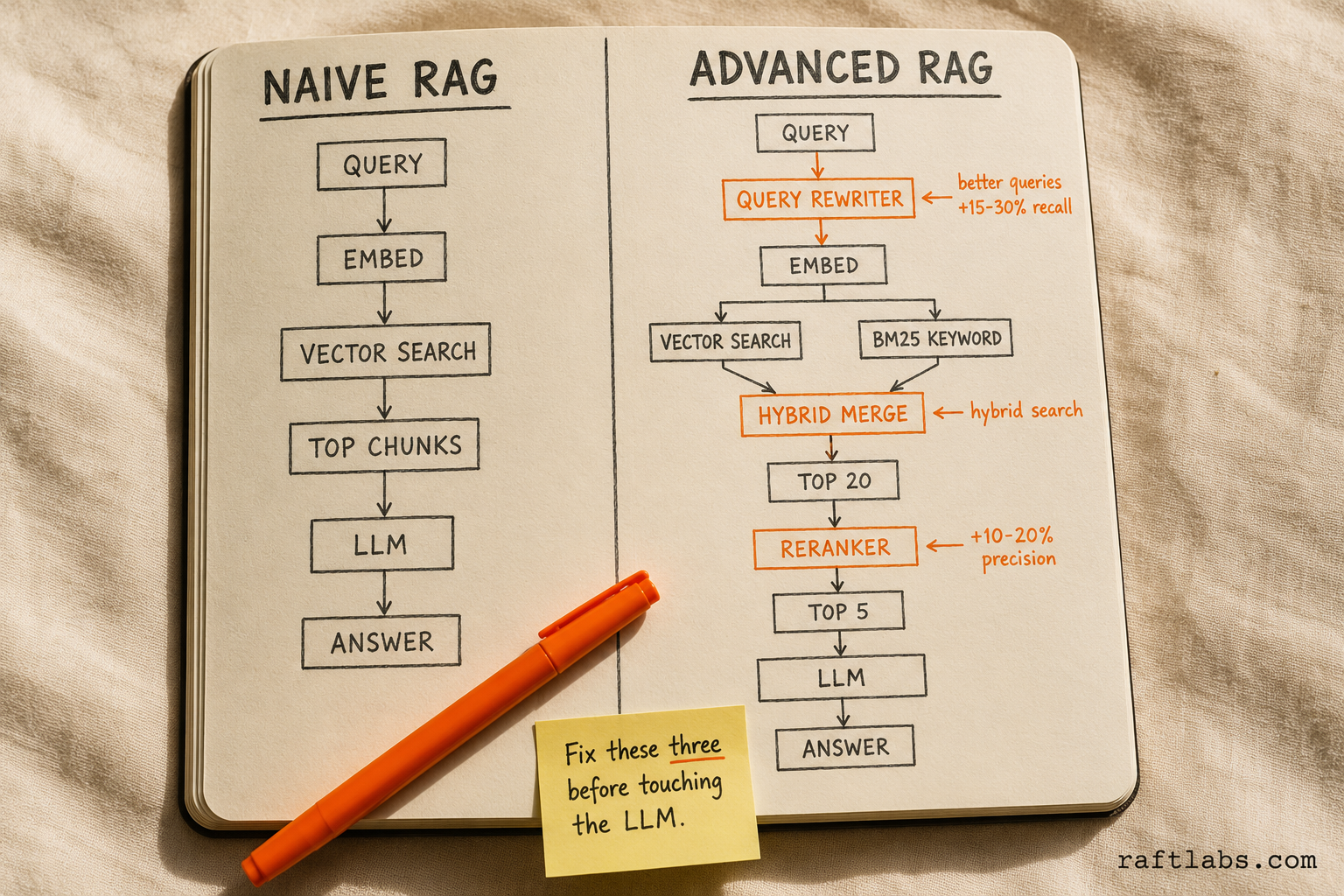
Advanced RAG adds three things:
Query rewriting. The user's raw question is often a poor search query. "How do I fix the billing thing?" is bad input for a vector search. A rewriting step reformulates it - "billing error resolution steps" - before hitting the retrieval layer. This alone improves recall by 15-30% on ambiguous queries.
Hybrid search. Vector similarity finds semantically related content. BM25 keyword search finds exact matches. You need both. A user searching for error code "ERR_AUTH_403" needs keyword matching, not semantic similarity. Hybrid search combines both signals, then merges the ranked results.
Re-ranking. Initial retrieval returns 20 candidates. A cross-encoder re-ranker (Cohere Rerank, BGE-reranker) scores each candidate against the query more precisely than the embedding-based similarity score. You pass the top 5 re-ranked results to the LLM. Typical improvement: 10-20% better answer accuracy, at the cost of an extra 100-300ms.
If your RAG system is underperforming, check which of these three you're missing before touching the LLM or the prompts.
RAG vs. fine-tuning: when to use which
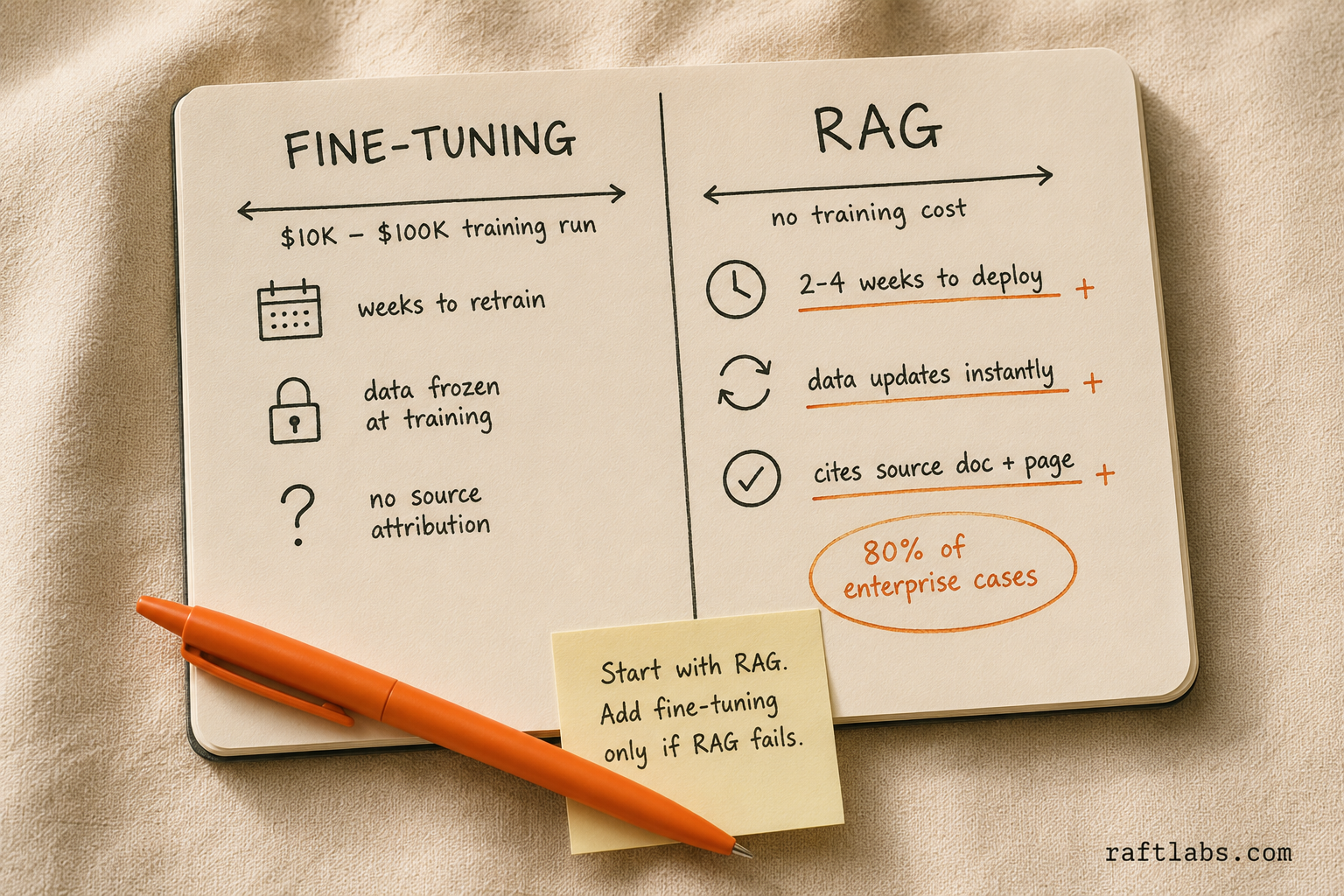
This is the most common question about RAG. The answer depends on what you're trying to achieve.
The RAG market reflects this growth. Grand View Research valued the global RAG market at $1.2 billion in 2024, projecting it will reach $11 billion by 2030 at a 49.1% annual growth rate. Enterprise adoption surveys show that among companies customizing LLMs for internal use, RAG is the most common approach by a wide margin - because it's faster to implement than fine-tuning and easier to update as data changes.
Use RAG when:
Your data changes frequently (weekly or more often)
You need source attribution ("this answer comes from document X, page Y")
You want to minimize hallucination (RAG grounds answers in retrieved data)
You have a diverse knowledge base (product docs + support tickets + internal wiki)
Budget is a concern (RAG requires no model training)
Use fine-tuning when:
You need the model to learn a specific style, format, or behavior
Your task is well-defined and consistent (classification, extraction, summarization in a specific format)
You need the model to internalize domain terminology and relationships
Latency is critical (fine-tuned models don't need a retrieval step)
Use both (RAG + fine-tuned model) when:
You need domain-specific language understanding AND access to current data
The base model struggles with your domain's terminology even with good context
You're building a production system where both accuracy and currency matter
When RAG is the wrong tool.
RAG assumes your data is stable enough to index. If your knowledge base changes faster than you can re-index it - live inventory data, real-time sensor feeds, stock prices - queries will hit stale embeddings. In those cases, a fine-tuned model or function calling (querying a live API at generation time) is a better fit. RAG is not the answer to every "connect LLMs to data" problem. Know the boundary.
In practice, most teams should start with RAG. It's faster to implement, easier to update, and provides source attribution that fine-tuning doesn't. Add fine-tuning only when RAG alone doesn't meet your quality bar.
Start with RAG, not fine-tuning
RAG vs fine-tuning: when to use which
| RAG | Fine-Tuning | Insight | |
|---|---|---|---|
| Data freshness | Updates instantly - re-index and go | Requires retraining to incorporate new data | RAG wins for frequently changing data |
| Source attribution | Built-in - tracks which chunks contributed | No attribution - answers from learned weights | RAG wins when citations matter |
| Style/behavior change | Limited - model behavior stays the same | Full control over model style and format | Fine-tuning wins for custom behavior |
| Budget | No model training cost - pay per query | $10K-100K+ for training runs | RAG wins for budget-sensitive projects |
| Latency | Retrieval adds 200-800ms per query | No retrieval step - direct inference | Fine-tuning wins for speed-critical apps |
Architecture patterns
Basic RAG
The simplest implementation. Good for prototypes and single-source use cases.
User Query → Embed → Vector Search → Top K Chunks → LLM → Answer
Pros: Simple, fast to build (1-2 weeks) Cons: Retrieval quality limited by embedding similarity alone
RAG with hybrid search
Combines vector similarity search with keyword search (BM25). Handles queries where exact terminology matters (product names, error codes, specific phrases).
User Query → Embed → Vector Search ─┐
           → BM25 → Keyword Search ──┤→ Merge + Rerank → LLM → Answer
Pros: Better retrieval for mixed query types Cons: More complex, needs tuning of the merge/rerank step
RAG with reranking
After initial retrieval, a cross-encoder model reranks the results for higher precision. This catches cases where embedding similarity retrieves related-but-wrong chunks.
User Query → Embed → Vector Search (Top 20) → Reranker (Top 5) → LLM → Answer
Reranking models: Cohere Rerank, BGE-reranker, cross-encoder from Sentence Transformers
Pros: Significantly better retrieval precision (10-20% improvement typical) Cons: Adds latency (100-300ms per query) and cost
RAG latency: what you're actually paying
Basic RAG adds 200-800ms per query on top of LLM inference time. Retrieval from a vector database is fast (10-50ms), but embedding the query, running approximate nearest neighbor search, and assembling context all add up. With re-ranking, add another 100-300ms. For a chatbot where users expect sub-second responses, this matters. You can cut latency by caching common query embeddings, reducing K (fewer retrieved chunks), or running retrieval and LLM calls in parallel where your architecture allows it. For real-time applications - live voice agents, sub-500ms response requirements - fine-tuning or function calling may be a better fit than RAG.
Agentic RAG
The LLM acts as an autonomous agent that decides what to retrieve, when, and from where. It can reformulate queries, search multiple sources, evaluate retrieved results, and iterate until it finds sufficient information. In 2026, agentic RAG has become the baseline for any serious enterprise RAG application - the static "retrieve once, generate once" pattern is increasingly seen as a prototype-only approach.
User Query → Agent LLM → Decide: What do I need?
                              ↓
                         Search Source A → Not enough → Reformulate → Search Source B
                              ↓                                           ↓
                         Combine Results → Generate Answer → Self-evaluate → Final Answer
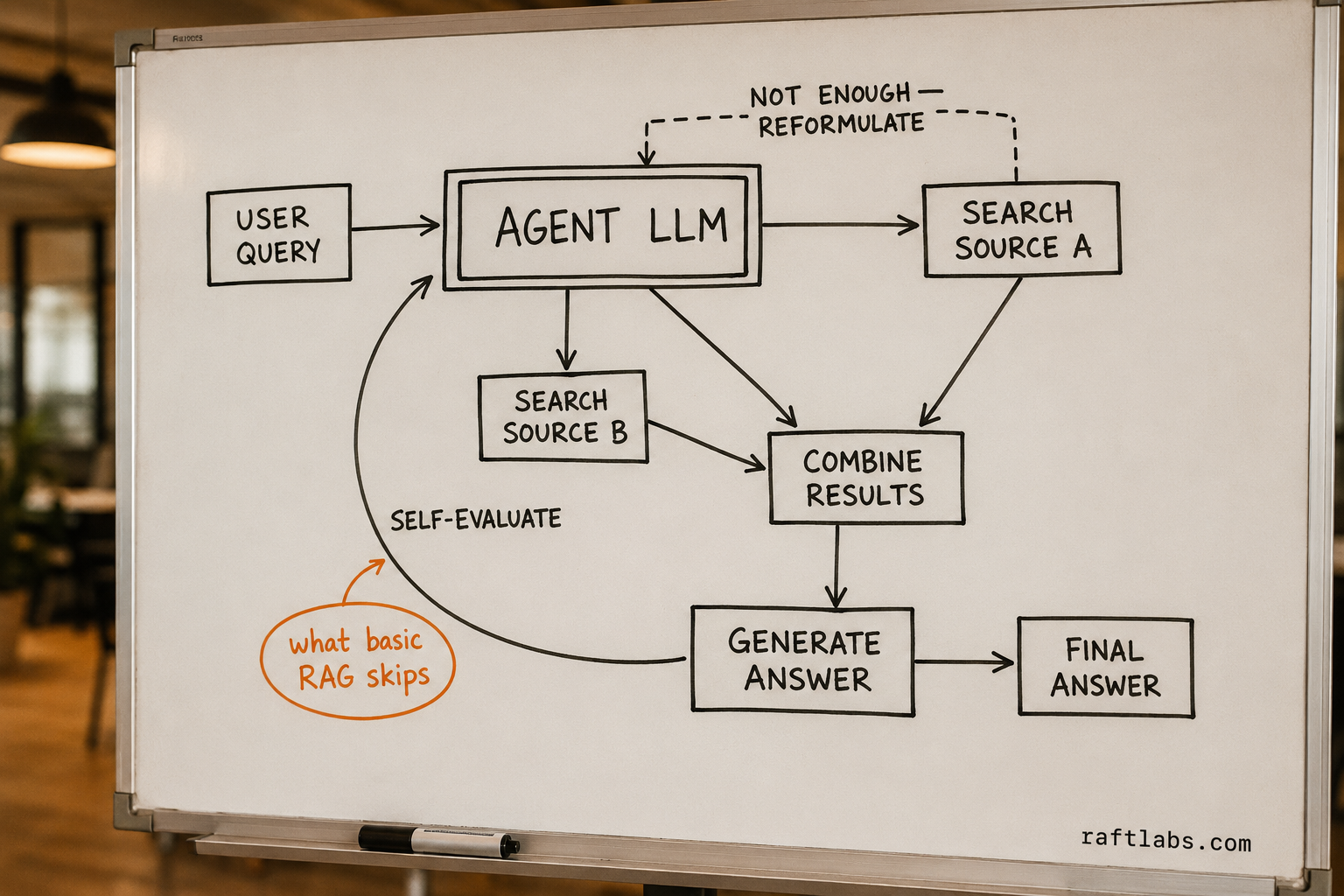
Key capabilities beyond basic RAG include query decomposition (breaking complex questions into sub-queries and retrieving for each independently), source routing (deciding which knowledge base to search based on question type), self-correction (evaluating retrieved chunks for relevance and re-retrieving if quality is insufficient), and multi-hop reasoning (chaining retrievals where the answer to one query informs the next).
Pros: Handles complex, multi-step questions across multiple data sources. 90%+ accuracy on complex queries vs. 60-70% for basic RAG. Cons: Higher latency (3-10 seconds vs. 1-3), higher cost (3-5x more LLM calls), harder to debug. See our guide to agentic AI for more.
GraphRAG
GraphRAG combines knowledge graphs with vector search. Instead of treating documents as isolated chunks, it builds a graph of entities and relationships extracted from your data, then uses graph traversal alongside vector retrieval.
User Query → Vector Search (relevant chunks) ─┐
           → Graph Traversal (related entities) ──┤→ Merge → LLM → Answer
GraphRAG wins over standard RAG in three scenarios: multi-hop questions (e.g., "Which customers in the healthcare vertical had escalations related to our billing module?" requires traversing customer/industry/ticket relationships), summarization over large corpora (e.g., "What are the main themes across all Q4 support tickets?" requires entity extraction and clustering), and relationship-dependent queries where the answer depends on connections between entities rather than content within a single document.
Pros: Handles relationship-dependent and multi-hop queries that pure vector search misses entirely Cons: Requires entity extraction pipeline to build the graph, more complex to maintain, higher upfront investment
RAG vs. long context: the 2026 debate
With context windows now reaching 1 million+ tokens across multiple frontier model families (Gemini and Claude both ship million-token context windows as of 2026), a reasonable question emerges: do you still need RAG at all? Can you just dump all your documents into the context window?
Long context replaces RAG when you have a small knowledge base (under 500 pages / 200K tokens) that fits in context, one-off analysis tasks where building a RAG pipeline isn't worth the setup, or situations where the entire document set is relevant.
RAG still wins when knowledge bases exceed any context window, cost sensitivity matters (sending 1M tokens per query is expensive; retrieving 5 relevant chunks is cheap), latency requirements are tight (processing 1M tokens takes significantly longer than processing 5 chunks), data changes frequently (RAG indexes update incrementally), or source attribution is required (RAG naturally tracks which chunks contributed to the answer).
For most enterprise applications with growing knowledge bases, RAG remains the practical architecture. Long context is a complement - useful for deep analysis of retrieved documents - not a replacement.
Implementation steps
Week 1: Data preparation
- Inventory your source documents (type, format, volume, update frequency)
- Clean the data (remove duplicates, fix formatting, handle encoding issues)
- Choose and implement a chunking strategy
- Select an embedding model and generate embeddings
- Load embeddings into a vector database
Week 2: Basic pipeline
- Build the query pipeline (embed query, retrieve, assemble context, generate)
- Create a simple evaluation dataset (50-100 question-answer pairs from your data)
- Test retrieval quality: does the system retrieve the right chunks for each question?
- Test generation quality: does the LLM produce correct answers from the retrieved context?
- Identify failure patterns (wrong chunks retrieved, right chunks but wrong answer, no relevant chunks exist)
Week 3: Optimization
- Tune chunk size and overlap based on failure analysis
- Add metadata filtering (restrict search by document type, date, or category)
- Implement hybrid search if keyword-sensitive queries are failing
- Add reranking if retrieval precision needs improvement
- Optimize prompts based on generation quality analysis
Week 4: Production readiness
- Add error handling (what happens when no relevant chunks are found?)
- Implement answer confidence scoring (how sure is the system?)
- Build source citation into the output
- Add logging and monitoring (track retrieval quality, generation quality, latency)
- Implement feedback collection (thumbs up/down on answers)
Common mistakes
1. Ignoring chunking strategy. Most RAG quality issues trace back to chunking. If chunks don't contain complete, coherent information units, the LLM gets garbage context and produces garbage answers. Spend time here.
"Most teams focus on the generation side - better prompts, better models. But the real use is in retrieval. If you're sending the wrong context to the model, no prompt will save you. Retrieval quality is the most underinvested part of RAG pipelines."
Harrison Chase, co-founder of LangChain, in a 2024 interview with The Pragmatic Engineer
2. Using only vector search. Vector similarity misses exact matches. A user searching for error code "ERR_AUTH_403" needs keyword matching, not semantic similarity. Hybrid search solves this.
3. Stuffing too much context. More retrieved chunks isn't always better. Beyond 5-10 relevant chunks, you introduce noise that confuses the LLM. Use reranking to select the best chunks, not just the most.
4. Not evaluating retrieval separately from generation. When answers are wrong, is it because the system retrieved the wrong information, or because the LLM misinterpreted correct information? These are different problems with different solutions.
5. Forgetting about data freshness. If your source documents update daily but your index updates weekly, you're serving stale answers. Automate re-indexing on a schedule that matches your data's update frequency.
6. No fallback for out-of-scope questions. Users will ask questions your data doesn't cover. The system should recognize this and say "I don't have information about that" rather than hallucinating an answer from the LLM's training data.
7. Swapping embedding models without re-embedding. Updating your embedding model without regenerating all stored vectors breaks the entire retrieval layer. Similarity scores become meaningless because queries and documents are no longer in the same vector space. Always re-embed the full corpus when changing models.
Performance benchmarks
For a well-implemented RAG system, target:
Retrieval recall@10: 85-95% (the correct chunk is in the top 10 retrieved)
Answer accuracy: 80-90% (subjective, evaluated by domain experts)
Latency: 1-3 seconds end-to-end (query to displayed answer)
Source attribution accuracy: 95%+ (cited sources actually contain the stated information)
No amount of LLM prompt engineering compensates for retrieving the wrong information. Fix retrieval first, then optimize generation.
RAG is the foundation for most enterprise AI applications - customer service chatbots, internal knowledge assistants, document Q&A systems, and more. At RaftLabs, we build RAG-powered applications for clients across industries, from healthcare knowledge systems to fintech compliance assistants. If you're scoping a RAG implementation, our RAG development team can have a production pipeline running against your data in 4 weeks. For teams that want a managed path from ingestion to production, our RAG development services cover the full stack.
Ask an AI
Get an instant summary of this post from your preferred AI assistant.
Common questions
- RaftLabs builds production RAG systems from healthcare knowledge systems to fintech compliance assistants. We optimize chunk strategies, embedding models, and retrieval pipelines for your specific domain. Our 12-week sprints deliver production-grade accuracy with source attribution, not just demo-quality prototypes.
- RAG is an AI architecture that improves LLM responses by retrieving relevant information from your data at query time and injecting it into the prompt context. Instead of fine-tuning the model on your data (expensive, slow), RAG connects the model to your documents, databases, and knowledge bases dynamically, providing accurate, up-to-date, and source-attributed answers.
- Use RAG when your data changes frequently, you need source attribution, data volume is large, or you want to avoid fine-tuning costs. Use fine-tuning when you need to change the model's behavior or style, the knowledge is static, or you need the fastest possible inference. For 80% of enterprise use cases - knowledge bases, document Q&A, support - RAG is the better choice.
- The most common mistakes are wrong chunk sizes (too large loses retrieval precision, too small loses context), poor embedding model selection (not matching your domain vocabulary), missing metadata (no source attribution in retrieved chunks), insufficient retrieval (returning too few or too many documents), and no evaluation framework (not measuring retrieval quality separately from generation quality).