Updated June 2026
SaaS Application Development Guide: Step by Step for 2026
How to plan, architect, and launch scalable, AI-ready SaaS apps. Covers SaaS vs on-premise, multi-tenant architecture, tech stack choices, and the mistakes that turn a 12-week build into a 12-month one.

In this article
Short answer
SaaS application development follows four phases: planning, UI/UX design, development, and launch with continuous iteration. RaftLabs builds SaaS MVPs for $10,000-$20,000 in 6-8 weeks. Full-featured platforms cost $20,000-$150,000 and take 12-14 weeks. The critical architecture decision is multi-tenant vs single-tenant, which affects cost, compliance, and scalability from day one.
Key takeaways
- SaaS architecture decisions made in week one cost 3-5x more to fix after real users and real data are in the system. Multi-tenant vs single-tenant is the most consequential early choice.
- Most SaaS products that fail do not fail because of bad code. They fail because founders skip problem validation and build something nobody would pay for.
- RaftLabs built PSi's real-time audio SaaS platform: multi-tenant architecture, sub-200ms latency, and full production deployment in 12 weeks.
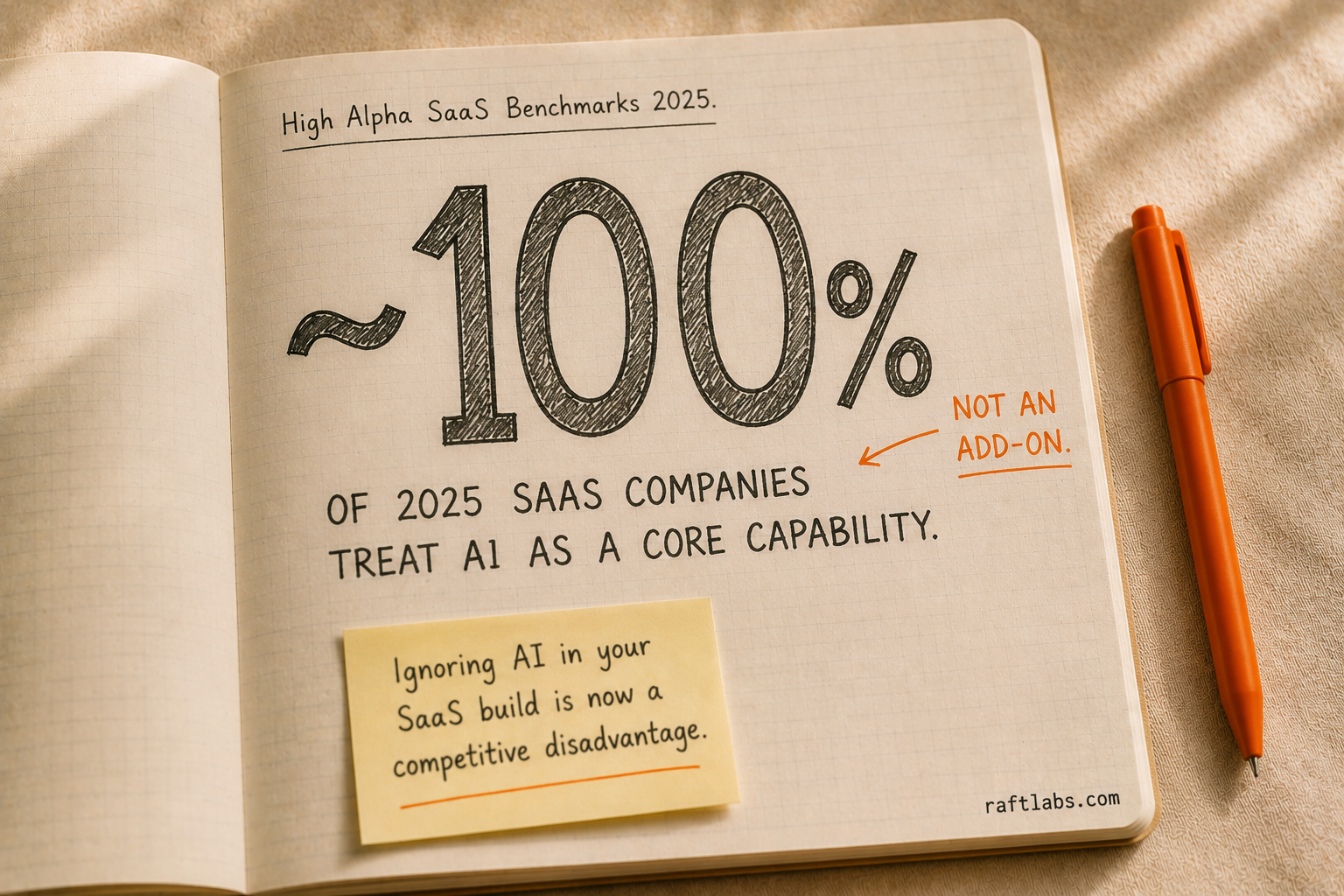
- AI is now a core product capability in SaaS, not an add-on. According to High Alpha's 2025 SaaS Benchmarks Report, nearly 100% of SaaS companies founded in 2025 treat AI as a core capability.
- SaaS MVPs cost $10,000-$20,000 and ship in 6-8 weeks. Full-featured platforms with multiple user roles and integrations cost $20,000-$150,000 and take 12-14 weeks.
SaaS revenue is projected to reach $793.10 billion by 2029, growing at 19.38% annually. That growth creates real demand, but it also raises the standard a competitive SaaS product must meet from day one.
This guide covers how to build a scalable SaaS app: architecture decisions, tech stack choices, development costs ($10,000 for an MVP, $45,000-$150,000 for a full product), and the common mistakes that turn a 12-week build into a 12-month one.
Who should read this guide?
Entrepreneurs and startups planning to launch a SaaS business from scratch
Product managers and founders planning to build a scalable, secure SaaS app
Developers and tech teams wanting a structured approach to SaaS development
Business owners exploring SaaS to digitize their services
According to Gartner, more than 50% of enterprise businesses are expected to rely on industry cloud platforms by 2028. The continued growth of SaaS highlights the importance of a structured development approach, often supported by experienced SaaS application development services providers.
What is SaaS?
SaaS (Software as a Service) is a cloud-based software delivery model where users access applications through a web browser or mobile app without installing them on their devices.
Instead of purchasing software outright, customers subscribe monthly or annually, paying only for what they use.
With SaaS, the provider manages hosting, maintenance, updates, and security. This makes it a cost-effective solution for businesses and individuals looking for scalable, accessible software.
Why SaaS Is the Future of Software
No Installation Needed: Log in and you are ready. Nothing to install or configure locally.
Accessibility: Use SaaS apps from anywhere on any device with an internet connection.
Lower Costs: Avoid high upfront costs for software and hardware. Pay a subscription fee instead.
Automatic Updates: SaaS providers handle all updates. You always have the latest version.
Scalability: Whether you are a small startup or a large enterprise, SaaS adapts to your needs.
Security: Many SaaS providers offer strong security measures, reducing your internal management burden.
AI Integration: AI is increasingly built into SaaS apps, helping businesses automate tasks, analyze data, and personalize experiences. SaaS products with AI features can provide smarter recommendations, improve decision-making, and predict trends.
All these benefits, combined with the growing power of AI, make SaaS a flexible, cost-effective, and intelligent choice.
Types of SaaS Applications
SaaS development takes different forms depending on who you are building for, what workflows the product needs to handle, and how data needs to be structured.
| SaaS Type | Best For | Key Architecture Consideration | Real-World Example |
|---|---|---|---|
| CRM Software | Sales, marketing, and support teams managing customer data at scale | Multi-tenant with row-level data isolation per account; real-time sync across user roles | Salesforce, HubSpot |
| ERP Software | Enterprises running multiple departments from a single system | Modular architecture; each business unit can be deployed and scaled independently | SAP, Oracle NetSuite |
| Project Management Software | Teams coordinating tasks, deadlines, and resources | Shared database with tenant-level schema separation; WebSocket connections for real-time collaboration | Asana, Linear, Trello |
| Accounting Software | Finance teams managing transactions, reporting, and tax compliance | Strict data integrity requirements; audit logging built into the schema from day one | QuickBooks, Xero |
| Email Marketing Software | Marketing teams running campaigns, automations, and audience segmentation | Event-driven architecture for triggered sequences; queue-based email delivery at volume | Mailchimp, ActiveCampaign |
The architecture consideration column is what separates a SaaS product built to scale from one that works fine at 50 users and collapses at 5,000.
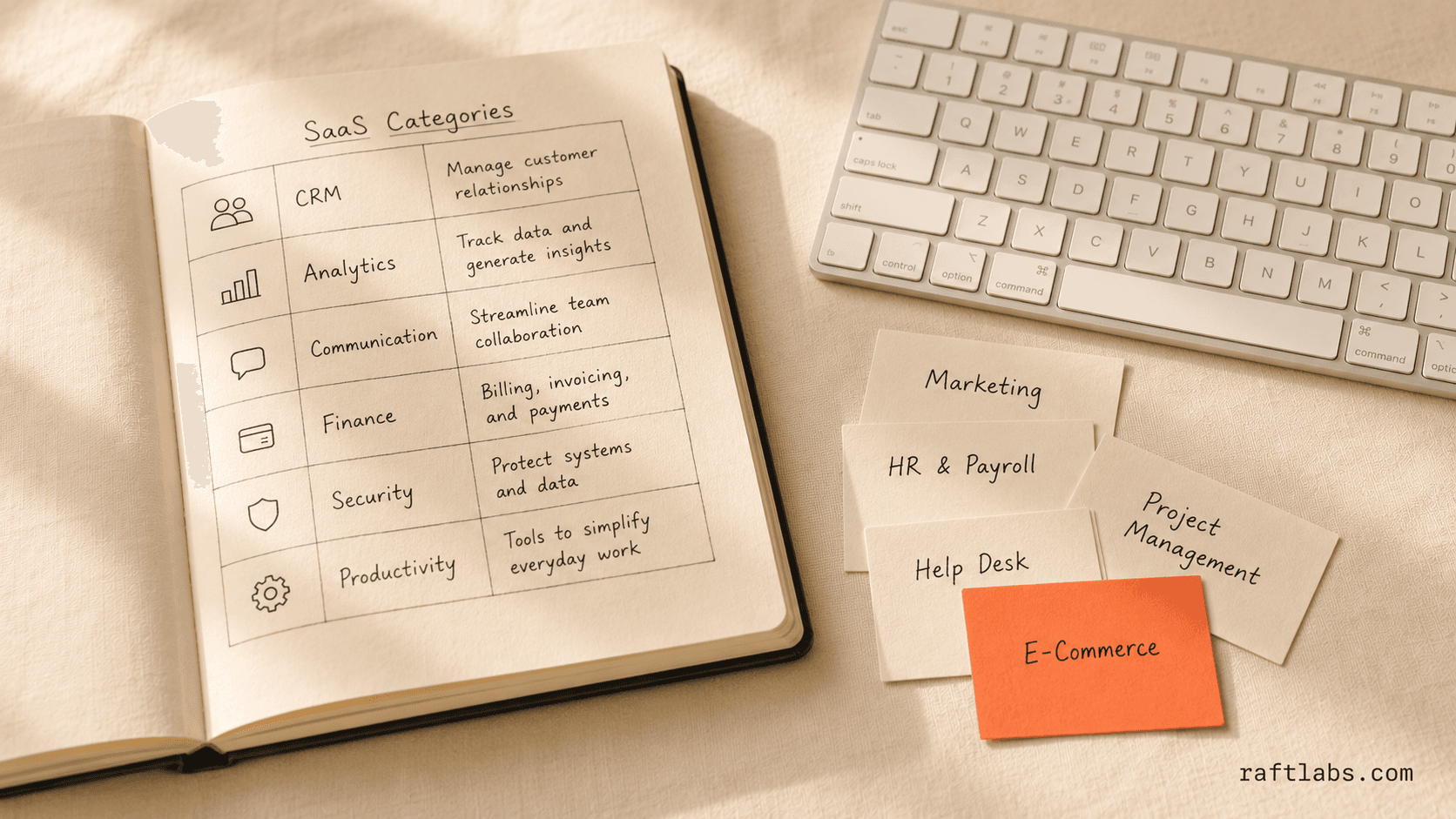
If you are planning a SaaS app development project, the type of product you are building shapes every infrastructure decision that follows.
For a deeper look at how real companies have built these products, see our examples of SaaS applications guide.
Customer Relationship Management Software
CRM software assists businesses in managing customer relationships and delivering better service. Key capabilities include:
Efficient management of customer data
Tracking all customer interactions
Identifying new leads and categorizing them accurately
Managing marketing campaigns
Identifying sales opportunities
Generating automated sales reports
Creating a centralized database
Enterprise Resource Planning Software
ERP software integrates all core business activities into a single system. It acts as the central nervous system of a business, integrating automation and intelligence to carry out day-to-day activities. Key capabilities include:
Accurate information availability across departments
Better collaboration between business units
Enhanced productivity and quality of management
Inventory tracking and monitoring
Minimizing risks by reducing errors
Scaling business operations
Project Management Software
Project management software simplifies project planning, resource allocation, and task scheduling. Key capabilities include:
Planning and tracking project progress
Scheduling meetings and milestones
Allocating resources effectively
Real-time project budget management
Easy documentation
Accounting Software
Accounting software organizes, manages, and automates financial tasks. Key capabilities include:
Simplifies time-consuming financial tasks
Generates accurate financial reports
Automates repetitive processes
Reduces errors in financial data
Easy tax filing and system integrations
Email Marketing Software
Email marketing software enables a company to run marketing campaigns at scale. Key capabilities include:
Advertising at lower costs than paid media
Converting viewers into customers
Sending targeted emails to specific audience segments
Automating email sequences
Generating analytics for campaign assessment
Differences Between SaaS B2B and SaaS B2C
| Aspect | B2B SaaS | B2C SaaS |
|---|---|---|
| Target Audience | Businesses, offering solutions for operations | Individual consumers, addressing personal needs |
| Product Complexity | More complex with advanced features and integrations | Simpler, user-friendly, with limited customization |
| Sales Cycle | Longer, involving multiple decision-makers, often taking months | Shorter, simpler, quick decisions driven by immediate needs |
| Pricing | More expensive, ranging from $30 to several thousand dollars per month | More affordable, typically $5 to $100 per month |
| Customer Support | Specialized support with dedicated account managers | Scalable and automated, relying on community forums and chatbots |
| Churn Rates | Generally lower due to longer-term contracts and higher switching costs | Higher churn as customers can easily cancel subscriptions |
| Marketing Approach | Focuses on educating prospects and demonstrating ROI | Emphasizes emotional appeal and quick value demonstration |
| Examples | Salesforce, HubSpot, Slack, Oracle | Netflix, Spotify, Duolingo, Microsoft Office Home |
SaaS Development Process: 7 Key Steps
As a SaaS product development agency, we follow a proven methodology to build and launch profitable SaaS apps in less than 16 weeks for our customers.
You can read some of our case studies.
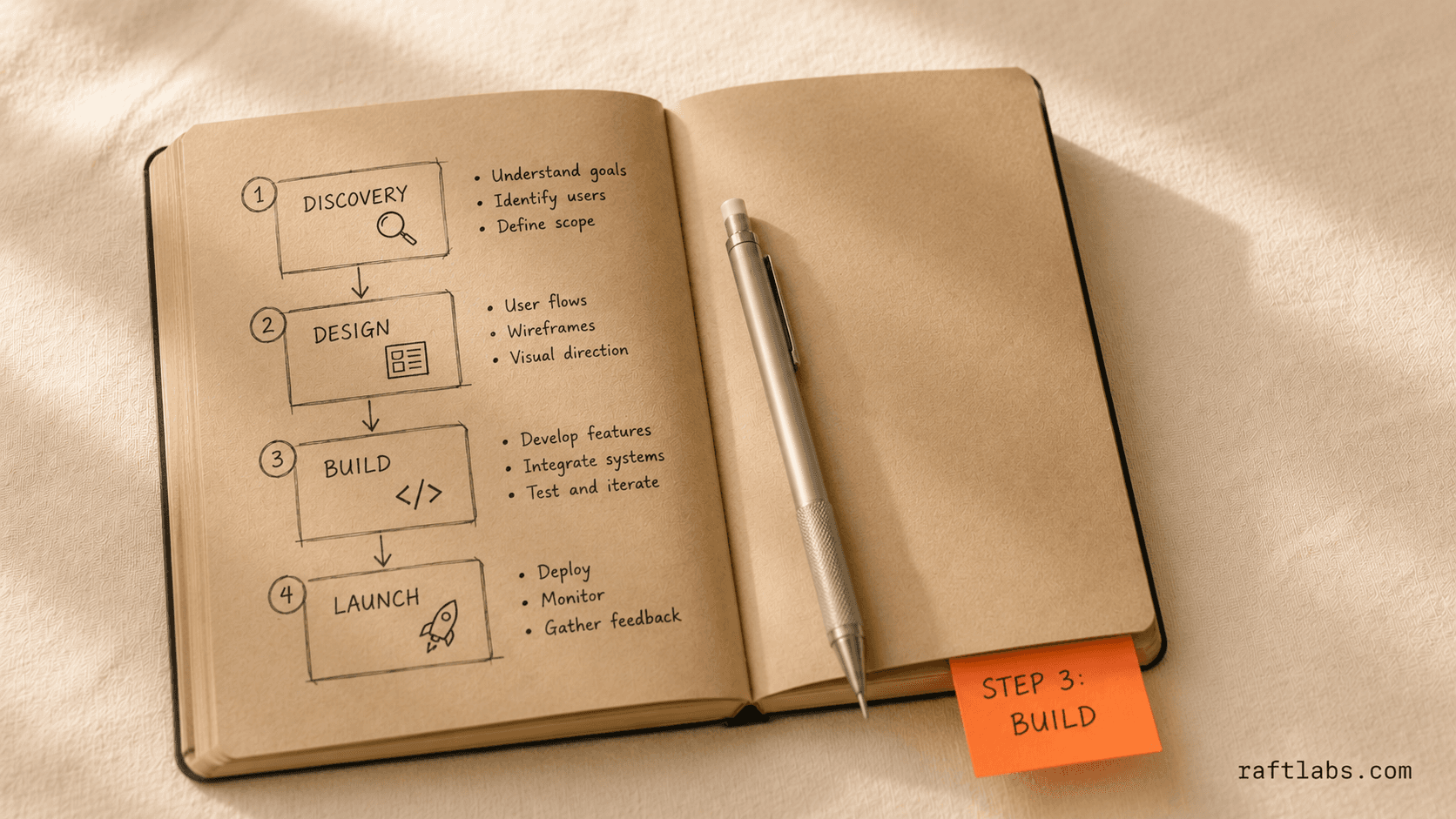
Stage 1: Idea Validation and Market Research
Before writing a single line of code or designing a screen, confirm that the problem you are solving is real, frequent, and worth paying for. Skipping this stage is the single most common reason SaaS products fail. Not bad code, not poor design. Building something nobody actually wanted.
Problem validation: Conduct 15-20 customer discovery interviews with your target audience. You are not pitching your idea. You are listening to their frustrations. The goal is to confirm the problem is real and recurring.
Willingness to pay: Validation is not just "do people have this problem?" It is "would they pay $X/month to solve it?" These are very different questions.
Competitor landscape mapping: Identify direct competitors (same solution, same audience), indirect competitors (different solution, same problem), and substitutes (spreadsheets, manual processes, hiring). Study their pricing pages, G2/Capterra reviews, and onboarding flows to find the gap your product will fill.
Market sizing: Estimate your TAM (Total Addressable Market), SAM (Serviceable Addressable Market), and SOM (Serviceable Obtainable Market). This determines whether the business is worth building and is critical for any future funding conversation.
Positioning decision: Based on your research, define your unique angle. Are you cheaper, simpler, more focused on a niche, or faster to set up? Your positioning drives every product and marketing decision that follows.
Output: A validated problem statement, competitive map, target customer profile, and a clear go/no-go decision on the idea.
Stage 2: Planning, Business Model, and Roadmap
Once the idea is validated, this stage transforms it into a concrete plan. The business model, feature scope, and delivery timeline are locked in here. These decisions shape every technical and design choice downstream.
Pricing model selection: Your pricing structure must be decided before architecture, because it directly affects what gets built. Flat-rate subscription keeps billing simple. Tiered pricing requires role-based access control. Usage-based pricing requires metering infrastructure. Each model has different development implications.
MVP definition: The MVP is the smallest version of the product that delivers genuine value to a real user. A working product with a deliberately narrow feature set, not a prototype or demo. Defining this boundary clearly is one of the most important decisions in the entire project.
Feature prioritization (MoSCoW): Every feature idea is categorized as Must-have, Should-have, Could-have, or Won't-have for the first release. This prevents scope creep before development begins.
Functional and non-functional requirements: Functional requirements describe what the system does (login, billing, notifications, search, export). Non-functional requirements describe how it performs: uptime targets (e.g., 99.9%), page load thresholds, and security standards (GDPR, HIPAA).
Risk register: Every potential blocker is documented: third-party API dependencies, compliance complexity, integration challenges, data migration requirements. Each risk gets a mitigation plan before development starts.
Phased roadmap: A delivery plan with three horizons: MVP, Growth features, Scale features. Sprint cycles, milestones, and launch date targets are set here.
Output: A Product Requirements Document (PRD), prioritized feature backlog, risk register, pricing strategy, and a phased roadmap.
Stage 3: Architecture and Technology Decisions
This is where the technical foundation is set. Bad decisions made here cost 3-5x more to fix once real users and real data are in the system. Most guides bury this inside "development," but architecture is a planning decision, not a coding decision.
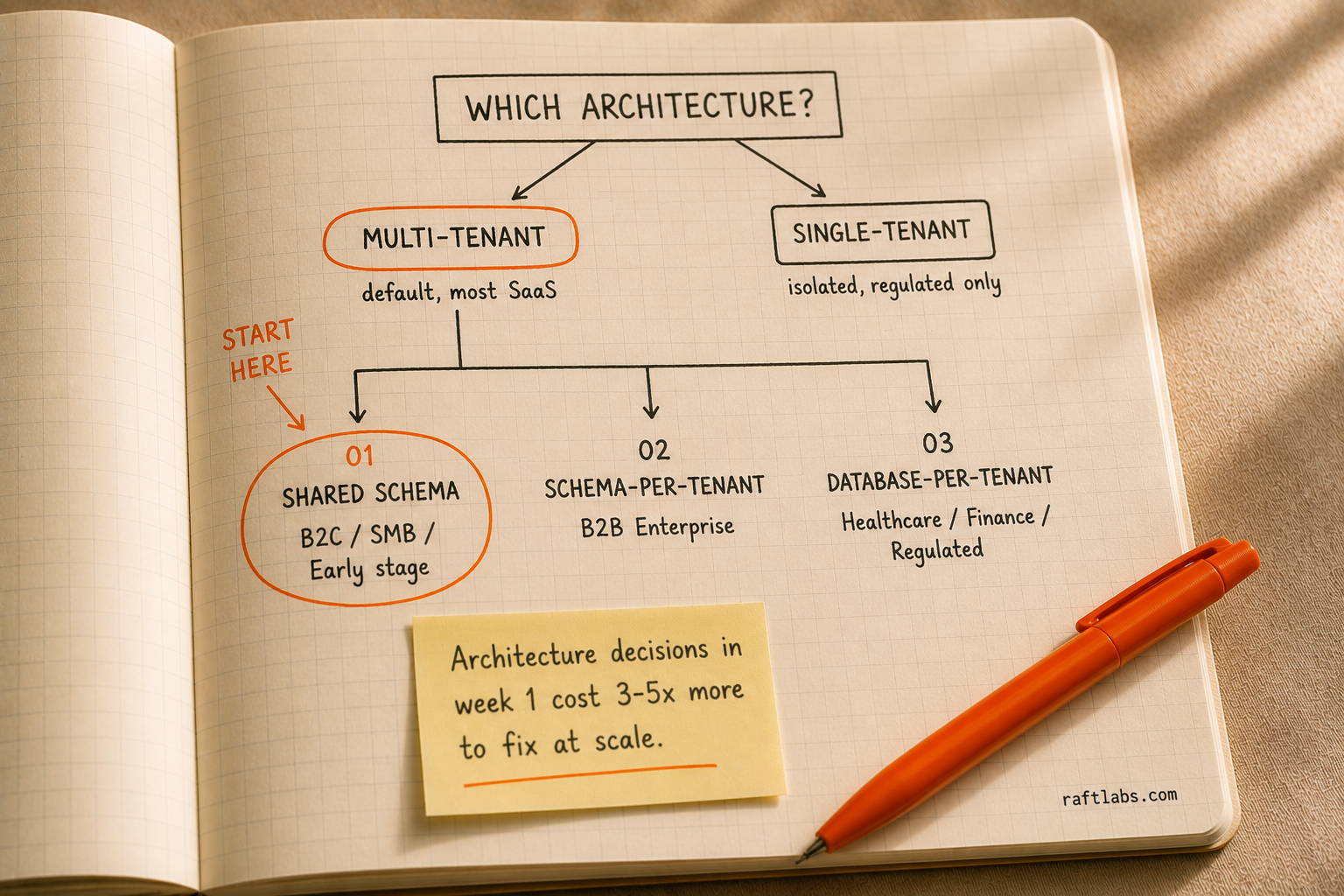
Multi-Tenant vs Single-Tenant: Multi-tenancy means multiple customers share the same application and infrastructure, with data logically separated. It is the right default for most SaaS products: lower cost, easier to maintain. Single-tenancy gives each customer their own dedicated environment and is only justified for highly regulated industries or enterprise contracts that demand it.
Data Isolation Model: Within multi-tenancy, how you separate tenant data has real compliance and performance consequences. Shared schema (row-level security) is the cheapest option and suits early-stage B2C or SMB products. Schema-per-tenant suits B2B SaaS selling to enterprise buyers. Database-per-tenant is the most expensive and only necessary for HIPAA, financial services, or data sovereignty compliance.
Tech Stack Selection: Frontend: React.js or Next.js. Backend: Node.js (NestJS), Python (FastAPI/Django), or Java (Spring Boot). Database: PostgreSQL as the default, Redis for caching. Cloud: AWS, GCP, or Azure. Billing: Stripe. Auth: Auth0, Clerk, or custom JWT. DevOps: Docker, Kubernetes, Terraform, GitHub Actions.
API Design Strategy: REST APIs handle standard operations. GraphQL is used when the frontend needs flexible data fetching. WebSockets handle real-time features.
Third-Party Integrations: Every external service the product connects to (CRMs, email providers, analytics tools, calendar APIs) is mapped out here, because each one has development cost and ongoing maintenance implications.
Scalability Planning: Auto-scaling configuration, load balancing strategy, CDN setup, and caching layers are planned now, not added later when the product is already under load.
Output: A technical architecture document, system design diagram, tech stack decision log, and infrastructure plan.
Stage 4: UI/UX Design
Design is the biggest factor in whether users stay after their first session. A product that solves a real problem but is confusing or slow to navigate will still churn. This stage confirms the product is not just functional, but genuinely intuitive.
User Research and Personas: Designers study how target users work today: what tools they use, where they feel friction, and what mental models they bring. Two to three user personas are created and used to evaluate every design decision throughout the project.
Information Architecture (IA): Before any screen is drawn, the structure of the entire product is mapped: every page, how they connect, and how a user navigates from signup to their first meaningful success. This "activation moment" is the most important UX milestone in any SaaS product.
Wireframing: Low-fidelity sketches with no colors or branding establish layout, hierarchy, and logic for each screen. Fixing a flow problem in wireframes costs hours. Fixing it after it is built costs days.
Prototyping: Clickable prototypes simulate the real product experience and are tested with real users before development starts.
Visual Design (UI): Brand identity, color system, typography, iconography, and spacing are applied. A design system is created so every screen stays visually consistent.
Responsive Design: Every screen is designed for desktop (1440px), tablet (768px), and mobile (375px) breakpoints.
Empty States, Error States, and Onboarding Prompts: What does the product look like before a user has any data? These details are critical to the first-use experience and should be designed intentionally.
Output: A complete Figma design file, design system/component library, clickable prototype, and developer handoff documentation.
Stage 5: Development
With planning, architecture, and design complete, development builds the actual product. This stage runs across four parallel workstreams (frontend, backend, database, and DevOps) that must be coordinated carefully.
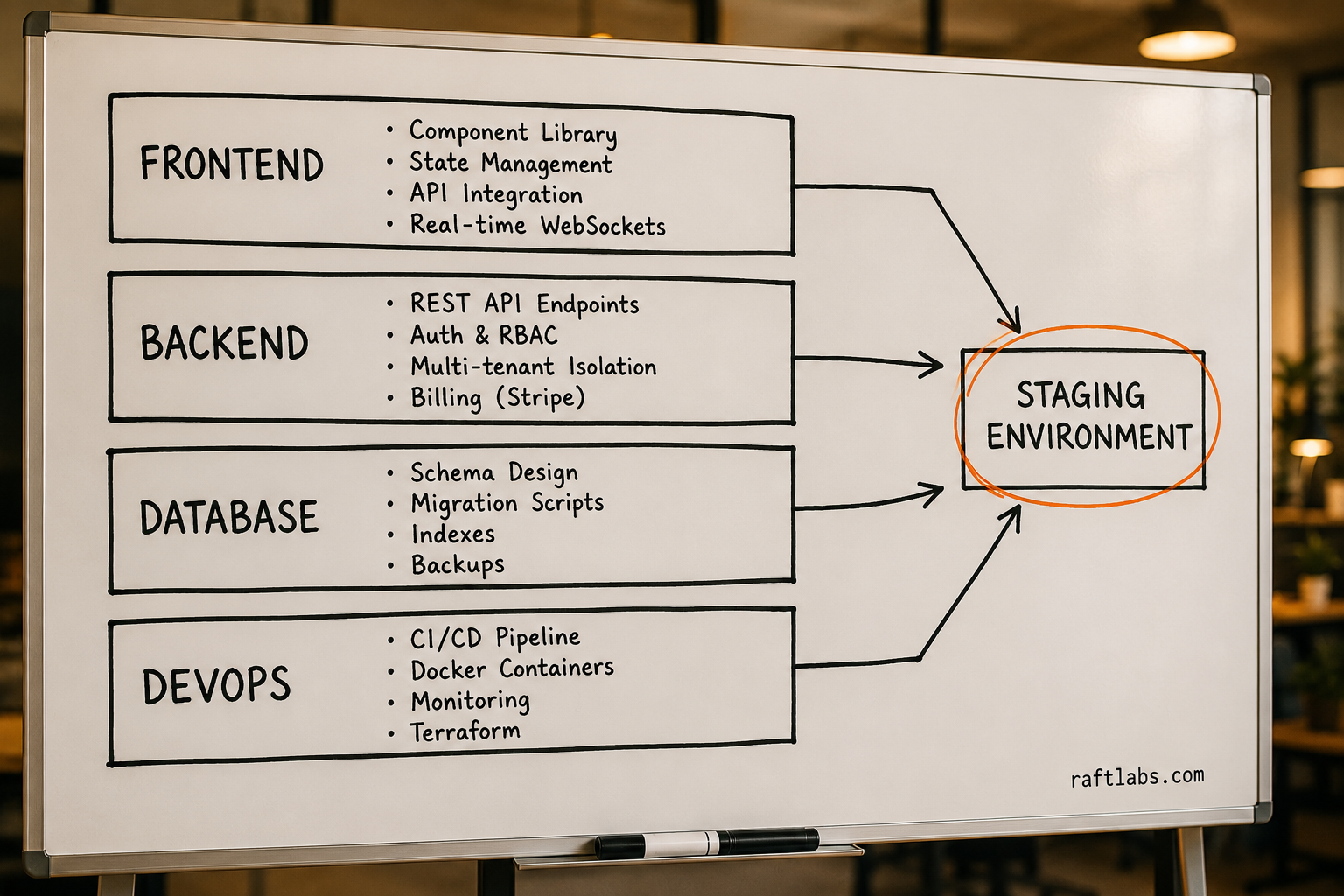
Frontend: Everything the user sees and interacts with.
Reusable component architecture built from the design system so UI elements stay consistent
State management (Redux, Zustand, or React Context) handles application-level data
API integration connects the frontend to the backend with proper loading states, error handling, and caching
Real-time features implemented using WebSockets where required
Performance optimization through code splitting, lazy loading, and bundle management
Backend: The engine that processes business logic and coordinates all communication.
All REST or GraphQL API endpoints built with input validation, authentication checks, and structured error handling
Authentication and authorization: JWT session management, OAuth (Google/GitHub login), and role-based access control
Multi-tenancy isolation logic confirms every database query is scoped to the correct tenant
Subscription and billing integration through Stripe handles plan creation, upgrades, downgrades, failed payment retries, invoice generation, and webhook processing
For AI-powered SaaS apps, the backend also wires LLM integrations (OpenAI, Claude, Gemini), vector databases, and AI inference pipelines into core product workflows
Background job queues handle long-running tasks like report generation and data sync so API responses stay fast
An internal admin panel gives the team visibility into all tenants, subscription status, and usage data
Database: Where the product's data lives.
Schema design built to support multi-tenancy, audit logging, and the full feature set from day one
Indexes applied to frequently queried columns
All schema changes managed through versioned migration scripts
Automated daily backups with point-in-time recovery configured and tested
DevOps and Infrastructure: What confirms the product can be reliably built, tested, deployed, and monitored.
Three environments configured: development, staging (a mirror of production), and production
Docker containers package the application so it runs identically across all environments
A CI/CD pipeline (GitHub Actions, GitLab CI) automatically runs the full test suite on each commit
Infrastructure as code via Terraform defines the entire cloud environment in version-controlled code
Monitoring and alerting through Datadog or AWS CloudWatch tracks uptime, error rates, and API response times
Output: A fully functional, tested, deployed application running in a staging environment ready for QA.
Stage 6: Testing, QA, and Beta Launch
Testing runs throughout development. This stage is the formal quality checkpoint before real users see the product.
Automated Testing Suite: Unit tests, integration tests, and end-to-end tests (Playwright or Cypress) simulate complete user journeys and catch regressions automatically with every deployment.
Load Testing: Tools like k6 simulate thousands of concurrent users to identify performance bottlenecks before real traffic hits.
Security Testing: Penetration testing, OWASP vulnerability scanning, authentication bypass testing, and SQL injection testing. For products handling sensitive data, a formal security audit may be required.
Cross-Browser and Cross-Device Testing: Tested across Chrome, Firefox, Safari, and Edge, and across desktop, tablet, and mobile screen sizes.
User Acceptance Testing (UAT): A small group of real target users tests the product in staging. Their feedback surfaces UX issues that automated tests cannot catch.
Closed Beta: 50-200 hand-selected users from your target audience get access before public launch. Their feedback shapes the final product. Critical bugs are fixed immediately; non-critical improvements go into the post-launch backlog.
Output: A stable, security-tested product with a passing automated test suite, resolved critical bugs from beta feedback, and confirmed readiness for public launch.
Stage 7: Launch and Post-Launch Iteration
Launch day is a milestone, not a finish line. The real work begins the moment the first paying customer signs up: turning a launched product into a growing business.
Pre-Launch Checklist: DNS configuration, SSL certificates, production environment verification, backup validation, monitoring alerts, billing system testing, and support queue readiness are all confirmed before going live.
Onboarding Infrastructure: The path from "just signed up" to "first meaningful success in the product" is the most important flow in the application. In-app tooltips, progress checklists, and empty-state prompts guide new users to value. An automated onboarding email sequence (day 1, day 3, day 7) nudges users who have not activated.
Analytics and Measurement: Product analytics (Mixpanel, Amplitude, or PostHog) are instrumented across the full user journey. The key SaaS metrics tracked from day one are MRR, churn rate, trial-to-paid conversion rate, activation rate, and NPS.
Public Launch: Product Hunt, email list, social media, press outreach, and community announcements drive the initial traffic spike.
Continuous Iteration: Two-week development sprints run after launch. Priorities come from user feedback, analytics data, churn analysis, and business metrics. Not internal opinions.
Scaling Infrastructure: As user numbers grow, the infrastructure evolves: database read replicas, additional caching layers, CDN optimization, and potentially migrating to a more isolated tenancy model for enterprise customers.
Churn Analysis and Retention: When users cancel, find out exactly why through exit surveys, cancellation interviews, and usage data. The root causes of churn become the highest-priority product improvements.
Output: A live product with paying customers, a functioning growth loop, and a continuous improvement cycle driven by real data.
Interested in how SaaS apps are built for specific industries? Check out our guide on building a healthcare SaaS app.
Not sure where your SaaS idea fits in this process? We scope SaaS builds every week. Share your idea in a free 30-minute call and we will tell you which stage you are at, what the right architecture looks like, and what a realistic timeline and budget would be. Book a free scoping call
SaaS Architecture: Multi-Tenant vs Single-Tenant
This is the most important technical decision in any SaaS cloud application development project. Get it wrong at the start and it costs 3-5x more to fix later, once real users and real data are in the system.
What is Multi-Tenancy?
Multi-tenancy means multiple customers (tenants) share the same application instance and infrastructure, with their data logically separated. Think of it like a modern apartment building: each tenant has their own private space, but the building, plumbing, and electricity are shared.
Single-tenancy gives each customer their own dedicated instance: their own database, their own application server, their own environment. Think of it like a private house.
Most modern SaaS products start with multi-tenant architecture because it is more cost-efficient and easier to maintain at scale.
The Three Isolation Models
How you separate tenant data within a multi-tenant architecture is a separate decision with real compliance and performance consequences.
| Isolation Model | How It Works | Cost | Best For |
|---|---|---|---|
| Shared schema (row-level security) | All tenants share the same tables; rows are tagged with a tenant ID and access is filtered at the query level | Lowest | B2C SaaS, SMB-focused products, early-stage startups |
| Schema-per-tenant | Each tenant gets their own schema within a shared database server | Medium | B2B SaaS serving enterprise buyers; balances isolation with infrastructure cost |
| Database-per-tenant | Each tenant gets a completely separate database instance | Highest | Products with strict data residency requirements, regulated industries (healthcare, financial services) |
How to Choose
Start with shared schema unless you have a specific reason not to. It is the cheapest to build and operate, and it can be migrated to schema-per-tenant later if enterprise buyer requirements demand it.
Move to schema-per-tenant when your sales conversations start hitting enterprise procurement checklists that include data isolation requirements. This happens earlier than most founders expect, usually around the Series A stage.
Database-per-tenant is rarely required at the MVP or early growth stage. It makes sense for healthcare SaaS development products covered by HIPAA BAA requirements, fintech SaaS development platforms with strict regulatory controls, or products sold to enterprise buyers in regions with data sovereignty laws.
For a detailed breakdown of how the tech stack fits into these architecture decisions, see our guide to choosing the right tech stack for your SaaS app.
Challenges of SaaS Application Development
1. Performance Optimization
If your app loads slowly or crashes under heavy traffic, users will leave.
How to address it: Optimize your database, use caching (like Redis), and implement CDNs. Load balancing distributes traffic so your app stays responsive.
2. Multi-Tenancy Management
Your SaaS app serves multiple customers, and you need to keep their data separate and secure.
How to address it: Use logical isolation (separate databases or schemas) and role-based access control (RBAC) to confirm data stays where it belongs.
3. Compliance and Data Privacy
Handling sensitive user data means following regulations like GDPR, HIPAA, or SOC 2.
How to address it: Encrypt data, enforce multi-factor authentication (MFA), and schedule regular security audits to stay compliant and build trust with users.
4. Cost Management
Cloud services, APIs, and third-party tools can create unexpected costs.
How to address it: Choose the right pricing model (subscription-based or usage-based) to balance expenses. Optimize cloud resources with auto-scaling.
5. Continuous Updates and Maintenance
Rolling out new features and bug fixes without breaking anything for existing users is a constant challenge.
How to address it: Set up a CI/CD pipeline for automated testing and deployment. Use feature flags to roll out changes gradually.
6. Uptime and Availability
If your app goes down, even briefly, it hurts your reputation and revenue.
How to address it: Use multi-region deployments, auto-scaling servers, and a solid disaster recovery plan with frequent backups.
7. Vendor Lock-In
Relying too heavily on a single cloud provider makes switching expensive.
How to address it: Use containerization (Docker, Kubernetes) to keep your infrastructure flexible so you are not tied to one provider.
8. User Experience Challenges
A confusing or clunky UI drives users away.
How to address it: Keep your design clean and intuitive. Use A/B testing and in-app guides to make onboarding easy.
How Much Does It Cost to Develop a SaaS Platform?
The cost of SaaS app development depends on:
- The development team's geographic location
- The type of product
- The features, technology, and required integrations
- The complexity of the project
For a full-scale SaaS platform, pricing ranges from $20,000 to over $150,000 depending on complexity.
If you are starting out, build an MVP first. An MVP is a basic version of your app with core features, helping you test the idea before investing in a full-scale platform. Cost for an MVP typically falls between $10,000 and $20,000, and development usually takes 6-8 weeks.
For more advanced SaaS applications with custom design, third-party integrations, or AI-powered features, costs and timelines increase. A medium-complexity SaaS (like Trello or Zendesk) can take 12-14 weeks and cost between $20,000 and $60,000.
AI-powered SaaS apps require a larger investment. Applications that use AI to automate tasks, improve user experience, and deliver data-driven insights are more expensive to develop but create stronger competitive moats.
Want a fixed-price estimate for your SaaS build? The ranges in this section give you a starting point. A scoping call gives you an actual number. We review your requirements and send back a fixed-price proposal within 48 hours. Get a fixed-price proposal
Also Read: Best SaaS Development Companies to Build your SaaS Product.
A Real SaaS Build: PSi Audio Platform
Reading about SaaS development theory is useful. Seeing what it actually looks like in practice is more useful.
PSi: Real-Time Audio SaaS Platform
PSi needed a production-ready SaaS platform for real-time audio communication. The product required sub-200ms latency at scale, a multi-tenant architecture to serve multiple enterprise clients from a single infrastructure layer, and deep integration with Agora for real-time streaming.
What RaftLabs built and how long it took:
Full SaaS web application development from discovery to production deployment: 12 weeks
Multi-tenant architecture with schema-per-tenant isolation for enterprise client data separation
Real-time audio infrastructure integrated at the platform level using Agora SDK
Admin dashboard for tenant management, usage monitoring, and billing
The outcome: a live platform handling concurrent audio sessions across multiple enterprise tenants, deployed on AWS, fully owned by the client from day one.
This is the kind of SaaS project that looks complex on paper but moves fast when architecture decisions are made correctly in week one rather than revised in week ten. For more examples, see our portfolio of SaaS applications.
Benefits of SaaS Application Development
Each benefit below is backed by a specific number, because "this is good" is not useful when you are making a business decision.
1. Faster Time to Market
SaaS products built on cloud infrastructure skip the hardware procurement, on-premise installation, and manual update cycles that add weeks to traditional software launches. Teams using modern SaaS development practices ship production-ready MVPs in 8-14 weeks. Startups that pivot once or twice based on early user feedback raise 2.5x more funding and grow 3.6x faster than those that do not, according to Lean Startup research.
2. Lower Infrastructure Cost
Moving from on-premise software to cloud-based SaaS eliminates server procurement, data center costs, and IT maintenance overhead. Organizations that migrate to cloud infrastructure report IT cost reductions of 30-40% on average, according to Flexera's State of the Cloud report.
3. Predictable Subscription Revenue
SaaS businesses running subscription models report an average Net Revenue Retention (NRR) of 106% at the median, meaning existing customers expand their spend year over year, according to KeyBanc Capital Markets. Compare this to one-time software licensing where revenue resets to zero each quarter.
4. Continuous Updates Reduce Churn
64% of software features are rarely or never used, according to Standish Group research. SaaS products that ship continuous updates based on usage data close that gap faster. Products with strong continuous improvement practices see churn rates of 3-5% monthly, while stagnant products often see 8-10%.
5. Global Reach From Day One
A SaaS web application built on AWS or Azure infrastructure is globally accessible from the moment it launches. 85% of all business applications are now SaaS-based, according to BetterCloud. The addressable market for a well-positioned SaaS product is not limited by geography.
6. AI Integration at the Product Level
Modern SaaS products can now integrate LLM-powered features directly into core workflows: automated data extraction, natural language search, intelligent recommendations, and workflow automation. According to the 2025 SaaS Benchmarks Report by High Alpha, nearly 100% of SaaS companies founded in 2025 treat AI as a core product capability rather than an add-on. Ignoring AI in a new SaaS development project is no longer a neutral decision. It is a competitive disadvantage.
Also Read: SaaS Product Development Lifecycle and Best Practices
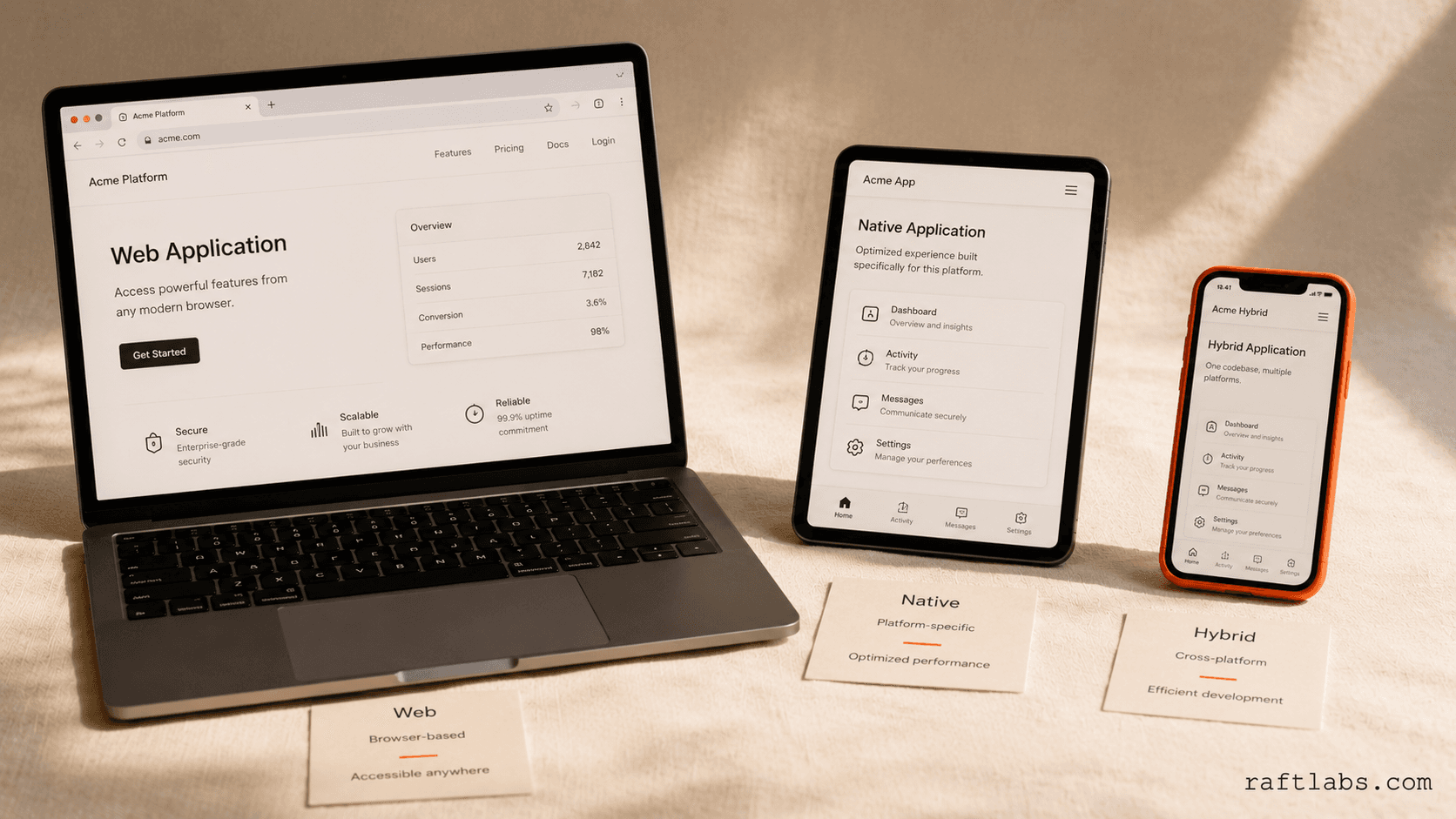
Web, Native, or Hybrid Apps: Which One Is Right for Your SaaS?
1. Web Apps
Web-based applications let users access the product through any web browser. Users open their browser, load the webpage, and start using it without downloading anything.
Examples: Twitter, Slack, Trello, Amazon, Gmail
Low-cost development and ease of maintenance make it the best choice for tight-budget scenarios and products where mobile-specific features are not required.
2. Native Mobile Apps
Native apps are built for specific platforms using platform-specific languages. iOS uses Swift or Objective-C; Android uses Kotlin or Java. Users download them through Google Play or the Apple App Store.
Examples: Facebook Messenger, Instagram, Spotify
Native apps deliver the highest performance and best platform-specific UX. They are the right choice when your product needs deep device integration.
3. Mobile Hybrid Apps
A hybrid app combines characteristics of native and web applications. It is available through app stores but runs on browser-based technology with native-like UI capabilities.
Examples: Evernote, Uber, Twitter Lite, OpenSea
The main advantage is cost-effectiveness. One codebase runs on both iOS and Android. Hybrid is the right choice when you need app store distribution but do not require deep native device integration.
SaaS vs On-Premise Software: Which Model Is Best for You?
| Aspect | SaaS | On-Premise Software |
|---|---|---|
| Deployment | Cloud-based, accessible via the internet | Installed and maintained on local servers or devices |
| Cost | Subscription-based, often lower upfront costs | High upfront costs, including hardware and licensing |
| Maintenance | Provider handles updates, patches, and maintenance | Requires internal IT team for updates and maintenance |
| Scalability | Easily scalable with subscription adjustments | Scaling requires hardware upgrades and additional software licenses |
| Customization | Limited customization options based on vendor offerings | High customization capabilities, tailored to specific needs |
| Access | Accessible from anywhere with an internet connection | Access limited to specific devices or networks |
| Security | Managed by the SaaS provider, often with advanced encryption | Security managed internally, dependent on the company's resources |
| Updates | Automatically updated by the provider | Requires manual updates |
| Data Control | Data stored on the provider's servers | Full control over data, stored on-premises |
| Implementation Time | Quick setup with minimal configuration | Longer setup time, requiring installation and configuration |
| Internet Dependence | Requires a stable internet connection | Can function without the internet |
Choose SaaS when your organization lacks resources for on-premise software management, when staff needs remote access, or when you want predictable costs. Choose on-premise when data sovereignty requirements, strict regulatory controls, or existing infrastructure makes cloud hosting impractical.
Top Existing SaaS App Examples
HubSpot: A marketing, sales, and service platform hosted on AWS. HubSpot's annual revenue exceeded $2.1 billion in 2023, a 26% year-over-year increase.
Zendesk: A cloud-based help-desk platform that assists businesses in gaining customer satisfaction. Provides free live chat services and helps businesses gather customer information.
Box: A cloud computing software that provides a single platform for content management. Supports 120+ file types and allows transmission of large files.
Notion: An all-in-one productivity application offering a single workspace for entire organizations. Supports note-taking, task assignment, and real-time collaboration.
Essential SaaS Business Terms You Should Know
- MRR (Monthly Recurring Revenue): A business metric predicting the recurring revenue a SaaS company generates monthly.
- Product Road Mapping: A high-level visual summary describing the product vision, strategy, and development progress.
- MVP (Minimum Viable Product): A basic version of a product with sufficient features to check viability. Early adopters use MVP.
- CAC (Customer Acquisition Costs): The total cost a business spends to acquire new customers.
- Churn Rate: The percentage of customers who cancel their subscriptions, causing loss of recurring revenue.
- LTV or CLV (Customer Lifetime Value): The total revenue a business earns from a customer until they churn.
- ARR (Annual Recurring Revenue): The amount a company earns through recurring subscriptions annually.
- Lead Velocity Rate: The percentage growth of qualified leads from one month to the next.
How to Choose a SaaS Development Partner
Whether you are considering SaaS application development outsourcing or evaluating agencies to augment your internal team, the wrong partner at the early stage costs more than the build itself. A bad architecture decision made in week two takes six months and significant budget to undo at Series A.
Here is what to evaluate, and why each point matters.
1. Do They Build SaaS Products Specifically, or Just Websites and Apps?
There is a meaningful difference. A SaaS product requires specific expertise in multi-tenant architecture, subscription billing infrastructure, tenant data isolation, and ongoing scalability planning. An agency that builds marketing sites and brochure apps will not bring those decisions to the table by default.
Ask directly: how many SaaS products have you shipped? What isolation model did you use for the multi-tenant architecture? What billing infrastructure did you build on?
2. Who Owns the Code and Infrastructure?
This is non-negotiable. The codebase, the repository, and all infrastructure should transfer to you at completion. Some agencies retain repository access or lock clients into proprietary tooling that makes switching expensive. Confirm full IP transfer in the contract before the project starts.
3. Can They Show You a Production Product?
Not a demo environment. A live product with real users. Any credible SaaS app development partner should be able to point to at least two or three products in production. Ask for the URLs, not just screenshots.
4. How Do They Handle Post-Launch?
The launch is not the end of a SaaS build. It is the beginning of the iteration cycle. A partner worth working with should have a clear approach to post-launch monitoring, bug resolution, and the first sprint of improvements based on real user data.
5. What Is the Fixed Price, and What Is Explicitly Out of Scope?
Scope creep is the most common reason SaaS development projects run over budget. A good partner gives you a fixed-price proposal with a clearly defined scope and an explicit list of what is not included. If the proposal is a range rather than a fixed number, that range will expand.
In-House vs Outsource vs SaaS Development Outsourcing
| Approach | Best For | Watch Out For |
|---|---|---|
| In-house team | Series A+ companies with 4-6 months to hire well | Time to first line of code is 3-6 months minimum |
| Staff augmentation | Technical founders with skill gaps | Context gaps between internal and external team |
| Full outsource | Pre-seed to seed founders without a CTO | IP ownership and architecture quality |
| SaaS outsourcing | Funded startups that need to move fast without a full internal team | Partner lock-in and handoff quality |
If you are at the early stage and evaluating your options, our SaaS startup founder's guide covers how to think about the build decision before you have committed to a team or a timeline.
For a comparison of how leading agencies approach SaaS delivery, timelines, and ownership terms, see our breakdown of the top SaaS development companies.
Wrapping Up
The next step is finding a suitable vendor to develop the appropriate SaaS product for your company.
RaftLabs works with founders, product teams, and enterprises to design and build SaaS applications. We collaborate closely with you to create a SaaS product that fits your business niche and scales reliably.
If you are gearing up to take your business to the next level, contact us and share your requirements and expectations for SaaS app development. We will give you a clear path forward.
Ask an AI
Get an instant summary of this post from your preferred AI assistant.
Common questions
- The main SaaS solution categories are CRM software, ERP, project management tools, accounting software, email marketing platforms, collaboration tools, and vertical SaaS built for specific industries. CRM and ERP products typically need complex multi-tenant data models and integrations. Project management tools need real-time sync. Vertical SaaS products often require domain-specific compliance layers such as HIPAA for healthcare or PCI-DSS for fintech.
- Yes, for most businesses. With SaaS, the vendor handles hosting, maintenance, updates, and security. Your team does not need to manage servers or run update cycles. On-premise software puts all of that on your IT team. The tradeoff is less control over infrastructure. For businesses with strict data sovereignty requirements or regulated data classifications, on-premise or hybrid deployments still make sense.
- SaaS development follows four main phases. First, planning and requirements: define the target user, core problem, business model, and feature set for the MVP. Second, architecture and design: choose the tech stack, decide on single-tenant vs multi-tenant, design the database schema, and create wireframes and UI prototypes. Third, development: build the backend API, frontend application, integrations, and authentication. Fourth, launch and iteration: deploy to production, monitor performance, collect user feedback, and ship improvements on a sprint cadence. Most SaaS MVPs take 6-8 weeks from kickoff to production launch.
- A complete SaaS application has six layers. Frontend handles what users see, typically built in React or Next.js. Backend API processes business logic in Node.js, Python, or Ruby on Rails. Database stores structured data with PostgreSQL for relational data and MongoDB for document-oriented use cases. Cloud infrastructure runs the application on AWS, GCP, or Azure. The authentication layer manages user identity via Auth0 or Cognito. The integration layer connects to third-party services like Stripe for payments and SendGrid for email.
- SaaS MVP development starts at $10,000 for a focused product with one or two core features and basic design. A full-featured platform with multiple user roles, custom design, and third-party integrations costs $20,000-$60,000. AI-powered or enterprise-grade SaaS products with complex business logic or compliance requirements are scoped on a custom basis. Ongoing operating costs run $2,000-$8,000 per month after launch. Team location is the biggest single cost variable: US agencies charge $100-$200/hour while offshore teams with equivalent quality deliver at $25-$60/hour.