Updated July 2026
Customer Support Software Development: Build vs. Buy for SaaS and Regulated Industries
Custom customer support software development costs $55,000-$110,000. SaaS companies embedding support inside their product, healthcare operators under HIPAA, and agencies building white-label helpdesks are the teams where a custom build pays back. Here is what goes into it and when the math works.

In this article
Short answer
Custom customer support software development costs $55,000-$110,000 and takes 12-24 weeks. SaaS companies embedding support inside their product, healthcare operators under HIPAA, and agencies building white-label helpdesks are the primary candidates. RaftLabs has built custom helpdesk tools and AI-assisted ticket routing for SaaS companies, healthcare operators, and white-label platform providers. Prototypes start at $10,000.
Key takeaways
- Zendesk Suite Professional is $115 per agent per month. At 25 agents, that is $34,500 per year. Custom helpdesk software development costs $55,000-$110,000 once. Payback is under 24 months for teams already at the $30,000/year mark.
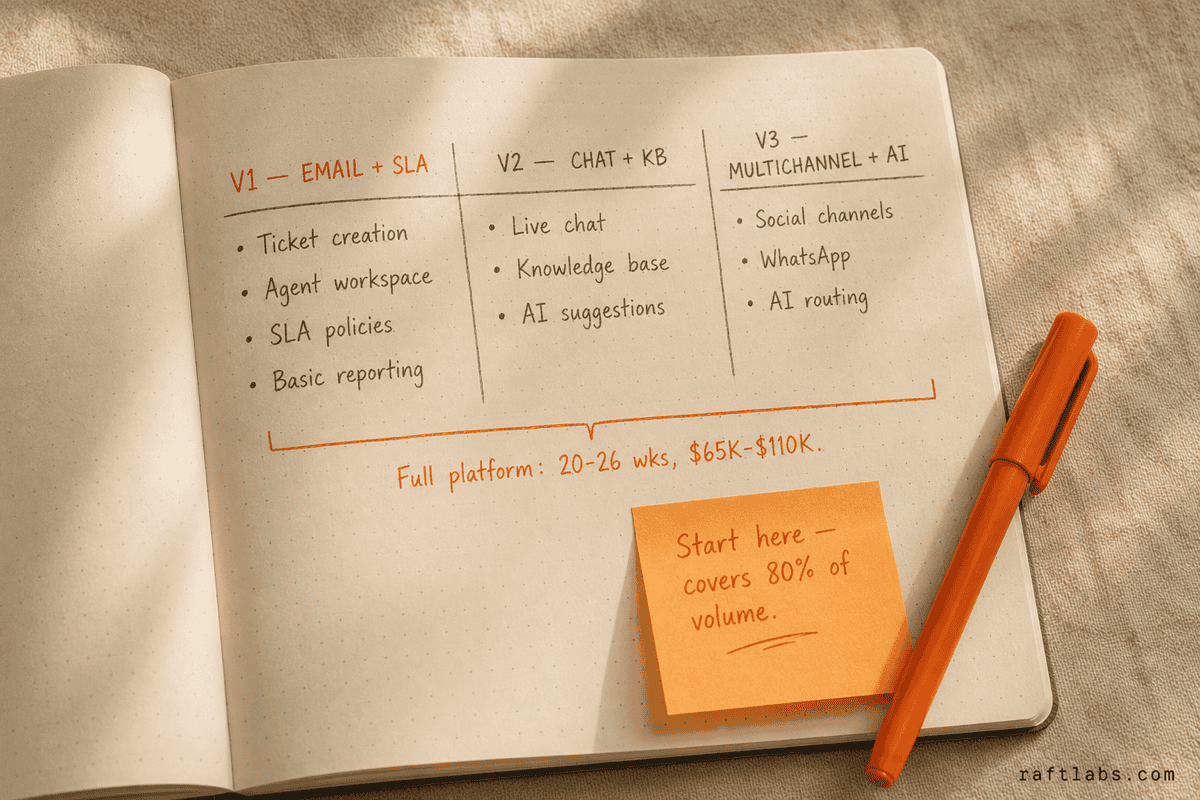
- Start with email ticketing, SLA tracking, and a knowledge base. In RaftLabs' experience this covers roughly 75-80% of support volume and takes 12-16 weeks to build.
- HIPAA-covered support workflows need PHI to stay inside your own infrastructure. Zendesk's HIPAA-eligible plan requires a BAA and limits which integrations you can use. Custom customer support software development gives you full control over data residency and audit trails.
- SLA tracking is the most underestimated piece. The timer must pause when a ticket enters Pending state, exclude weekends and holidays in the agent's time zone, and apply different policies per customer tier.
- Build if you are embedding support inside a SaaS product, building a white-label helpdesk for agencies, or managing HIPAA/FINRA compliance. Do not build if you are a standard team that needs ticketing up in days.
Your SaaS product has 30 agents handling 800 tickets a day. Zendesk bills you $115 per seat per month. That is $41,400 a year before AI add-ons, before the advanced reporting module, and before the compliance upgrade your legal team keeps asking about. You have looked at the renewal invoice twice. You are wondering whether building your own customer support software makes sense.
For some companies, it does. For most, it does not. The dividing line is not headcount or ticket volume. It is whether your workflows fit inside what an off-the-shelf platform can actually do.
The operators who run custom customer support software development projects share a common pattern: they tried to make Zendesk, Freshdesk, or Intercom work, hit a real ceiling, and calculated that the ceiling cost more than a build. The ceiling is almost always one of three things: data residency requirements, deep product embedding, or needing to resell the helpdesk as their own product.
A custom-built customer support platform costs $55,000-$110,000 at $35-$40/hr. Here is how that breaks down, when it makes sense, and where these projects go wrong.
| Scope | Timeline | Cost |
|---|---|---|
| Prototype (clickable demo to validate the idea before a full build) | varies | from $10,000 |
| Email ticketing + SLA + knowledge base (V1) | 12-16 weeks | $35,000-$55,000 |
| Adds live chat + reporting (V2) | +6-8 weeks | +$15,000-$30,000 |
| Adds multi-channel + AI routing (V3) | +6-8 weeks | +$15,000-$25,000 |
| Full platform | 20-26 weeks | $65,000-$110,000 |
According to Gartner's 2024 CRM and Customer Engagement Center Magic Quadrant, 62% of companies report their customer service platform cannot handle custom workflow requirements without significant workarounds or additional development. That is not a software problem. It is a model-fit problem.
Clone scripts vs. custom build
Before committing to customer support software development from scratch, most teams look at clone scripts and white-label options. Three of the most common are Faveo Helpdesk, UVdesk, and HelpSpot.
Faveo Helpdesk is an open-source PHP application you can self-host. The base product handles email ticketing and basic SLA. The problems start when you need anything beyond that. Multi-channel support, SLA state machines that handle business hours correctly, and any meaningful AI deflection layer require paid modules or custom development on top of an unfamiliar codebase. You end up maintaining a PHP application you did not write, against a code quality baseline you have no control over. Teams that go this route often spend more in developer time over 18 months than a clean custom build would have cost.
UVdesk takes a similar approach. It is Laravel-based and reasonably structured, but the plugin ecosystem is thin. If your SLA logic has conditional branching per customer tier, or your compliance team needs a full audit trail of every ticket state change, you will be building those on top of UVdesk rather than getting them from it.
HelpSpot is a hosted option with a more honest feature scope. It works well for small teams with simple workflows. At scale, the per-agent pricing model becomes a problem. At 25 agents, HelpSpot costs $18,000-$24,000 per year. That is better than Zendesk, but you still do not own the platform, you cannot modify the data model, and you have no path to embedding it inside your own product without iframe workarounds that break the user experience.
The pattern across all three is the same: clone scripts and white-label options are priced for simplicity. When your requirements move past simple, you pay in developer time, workarounds, and long-term maintenance of code you did not write and cannot fully control. At that point, custom customer support software development from scratch is often the cleaner answer.
Who actually builds custom customer support software
Custom helpdesk development is not for every business. Four types of operator build instead of buying, and their reasons are specific.
SaaS companies embedding support inside the product. When your users are already inside your application, sending them to an external Zendesk widget breaks the session. They lose context. They re-enter information your product already has. A native support panel opens a ticket pre-populated with their account ID, subscription tier, and recent activity. Zendesk can be embedded, but every customization costs extra, and the handoff between your product data and Zendesk's data model is always a workaround. SaaS companies with 5,000+ users where support quality directly affects retention are the clearest candidates for custom customer support software development.
Healthcare operators under HIPAA. Patient support tickets regularly contain protected health information. Symptoms described in a message, a billing inquiry with insurance details, a provider sending clinical notes. Zendesk's HIPAA-eligible plan exists, but it requires a Business Associate Agreement, restricts which third-party integrations you can activate, and costs more than the standard tier. A custom build keeps PHI entirely inside your own HIPAA-compliant cloud infrastructure, with audit trails you control and data residency guarantees that do not depend on a vendor's compliance posture. This is the deciding factor for digital health SaaS companies, telehealth platforms, and hospital systems with patient-facing support.
Financial services firms under FINRA or FCA oversight. Customer communications in fintech and brokerage are regulated. Records must be retained for specified periods, reviewed on audit, and sometimes restricted from leaving certain jurisdictions. Off-the-shelf platforms were not built for this. Configuring Zendesk for FINRA compliance requires third-party add-ons that add cost and introduce new data-flow risks. A custom build handles retention rules and residency requirements natively.
Agencies and platform operators building white-label support tools. If you manage support for multiple brands, franchises, or clients, Zendesk's multi-brand feature exists but cannot be resold under your own domain. A custom multi-tenant build is a product you own and price. Running 20 clients at $500-$1,500 per month generates $120,000-$360,000 in annual recurring revenue. The build cost pays back in under 12 months at the higher end.
V1, V2, and V3 features
"The organizations that build successful support platforms start with email ticketing and SLA tracking, prove the workflow works, then add channels. The teams that try to match Zendesk's full feature set from day one either run out of budget or ship nothing."
Kate Leggett, VP and Principal Analyst, Forrester Research (Customer Service Technology Report, 2024)
V1: email ticketing and SLA (12-16 weeks, $35,000-$55,000)
This covers roughly 75-80% of support volume for most businesses (RaftLabs estimate). The core components are:
Ticket creation from email. When a customer emails your support address, the system creates a ticket with the full thread, sender contact record, and attachments. Agent replies send from the same support address, keeping the thread in the customer's inbox.
Ticket management. Each ticket has a status (Open, Pending, On Hold, Solved, Closed), an assignee, a priority, and tags. Agents can merge duplicates, split multi-issue tickets, and add internal notes.
Queue and routing. Rules assign tickets based on subject keywords, sender domain, or customer tier. Round-robin distributes load across available agents. Overflow routing handles backlog.
SLA policies. First response time and resolution time targets by priority level. Business hours definitions, holiday calendars, and escalation alerts when a ticket hits 80% of its SLA window. This is the component most builds underestimate. More on why below.
Agent workspace. A single inbox showing assigned and queued tickets. Canned responses, internal notes, and a customer context panel showing past ticket history.
Basic reporting. Ticket volume, average first response time, average resolution time, and SLA breach rate.
One note on SLA: skipping it in V1 saves roughly $8,000-$12,000. The problem is that SLA state interacts with every ticket status change. Retrofitting it after launch means rebuilding the ticket state machine. Plan for SLA from the start.
V2: live chat and knowledge base (adds 6-8 weeks, $15,000-$30,000)
Live chat is not just adding a widget. A persistent connection must stay open between the customer's browser and an available agent. When that connection drops mid-conversation, the chat must not appear abandoned.
The knowledge base is the highest-ROI addition after email ticketing. A searchable self-service portal deflects 15-25% of tickets before they open. The cost per ticket through self-service is near zero. The cost per ticket handled by an agent is $8-$15 depending on volume. For a team handling 500 tickets a day, a 20% deflection rate saves $800-$1,500 per day in agent cost.
This phase also adds AI-suggested replies. When an agent opens a ticket, the system searches the knowledge base and surfaces relevant article snippets. Teams using this consistently see 3-5 minutes cut from average handle time per ticket.
V3: multi-channel and AI routing (adds 6-8 weeks, $15,000-$25,000)
Multi-channel brings social media (Twitter/X, Facebook, Instagram) and WhatsApp into the same ticket queue. The complexity is in the APIs. Social platforms change webhook specifications frequently. Budget $500-$1,000 per month in ongoing maintenance for social channel API changes. This is a real operational cost, not a worst-case estimate.
AI routing assigns tickets to the right agent or team based on issue type, customer tier, and agent workload without manual triage. A team running manual triage at 500 tickets per day spends roughly two hours per day on routing decisions. AI routing brings that to near zero.
AI deflection economics
Zendesk Suite Professional is $115 per agent per month: at 25 agents that is $34,500 a year before AI add-ons. The custom-build case is not the license alone; it is what the AI layers remove from the ticket queue. This guide prices each layer.
| AI layer | What it removes | Saving at 500 tickets a day | Build cost |
|---|---|---|---|
| Self-service knowledge base | 15 to 25 percent of tickets | $800 to $1,500 a day ($200K to $375K a year) | Inside V2 ($15K to $30K) |
| AI-suggested replies | 3 to 5 minutes of handle time per ticket | Shorter queues, fewer agents needed | Inside V2 |
| AI routing | About 2 hours a day of manual triage | Near zero | Inside V3 ($15K to $25K) |
| Full custom platform | The $115/agent/mo Zendesk bill | $34,500/yr at 25 agents | $65,000 to $110K |
The knowledge base is the highest-ROI addition after email ticketing: at $8 to $15 per agent-handled ticket, a 20 percent deflection rate is the line that pays for the entire platform. Annualized savings assume 250 working days.
Where projects fail
The SLA state machine. This is the failure mode we see most often in customer support software development. Most teams scope SLA as a countdown timer: start when the ticket opens, stop when the agent responds. That description is not wrong. It is incomplete.
SLA time should only count during business hours. A ticket arriving at 6pm Friday should not start its clock until Monday morning. Counting weekend hours produces breach reports showing your team as constantly failing when they are not. When a ticket moves to Pending (waiting for the customer), the clock should pause and resume on the customer's next reply. This requires tracking the full history of status changes, not just the current status. Priority customers, enterprise accounts, and free-tier users often have different SLA targets. Policies must be assigned at ticket creation and cannot be changed retroactively without voiding the original SLA record.
Teams that treat SLA as a simple timer typically spend three to four weeks of rework in production to fix breach calculation errors. Designing the state machine correctly upfront adds roughly one week to the timeline and saves all of that rework.
Email thread correlation. When a customer replies to a ticket email, matching that reply to the original ticket uses email headers (In-Reply-To and References). Some email clients strip those headers. Some customers start a new thread instead of replying. Some CC additional people who then reply from different addresses. Every build that skips proper thread correlation logic creates duplicate tickets in production. This is not an edge case. It is the normal operating behavior of a meaningful percentage of your customer base.
Forrester's Customer Service Technology Survey 2024 found that 54% of enterprises use more than one customer service platform simultaneously. That is the most expensive possible outcome: platform costs stack, agents context-switch, and tickets fall through the cracks between systems. Proper thread correlation prevents that from happening inside the system you build.
How RaftLabs builds apps like Zendesk
We have built custom helpdesk platforms for SaaS companies that needed support embedded inside the product session, healthcare operators who could not send PHI outside their own infrastructure, and platform owners building white-label tools to sell to their own clients.
The builds we take on are not standard ticketing reimplementations. They are cases where Zendesk, Freshdesk, or Intercom created a fundamental workflow or compliance constraint that the business could not route around.
Our customer support software development process starts with the SLA design before anything else. It is the component that touches every other part of the system. We design the state machine, map the business-hours logic, and agree on the policy structure before writing a line of application code. This adds two to three days of design work upfront and prevents the most common four-week rework cycle in production.
Statista's 2024 SaaS market report puts the customer service software market at $11.5 billion, growing at 15% annually. The growth is driven by SaaS companies embedding support natively inside their products rather than pointing users to an external helpdesk URL. That is the category of customer support software development where we do our best work.
If you are running into a ceiling on Zendesk or Freshdesk, or you are building support as a product feature rather than a bolt-on, we will give you a feature-by-feature scope and a realistic cost range within 48 hours. Request a 30-minute scoping call.
Ask an AI
Get an instant summary of this post from your preferred AI assistant.
Common questions
- Custom customer support software development costs $55,000-$110,000 at $35-$40/hr. An email-only MVP with SLA tracking and a knowledge base runs $35,000-$55,000 over 12-16 weeks. Adding live chat and reporting costs $15,000-$30,000 more. A full multi-channel platform with AI routing costs $65,000-$110,000 over 20-26 weeks.
- An email-only ticketing MVP takes 12-16 weeks. A full multi-channel platform with live chat, a knowledge base, social channels, and reporting takes 20-26 weeks. The timeline is driven by SLA state machine complexity, real-time chat infrastructure, and compliance work if HIPAA or FINRA requirements apply.
- Yes. Custom helpdesk software development can be deployed in your own HIPAA-eligible cloud infrastructure, giving you full control over PHI handling, audit trails, and BAA compliance. This is the primary reason healthcare operators and digital health SaaS companies choose a custom build. Budget an additional $10,000-$20,000 for compliance architecture and penetration testing.
- Build when your team has 20+ agents and per-seat costs are a real budget line, when you need HIPAA or FINRA-compliant data handling, when support needs to be embedded inside your SaaS product without a redirect, or when you are building a white-label tool to resell. Keep using Zendesk or Freshdesk when you need ticketing operational in days and your workflows are standard.
- SLA tracking across business hours and time zones. The timer must pause when a ticket waits for a customer reply, resume on their response, exclude weekends and holidays per agent time zone, and apply different targets per customer tier. Teams that skip proper state machine design spend 3-4 weeks of rework in production fixing breach calculation errors.