Top AI Tools for Business in 2026: The Complete Guide
Every business function has an AI tool now. This guide cuts through the noise - organized by job to be done, with real pricing and honest limitations for each tool.

In this article
Short answer
Choosing AI tools for business in 2026 depends on the function - writing, support, sales, meetings, or analytics - and off-the-shelf tools work well until the workflow needs AI that knows your specific data, customers, or processes. For that threshold, RaftLabs builds custom AI at 4.9/5 on Clutch and $29-$49/hr, integrated into existing systems rather than sold as another subscription.
Key takeaways
- Organize your AI tool evaluation by business function, not by technology category - the right frame is 'what job does this need to do'
- Most off-the-shelf AI tools solve the 80% case well - the ceiling problem is always the remaining 20% that's specific to your business
- Start with one tool per function, run a 30-day pilot, measure the actual time saved before adding more tools
- Customer support and meeting transcription have the fastest ROI for most businesses - these are the best starting points
- When an AI tool requires your team to change their workflow to fit the tool, instead of the tool fitting their workflow - that's the signal to consider custom AI
The number of AI tools available to businesses doubled in 2025. It's set to double again in 2026.
Most of them are fine. Some are genuinely useful. Very few will give you back meaningful time or money without a clear adoption plan.
According to McKinsey, 78% of organizations reported using AI in at least one business function in 2024, up sharply from 55% a year earlier. Yet only 6% qualify as high performers with measurable financial impact.
"Just as electricity transformed almost everything 100 years ago, today I actually have a hard time thinking of an industry that I don't think AI will transform in the next several years." - Andrew Ng, Co-founder of Google Brain and Coursera, Adjunct Professor at Stanford University
That gap between adoption and impact is the whole story of this guide. Signing up for a tool is easy. Getting measurable value out of it depends on picking the right tool for the right job and being honest about where it stops working.
This guide is organized the way a business actually works - by the job that needs to get done, not by AI category label. We'll tell you which tools are worth trialing in each function, what they cost, what they're genuinely good at, and what their ceiling is.
We'll also tell you when you've hit the ceiling of what off-the-shelf AI tools can do for your business - and what the right next step is.
How to read this guide
This guide covers tools that non-technical teams can sign up for and use today. You don't need a developer to use any of these tools in their basic form.
We're not covering every AI tool in every category. We're covering the tools that show up consistently in the businesses we work with and that have a demonstrable ROI for a typical business use case.
A few things we won't do:
We won't declare one tool the "winner" in a category without explaining which team type it's winning for.
We won't recommend free tools over paid ones just because they're free. Free tools with low ROI are worse than paid tools with high ROI.
We won't pretend that any off-the-shelf AI tool solves your specific business problem perfectly. They don't. The question is whether they solve enough of it to be worth adopting.
Let's go function by function.
Best AI tools by business function
Writing and content creation
This is where most businesses start with AI, and it's where the tools are most mature.
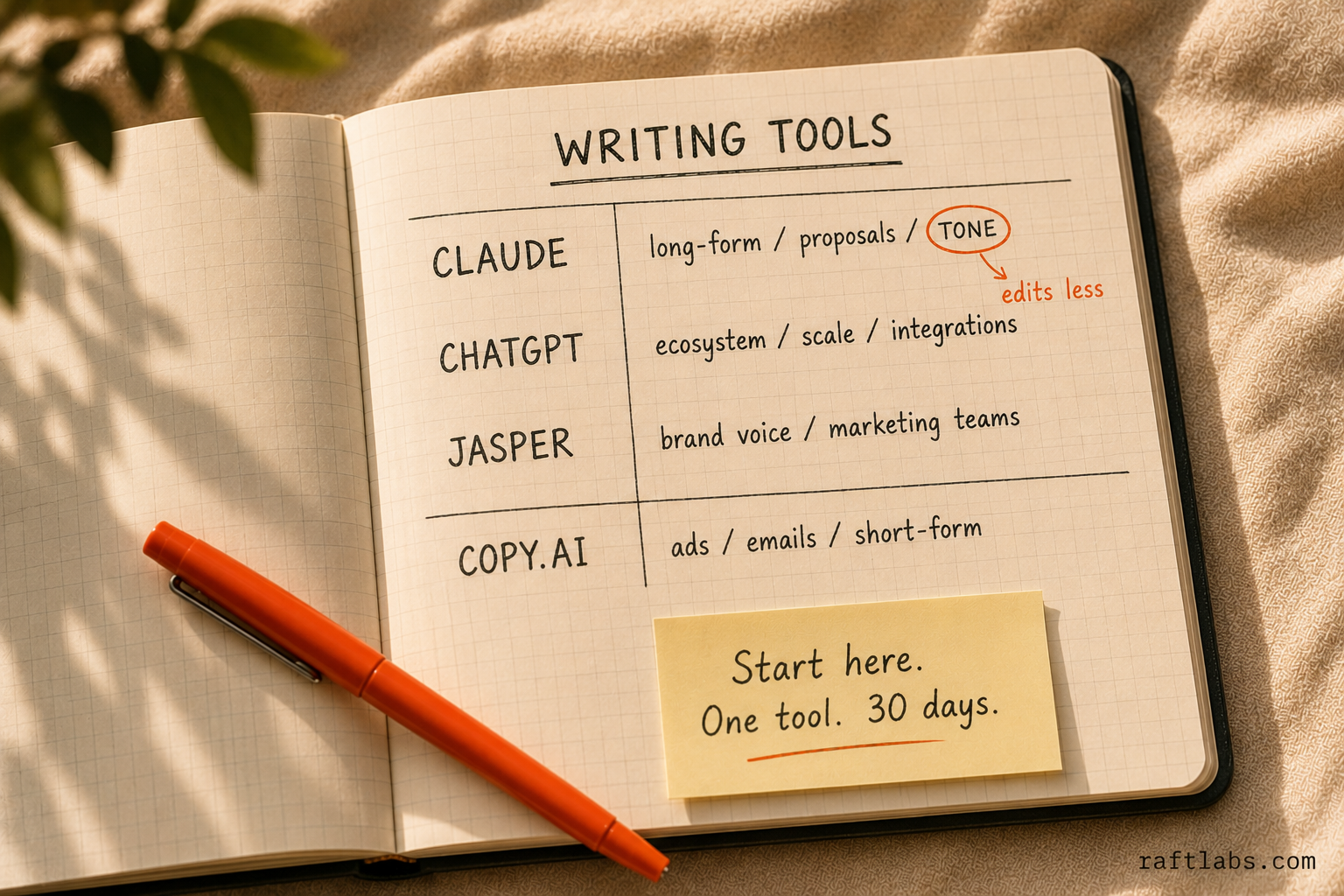
Claude (Anthropic)
Best for: Long-form writing, proposal drafts, client-facing documents, anything where tone and voice matter.
Claude's strength is instruction-following and coherence across long outputs. If you write client proposals, thought leadership content, case studies, or internal reports - Claude produces cleaner first drafts than most alternatives. You spend less time editing.
Notable use case: Client proposals, thought leadership content, case studies, and internal reports that need a clean first draft with less editing.
Pricing signal: Free tier available. Claude Pro at $20/month per user. Team plan at $25-30/user/month.
What to watch: Thinner ecosystem than ChatGPT. Fewer integrations with CMS platforms and publishing tools.
ChatGPT (OpenAI)
Best for: Templated content, high-volume content generation, workflows where you need AI connected to other tools.
ChatGPT's strength for content is ecosystem. It integrates with more CMS platforms, email tools, and scheduling tools than any alternative. For teams that need content at scale and want the AI connected to their publishing workflow, ChatGPT is the pragmatic choice.
Notable use case: High-volume content teams that need AI connected to their publishing workflow - CMS, email, and scheduling tools - not just a chat window.
Pricing signal: Free tier available. ChatGPT Plus at $20/month. Team at $25-30/user/month.
What to watch: Longer outputs can lose coherence. Tone-sensitive writing often needs more editing than Claude.
Jasper
Best for: Marketing teams running high-volume content production with brand voice consistency.
Jasper is built specifically for marketing content - brand voice training, templates for different content types, and team workflows with review and approval steps. If your marketing team produces 30+ pieces of content per month and needs brand consistency across writers, Jasper's workflows earn their price.
Notable use case: A marketing team producing 30+ pieces of content per month across multiple writers that needs brand-voice consistency enforced through review workflows.
Pricing signal: Creator plan at $49/month (1 user). Pro plan at $69/month for 5 seats. Business plan is custom-priced.
What to watch: The underlying AI is still GPT-based - you're paying for the workflow layer, not better AI. If your team is disciplined with prompts, you can get most of the same output directly from ChatGPT for less.
Copy.ai
Best for: Sales and marketing teams generating short-form copy - ads, emails, landing page copy, product descriptions.
Copy.ai built its reputation on short-form copy workflows. The pre-built templates for ad copy, cold emails, and product descriptions save setup time for marketing teams who write the same types of content repeatedly.
Notable use case: Sales and marketing teams that write the same short-form formats repeatedly - cold emails, ad copy, product descriptions - and want pre-built templates instead of prompting from scratch.
Pricing signal: Free tier (limited). Starter at $49/month. Team plan at $249/month for 5 users.
What to watch: Less useful for long-form content. The template advantage disappears once your team builds their own ChatGPT or Claude prompts.
The writing tools verdict: Start with Claude or ChatGPT directly. If your team produces at scale and needs brand consistency workflows, Jasper earns its keep. Copy.ai is worth trialing if short-form ad and email copy is your primary need.
Customer support
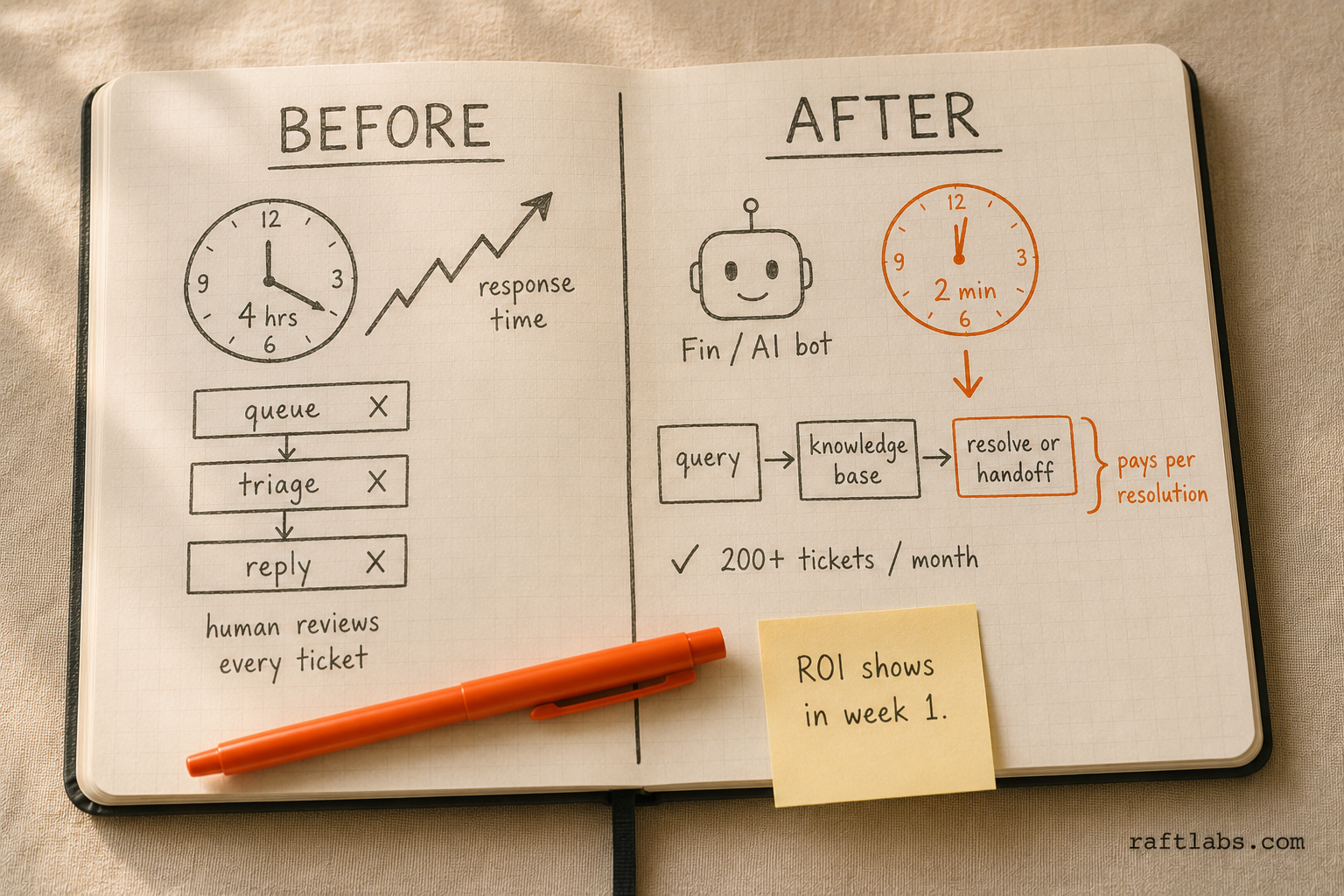
Customer support has the fastest measurable ROI of any AI implementation in business. If you handle more than 200 support tickets per month, AI is almost certainly worth deploying here.
Intercom Fin
Best for: Product companies and SaaS businesses with a strong help center or documentation base.
Intercom Fin is an AI agent built on top of GPT-4o, designed specifically for customer support. It reads your help center, your documentation, and your historical ticket resolutions - and handles customer queries using that knowledge. It hands off to a human agent when it can't resolve the issue.
The key advantage: Fin is embedded in Intercom's existing support infrastructure. If your team already uses Intercom for live chat and ticketing, deploying Fin requires no new tooling - just configuration.
Notable use case: A SaaS company already running Intercom for live chat and ticketing that wants AI resolution added through configuration, not new tooling.
Pricing signal: Intercom's core plans start at $39-99/seat/month depending on plan tier. Fin is priced at $0.99 per resolution (conversations resolved without human handoff) - you only pay for conversations the AI actually handles.
What to watch: Only works well if your help center content is accurate, comprehensive, and up to date. "Garbage in, garbage out" applies completely here.
Zendesk AI
Best for: Enterprise and mid-market support teams already on the Zendesk platform.
Zendesk's AI features are built into their existing Agent Workspace - AI drafts reply suggestions, categorizes incoming tickets, and routes tickets to the right team automatically. Unlike Fin, Zendesk AI is designed to assist human agents rather than replace them for the first tier.
Notable use case: An enterprise or mid-market support team on Zendesk that wants AI to draft replies and route tickets for human agents, not resolve tickets autonomously.
Pricing signal: Included in higher Zendesk tiers (Suite Professional at ~$115/agent/month). Advanced AI features are an add-on at ~$50/agent/month.
What to watch: The AI works to assist agents, not replace them. If you want to reduce headcount, the autonomous-first model (like Fin) has a faster ROI.
Freshdesk AI (Freddy)
Best for: Small to mid-sized businesses that want customer support AI at a lower price point.
Freshdesk's Freddy AI offers a similar feature set to Zendesk AI - suggested replies, auto-categorization, automated responses for common queries. The pricing is lower, which makes it a viable option for smaller teams.
Notable use case: A smaller support team that wants suggested replies and auto-categorization at a lower price point than Zendesk before committing to a bigger AI support budget.
Pricing signal: Freddy AI Copilot is included in Freshdesk's higher tiers (Pro at ~$35/agent/month, Enterprise at ~$65/agent/month). Freddy Self Service (autonomous bot) is an add-on.
What to watch: Less polished than Intercom Fin for autonomous resolution. Better as an agent assistant than a first-tier bot.
The customer support verdict: If you're on Intercom, Fin is the lowest-friction first step and has the clearest per-resolution pricing. If you're on Zendesk or Freshdesk, use their native AI features before evaluating a switch. If you're not on any platform yet, Intercom Fin is the strongest full-cycle option for AI-first support.
Sales and CRM automation
AI in sales is mostly about surfacing the right information at the right moment - not replacing salespeople.
Salesforce Einstein
Best for: Enterprise sales teams on Salesforce CRM who want AI built into their existing workflow.
Salesforce Einstein AI is baked into the Salesforce platform - deal scoring, next-action recommendations, automated email drafting, and pipeline forecasting. If your team is already in Salesforce 8 hours a day, Einstein is the path of least resistance.
Notable use case: An enterprise sales org that lives in Salesforce all day and wants deal scoring, next-action recommendations, and forecasting without switching tools.
Pricing signal: Included in higher Sales Cloud tiers (Professional at ~$80/user/month, Enterprise at ~$165/user/month). Einstein-specific features may require add-ons.
What to watch: Only useful if your team actually keeps Salesforce updated. AI built on bad CRM data produces bad recommendations.
HubSpot AI
Best for: Mid-market sales teams on HubSpot CRM who want AI without the Salesforce complexity.
HubSpot has been embedding AI across their platform - AI-powered email sequences, deal scoring, contact enrichment, and a Breeze AI layer that summarizes deal history and suggests next steps. For teams under 100 people that don't want Salesforce complexity, HubSpot AI is a strong option.
Notable use case: A sub-100-person sales team on HubSpot that wants AI-scored deals and next-step suggestions without taking on Salesforce's implementation complexity.
Pricing signal: HubSpot's Sales Hub Professional is ~$90/user/month. The AI features are included in the platform.
What to watch: Less customizable than Salesforce for complex enterprise sales motions.
Gong
Best for: Sales teams that want AI-powered conversation intelligence - insight from sales calls, not CRM data.
Gong records and analyzes sales calls. Its AI identifies what top performers say differently, flags deals at risk, and coaches reps on specific conversation patterns. Unlike CRM AI, Gong's value comes from what's actually said in customer conversations.
Notable use case: A sales team of 10+ AEs that wants to know what top performers say differently on calls, not just what's logged in the CRM.
Pricing signal: Custom pricing. Typically $1,200-$1,600 per seat per year. Minimum seat requirements.
What to watch: High price point means the ROI only makes sense for teams with deal values and volume that justify the investment. Works best for teams of 10+ AEs.
The sales tools verdict: Start with the AI built into your existing CRM. If you're on HubSpot, use Breeze. If you're on Salesforce, use Einstein. Add Gong only when your sales team is large enough and your deal values high enough to justify the per-seat cost.
Meetings and productivity
This category has exploded - every meeting now has an AI note-taker option. The tools are genuinely good and the ROI is fast.
Otter.ai
Best for: Small to mid-sized businesses that want meeting transcription and summary without a big budget.
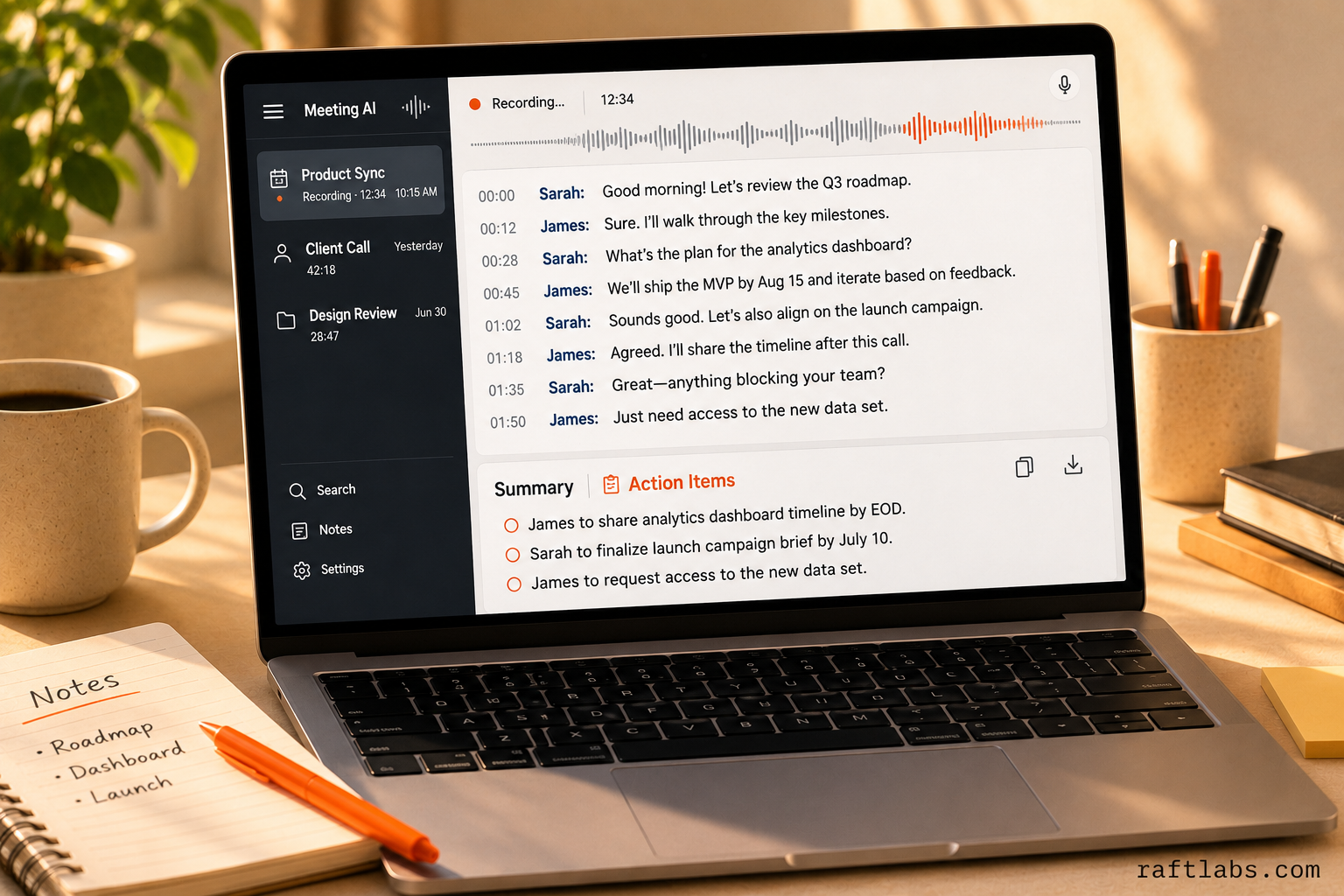
Otter records and transcribes meetings across Zoom, Google Meet, and Teams. It produces automated summaries, action item extraction, and a searchable transcript. The free tier is usable. The Pro tier is affordable.
Notable use case: A budget-conscious team that wants meeting transcription and action items across Zoom, Meet, and Teams without a big software line item.
Pricing signal: Free tier (limited minutes). Pro at $10/user/month. Business at $20/user/month.
What to watch: Summary quality is good but not great - action items and decisions sometimes need a human review before they're shared. Works better on clearly structured meetings than on free-flowing conversations.
Fireflies.ai
Best for: Teams that want meeting transcription plus CRM integration - sync meeting notes to Salesforce, HubSpot, or Notion automatically.
Fireflies has a stronger CRM integration story than Otter. If your sales or customer success team wants meeting notes pushed automatically to their CRM, Fireflies is worth paying for over Otter.
Notable use case: A sales or customer success team that wants meeting notes pushed automatically into Salesforce, HubSpot, or Notion instead of copy-pasted after every call.
Pricing signal: Free tier. Pro at $18/user/month. Business at $29/user/month.
What to watch: More expensive than Otter for the base tier. The CRM integrations (where the value comes from) are on the Business plan.
Notion AI
Best for: Teams already using Notion for documentation and project management who want AI inside their existing workspace.
Notion AI adds an AI writing and summarization layer inside Notion - draft documents, summarize pages, extract action items, and generate content from prompts, all without leaving your workspace. If your team runs on Notion, it's a low-friction AI adoption.
Notable use case: A team that already runs documentation and project management in Notion and wants drafting, summarizing, and action-item extraction inside that same workspace.
Pricing signal: Notion AI is an add-on at $8/user/month on top of Notion's plan. Notion Plus is $8-16/user/month.
What to watch: Only valuable if you actually use Notion. Not a reason to switch to Notion on its own.
Microsoft Copilot (M365)
Best for: Teams deeply embedded in Microsoft 365 - Word, Excel, Teams, Outlook, SharePoint.
Microsoft Copilot writes documents in Word, builds formulas in Excel, summarizes Teams meetings, and drafts emails in Outlook. The integration is deep and the promise is strong. The reality in 2026 is that Copilot works best for knowledge workers who spend the majority of their day in Office apps.
Notable use case: Knowledge workers who spend most of their day in Word, Excel, Teams, and Outlook and want AI drafting, formulas, and meeting summaries inside those same apps.
Pricing signal: ~$30/user/month on top of existing Microsoft 365 Business licenses.
What to watch: The ROI depends heavily on how deep Microsoft 365 usage is in your team. For teams that use Google Workspace, this is the wrong tool.
The meetings and productivity verdict: Otter or Fireflies for meeting transcription - both are high-ROI. Pick based on whether you need CRM integration (Fireflies) or just transcription (Otter). Notion AI if your team is on Notion. Microsoft Copilot if your team is on M365 and uses it heavily enough to justify the add-on cost.
Data and analytics
AI is starting to make meaningful changes in how business teams interact with data - lowering the barrier to analysis for non-technical people.
Tableau AI (Salesforce)
Best for: Enterprise teams that already use Tableau for BI and want AI-powered natural language querying.
Tableau's AI layer (Einstein Copilot for Tableau) lets users ask questions in plain English - "Show me sales by region last quarter compared to the same period last year" - and get an automatically generated visualization. For businesses where BI tooling is already Tableau, this is a worthwhile feature.
Notable use case: A BI team already standardized on Tableau that wants non-technical staff to ask plain-English questions like "show me sales by region last quarter" instead of filing a report request.
Pricing signal: Tableau is $70-115/user/month (Creator tier). AI features are integrated rather than separately priced.
What to watch: Expensive if you don't already have Tableau. Only makes sense if your data is already in Tableau's ecosystem.
Power BI Copilot (Microsoft)
Best for: Teams using Microsoft Power BI for reporting, especially if those teams are on M365.
Power BI Copilot lets users ask natural language questions about their data, auto-generates DAX (Power BI's formula language) from plain English, and summarizes report insights. For Microsoft-stack businesses, this is a practical way to open BI capabilities to non-technical users.
Notable use case: A Microsoft-stack team that wants to open BI reporting to non-technical staff without hiring more analysts to write DAX formulas.
Pricing signal: Power BI Pro is ~$10/user/month. Premium per user is ~$20/user/month. Copilot features require Premium.
What to watch: DAX generation is impressive when it works, but complex queries still require a human reviewer. Not a replacement for a data analyst - a productivity tool for one.
Obviously AI
Best for: Non-technical teams that want predictive analytics without a data science team.
Obviously AI is a no-code predictive modeling tool. Upload your CSV or connect your data source, pick a prediction target (e.g., "which customers are likely to churn?"), and get a model output without writing code. For small to mid-sized businesses that want predictive analytics but don't have data scientists, it's a practical starting point.
Notable use case: A small or mid-sized business that wants a churn or lead-scoring model without hiring a data science team to build one.
Pricing signal: Starts at ~$75/month for the basic plan. Business plans scale with data volume.
What to watch: Works well for standard prediction tasks (churn, revenue forecast, lead scoring). Doesn't handle highly complex modeling or large unstructured datasets well.
The data tools verdict: Match to your existing stack. Power BI Copilot for Microsoft-stack teams. Tableau AI for Tableau-embedded enterprises. Obviously AI for small businesses that want predictive modeling without technical overhead.
Document processing and automation
This is where off-the-shelf tools start showing their ceiling - and where the argument for custom AI gets strongest.
Adobe Acrobat AI
Best for: Teams that process PDFs regularly and need AI summarization, Q&A, and comparison without any technical setup.
Adobe's AI Assistant (built into Acrobat) lets you ask questions about a PDF, get a summary, and compare documents - all inside the Acrobat interface. For teams that handle contracts, reports, or proposals in PDF format, it's a no-setup starting point.
Notable use case: A team that handles contracts, reports, or proposals in PDF format and wants quick summaries or document comparisons without any setup.
Pricing signal: Acrobat Standard at ~$13/month. Acrobat Pro at ~$20/month. AI Assistant is included in Acrobat plans.
What to watch: The AI works on individual documents or small sets. It can't process hundreds of documents automatically or route results to your CRM or database. This is the ceiling.
Docsumo
Best for: Businesses that process structured documents at volume - invoices, bank statements, tax forms, insurance claims.
Docsumo uses AI-OCR to extract data from structured documents automatically and route it to downstream systems. It's built specifically for document processing workflows - not for asking questions about a document, but for extracting specific fields and pushing them where they need to go.
Notable use case: A finance or operations team processing invoices, bank statements, or insurance claims at volume that needs extracted fields routed automatically into downstream systems.
Pricing signal: Starter plans from ~$500/month. Custom pricing at volume.
What to watch: Works well on structured documents with predictable formats. Accuracy drops on highly variable or unstructured documents.
Custom LLM pipelines
Best for: Businesses processing large volumes of variable documents where off-the-shelf tools can't achieve the required accuracy or can't connect to your specific downstream systems.
When Docsumo's accuracy isn't good enough for your document type, or when Adobe Acrobat AI isn't automating anything (just adding a UI layer), the answer is a custom LLM pipeline. This is a software system built specifically for your documents - trained on examples of your actual documents, tuned for your accuracy requirements, and integrated with your specific systems.
This is where the off-the-shelf vs. custom AI distinction matters most.
Notable use case: A finance team where Docsumo's extraction accuracy tops out at 85% on their specific document variants and the remaining 15% error rate is too costly to leave to manual review at their document volume.
Pricing signal: Custom build, typically $30,000-$80,000 for a production-grade document processing pipeline.
What to watch: Custom is the right call only after an off-the-shelf tool has actually been tried and hit a real, specific limitation - not a starting point for a document workflow you haven't tested a packaged tool on yet.
Comparison table: AI tools for business
| Tool | Function | Starting price | Best for | Key limitation |
|---|---|---|---|---|
| Claude | Writing | $20/user/month | Long-form, client-facing writing | Thinner integrations than ChatGPT |
| ChatGPT | Writing / General | $20/user/month | Broad tasks, ecosystem integrations | Shorter outputs can lose coherence |
| Jasper | Content marketing | $49/month | Brand-consistent content at scale | High cost vs. doing it in ChatGPT |
| Copy.ai | Short-form copy | $49/month | Ads, emails, product descriptions | Less useful for long-form |
| Intercom Fin | Customer support | $0.99/resolution | AI-first support on Intercom | Requires strong help center content |
| Zendesk AI | Customer support | ~$50/agent/month add-on | Agent assistance at enterprise scale | Assists agents, doesn't replace tier 1 |
| Freshdesk Freddy | Customer support | Included in Pro plan | SMB support at lower price point | Less polished for autonomous resolution |
| Salesforce Einstein | Sales CRM | Included in higher tiers | Enterprise sales on Salesforce | Only useful with clean CRM data |
| HubSpot AI | Sales CRM | Included in Sales Hub Pro | Mid-market sales on HubSpot | Less customizable than Salesforce |
| Gong | Sales intelligence | ~$1,200-1,600/seat/year | Sales coaching from call intelligence | High price point, needs scale |
| Otter.ai | Meeting transcription | $10/user/month | Affordable meeting transcription | Summary quality needs human review |
| Fireflies.ai | Meeting + CRM sync | $18/user/month | Meeting notes with CRM integration | CRM features are on higher plans |
| Notion AI | Productivity | $8/user/month add-on | AI inside existing Notion workspace | Only valuable on Notion |
| Microsoft Copilot | Productivity | ~$30/user/month add-on | M365-heavy knowledge workers | Only ROI-positive for heavy M365 users |
| Tableau AI | Data analytics | Included in Tableau | Natural language querying in Tableau | Expensive if not already on Tableau |
| Power BI Copilot | Data analytics | ~$20/user/month (Premium) | BI for Microsoft-stack businesses | Complex queries still need human review |
| Obviously AI | Predictive analytics | ~$75/month | Predictive models without a data team | Limited on complex/large datasets |
| Adobe Acrobat AI | Document Q&A | Included in Acrobat Pro | PDF summarization, individual docs | Can't process documents at scale |
| Docsumo | Document processing | ~$500/month | Structured document extraction at volume | Accuracy drops on variable documents |
The ceiling problem: when AI tools stop working for you
Every off-the-shelf AI tool has a ceiling. It's the point where the tool handles the easy, generic cases - and fails on the cases that matter most to your business.
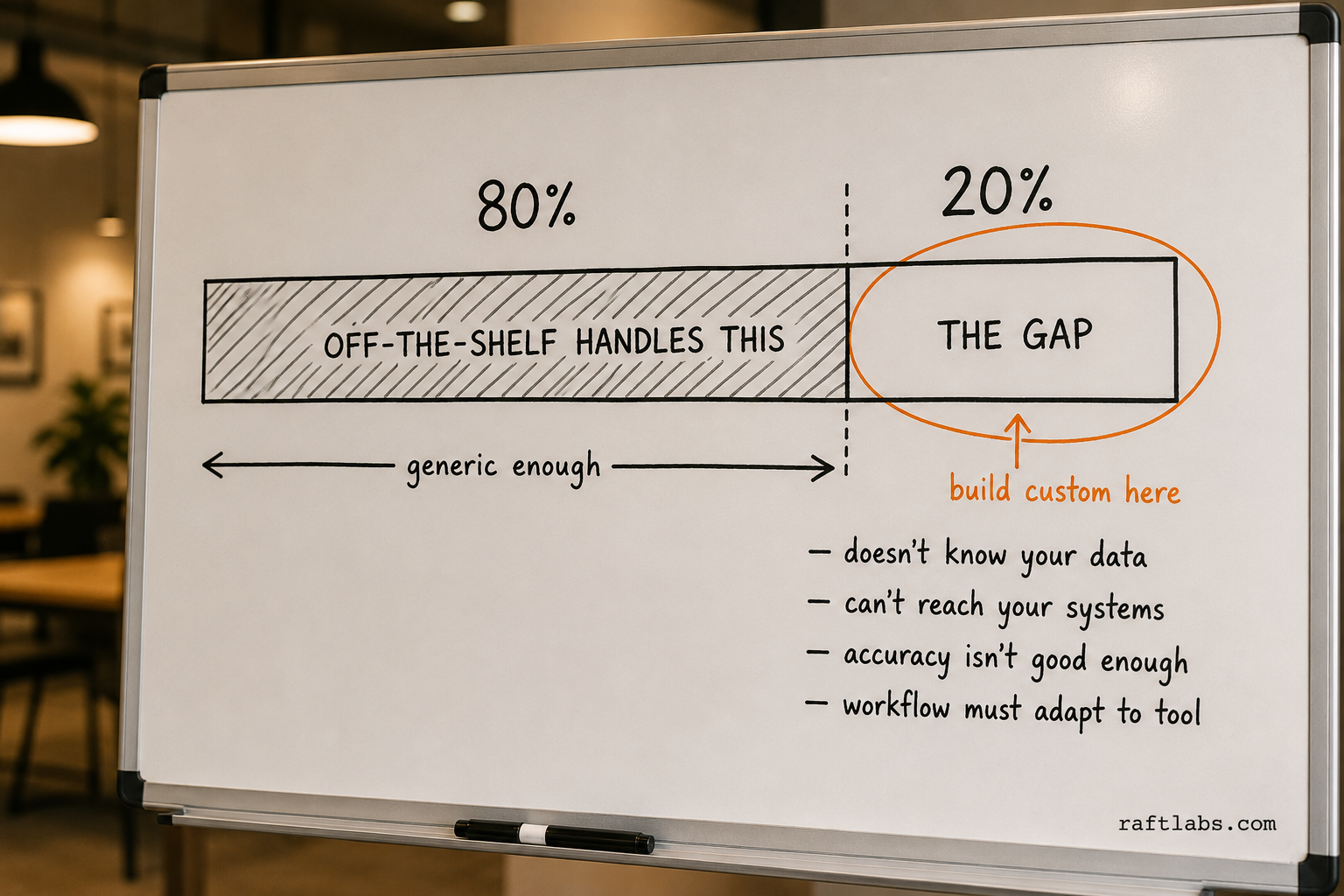
The ceiling shows up in a few consistent ways:
The tool doesn't know your specific context. ChatGPT doesn't know your pricing rules. Intercom Fin doesn't know your customer history beyond what's in the help center. Otter doesn't understand your internal jargon and acronyms. Off-the-shelf tools are trained on general data. Your business is specific.
The tool can't connect to your systems. The AI works in the tool's interface, but the output has to be manually moved into your CRM, ERP, or database. The time savings from AI get eaten by the copy-paste step.
The tool requires your team to change their workflow. Instead of AI fitting into how your team works, your team is adjusting their work to fit the AI tool. That's a signal that the tool is solving a different problem than yours.
The tool's accuracy isn't good enough for your use case. 90% accuracy sounds high until you're processing 1,000 invoices per week and that 10% error rate is 100 invoices your team has to manually fix.
None of these are failures of the AI tool - they're just the boundary of what a general tool can do. When you hit that boundary on a workflow that matters, that's when you need something built specifically for your business.
Off-the-shelf vs. custom AI: the decision trigger
Here's the simplest decision framework we use.
Use off-the-shelf tools when:
The workflow is generic enough that a general AI tool handles it well
The tool's integrations cover the systems you need to connect to
Accuracy requirements are met by the tool's out-of-the-box performance
The tool fits into your team's existing workflow without significant adaptation
Go custom when:
The tool handles 80% of the workflow but the 20% that's missing is the high-value part
Your workflow requires AI that knows your specific data, customers, or internal processes
You need AI integrated with systems the tool doesn't connect to
Accuracy requirements exceed what the tool delivers on your specific documents or queries
Your team is spending significant time moving data between the AI tool and your other systems
The signal isn't "off-the-shelf tools failed." The signal is "this tool is useful, but there's a specific capability gap that's keeping us from getting the full value from this workflow."
Custom AI doesn't replace the off-the-shelf tools. It fills the gap between what the tools can do and what your business actually needs.
Where to start: a 30-day AI adoption plan for non-technical teams
Most businesses fail at AI adoption because they try to do too much at once. Here's a focused plan.
Week 1: Pick one function. Choose the single business function with the highest volume of repetitive work. Not the most technically interesting problem - the most time-consuming one. Document exactly how that workflow works today: inputs, steps, outputs, time per cycle.
Week 2: Trial one tool. Sign up for the relevant tool from the list above. Run a two-week pilot on real work. Don't change the workflow to fit the tool - run the tool alongside the existing workflow and compare outputs.
Week 3: Measure what actually changed. How many hours per week did the tool save? How much human review was still required? What did the tool get wrong? Is the output quality good enough to use without editing? Be honest. If the tool saved two hours per week and costs $50 per month - that's a clear yes. If it required 30 minutes of editing for every 10 minutes it saved - it's not the right tool.
Week 4: Decide and scale. If the pilot showed clear value, roll the tool out to the full team. If it showed a capability gap, you now have specific evidence of what the gap is - and you can decide whether it's worth solving with a different tool or with something custom.
Then pick the next function and repeat.
The businesses that succeed with AI adoption don't use more tools - they use fewer tools, used consistently, with clear measurement of what they're actually doing.
If you've gone through this cycle and found the ceiling - if there's a workflow where the tool handles most of it but the remaining gap is costing you real money - that's where we come in.
RaftLabs doesn't resell these tools. We build on top of them. Our AI development services cover custom agents, automation pipelines, and LLM integrations built specifically for your data and your processes. Fixed price. 12-week sprints. Starting with a free diagnostic to identify exactly where the gap is and what it would take to close it.
Request a 30-minute call. We'll tell you honestly whether you need custom AI or whether there's a tool you haven't tried yet.
Ask an AI
Get an instant summary of this post from your preferred AI assistant.
Common questions
- For small businesses, the highest-ROI AI tools are: ChatGPT or Claude for writing and content (both have free tiers), Otter.ai or Fireflies for meeting transcription ($10-20/user/month), and Intercom Fin or Freshdesk AI for customer support (if you handle more than 200 support queries per month). Start with one function, measure the time saved, then add tools.
- A realistic AI tool budget for a 20-person business is $500-2,000 per month, covering writing tools, a meeting transcription tool, and an AI layer on your existing CRM or support platform. Larger businesses with heavier automation needs typically spend $5,000-20,000 per month on AI tools across multiple functions before hitting the ceiling where custom AI becomes more cost-effective.
- AI tools are off-the-shelf products you can sign up for and use immediately - they're built for general use cases. Custom AI is software built specifically for your business - it knows your data, your customers, your processes, and integrates with your specific systems. Off-the-shelf tools are cheaper and faster to start with. Custom AI is the right choice when tools hit their ceiling on your most valuable workflows.
- Microsoft Copilot (M365 Copilot) is worth it if your team is heavy Microsoft 365 users - Word, Excel, Teams, Outlook, SharePoint. At approximately $30/user/month on top of existing M365 licenses, it's a meaningful add-on. The value is highest for knowledge workers who spend 3+ hours per day in Office apps. For teams not embedded in Microsoft 365, the value is lower.
- When existing tools handle 80% of your use case but the 20% gap is the part that drives the most business value - that's the custom AI threshold. Common triggers: needing AI that knows your internal data, processes, or customers; needing AI integrated into your existing systems (ERP, CRM, ops tools); needing reliability guarantees that public LLM APIs can't offer. RaftLabs builds custom AI for exactly this threshold - agents, automation pipelines, and LLM integrations built on your data and processes.
- Business and enterprise tiers of ChatGPT, Claude, and most named tools in this guide do not train their underlying models on your conversation data by default - that protection is specific to paid business plans, not the free consumer tiers. Before rolling out any AI tool company-wide, confirm the tier you're on and read the data-handling terms rather than assuming the free version has the same protections as the paid one.
- Two weeks of real work is usually enough to tell if a tool is worth scaling - long enough to cover normal week-to-week variation, short enough that a bad pick doesn't cost you a quarter. Measure hours saved against the subscription cost and the amount of human review still required. If you can't tell after two weeks, the tool likely isn't different enough from your current process to matter either way.
- Buying multiple tools across functions before finishing an honest evaluation of the first one. Businesses that succeed with AI adoption use fewer tools, chosen deliberately and measured against a real workflow, over businesses that try five tools at once and can't say which one actually helped. Before you commit budget to a new tool, finish measuring the one you're already piloting.