Salesforce vs custom CRM: How to know when to switch
Salesforce works for most teams. Then it doesn't. Here is how to tell if you've hit the wall - and what building a custom CRM actually costs and delivers.

In this article
Short answer
Salesforce Enterprise costs $165/user/month. Above $24K/year in licensing with heavy customization, custom CRM typically breaks even in 18-36 months. RaftLabs builds custom CRMs for teams where Salesforce's object model, per-seat costs, or $80K-$120K admin dependency no longer makes sense.
Key takeaways
- Salesforce Enterprise costs $165/user/month - a 30-person sales team pays $59,400/year before add-ons, integrations, and admin costs
- The average Salesforce implementation for mid-market companies costs $30,000-$150,000 in setup and customization
- Custom CRM breaks even vs Salesforce at 18-36 months for teams of 20+ where Salesforce requires heavy customization
- Teams with proprietary sales processes, complex data relationships, or vertical-specific workflows get the most value from custom builds
- Salesforce remains the right choice for teams following standard B2B SaaS sales motions with under 50 reps
Salesforce is the default CRM for a reason. It's battle-tested, infinitely configurable, and has an entire system of consultants, apps, and integrations behind it. Most sales teams should use it.
But there's a version of Salesforce that doesn't serve you well. It's the version where you're paying $165/user/month, have a full-time Salesforce admin, and still can't get the pipeline report your VP of Sales actually wants. It's the version where your reps log in, update 12 fields, and go back to the spreadsheet they actually work from.
That's the version worth leaving.
Here's how to tell which version you have.
The Salesforce cost reality
Let's establish what Salesforce actually costs at different scales.
According to IDC's 2024 CRM market share analysis, Salesforce holds 20.7% of the global CRM market - more revenue than its four closest competitors combined. That dominance reflects genuine product quality. It also reflects enormous switching costs and lock-in. Salesforce's $21.6 billion in CRM revenue tells you how thoroughly it's embedded across enterprise sales teams worldwide.
Per-seat pricing (Sales Cloud):
Starter Suite: $25/user/month (extremely limited)
Pro Suite: $100/user/month
Enterprise: $165/user/month (most mid-market teams)
Unlimited: $330/user/month
The add-on problem: The license price is where the budget starts, not where it ends.
Pardot (marketing automation): $1,250-$4,000/month flat fee
CPQ (configure, price, quote): $75-$150/user/month
Service Cloud (customer success): $75-$300/user/month
Salesforce Inbox (email integration): $36/user/month
Einstein AI features: $50-$150/user/month
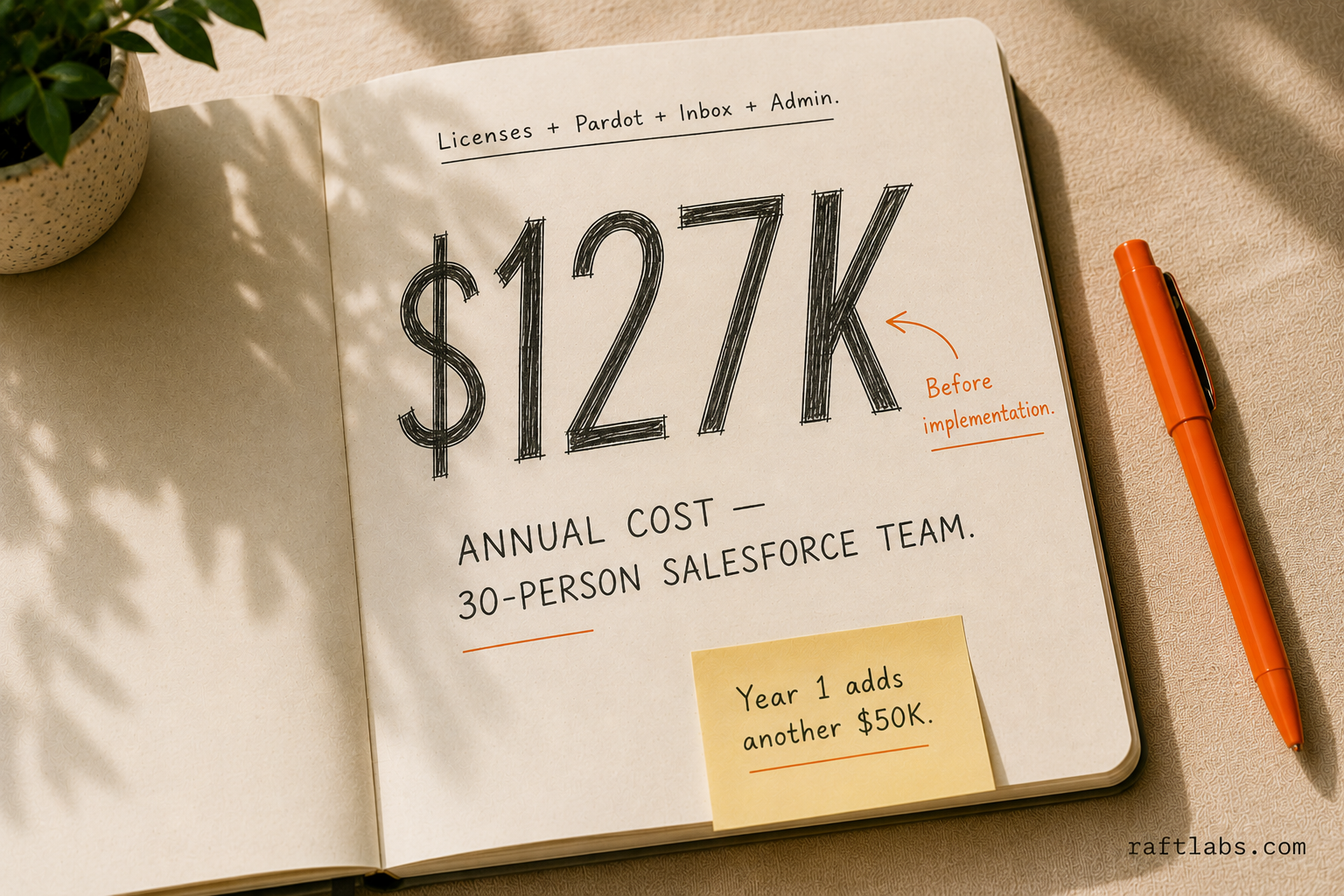
A 30-person sales team on Enterprise with basic add-ons:
Licenses: $165 x 30 x 12 = $59,400/year
Pardot: $15,000/year
Salesforce Inbox: $36 x 30 x 12 = $12,960/year
Salesforce admin (part-time contract): $40,000/year
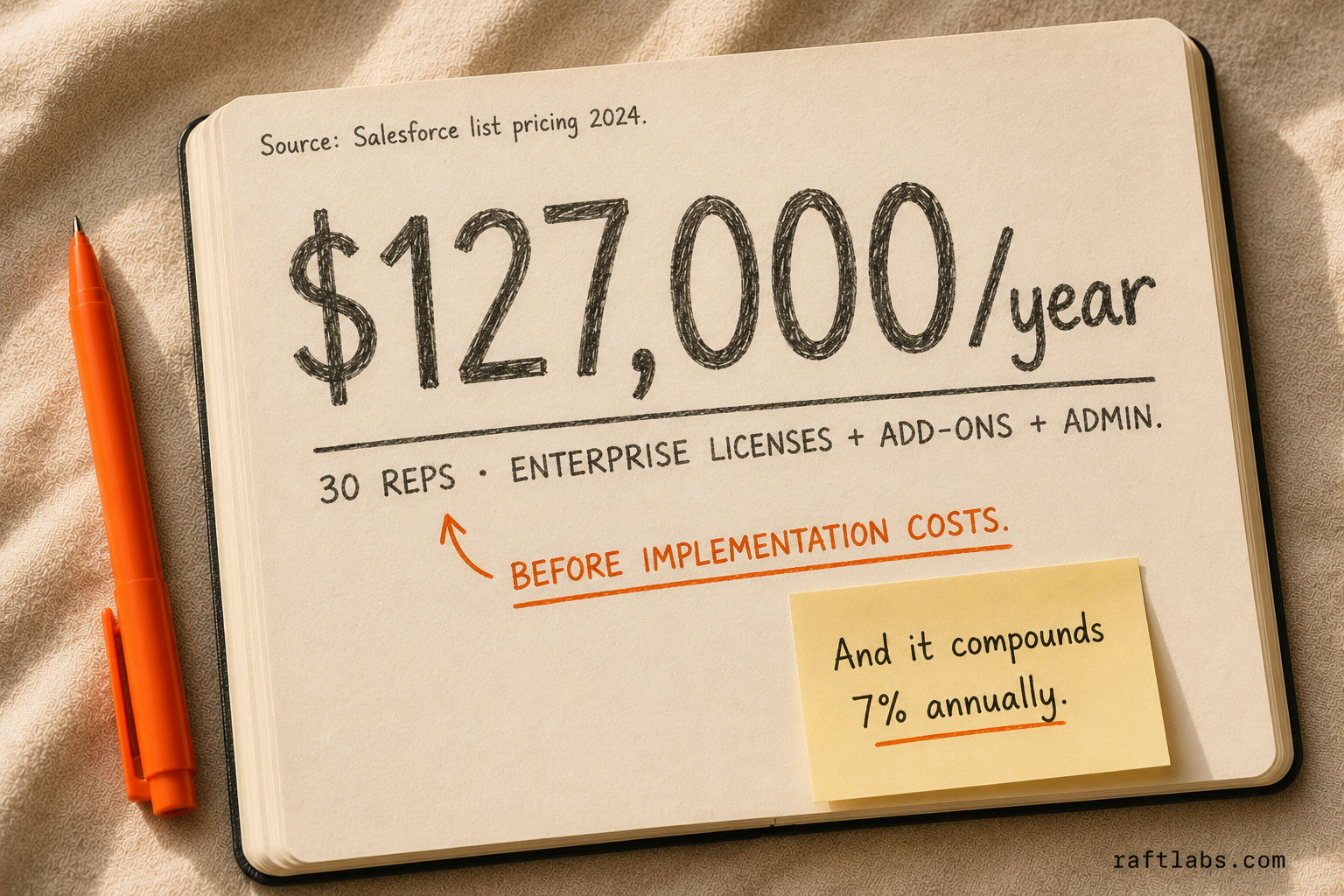
Total: ~$127,000/year before implementation.
Add implementation costs:
Basic setup: $15,000-$30,000
Standard customization: $30,000-$75,000
Complex customization: $75,000-$150,000
Most mid-market teams spend $150,000-$200,000/year on Salesforce total cost of ownership by year 3.
The hidden costs most teams discover post-sale
The line items above are visible before you sign. These ones usually aren't.
API call limits on lower tiers. Salesforce Starter and Pro restrict API calls per 24-hour window. If your ops team is running automations, syncing to a data warehouse, and pulling reports simultaneously, you'll hit the ceiling. The fix is an upgrade to Enterprise - at $65 more per user per month.
Apex governor limits. Salesforce's Apex scripting language has hard execution limits: 150 DML operations per transaction, 100 SOQL queries per transaction, and a 10-second CPU time cap. These limits exist to protect the multi-tenant infrastructure. They also mean a Salesforce developer can't just write straightforward code - they write Salesforce-specific code that stays inside the governor constraints. That's a specialized skill, and it costs $80,000-$120,000/year for a Salesforce-certified admin who can manage it.
The certified admin dependency. Most companies hire their first dedicated Salesforce admin when the system breaks something important and nobody can fix it. By that point, the admin inherits a customized environment they didn't build. When they leave - and they do leave - the next admin spends 3-6 months just understanding what they inherited. The market rate for a Salesforce-certified admin is $80,000-$120,000/year. That's a line item that never appears in the initial license quote.
Mandatory annual price increases. Salesforce has increased list prices 5-10% annually for the past several years. Every contract renewal locks in the higher rate. For a 30-person team, a 7% annual increase adds $4,000-$9,000 to the bill each year.
Quick financial threshold: If your CRM bill is under $24,000/year (roughly 10-12 users on Pro Suite with no add-ons), Salesforce Starter or Pro is almost always cheaper than building. Above $60,000/year with 3+ custom objects and custom workflows, the math shifts toward custom. The break-even point isn't the build cost - it's how much you're spending annually to maintain a tool your team works around.
What Salesforce does well
Before listing the failure cases, let's be honest about where it excels.
Standard B2B SaaS sales. If you're running an outbound SDR model with standard pipeline stages (Prospecting, Qualifying, Demo, Proposal, Closed Won/Lost), Salesforce is excellent. The Leads-to-Contacts-to-Opportunities model fits this motion well.
Large enterprise sales teams. Territory management, quota tracking, complex approval workflows, and role hierarchy are genuinely hard to build. Salesforce has 25 years of engineering behind these features.
Integrations. Salesforce connects to 3,000+ tools natively via AppExchange. Your marketing team uses HubSpot? Plug it in. Your CS team uses Zendesk? There's a connector.
Reporting and dashboards. Einstein Analytics is genuinely good. If your team knows how to use it, you can build solid pipeline forecasts, activity reports, and revenue dashboards.
Hiring and onboarding. Sales reps know Salesforce. When you hire a new AE, they're productive on day one.
Where Salesforce fails you
Your process doesn't fit the object model
Salesforce's data model has Leads, Contacts, Accounts, Opportunities, and Activities. It's built for B2B sales where contacts belong to accounts and opportunities track through stages.
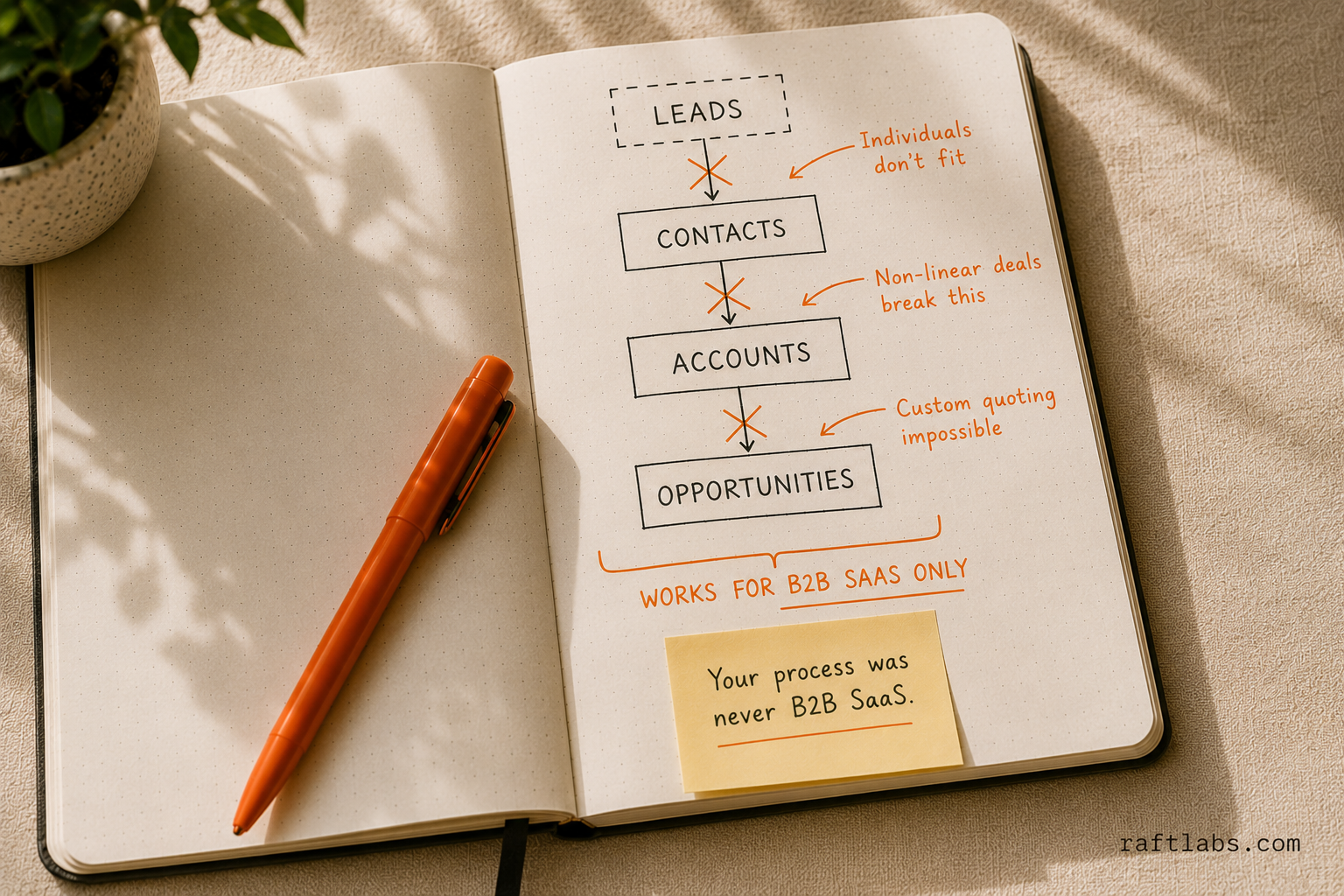
This breaks down when:
You sell to individuals, not companies. Consumer businesses, financial advisors, insurance agents, and real estate teams often find the Account/Contact model is backwards for their use case. Forcing individual consumers into "Accounts" creates reporting confusion and forces reps to work around the system.
Your deal structure is complex. If a single contract involves multiple products, multiple decision-makers across multiple departments, and milestone-based payment schedules, the standard Opportunity model gets messy fast. "Opportunity line items" help but require CPQ licensing.
You have non-linear sales stages. Salesforce assumes deals only advance. If your deals go backwards - Proposal to Qualifying to Demo again after the champion changes - your pipeline data gets polluted and reps stop trusting it.
Your team pays for complexity they don't use
Enterprise license comes with features that average sales reps never touch: territory hierarchies, Partner Communities, Order Management, Revenue Cloud. If you're paying for Enterprise because you need one custom field, you're overpaying by $65/user/month.
The irony: the simpler your actual process, the more Salesforce's complexity works against you. A 10-person founder-led sales team with 4 pipeline stages doesn't need approval workflows, role hierarchies, or territory management. They need a tool that's fast and honest about where deals actually are.
Admin dependency is a business risk
If your Salesforce environment requires a dedicated admin to function, you have a single point of failure.
Every mid-market Salesforce implementation reaches a point where the system is so customized that only one person understands how it all works. When that person leaves - and they always leave - the next 3 months go to recovery.
Custom CRM doesn't eliminate this risk, but it gives you control over what's complex and what isn't.
Your data lives in Salesforce, not your business
Salesforce owns your data model. You can export it, but the relationships between objects are Salesforce-specific. If you ever need to migrate, the export is a CSV graveyard that requires significant engineering to make sense of.
More practically: if you want to cross-reference your CRM data with your billing data, your product usage data, and your marketing engagement data in a single query - Salesforce requires either expensive connectors or a data warehouse integration. Custom CRM gives you a standard database you can query however you need.
The custom CRM case
Custom CRM is the right choice when one or more of these is true:
1. You've already spent $50,000+ on Salesforce customization and it still doesn't work. This is the clearest signal. If you've paid consultants to bend Salesforce to your process and the reps still use spreadsheets, the problem is the tool, not the implementation.
2. Your sales process is genuinely different from B2B SaaS. Industrial sales with complex quoting. Real estate brokerage with dual-sided relationships. Healthcare sales with credentialing workflows. Manufacturing rep networks with complex commission structures. These aren't standard Salesforce workflows, and forcing them in creates more problems than it solves.
3. You have regulatory or data sovereignty requirements. Healthcare companies handling PHI can use Salesforce Health Cloud, but the complexity and cost increases significantly. Financial services companies in certain jurisdictions face data residency requirements that make US-hosted SaaS complicated.
4. Your team is 20+ reps and growing fast. At $165/user/month, your CRM cost scales with headcount. Custom CRM is a fixed development cost that doesn't grow linearly with your team size.
5. You need tight integration with a proprietary system. If your CRM needs to talk to a custom ERP, a custom quoting tool, or a proprietary pricing system, Salesforce integration work gets expensive fast. Custom CRM lets you build the integration properly from the start.
What a custom CRM actually looks like
The term "custom CRM" covers a wide range. Here's what the tiers look like:
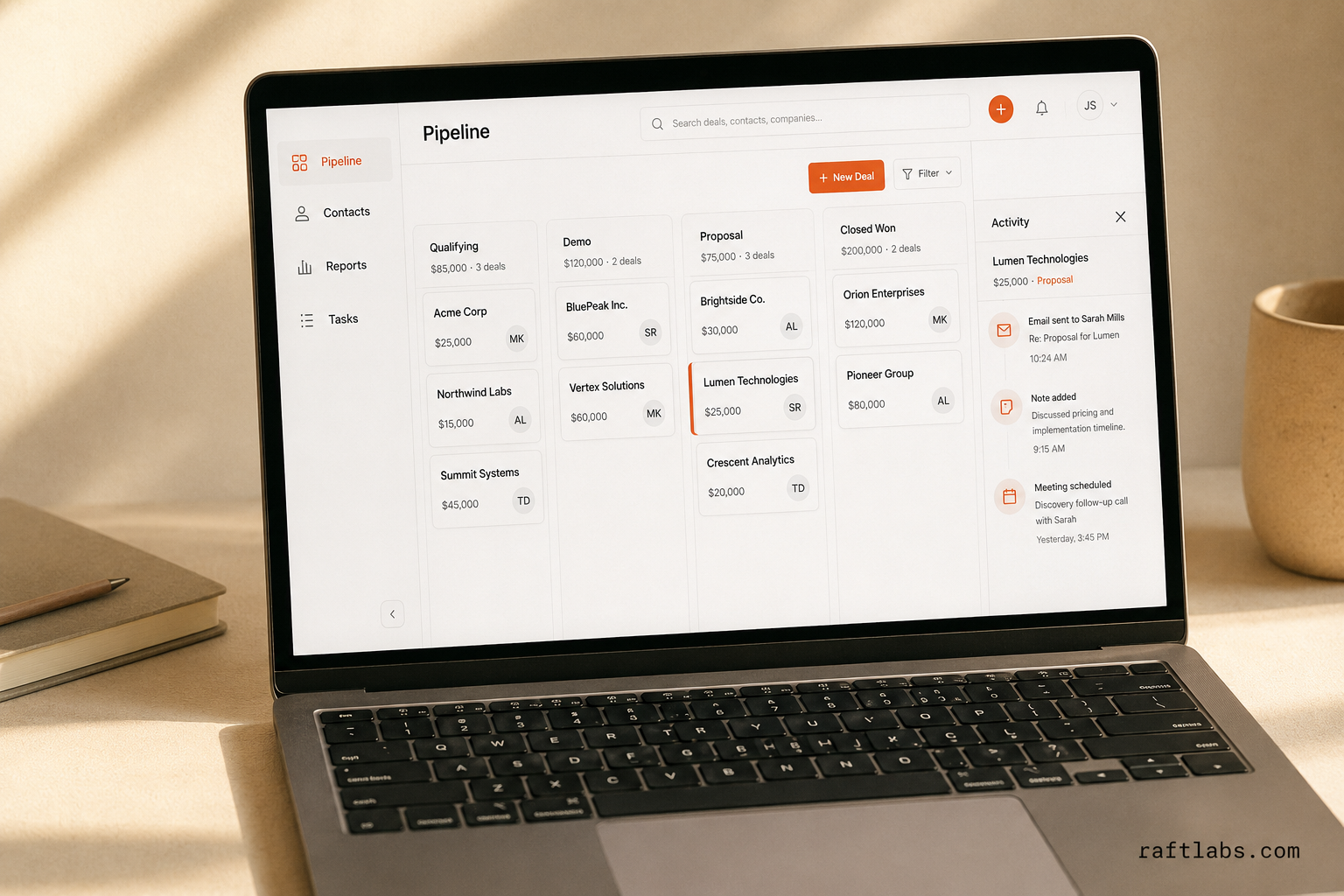
CRM MVP ($60,000-$100,000, 3-4 months):
Contact and account management with custom fields
Deal pipeline with configurable stages
Activity logging (calls, emails, meetings, notes)
Task management and follow-up reminders
Basic reporting (pipeline by stage, activity by rep)
Email sync (via Gmail or Outlook API)
This is better than a spreadsheet and worse than Salesforce. It's enough to test whether the custom approach works for your team.
Full CRM ($100,000-$200,000, 5-7 months):
Everything in MVP, plus:
Automation workflows (auto-create follow-up tasks, move stage on trigger, send notifications)
Custom dashboards and reporting with filters
Document storage and e-signature integration
Product catalog and basic quoting
Integration with marketing tools (HubSpot, Mailchimp)
Role-based permissions
Mobile app (iOS or Android)
This is genuinely competitive with Salesforce Enterprise for teams where the out-of-the-box workflows work.
Enterprise CRM ($200,000-$500,000+, 8-14 months):
Territory and quota management
Complex approval workflows
Revenue forecasting models
ERP integration (SAP, Oracle, NetSuite)
Multi-currency and multi-language support
Advanced commission tracking
Only justified for teams with 100+ reps or highly specialized processes that Salesforce genuinely can't handle.
The failure mode no one talks about
Custom CRM fails in a specific, predictable way. A VP Sales or CTO approves a "lightweight CRM" project. The team scopes it at $80,000 and 4 months. It ships, reps use it, the team adds features. Three years later, you have a 200,000-line internal system that two engineers maintain part-time, no documentation, and a backlog of 60 feature requests that nobody has bandwidth to build.
The company is now trapped. Migrating to Salesforce requires mapping a custom data model. Rebuilding the system properly costs $200,000+. Staying put means the system gets worse every quarter as the engineers who built it move on.
This happens when:
The initial scope doesn't include a dedicated engineering owner for the long term
The CTO treats it as a one-time project rather than a product that needs ongoing investment
The team adds features reactively, without a data model that can absorb them
There's no documentation of why architectural decisions were made
The fix isn't to avoid building - it's to build with an explicit plan for who owns the system in years 2-5. A custom CRM without an engineering owner is a liability. One with a clear owner and a product roadmap is an asset.
Break-even analysis
Let's make this concrete. Here's the break-even calculation for a 30-person sales team.
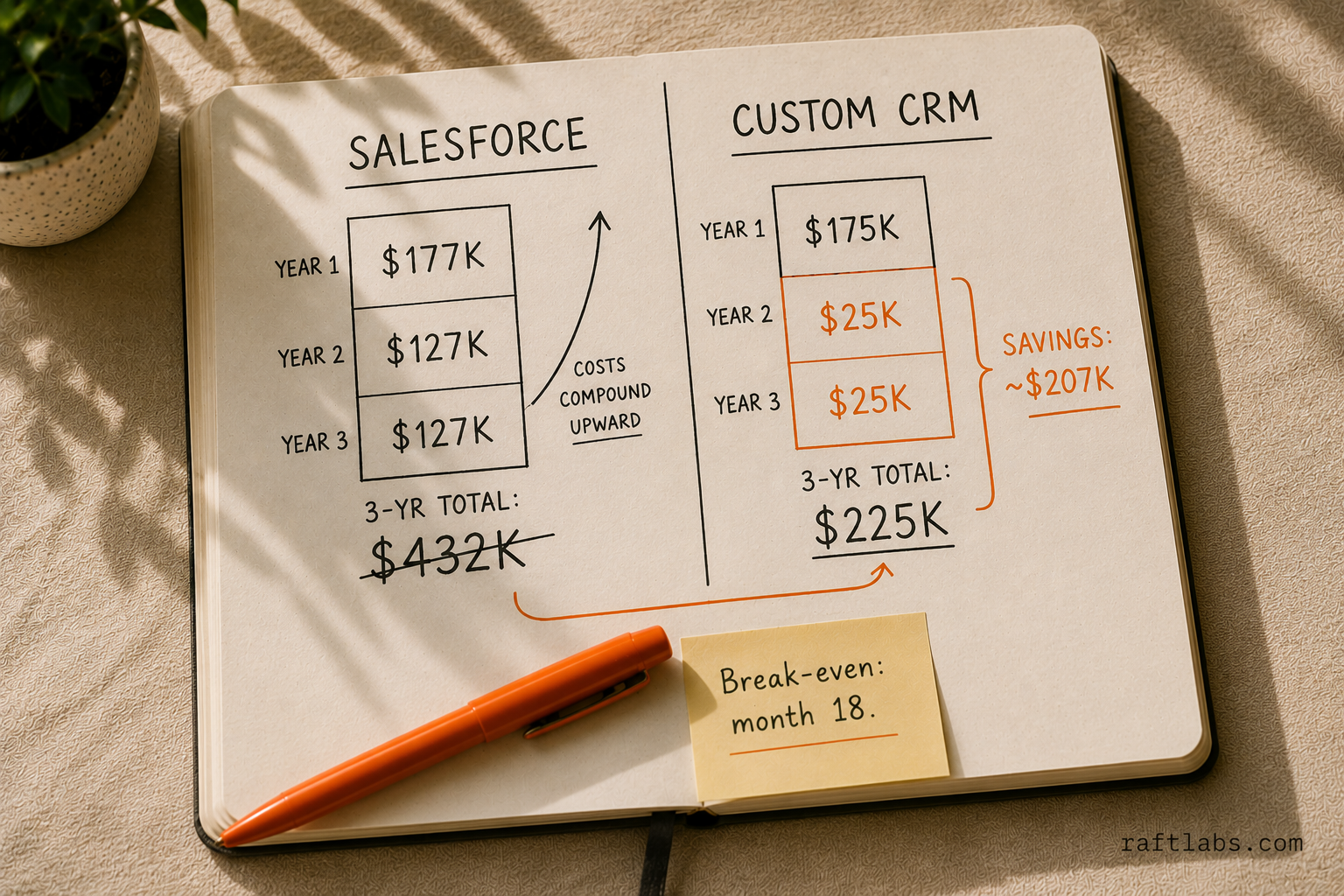
Gartner's 2024 CRM market analysis put global CRM software revenue at $25.7 billion, growing at 12.2% year over year. Per-seat pricing increases of 5-10% annually are built into every major CRM vendor's model. That means the cost of staying on Salesforce compounds - the break-even math below gets more favorable for custom CRM every year you wait.
Salesforce Enterprise (annual TCO):
Licenses: $59,400
Pardot: $15,000
Other add-ons: $13,000
Admin (part-time): $40,000
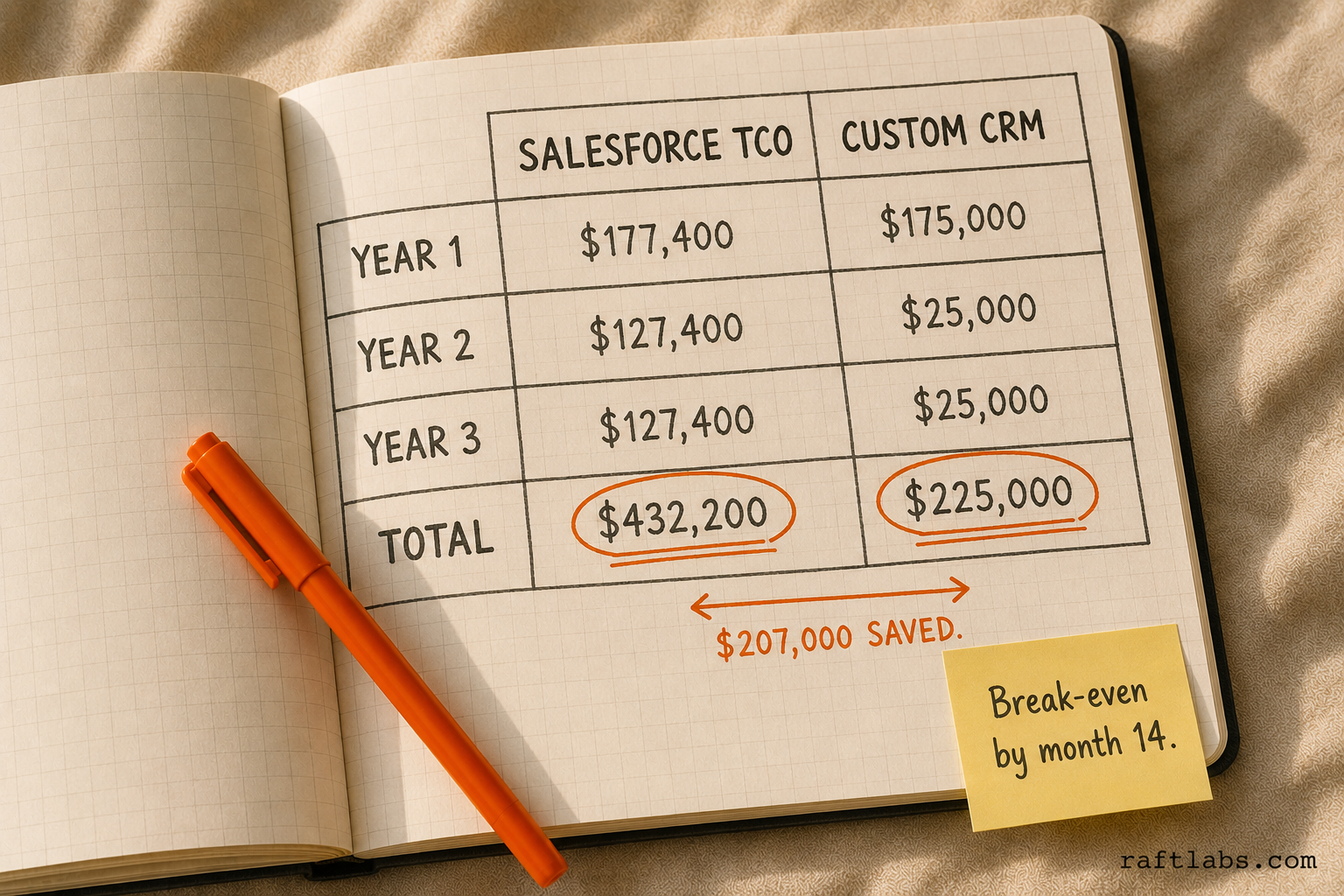
Year 1: $127,400 (plus $50,000 implementation = $177,400)
Year 2+: $127,400/year
Custom CRM:
Build: $150,000
Year 1 maintenance and hosting: $25,000
Year 1: $175,000
Year 2: $25,000
Year 3: $25,000
3-year total:
Salesforce: $177,400 + $127,400 + $127,400 = $432,200
Custom CRM: $175,000 + $25,000 + $25,000 = $225,000
Savings over 3 years: ~$207,000
The calculation shifts if you have fewer than 15 reps, don't need add-ons, or have a simple process that doesn't require customization. With 10 reps on Pro Suite ($100/user/month), Salesforce costs $12,000/year in licenses plus a much lighter admin burden. At that scale, custom CRM doesn't break even for 5-7 years.
The migration question
If you're on Salesforce and considering a switch, the migration is the hardest part.
What you can export cleanly:
Contacts and accounts (CSV, structured data)
Opportunities with basic fields
Activity history (limited)
Custom object data if you set it up properly
What gets lost in translation:
Complex object relationships
Automation history
Salesforce-specific formula fields
AppExchange integrations
A proper Salesforce migration - data mapping, validation, cleaning, and loading - costs $15,000-$30,000 and takes 4-8 weeks depending on data quality. Budget for this separately from the CRM build.
The honest recommendation
Stay on Salesforce if:
Your team follows standard B2B sales motion
You have fewer than 30 reps
Your process fits the standard Leads/Contacts/Accounts/Opportunities model
Your Salesforce admin situation is manageable
You depend on AppExchange integrations
Consider custom CRM if:
You've spent $50,000+ on Salesforce customization and reps still work around it
Your process is genuinely non-standard (dual-sided, complex quoting, regulatory constraints)
You're at 20+ reps and the per-seat cost is becoming a significant budget line
You need tight integration with proprietary systems
You have data sovereignty requirements
You have a clear engineering owner for the long term - a VP Engineering or CTO who treats CRM as a product, not a project
Never build custom CRM to:
Save money in year one (you won't)
Avoid the hard work of defining your actual sales process (the process work is the same either way)
Get revenge on a bad Salesforce implementation (fix the process first, then evaluate tools)
Skip the question of long-term ownership (a custom CRM without an owner becomes technical debt)
The best CRM is the one your reps actually use. For most teams, that's still Salesforce. For the teams it isn't built for - and who have the engineering ownership to sustain it - a well-scoped custom build pays for itself within 2-3 years.
One example: a 45-person sales team RaftLabs built for replaced $130K/year in Salesforce licensing and admin costs with a $140K custom build. The system paid back in 14 months and gave them a data model their reps actually trusted.
Ask an AI
Get an instant summary of this post from your preferred AI assistant.
Common questions
- Custom CRM makes sense when: your process doesn't fit Salesforce's object model without significant customization (costing $50,000+), you have regulatory or data residency requirements that prevent cloud SaaS, your team is paying for Salesforce features they never use, or you've already paid for multiple failed Salesforce implementations. For standard B2B sales with under 50 reps, Salesforce is almost always the better choice.
- A basic custom CRM with contact management, deal pipeline, activity logging, and reporting costs $60,000-$120,000 to build. A full-featured system with email integration, automation workflows, product catalogs, and custom reporting costs $120,000-$250,000. Enterprise-grade CRM with territory management, complex approvals, and ERP integration costs $250,000-$500,000+.
- The hidden costs are substantial: implementation and customization ($30,000-$150,000), Salesforce admin salary or contract ($60,000-$120,000/year), add-on licenses (Pardot, CPQ, Service Cloud each add $75-$150/user/month), and annual price increases of 5-10%. A 30-person team often pays $150,000-$200,000/year total cost of ownership, not the advertised per-seat price.
- Yes. Custom CRMs integrate with any tool that has an API - HubSpot, Mailchimp, Apollo, Outreach, LinkedIn Sales Navigator, Stripe, Slack, and more. The integration work adds $5,000-$15,000 per tool depending on complexity. The advantage over Salesforce is that you control the data model on both sides, so integrations don't require workarounds.
- A basic CRM MVP takes 3-4 months. A full-featured CRM with automation, reporting, and integrations takes 5-8 months. Plan for 2-3 months of post-launch iteration to tune workflows based on actual sales team usage.