Cost to Build a Messaging App Like WhatsApp: The Engineering Reality
WhatsApp sends 100 billion messages a day on infrastructure that started as a small team's project. If you are building a messaging app for a niche audience - enterprise teams, a specific community, or a regulated industry - you do not need to solve WhatsApp's scale problems. You need to solve your users' communication problems. Here is what that actually requires.

In this article
Short answer
RaftLabs builds messaging MVPs in 10-16 weeks for $30K-$60K using WebSockets, encryption, and push notifications. Hard problems: offline delivery guarantees, key management, push reliability across iOS and Android. Build for compliance-heavy contexts, not to compete with WhatsApp.
Key takeaways
- Real-time messaging requires WebSockets, not REST APIs. Each user maintains a persistent WebSocket connection. Redis Pub/Sub routes messages across server instances when users connect to different servers.
- Message delivery guarantees for offline users are harder to build than real-time messaging. You need a delivery queue, read receipts, and push notifications working together reliably.
- End-to-end encryption is the right choice for privacy-sensitive and regulated use cases. For enterprise tools where IT needs admin access, server-side encryption with controlled visibility is often the better fit.
- Media handling (photos, videos, voice notes) generates real and growing storage and bandwidth costs. Plan your CDN delivery and compression strategy before launch, not after.
- Building custom messaging makes sense when you have compliance requirements, deep platform integration needs, or a specific context where generic apps fail. Otherwise, Sendbird or Stream will get you there in days.
You are not building the next WhatsApp. Nobody is. That ship sailed in 2014 when Facebook paid $19 billion for it. What you might be building is a messaging product for a specific context where WhatsApp does not fit: a healthcare platform where HIPAA compliance is mandatory, an enterprise tool where IT needs admin controls, a logistics product where field team communication is broken.
A messaging MVP - 1-on-1 chat, group chat, push notifications, and basic media sharing - costs $30K to $60K and takes 10 to 16 weeks to build. With end-to-end encryption, budget $60K to $110K and 14 to 20 weeks.
| Scope | Timeline | Cost |
|---|---|---|
| MVP (1-on-1, groups, media) | 10-16 weeks | $30K-$60K |
| With end-to-end encryption | 14-20 weeks | $60K-$110K |
| With voice and video calling | Add 6-10 weeks | Add $30K-$60K |
The engineering fundamentals are the same across all of these. The product decisions are completely different. This guide covers both.
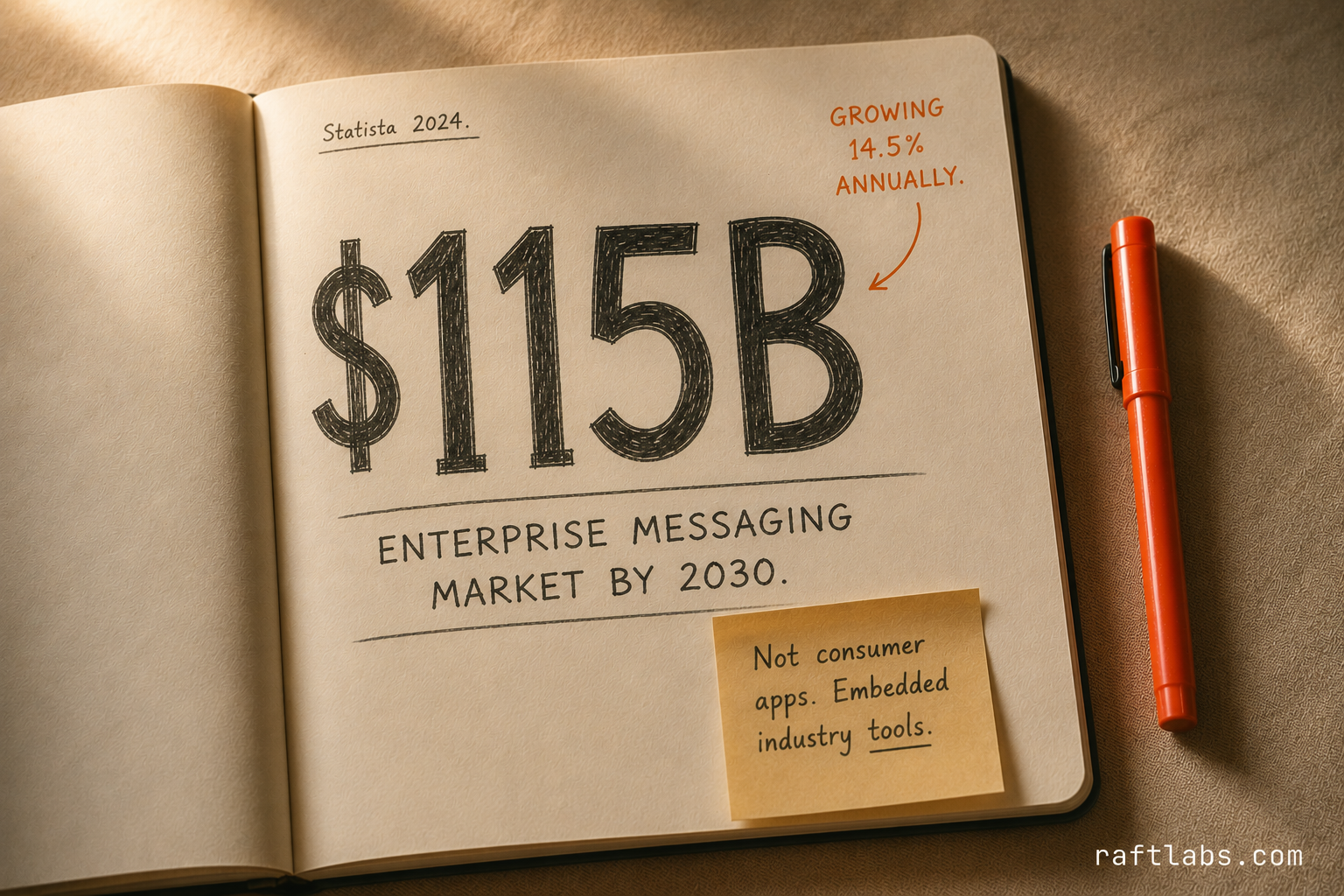
According to Statista, the global enterprise messaging market is projected to reach $115 billion by 2030, growing at 14.5% annually. Most of that growth will not come from new consumer apps. It will come from embedded messaging in industry-specific platforms - healthcare coordination, field service communication, logistics team tools.
How does WhatsApp make money - and what are your options?
WhatsApp is free for consumers. Meta monetizes it through the WhatsApp Business API, which charges businesses per conversation to reach customers at scale. In 2023, WhatsApp Business generated over $900 million in revenue for Meta, with per-conversation pricing ranging from $0.005 to $0.15 depending on region and message type.
When you build your own messaging product, your monetization options are different. The right model depends on your product context.
If messaging is the core product - a standalone communication platform for a niche vertical - a per-seat SaaS subscription is the standard model. Healthcare teams, legal firms, and field service operators pay $15 to $40 per user per month for compliance-grade communication that WhatsApp cannot legally provide.
If messaging is a feature embedded in a larger platform, the value is retention and stickiness, not direct revenue. A marketplace that embeds buyer-seller chat reduces support tickets, increases conversion, and improves trust - all of which translate to higher GMV. The messaging feature pays for itself indirectly.
If you are building a B2B communication tool and selling access to your messaging infrastructure, a per-MAU (monthly active user) API pricing model mirrors what Sendbird and Stream charge: $0.01 to $0.05 per MAU at volume.
According to McKinsey's 2024 Digital Trends Report, businesses that embed native communication into their platforms report 23% higher customer retention compared to those relying on generic third-party tools.
Who builds this instead of using WhatsApp or a messaging SDK?
The companies that build custom messaging are not trying to beat WhatsApp. They have a specific reason generic tools fail for them.
Healthcare platforms with PHI handling requirements: any messaging that includes patient names, appointment details, diagnosis references, or medication mentions is Protected Health Information under HIPAA. Standard consumer apps and most third-party messaging SDKs do not sign a Business Associate Agreement. A healthcare coordination platform - connecting nurses, physicians, and patients - needs compliant messaging built into its core, not bolted on through a tool that cannot legally handle the data.
Enterprise SaaS products that need IT-controlled communication: a project management platform or ERP that serves enterprise clients with IT departments needs messaging that integrates with their SAML/SCIM identity management, provides admin controls for message archiving and eDiscovery, and allows remote wipe of messages from a departed employee's device. Sendbird and Stream can do some of this; the deep identity integration usually requires custom work anyway.
Logistics and field service operators with embedded workflows: a field service app connecting dispatchers with technicians does not just need chat. It needs chat that surfaces job context (ticket ID, asset details, GPS coordinates), routes messages based on job assignment, and archives communication per job for liability purposes. That tight integration with the operational data model is impractical to achieve with a generic SDK.
Regulated financial services and legal platforms: FINRA requires broker-dealer firms to archive all communications. Legal hold requirements mean messages cannot be deleted once litigation is anticipated. E2E encryption - which prevents the platform from reading messages - is architecturally incompatible with both. These platforms need server-side encryption with controlled admin access, full audit logging, and integration with their compliance archiving system.
"The hardest part of messaging infrastructure is not real-time delivery to online users - any WebSocket implementation handles that. The hard part is guaranteed delivery to offline users across unreliable mobile networks, with correct ordering and no duplicates." - Jan Koum, co-founder of WhatsApp, in an interview with Wired, 2014
What makes messaging hard to build
Consumer messaging apps look deceptively simple. Send a message, see it appear on the other end. The complexity is in what happens in between.
WhatsApp's engineering blog describes how they rebuilt their entire delivery system around an acknowledgment protocol. Each message travels from sender to server to recipient, with the server buffering messages for offline users in a delivery queue. When the recipient reconnects, they receive queued messages in order. That design is the same for any production messaging product - including yours.
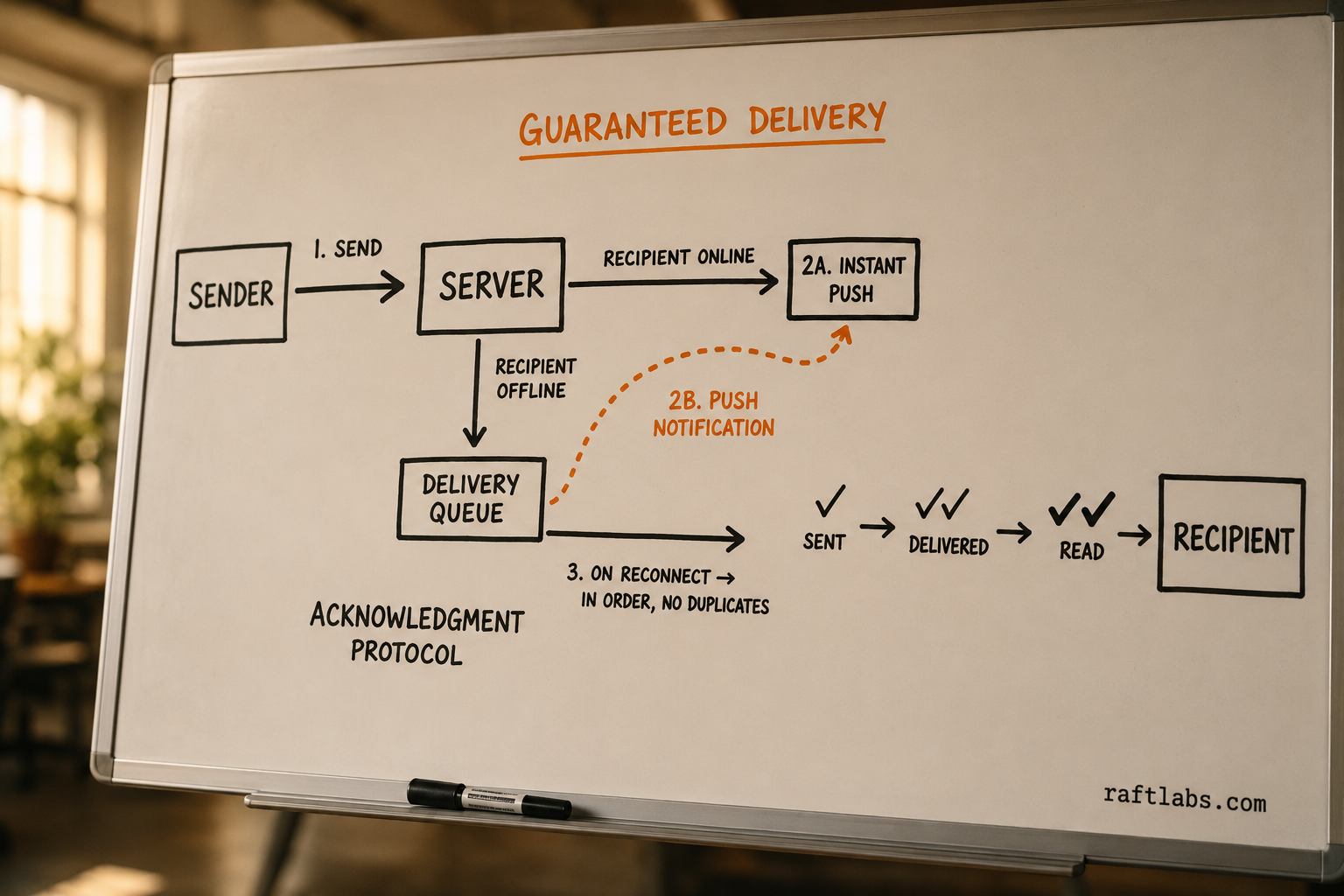
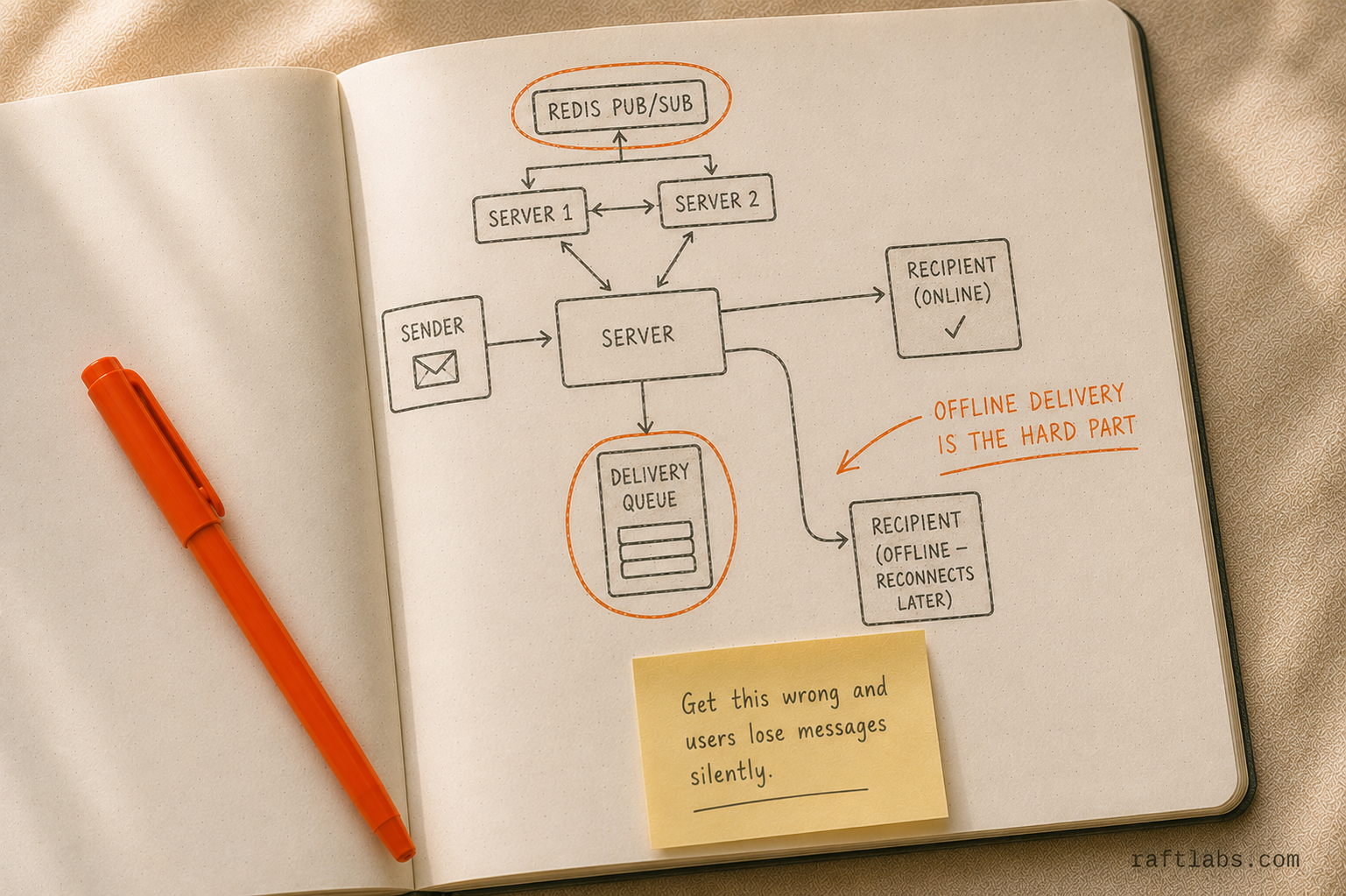
Delivery guarantees: messages must arrive reliably even when recipients are offline, switch networks, or close the app. Without a queuing layer and acknowledgment protocol, messages disappear silently when networks are poor.
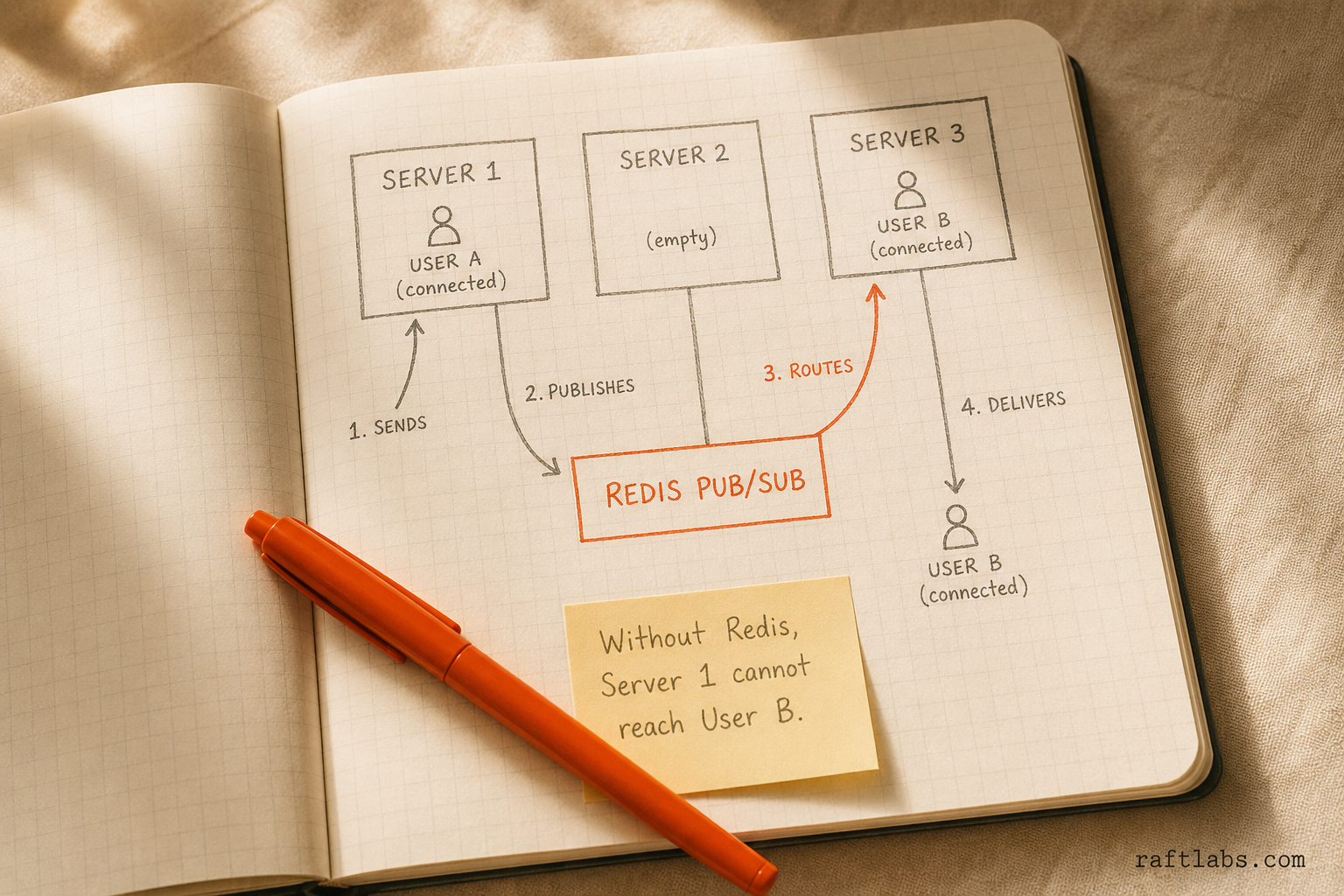
Real-time at scale: persistent WebSocket connections to thousands of simultaneous users require careful server architecture. Each server instance only knows about connections to itself, so you need a message broker (Redis Pub/Sub) to route messages across server instances.
Ordering: messages must arrive in the correct order. In distributed systems under load, this is not automatic. Without sequence numbers and server-side ordering, group chats become incoherent during high-traffic periods.
Offline sync: when a user comes back online after hours of downtime, they need all missed messages in order, without duplicates. This requires a persistent message queue per user, not just push notifications.
These are solved problems. Libraries, services, and proven patterns exist for all of them. But you need to make the right architectural choices before you write production code. They are expensive to retrofit.
Feature phasing: V1, V2, V3
The failure mode RaftLabs sees most often in messaging builds is scope creep at V1. Teams that try to ship everything in the first version ship nothing usable in the first six months.
V1 - what you need to launch
| Feature | Why it is required at launch |
|---|---|
| 1-on-1 messaging | Core product. No messaging app ships without this. |
| Group chat (up to 50 participants) | Covers most use cases. Large groups are a V2 scaling problem. |
| Delivery status (sent, delivered, read) | Users need confirmation. Without this, they resend and flood the system. |
| Push notifications | The most important background feature. Offline users must know when they have messages. |
| Media sharing (photos, documents) | Expected in any modern messaging context. Voice notes are a high-value addition if budget allows. |
| Contact discovery | Phone number, username, or invitation - decide the model before building. It shapes onboarding. |
| Basic message history | Users need scroll-back. Store at least 30 days of messages at launch. |
V1 cost: $30K to $60K. Timeline: 10 to 16 weeks.
V2 - after you have proven the model
| Feature | When it becomes necessary | Rough cost to add |
|---|---|---|
| End-to-end encryption | When you have healthcare, legal, or financial users asking for it - or when a compliance audit requires it | $40K-$60K |
| Voice and video calls | After you have evidence users want it. WebRTC is expensive to build correctly. Use Daily.co or Agora for v1 instead. | $30K-$60K |
| Message reactions and threading | When user research shows friction without it (usually 3-6 months post-launch) | $15K-$25K |
| Rich link previews | Nice to have; not a retention driver at launch | $8K-$12K |
| Larger group support (up to 500+) | When your use case genuinely needs it. Changes server architecture. | $20K-$35K |
V3 - at scale
| Feature | Trigger threshold |
|---|---|
| Message search at scale | When your archive exceeds 6 months and users start complaining about finding old messages |
| Multi-device sync | When your platform expands to web and desktop alongside mobile |
| Message scheduling and broadcast lists | When power users in enterprise or logistics contexts ask for it |
| Compliance archiving and eDiscovery export | When you onboard your first regulated enterprise customer |
| Desktop and web apps | When mobile-first is insufficient for your user base's primary work context |
The encryption decision - before you write a line of code
If you are building for a regulated industry - healthcare, legal, financial services - end-to-end encryption is not optional. You need it from day one to meet compliance requirements, and the decision shapes your entire key management and storage architecture.
If you are building for enterprise teams with IT admin requirements, you may need the opposite: message archiving, admin visibility, and compliance export. True end-to-end encryption is architecturally incompatible with these.
These two paths are not reconcilable. Make the decision before development starts.
For regulated consumer-facing apps: implement the Signal Protocol. It is open source, well-documented, and available as a library. Cross-platform mobile saves $30K to $50K compared to building native iOS and Android separately.
For enterprise with admin controls: store messages server-side, encrypted at rest, with admin access maintained through key management. Plan for 4 to 8 additional weeks to build the audit logging and admin control interfaces that enterprise IT requires.
How real-time messaging actually works - and what it costs
WebSockets vs. polling
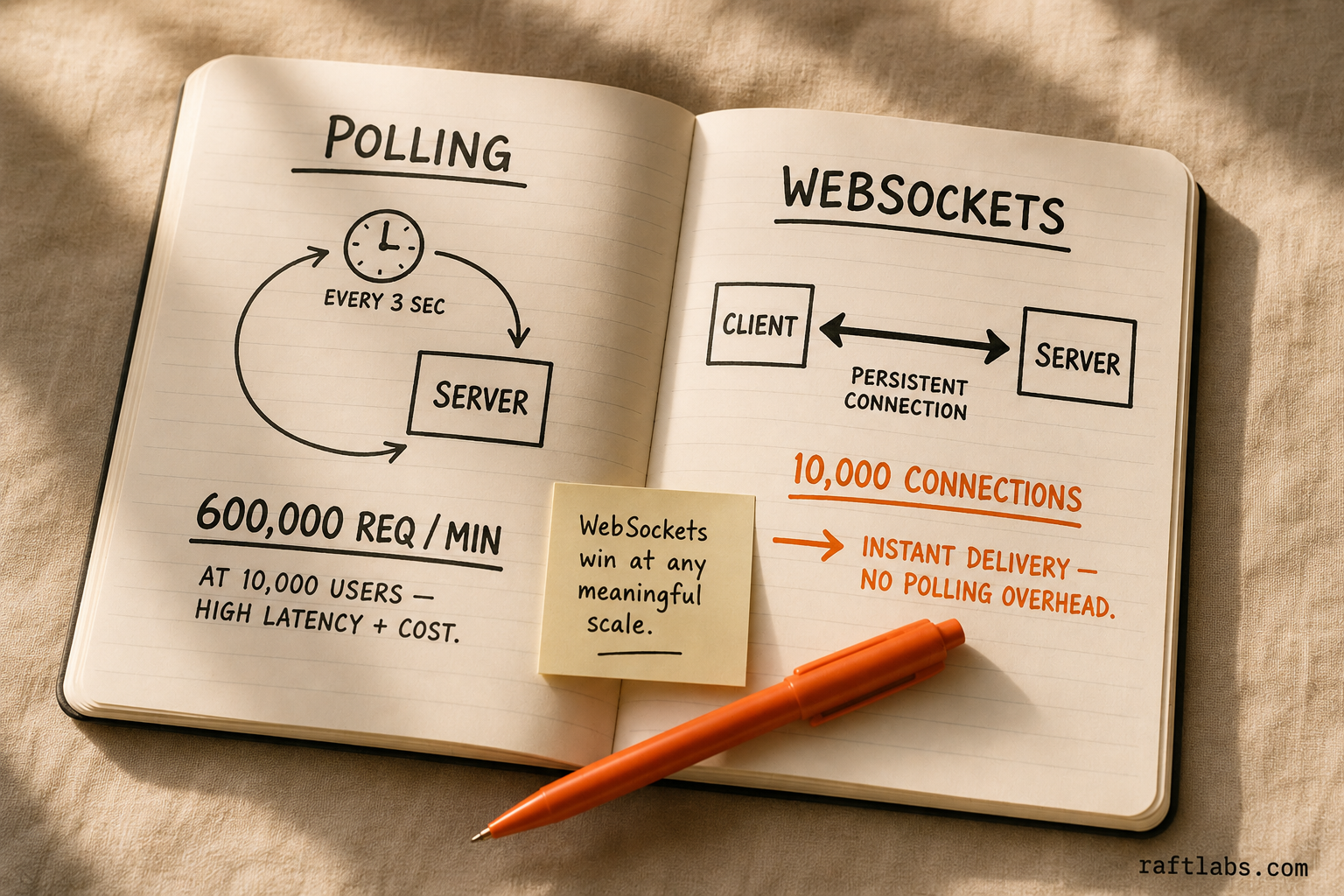
WebSockets maintain a persistent connection and deliver messages the instant they arrive. Polling - asking the server every few seconds "any new messages?" - creates latency and server load that do not scale.
At 10,000 concurrent users, polling generates roughly 600,000 HTTP requests per minute. WebSockets replace that with 10,000 persistent connections. The infrastructure cost difference shows up in your monthly cloud bill within weeks of launch. Design for WebSockets from day one.
Message storage and media costs
Messages must be stored server-side for delivery to offline users, cross-device sync, and message history. A relational database handles this straightforwardly. The question is how long you retain messages - and for end-to-end encrypted apps, whether the server can read them at all.
Media is where your operating costs grow fastest. Photos, videos, and voice notes require object storage (AWS S3 or equivalent) delivered via CDN (CloudFront or Cloudflare). Generate thumbnails server-side on upload. Set file size limits early - 10MB per file is a common starting point. Video sharing will push monthly costs from $2K to $15K at the same user volume if left unconstrained.
Horizontal scaling
Your chat servers need to scale horizontally. The routing layer (Redis Pub/Sub) ensures that when user A (connected to server 1) sends a message to user B (connected to server 3), server 3 delivers it. Without this layer, horizontal scaling breaks message delivery. This is the architectural decision that determines your infrastructure ceiling. Getting it right costs 1 to 2 weeks of extra architecture work upfront. Getting it wrong costs a full rewrite at scale.
According to Ericsson's Mobility Report 2024, mobile data traffic is expected to grow at 20% annually through 2030, with messaging apps representing a disproportionate share of that traffic due to media attachments. Infrastructure costs scale with usage - plan for it.
Build vs. WhatsApp: when does custom win?
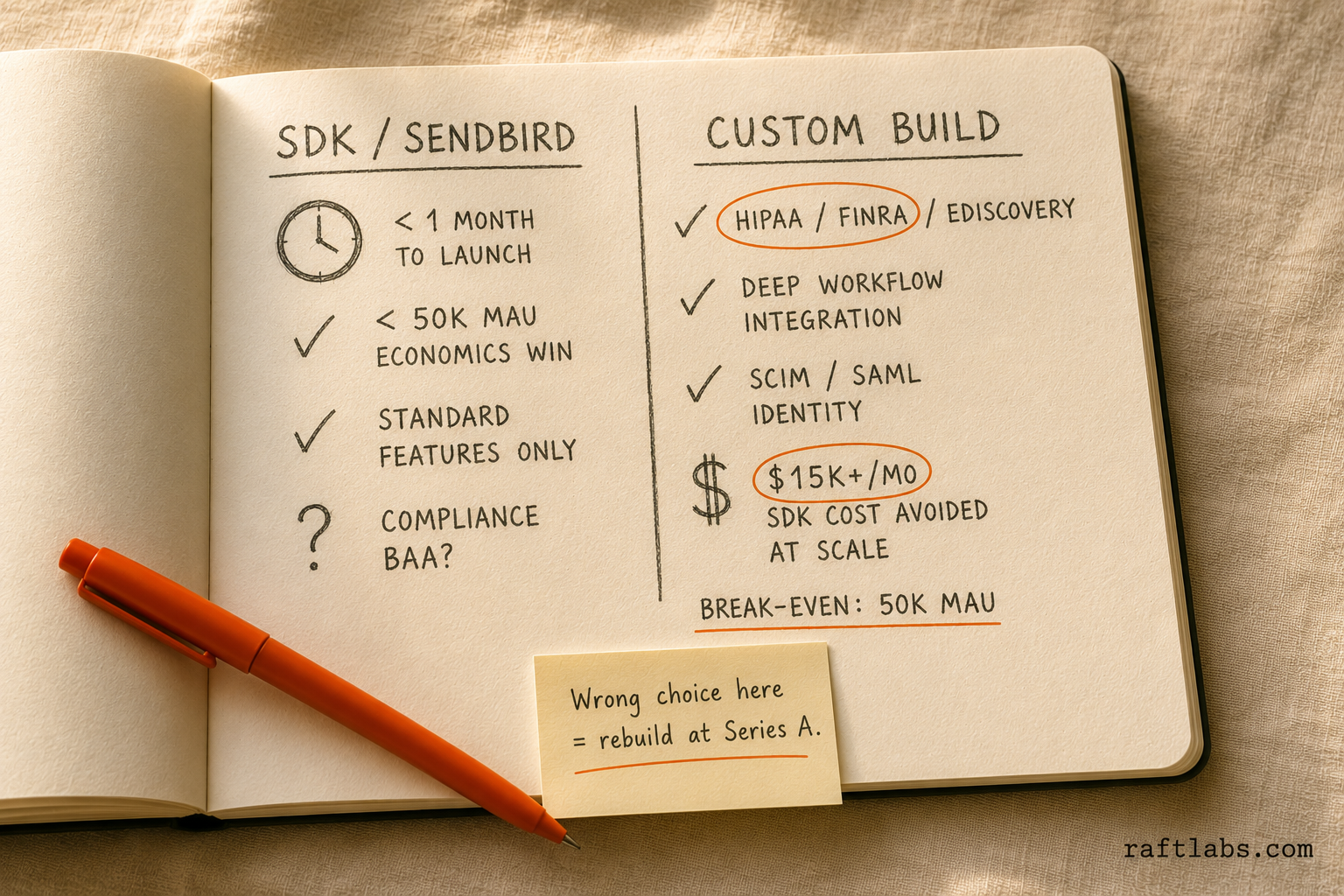
Use WhatsApp Business API or a third-party SDK (Sendbird, Stream, Twilio Conversations) when:
You want messaging live in under a month and do not have compliance requirements
Your user base is under 50,000 MAU (Sendbird's pricing is typically lower than a custom build's monthly operating cost at this scale)
You need standard features only and are not embedding messaging deeply into proprietary workflows
Voice and video calling is a primary feature (third-party WebRTC services are significantly cheaper than building native)
Build custom messaging when:
You handle PHI, financial communications, or any data subject to a specific compliance framework that requires a BAA or regulatory audit trail
Your platform's operational data (jobs, tickets, transactions) needs to be surfaced directly inside the chat context - and a generic SDK cannot reach your internal data model
Enterprise customers require SCIM/SAML integration, remote message wipe, and eDiscovery export, and the SDK vendor cannot credibly deliver these
Your message volume and user scale will push third-party SDK costs above $15K per month within 18 months of launch
The break-even point between a third-party service and a custom build is roughly 50,000 MAU for most pricing models. Below that, third-party wins on economics. Above it, custom wins on cost and control.
What we have seen in production builds
The failure mode RaftLabs sees most often in messaging infrastructure is teams who get offline delivery wrong and discover it three months post-launch. The symptom is user complaints about missed messages. The root cause is a push notification that fired but the message did not queue correctly for delivery on reconnect. Fixing this post-launch requires rewriting the delivery acknowledgment layer while the system is live - a painful process. Teams that design the offline queue upfront save four to six weeks of remediation work.
The second common failure: not deciding on the encryption model before writing the first line of code. A healthcare platform that chose E2E encryption in v1 and then signed an enterprise customer requiring admin message access had to rebuild the entire key management layer six months into production. That cost $80K and delayed their Series A data room by two months.
How RaftLabs approaches this
The first question on every messaging build: what is the compliance context? Healthcare, legal, enterprise with IT requirements - each changes the architecture significantly before any product code is written.
The second question: what is the network model? Phone-number discovery, username-based, organization or tenant-based? This shapes onboarding, user management, and scalability planning.
RaftLabs builds messaging infrastructure as part of larger platforms - field service apps, healthcare coordination tools, marketplace operator communication, internal enterprise tools. Standalone consumer messaging apps competing with WhatsApp are not a problem we solve.
If you are building messaging as a feature of a larger product where generic tools do not fit, request a 30-minute scoping call and we will tell you whether custom or SDK is the right call for your stage.
Ask an AI
Get an instant summary of this post from your preferred AI assistant.
Common questions
- A messaging MVP with 1-on-1 and group chat, push notifications, and basic media sharing takes 10-16 weeks with a team of 3-5 developers. Adding voice and video calls extends the timeline by 6-10 weeks. Adding end-to-end encryption and compliance features such as message archiving and admin controls adds 4-8 weeks on top of that.
- MVP development runs $30K-$60K. Monthly operating costs range from $2K-$15K for a small active user base, scaling with message volume and media storage. Photos and videos are the variable costs that grow fastest with user activity. Voice and video calling infrastructure adds significant ongoing cost and is best handled by a third-party service in v1.
- WebSockets maintain a persistent connection between client and server. When a user sends a message, it pushes through the WebSocket to the server, which immediately pushes it to the recipient's open connection. If the recipient is offline, the message queues and delivers on reconnect, with a push notification triggered in parallel. Servers need Redis Pub/Sub to route messages correctly when users connect to different server instances.
- The Signal Protocol is an open-source end-to-end encryption protocol used by WhatsApp and Signal. It provides forward secrecy (each message uses a different encryption key) and deniability. Build it in v1 if you are building for healthcare, legal, financial, or any privacy-regulated context. For internal enterprise tools where IT needs admin access, server-side encryption with controlled admin visibility is often a better architectural fit. These two approaches are fundamentally incompatible, so the decision must be made before writing a line of code.
- Almost certainly not. WebRTC is complex to build reliably across mobile platforms and network conditions. It adds significant cost and timeline to a v1 build. Use Daily.co, Agora, or Twilio Video for v1. Build native calling only when you have proven demand and the usage volume to justify the engineering investment.