Radon Mitigation Software Development
Radon mitigation software for the full job, test to retest.
A radon job runs on a clock: a 48-hour test, a closing date, an install, a retest. We turn that chain into one owned system, so the test result, the quote, the licence record, and the report stop living in paper forms and separate tools.
Bring one stuck workflow. Leave with a build, buy, repair, or wait recommendation.
Trusted by























The brief
Start with what is not working.
Good software decisions begin with the constraint, not a list of features or a preferred technology.
The test result sits in one place, the quote in another, and the closing date in a notebook.
Homeowners and agents call the office because no one can see where a job stands.
Reports, licence records, and monitor calibration dates get chased by hand before every deadline.
Plain answer
Radon mitigation software from RaftLabs runs one job record from the first test request through the 48-hour monitor test, diagnostic visit, quote, install, and post-install retest. It holds the test result, the closing date, the licence record, and the report in one place, so nothing waits on paper forms or memory.
What to remember
- Use this when the job chain from test to retest keeps breaking between tools.
- The first release should complete one full job path, from test request to retest result.
- The closing date drives the schedule, so the system should sort work by that date first.
- Quote the office screens as their own scope: scheduling, exceptions, licence records, and report history are a second product, not a single admin-panel line.
- The code, cloud accounts, data, and operating notes should stay usable by another capable team.
The first decision is not what to build.
It is whether software is the right answer at all. We use four possible recommendations before discussing a development scope.
- 01
Buy
Choose a maintained product when it handles booking, quotes, and invoices and the remaining gaps can be solved with setup, a connector, or a small process change. Paying for software you do not have to maintain is often the better trade.
- 02
Repair
Keep the tools you have when the team still gets value from them and the gaps sit in how they connect. Start with evidence: where each record lives, who copies what by hand, and where a job stalls between the test and the retest.
- 03
Build
Own the system when the radon chain shapes your margin and your reputation with agents: the test window, the closing date, the state report, and the retest. Start with one complete job path and the connections that path cannot work without.
- 04
Wait
Do not turn a changing rule into permanent software. Settle your state reporting steps and your quote process first, name the workflow owner, and measure the cost of the paper chain before paying for a product.
Not sure which path is yours? Bring it to a 30-minute call. Leave with the answer in writing.
Fit
Custom software should earn its maintenance burden.
A feature request is not enough. The case is real when the same constraint shows up in time, errors, margin, or customer experience.
Your jobs run test, diagnostic, quote, install, and retest, and the chain breaks between tools.
Closing dates drive your schedule, and a missed step costs you the job or the agent relationship.
The organisation can name a workflow owner and what 'done' looks like for the first release.
A maintained field service product fits with reasonable setup and process change.
The team wants software to settle an unresolved operating policy.
The brief is a feature list with no user, transaction, or business result attached.
Not sure which side you are on? Use the first call to make that decision. A useful answer may be to buy, connect, repair, or wait.
Start with the job, not the software.
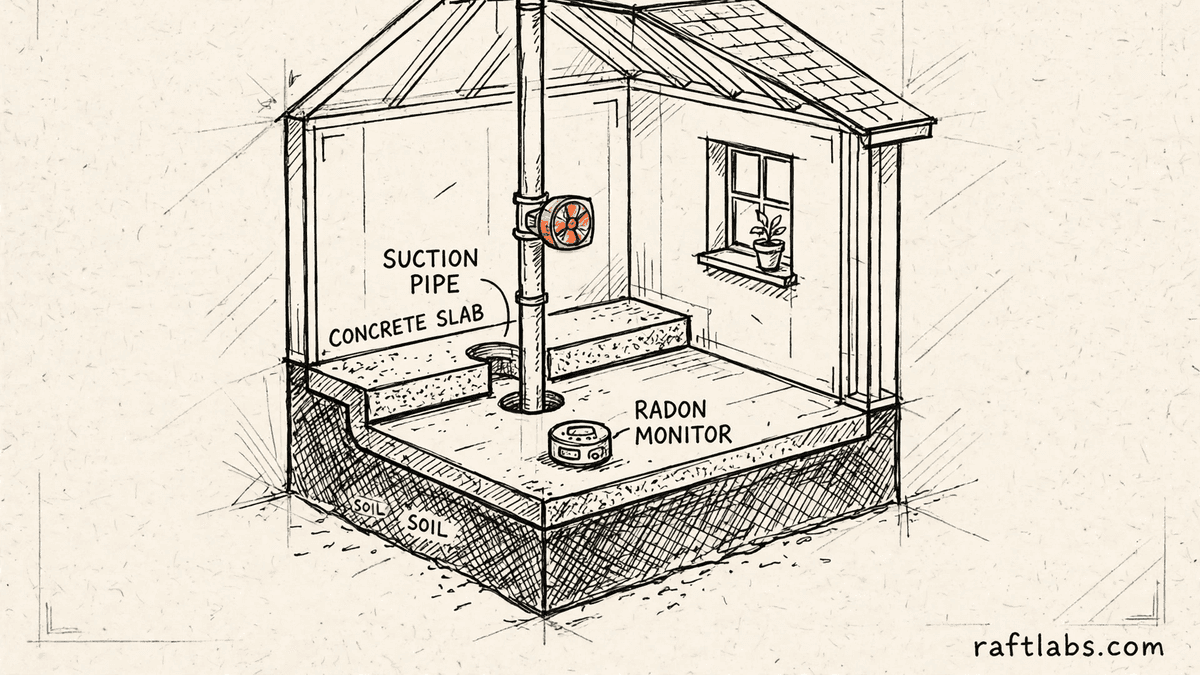
A radon job is a chain with a deadline at the end of it. A homeowner or an agent asks for a test. A monitor goes into the lowest level of the home and runs for 48 hours. Someone picks it up, reads the result, and writes the report. If the number is high, a diagnostic visit follows, then a quote, an install, and a retest after the system runs. Most of these jobs sit inside a house sale, so a closing date hangs over every step.
The chain breaks in plain places. The test is booked on the phone and written in a diary. The result lives in the monitor software. The quote is a separate document. The agent calls the office to ask where things stand, and the office calls the technician. The licence record and the calibration date for the device sit in a folder no one opens until a report is questioned.
A second product hides inside the first. Homeowners and agents see one screen; your team lives in another: scheduling, exceptions, licence records, state reports, and a record of who did what. Quotes that squeeze all of that into an "admin panel" line item are where budgets most often break. On a real platform, your team's screens are routinely the most underestimated part of the build, so we quote them as their own job, with their own users, from the start.
Custom software makes sense when one owned system can hold the whole chain better than paper, a diary, and three disconnected tools. The first release should take one job from test request to retest result. It should not replace every tool at once.
We start where it hurts.
The interface is only one part of the job. The real scope includes the rules, the data, the connections to your other systems, what happens when things fail, who can see and change what, and who runs it after release.
Booking and scheduling that follow the closing date
Homeowners and agents book a test online instead of by phone. The schedule sorts by closing date and test window, so the job that can hold up a sale never sits behind a routine retest.
One job record from test to retest
The request, the monitor placement, the result, the diagnostic notes, the quote, the install, and the retest live on one record. Anyone in the office can answer where a job stands without calling the technician.
Reports and licence records made from the job
The test report and the mitigation certificate come from the job record, so the numbers match. Licence details, device serial numbers, and calibration dates sit on the same record, ready when a state report or a dispute asks for them.
A portal for homeowners, agents, and inspectors
Each person sees their own jobs: the result, the quote, the install date, the retest result. Agents get a short update at each stage, which is what keeps the next referral coming.
Monitor and retest tracking that runs itself
Each monitor carries its calibration due date and current job. The retest is booked from the install record, and past customers get a reminder when a follow-up test falls due.
Which one is yours?
Bring it to a 30-minute call. Leave with a build, buy, repair, or wait recommendation in writing. Free, whether or not we ever work together.
The chain
Software for each stage of the radon job.
Every stage has its own rule. The system should hold the rule, so the job cannot move on with a step missing.
Testing and the 48-hour window
The record holds the device, the placement, the start time, and the pickup time. Closed-house conditions and any sign the device was moved are noted on the job, so the result can be defended if a buyer or seller questions it later.
Diagnostics and quotes
The diagnostic visit records the foundation type, the sump, and the route the pipe can take. The quote is built from that record, so the price the homeowner signs matches what the crew finds on install day.
Installs and state tags
The install record holds the system type, the fan, and the tag number where your state requires one. Where a state report is due within a set number of days, the job stays open until the report step is done.
Post-install retests
The retest cannot be booked before the system has run for the required hours, and it must land inside the allowed window. The result closes the job and starts the clock for the follow-up reminder.
Real estate work
Agent, inspector, buyer, and seller sit on the record with the closing date. Each gets the update meant for them, and the office can show a partner every job they sent and where each one stands.
Proof
The fifth attempt became a product customers could keep using.
UrShipper had already worked with four development vendors. Its founder describes the communication and decisions during the recovery.
The case study documents a 14-week recovery, five carrier connections, a Shopify fulfilment workflow, and client-reported results. It is one comparable project, not a promise that every inherited codebase can follow the same plan.
Read the UrShipper case studyWhich workflow is costing you the most right now?
Bring it to a 30-minute call. Leave with a build, buy, repair, or wait recommendation in writing. Free, whether or not we ever work together.
Let the work pick the shape.
The way people work should decide the form of the software. The office works at a desk, the technician works in a basement with weak signal, and the homeowner works from a phone. Those facts tell us what belongs in the first release.
Web app
The office system and the client portal. Booking, job records, quotes, reports, and partner updates in a browser: no installs, no versions, no device limits. When in doubt, this is usually the right first surface.
Mobile app
Work away from a desk: monitor placement, photos, signatures, and job status from the basement, with weak signal.
Desktop app
Local hardware, large files, work without a browser.
Browser extension
One task inside a system that otherwise works.
Connected devices
Monitor data pulled in directly, when the device and its maker allow a documented connection.
One product may need several surfaces. Each one should support the same complete workflow, not start another feature list.
How it works
Close one expensive risk before opening the next.
Each stage answers a buyer question and leaves behind a decision you can inspect. The next stage only opens when the expensive uncertainty in the current one is small enough to accept.
- 01Understand
Trace the real job
Where does the chain break between the test and the retest?
Follow one job from the first call to the retest result. Include the paper forms, the diary, the phone calls from agents, and the steps that only one person in the office knows how to do.
Decision produced
A map of the job chain, the exceptions, the owners, the systems, and the baseline cost or delay worth changing.Risk closed
Paying to automate the visible symptom while the expensive constraint remains. - 02Shape
Choose the first useful release
What needs to exist together for one job to run from test to retest?
Choose the shape from the way the work happens, not from a preferred technology. Name the user, the device, the data, the system connections, who can access what, the exceptions, and the result the first release must complete.
Decision produced
The first-release boundary: the job record, the schedule, the report, and the portal view that path cannot work without, with a clear definition of done.Risk closed
A small-looking feature list that quietly depends on several interfaces, systems, and owners. - 03Prove
Review working software
Will it hold up on a real job with a closing date attached?
Review the product against the agreed job path, not a tour of finished screens. Book a test, place a monitor, read a result, send a quote, close a job. Record changed assumptions and test what happens when data is missing or a device record is out of date.
Decision produced
Working checkpoints tested with realistic jobs, real user types, system connections, recovery plans, and the people who will use or run the system.Risk closed
Discovering the important gaps during migration or after customers depend on the release. - 04Transfer
Release, measure, and hand over
Did the new system shorten the chain, and can another capable team operate it?
Move a controlled set of jobs first. Compare booking time, status calls, report turnaround, or another agreed measure with the starting point before adding the next workflow.
Decision produced
A controlled release, comparison with the baseline, operating notes, account ownership map, and a recommendation for what should happen next.Risk closed
Measuring development activity instead of the business result, or depending on the original vendor to keep the system running.
What stays out of the black box
These are operating conditions to put in the engagement, not claims to take on faith.
The scope names one complete workflow
The user, the trigger, the decisions, the data, the exceptions, and what 'done' looks like. A screen list is not enough.
Progress is visible in working software
Reviews against the product at agreed checkpoints, while there is still time to act.
A scope change has a price before it has code
A new workflow or system connection shows its effect on cost and timing before anyone approves it.
Ownership exists throughout, not only at handover
Code, cloud, data, and provider access stay visible and under your control from day one.
The work is checkable without being technical
Checkpoints are working software you use yourself, reported in plain language.
Custom software by industry.
Start from your domain. Each area below is a working practice with shipped products behind it.
What it costs
Every project starts at $10K.
The first phase turns the costliest patched workflow into a scoped build with written acceptance criteria.
Starting investment
Starts at $10K
Workflow complexity, systems to connect, data migration, and user roles set the scope. After a 30-minute call, you get a written build, buy, repair, or wait recommendation plus first-phase direction. Free, whether or not you build with us.
Not ready to talk? Start here.
Four useful next paths: decide whether to own the software, estimate the cost range, understand what moves the price, or inspect a comparable recovery.
Run the build-vs-buy calculator
Compare the cost and operating trade-offs before turning a workflow into a development brief.
Estimate the cost range
Get a working cost range for your scope before you talk to any vendor.
Read the cost guide
See the scope factors that move price, timing, team shape, and long-term maintenance.
Inspect a product recovery
See what changed when UrShipper moved from four failed vendor attempts to a controlled migration.
Build or buy
| Buy field service software | Build custom software | |
|---|---|---|
| Best fit | Booking, quotes, and invoices are the whole problem, and its pricing makes sense | The radon chain itself is the problem: test windows, closing dates, state rules, and retests |
| Manual work | Setup and process changes can remove the constraint | Staff copy results, dates, and licence details between tools by hand every day |
| State rules | Tags, reporting deadlines, and calibration dates held as notes and manual reminders | State rules sit on the job as required steps, and a job cannot close with a step missing |
| Partner updates | Agents and inspectors updated by phone and email, when someone remembers | Each partner sees their own jobs and gets a short update at every stage |
Work with us
Bring one stuck workflow. Leave with a decision.
In a 30-minute call, we will help you decide whether to buy, connect, repair, build, or wait. If custom software is not the sensible next move, that is still a useful answer.
- One named workflow owner and one complete path for the first phase.
- Scope, price, what 'done' looks like, and exclusions agreed before paid work starts.
- Code, cloud, data, and provider access remain under your control.
- Post-launch warranty cover for defects in the agreed scope.
Frequently asked questions
Straight answers to what buyers ask before they scope. Still stuck? .
It is software built around the way a radon company works: a test request comes in, a monitor runs for 48 hours, a diagnostic visit follows, then a quote, an install, and a post-install retest. It holds the test result, the closing date, the licence record, and the report on one job record, instead of spreading them across paper forms, inboxes, and separate tools.
The job record carries the test start, the pickup time, and the closing date from the start. The schedule sorts by closing date, so the jobs that can hold up a house sale surface first. When a monitor goes out, the record shows which device it is, where it sits, and when it comes back. A late pickup or a missing result shows up as a problem before the agent has to call and ask.
Yes. A client portal gives the homeowner one place to book a test, see the result, read the quote, and check the install date. The agent or inspector who sent the job gets a short status update at each stage: test booked, result in, quote sent, system in, retest done. Your office stops answering the same status calls all day, and the people waiting on a closing stop guessing.
Each job record holds the licence details for the tester and the mitigator, the device serial number, and its calibration date. The report is made from the job record itself, so the numbers on the report match the numbers on the job. Where your state sets a reporting deadline or a tag rule, that rule sits on the job as a required step, and the job cannot close until the step is done.
Yes. Each monitor is a record with a serial number, a calibration due date, and a current job. The system warns before a calibration lapses, so a device never goes into a home out of date. The post-install retest is booked from the install record, inside the window your state and your own practice allow, and a reminder goes out when a past customer is due a follow-up test.
Buy a field service product when it handles booking, quotes, and invoices well and your team can live with its limits. Build custom when the radon chain itself is the problem: the 48-hour test window, closing dates, state tags and reports, monitor calibration, and retest rules that a general tool holds only as notes and manual reminders. If your rules are still changing every week, wait and settle them first.
The first paid phase may cover a bounded audit, a proof of concept, or a small first release that completes one full job path. The final price depends on how many kinds of users it serves, what it needs to connect to, whether data needs moving over, whether phones or tablets are involved, and your state reporting rules. The agreed phase is priced in writing before it starts.
Timing depends on scope: a booking and job-record release is a smaller engagement, while a release with a client portal, report generation, and state reporting rules takes longer. The schedule is set once the first job path and what 'done' looks like are clear.
We need one person who owns the workflow, access to the forms and reports you use now, timely answers on business rules, and someone who can accept or reject each milestone. A weekly working session is usually enough once the scope is stable. Your team should not have to manage developers day to day. The team that scopes your project is the team that does the work: no handoff to another vendor after you sign, and you can talk to the people doing the work directly.
You judge what you can see, not the code. Every checkpoint is working software you click through yourself, tested against the job path agreed at the start: book a test, read a result, send a quote, close a job. Progress is reported in plain language: what changed, what's next, and what it costs. Because you own the code, the accounts, and the operating notes throughout, nothing about the work is locked inside our heads.
You own the code built for you and control where it lives, the cloud accounts, the data, analytics, and third-party subscriptions. Outside services and open-source pieces keep their own licence terms. The operating notes and handover material stay current so another capable team can take over.
Every launch includes post-launch warranty cover for defects in the agreed scope, release support, and small screen corrections. After that, work can continue as another fixed phase or an ongoing product engagement. The code and accounts stay under your control either way.