Irrigation Contractor Software
Irrigation software for the record no one should carry in their head.
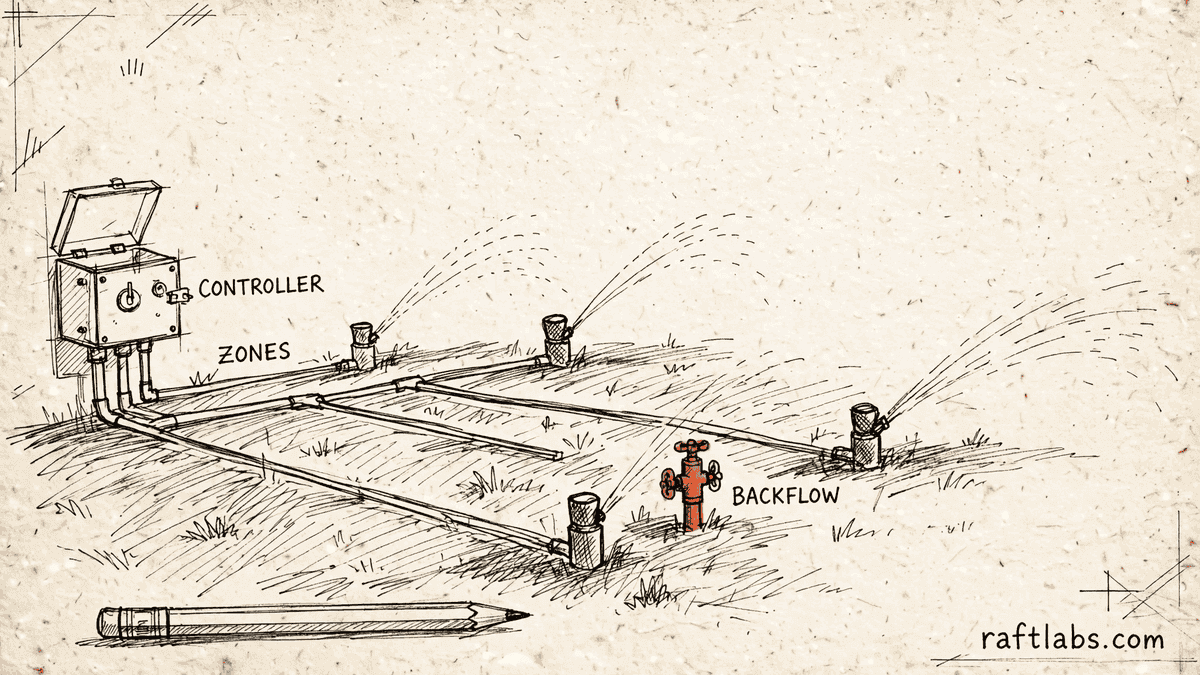
Every property you service has its own zones, controller, and backflow device, and every one of those facts usually lives in a spreadsheet, a group text, or one person's memory. We turn that record into software your whole team can use.
Bring one stuck workflow. Leave with a build, buy, repair, or wait recommendation.
Trusted by























The brief
Start with what is not working.
Good software decisions begin with the constraint, not a list of features or a preferred technology.
The backflow test dates for hundreds of properties live in one person's head.
Spring startups and fall blowouts are booked by phone, one call at a time, in the same few frantic weeks.
A technician arrives at a property without knowing its zones, its controller, or what was fixed last season.
Plain answer
Irrigation contractor software keeps one record for every property: its zones, its controller, its backflow device and test history, and its seasonal visits. It replaces the spreadsheets, group texts, and memory that usually carry spring startups, fall blowouts, and annual backflow tests, so nothing depends on one person remembering.
What to remember
- The property record is the product: zones, controller, backflow device, access notes, and history in one place.
- Seasonal rounds get planned once, in route order, before the phone starts ringing.
- Backflow test due dates and tester certifications are tracked by the system, not by memory.
- Buy a purpose-built product when it fits; own custom software when your seasonal round, pricing, or compliance record is the part no product handles your way.
- Quote the team's own screens as their own scope: dispatch, exceptions, approvals, and the compliance record are a second product, not a single admin-panel line.
Fit
Custom software should earn its place in a seasonal business.
A feature list is not enough. The case is real when the same failure shows up every spring and every fall: missed tests, lost bookings, unbilled visits.
Your property knowledge lives in spreadsheets, texts, and one person's memory, and it breaks when that person is away.
Seasonal rounds, backflow due dates, or zone by zone quoting follow rules that are yours and that general tools handle through notes and workarounds.
You can name one workflow to fix first, such as the fall blowout round or the backflow register, and say what 'done' looks like for it.
A purpose-built irrigation product already covers your rounds, records, and compliance in a way your team actually uses.
Your records are small and stable enough that a shared calendar and a tidy spreadsheet genuinely hold them.
The brief is a feature list with no property, visit, or billing result attached.
Not sure which side you are on? Use the first call to make that decision. A useful answer may be to buy, connect, repair, or wait.
Start with the property, not the software.
An irrigation company does not really sell visits. It sells memory: the record of every property it looks after. This property has fourteen zones and a controller in the garage. That one needs its backflow device tested before the end of May, and only two of your technicians hold the certification to test it. A third has a gate code, a dog, and a valve that sticks every second season. When that memory lives in one person's head, the business has a single point of failure with a phone number.
Twice a year, the memory gets stress tested. In spring, every customer wants their system started up in the same few weeks: water back on, each zone checked, heads adjusted, and backflow tests due at the same time. In fall, the first cold forecast sends everyone calling at once for a blowout, the visit where compressed air clears the water from the lines so they do not freeze and crack. Booked by phone, one call at a time, both rounds produce the same results: double-booked crews, routes that cross the city twice, and customers who never got called back and quietly hire someone else next year.
This page is about irrigation work only. It is not our landscaping industry page, which covers general grounds work such as mowing, cleanups, and planting. Irrigation is the narrower trade underneath it: zones, controllers, backflow devices, and two seasonal deadlines that do not move. Software earns its place here when one owned record can carry that detail for every property, every season, without depending on who happens to answer the phone.
The record has to carry the season.
The screens are only one part of the job. The real scope is the property record, the seasonal round, the compliance dates, and what happens when a visit finds more work than it came for.
One record for every property
Zones and what each one waters, the controller and where it sits, the backflow device and its test history, access notes, and every visit ever made. A technician opens the record on the way and arrives already knowing the property.
Seasonal rounds planned once
The spring startup round and the fall blowout round are assembled before the season opens: every due property on one list, grouped by service area, in driving order, with a fixed number of stops per crew per day. Customers confirm windows instead of calling the office.
Backflow tests that cannot slip
Each device carries its last test date and its next due date. The office and the customer hear about a test before it expires, and the visit is only assigned to a technician whose tester certification is current. Results stay on the property record for the day an authority asks for them.
Repairs approved where they are found
A broken head or a valve that will not close is recorded at the visit with a photo and a price from your own list. The customer approves there or by message, and the approval stays on the job, so the invoice never depends on someone remembering a verbal quote.
Quotes priced zone by zone
New systems are estimated the way they are installed: heads, valves, and pipe for each zone, with the controller and the backflow preventer as their own lines. The approved quote becomes the install record, so the crew installs what was sold.
Which one is yours?
Bring it to a 30-minute call. Leave with a build, buy, repair, or wait recommendation in writing. Free, whether or not we ever work together.
Choices
Know what each option actually covers.
Most irrigation companies try several of these before calling us. Each one covers part of the work. The honest question is which part it leaves to memory.
Purpose-built irrigation products
Tools such as Sprinklerly and QuoteIQ are made for this trade: scheduling, dispatch, route planning, backflow compliance, and zone based quoting. When one of them matches how you run your rounds, buying it is the sensible move, and we will say so on the call.
General field service tools
Broad tools run jobs and invoices well, but irrigation detail tends to end up in notes: backflow dates, winterization status, and zone counts typed into a customer file. That works until the round gets big enough that nobody can read the notes fast enough.
Landscaping software
Grounds software is built for mowing routes and maintenance contracts across many kinds of work. Irrigation adds a legal test date, a device register, and two hard seasonal deadlines. Companies that do both often need the grounds tool for the crews and a proper irrigation record underneath it; see the landscaping industry page for the grounds side.
Watering controllers
A smart controller decides when each zone waters, using weather and soil conditions. That is a different job from running your company. This page is about the business record: properties, crews, tests, quotes, and bills. The two meet on the property record, where the controller type belongs as a fact your technicians can see.
Spreadsheets and group texts
The starting point for almost every company we meet, and fine at a small scale. The failure mode is quiet: a due date edited by accident, a booking sitting in a text thread, a season billed from notes. If that sounds familiar, a neighbouring trade with the same shape is pool service management, where the route record carries the same weight.
Proof
The fifth attempt became a product customers could keep using.
UrShipper had already worked with four development vendors. Its founder describes the communication and decisions during the recovery.
The case study documents a 14-week recovery, five carrier connections, a Shopify fulfilment workflow, and client-reported results. It is one comparable project, not a promise that every inherited codebase can follow the same plan.
Read the UrShipper case studyWhich workflow is costing you the most right now?
Bring it to a 30-minute call. Leave with a build, buy, repair, or wait recommendation in writing. Free, whether or not we ever work together.
How it works
Close one expensive risk before opening the next.
Each stage answers a buyer question and leaves behind a decision you can inspect. The next stage only opens when the expensive uncertainty in the current one is small enough to accept.
- 01Understand
Trace the real workflow
Where do properties, tests, or bookings actually get lost?
Follow one property through a full year: the startup, the mid-season repair, the backflow test, and the blowout. Include the spreadsheets, the group texts, and the person everyone calls when a date is missing.
Decision produced
A map of one full season as it really runs: the property records, the booking path, the exceptions, and the point where memory replaces a system.Risk closed
Paying to automate the tidy version of the season while the real one still runs on texts and memory. - 02Shape
Choose the first useful release
What needs to exist together for one season to run on the record?
Choose the shape from the way the work happens, not from a preferred technology. Name who uses it, what they see at a property, which dates the system must never miss, and the result the first release must complete.
Decision produced
The first-release boundary, usually the property record plus one seasonal round or the backflow register, with a clear definition of done.Risk closed
A small-looking feature list that quietly depends on every property, every crew, and every local reporting rule at once. - 03Prove
Review working software
Will it hold up in the middle of the rush, not just in a demo?
Review the product against the agreed workflow, not a tour of finished screens. Plan a round, move a crew, find every backflow test due next month, and bill a completed visit, using your own properties as the test data.
Decision produced
Working checkpoints tested with your real property list, real due dates, and the people who will run the round and answer the phones.Risk closed
Discovering in the first week of spring that the round cannot be rearranged when a crew member is sick. - 04Transfer
Release, measure, and hand over
Did the season run cleaner, and can another capable team operate it?
Start with one crew or one service area. Compare missed dates, wasted trips, and time from visit to invoice with the season before, then extend the record to the rest of the company.
Decision produced
A controlled release, comparison with the starting point, operating notes, account ownership map, and a recommendation for what should happen next.Risk closed
Measuring development activity instead of missed tests, lost bookings, and unbilled visits, or depending on the original vendor to keep the system running.
What it costs
Every project starts at $10000.
The first phase turns the costliest patched workflow into a scoped build with written acceptance criteria.
Starting investment
Starts at $10000
Workflow complexity, systems to connect, data migration, and user roles set the scope. After a 30-minute call, you get a written build, buy, repair, or wait recommendation plus first-phase direction. Free, whether or not you build with us.
Not ready to talk? Start here.
Four useful next paths: decide whether to own the software, estimate the cost range, understand what moves the price, or inspect a comparable recovery.
Run the build-vs-buy calculator
Compare the cost and operating trade-offs before turning a workflow into a development brief.
Estimate the cost range
Get a working cost range for your scope before you talk to any vendor.
Read the cost guide
See the scope factors that move price, timing, team shape, and long-term maintenance, including what it takes to move years of property records out of spreadsheets and into one system your crews will actually use.
Inspect a product recovery
See what changed when UrShipper moved from four failed vendor attempts to a controlled migration.
Work with us
Bring one stuck workflow. Leave with a decision.
In a 30-minute call, we will help you decide whether to buy, connect, repair, build, or wait. If custom software is not the sensible next move, that is still a useful answer.
- One named workflow owner and one complete path for the first phase.
- Scope, price, what 'done' looks like, and exclusions agreed before paid work starts.
- Code, cloud, data, and provider access remain under your control.
- Post-launch warranty cover for defects in the agreed scope.
Common questions
It is the system that runs the business side of an irrigation company: one record per property with its zones, controller, and backflow device, plus scheduling, dispatch, quoting, invoicing, and customer communication. It is not the controller itself. The controller decides when the water runs; this software decides which crew goes where, what they will find, and what gets billed.
Landscaping software covers general grounds work: mowing routes, cleanups, planting, and broad maintenance contracts. Irrigation work is narrower and less forgiving. Each property has a system of zones fed from one controller, a backflow device with a legal test date, and two seasonal rushes that compress a large share of the year into a few weeks. If your company does both, our landscaping industry page covers the grounds side; this page covers the irrigation record on its own terms.
The facts a technician needs before opening the truck door: how many zones the property has and what each one waters, which controller runs them and where it sits, the backflow device type, its serial details, and its last test result, gate or access notes, parts the property usually needs, and the full visit history. When that record is complete, a new hire can service a property almost as well as the person who installed the system.
A backflow preventer is the device that stops irrigation water from flowing backward into the drinking water supply, and most water authorities require it to be tested once a year by a certified tester. The software keeps each device on the property record with its last test date, calculates the next due date, reminds your office and the customer before it expires, and only assigns the test to a technician whose certification is current. The test result is stored on the property, so the paperwork can be produced years later without searching a van or a filing cabinet.
The round is planned before the season starts, not assembled while the phone rings. Every property due a startup or a winterization blowout appears on one list, grouped by service area and arranged in driving order, with a set number of stops per crew per day. Customers get offered windows inside their area day and confirm without a call. When a freeze is forecast, you can see exactly who is still unbooked and contact only those customers, instead of starting the list again.
New systems are priced zone by zone. Each zone carries its heads, valves, and pipe runs, and the quote adds the controller and the backflow preventer as their own line items, because those are the parts most often forgotten and the ones that quietly eat the margin. The customer can be shown clear options at different levels, and the approved quote becomes the install record, so what was sold is what the crew installs and what the property record keeps.
General tools handle jobs, invoices, and a calendar well, and for many trades that is enough. The gap shows up in the irrigation details: backflow certification dates and winterization status per property tend to live in customer notes or extra fields someone added, seasonal rounds need to be placed in bulk and in route order rather than one job at a time, and the property record needs zones and a controller, not just an address. Contractors usually feel the gap first in April, when the spreadsheet comes back out.
Buy first when a purpose-built product matches how you already work. Sprinklerly covers scheduling, dispatch, route planning, and backflow compliance for irrigation contractors, and QuoteIQ covers zone by zone quoting and seasonal service plans, with plans starting at 29.99 dollars a month on its irrigation page; confirm current pricing on the vendor site. Build custom when the part that matters most, such as your compliance record, your pricing rules, or a connection to the rest of your operation, is the part the product handles in a way that does not fit, or when you have outgrown notes and workarounds inside a general tool.
Yes, when the service areas are set up first. You define which areas are served on which days and how many stops each crew can take, and customers book into open windows for their own area only. That keeps routes tight instead of scattering self-booked jobs across the map, and it turns the two seasonal phone rushes into confirmations your office reviews rather than calls it answers one by one.
The finding is recorded on the property at the visit: what is broken, a photo, and the price to fix it from your own price list. The customer approves on the spot or from a message, and that approval stays attached to the job. By invoice time, nobody has to reconstruct a verbal quote from a text thread, which is where most billing arguments in this trade start.
The invoice is created from the visit record, not from memory or a notebook at the end of the fortnight. Each completed startup, blowout, or repair already carries its price, its parts, and its approval, so billing the whole round is a review pass rather than a reconstruction. Visits that were booked but not completed stay visible instead of quietly never being billed or being billed twice.
Yes, when the other product offers suitable access and your office owns the mapping. The usual connections are accounting for invoices and payments, and the customer messaging tools you already use. Define which system owns the customer, the property, the invoice, and the payment, then test the awkward cases: a refund, a part-paid invoice, and a visit that was rescheduled after it was billed.
The first paid phase may cover a bounded audit, a proof of concept, or a small first release, such as the property record plus one seasonal round. The final price depends on how many properties and crews the system carries, what it connects to, whether records need moving over from spreadsheets, and how your local backflow reporting works. The agreed phase is priced in writing before it starts.
Timing depends on scope. A first release that covers the property record, one seasonal round planned in route order, and backflow due dates is a smaller engagement than one that also adds quoting, customer self-booking, and accounting connections. The schedule is set once the first workflow and what 'done' looks like are clear.
You judge what you can see, not the code. Every checkpoint is working software you click through yourself, tested against the workflow agreed at the start: plan a round, open a property, find a backflow test that is due. Progress is reported in plain language: what changed, what is next, and what it costs. Because you own the code, the accounts, and the operating notes throughout, nothing about the work is locked inside our heads.
You own the code built for you and control where it lives, the cloud accounts, the data, analytics, and third-party subscriptions. Outside services and open-source pieces keep their own licence terms. The operating notes and handover material stay current so another capable team can take over.
Every launch includes post-launch warranty cover for defects in the agreed scope, release support, and small screen corrections. After that, work can continue as another fixed phase or an ongoing product engagement. The code and accounts stay under your control either way.