Home Staging Company Software
Home staging company software for companies whose furniture is always somewhere else.
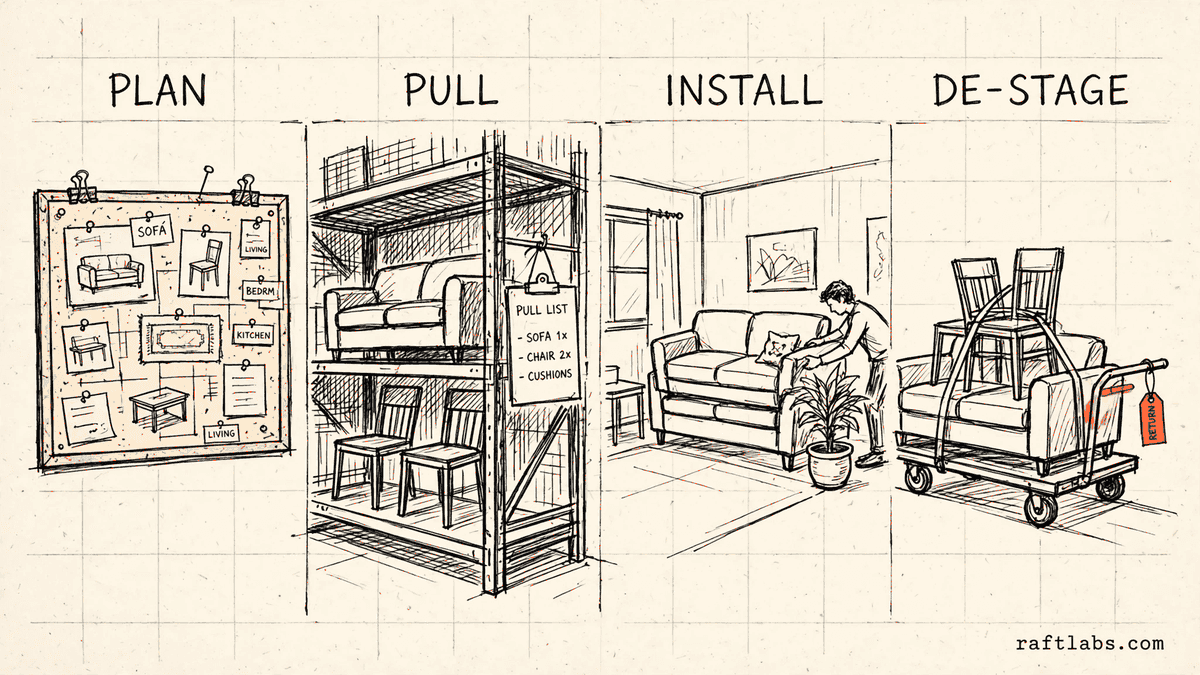
Your furniture earns its keep inside other people's houses. We turn that run into software that holds every piece the company owns, plans each property room by room against what is free on the install date, builds the warehouse pull list, and schedules the install, any extension, and the de-stage pickup as one job.
Bring one stuck workflow. Leave with a build, buy, repair, or wait recommendation.
Trusted by























The brief
Start with what is not working.
Good software decisions begin with the constraint, not a list of features or a preferred technology.
Nobody can say which pieces are in the warehouse, which are in a staged property, and which were promised to two installs on the same day.
Inventory, properties, proposals, and crew schedules each live in a different spreadsheet or text thread.
At de-stage, a piece comes back damaged, or does not come back, and there is no record of its condition when it went out.
Plain answer
RaftLabs builds home staging business software for staging companies that own their furniture and circulate it from property to property. One job record follows each property from the room-by-room plan, checked against which pieces are free on the install date, through the warehouse pull list, the install, any extension, and the de-stage pickup, with every piece's condition and current location on its own record.
What to remember
- Use this when the inventory spreadsheet, the proposal, and the crew's text thread disagree about where a piece is.
- Every piece the company owns has one record: what it is, where it is now, what condition it is in, and which property it is promised to.
- Room-by-room selections are checked against availability on the install date, so the same sofa is never promised twice.
- Quote the company's own screens as their own scope: the inventory record, the room planner, the pull list, and the install calendar are a second product, not a single admin-panel line.
- Hire freelancers for one small, well-defined task; use one accountable agency party when the work needs coordination across screens, rules, data, and connections.
The first decision is not what to build.
It is whether software is the right answer at all. We use four possible recommendations before discussing a development scope.
- 01
Buy
Choose a maintained product when it handles your inventory, your room planning, your pull lists, and your install and de-stage scheduling, and the remaining gaps can be solved with configuration, a connector, or a small process change. Paying for software you do not have to maintain is often the better trade.
- 02
Repair
Keep the existing system when the office and the warehouse still get value from it and the code can be understood safely. Start with evidence: where the code lives, how the data is organized, what is tested, which outside services it depends on, who can access what, and how updates go live.
- 03
Build
Own the system when your planning rules, inventory model, or crew workflow shape margin, customer trust, or speed, and no maintained product will hold them. Start with one complete path, usually the run from proposal to de-stage, and the system connections that path cannot work without.
- 04
Wait
Do not turn unsettled availability rules into permanent software. Settle how inventory, planning, and scheduling should work, name the workflow owner, and measure the cost of the current process before paying for a product.
Not sure which path is yours? Bring it to a 30-minute call. Leave with the answer in writing.
Fit
Custom staging software should earn its maintenance burden.
A feature request is not enough. The case is real when the same constraint shows up in time, errors, margin, or customer trust.
Inventory, properties, proposals, and crew schedules are tracked in separate places, and the errors reach clients at install.
Your availability, planning, or condition rules differ from a generic product, and the company keeps forcing workarounds.
The organisation can name a workflow owner and what 'done' looks like for the first release.
A maintained product fits your inventory model and scheduling rules with reasonable configuration.
The team wants software to settle planning and availability rules nobody has agreed yet.
The brief is a feature list with no user, transaction, or business result attached.
Not sure which side you are on? Use the first call to make that decision. A useful answer may be to buy, connect, repair, or wait.
Start with the operation, not the software.
A staging problem usually starts as a where-is-it problem. The inventory lives in a spreadsheet, the proposal in a document, the install date in a calendar, and the crew's instructions in a text thread. Each record looks fine on its own. The trouble starts when they disagree, and they disagree at the worst moment: install morning, with the truck being loaded, when the sofa on the plan turns out to be still sitting in a property across town.
The warehouse itself makes a plain system fail. The crew works with their hands full and a truck to load, not at a keyboard. Software that makes them stop, search, and retype piece details for every item will be abandoned for the text thread within a week, and the text thread is what loses the piece that never came back from a de-stage.
A second product hides inside the first. Clients and agents see their proposal and their staged rooms; your team lives in another set of screens: the inventory record, the room planner, pull lists, the install calendar, and a record of who changed what. Quotes that squeeze all of that into an "admin panel" line item are where budgets most often break, so we quote your team's screens as their own job, with their own users, from the start.
Custom software makes sense when one owned job record can hold the proposal, the plan, the pull list, the install, and the de-stage together better than a product, connector, or process change. The first release should take the smallest useful path from a property being won to its furniture being back in the warehouse. It should not replace every tool at once.
We start where it hurts.
The property record is only one part of the job. The real scope includes how inventory is catalogued, how plans are checked against real availability, how the warehouse pulls, what happens when things fail, who can see and change what, and who runs it after release.
The same piece promised to two installs
Check every room selection against availability on the install date as it is picked. A piece that is out at another property cannot be promised, and the clash shows at planning, not at the truck.
Inventory in a spreadsheet nobody trusts
Give every piece one record with its photo, its location, and its condition. The warehouse, the designer, and the crew all read the same record, so the spreadsheet stops being a second opinion.
Pull lists rebuilt from proposals
Turn the approved room plan into the warehouse pull list, in room order, with packing notes. The crew pulls against the plan itself, not against a message about the plan.
Extensions agreed and never recorded
Put the install, the end date, any extension, and the de-stage on one property record. An extension keeps the pieces spoken for, so they are not planned into the next property.
Damage argued about weeks after de-stage
Record condition when a piece goes out and when it comes back, with a photo at de-stage. The repair conversation starts from dated records, not from memory in the warehouse.
Which one is yours?
Bring it to a 30-minute call. Leave with a build, buy, repair, or wait recommendation in writing. Free, whether or not we ever work together.
Verticals
Custom software for specialised operations.
Some workflows only exist in one kind of company. The same rules apply: configure first, build only the part the maintained products cannot cover, and start with one complete path.
Staging companies that own their inventory
Owned furniture circulating property to property is the whole business: plan, pull, install, extend, de-stage. The system keeps that run on one record per property and one record per piece, so a new crew member works the same way as the person before them.
Multi-crew operations with a warehouse
When several crews and a warehouse team share the work, the pull list, the truck, and the calendar have to agree. Each team works from the same job record, so the warehouse pulls what the designer planned and the crew installs what was pulled.
Agent and developer work
Repeat clients book properties in a flow, often with the same styles and short notice. Their properties, agreements, and past plans stay in one place, so a returning client's next property starts from their history, not from a blank proposal.
Vacant and occupied staging
An occupied home adds the owner's own furniture and access limits to the plan. The record holds what is the company's, what is the owner's, and when crews may be in the property, so nothing is moved, mixed up, or collected by mistake.
Model homes and multi-unit work
The same rooms repeat across units, with pieces held in place for months. Repeated room plans and long holds sit on the record as real fields, so availability planning sees the units still furnished, not as stock that looks free.
Check it yourself
No story here. A check you can run instead.
This page carries no client story for staging companies, because we will not invent one. What you can do is test any system, ours included, against one full staging job before you sign.
Run one property from proposal to de-stage: win the job and turn the proposal into a room-by-room plan, try to pick a piece that is out at another property on the install date and check it refuses, turn the plan into a pull list, extend the term, then de-stage and check every piece back in with its condition. Proposal, plan, pull list and pickup should be one job record, not four places that agree only when someone retypes them.
The one-property test
What to check before you sign
Bring this check to any vendor, including us. A system that cannot pass it in a demonstration will not pass it in your busiest week.
Which inventory, planning, or scheduling problem is costing you the most right now?
Bring it to a 30-minute call. Leave with a build, buy, repair, or wait recommendation in writing. Free, whether or not we ever work together.
Let the work pick the shape.
The way people work should decide the form of the software. Designers plan at a desk or in the property, the warehouse works standing with hands full, and crews check pieces in at the door. Those facts tell us what belongs in the first release.
Web app
Work done across roles and locations. Designers, warehouse staff, crews, and the manager all get the same current property and inventory records in a browser: no installs, no versions, no device limits. When in doubt, this is usually the right first surface.
Mobile app
Work away from a desk: photographing a new piece into the catalogue, or checking pieces in at a de-stage.
Desktop app
Local hardware, large files, work without a browser. The warehouse station and label printing for piece tags often live here, where the company must keep running on the local network.
Browser extension
One task inside a system that otherwise works.
Connected devices
Label printers and scanners that read piece tags, when the physical setting demands them and the equipment maker allows the connection.
One product may need several surfaces. Each one should support the same complete workflow, not start another feature list.
How it works
Close one expensive risk before opening the next.
Each stage answers a buyer question and leaves behind a decision you can inspect. The next stage only opens when the expensive uncertainty in the current one is small enough to accept.
- 01Understand
Trace the real workflow
Where is the cost or failure actually coming from?
Follow one property from start to finish: the inquiry and proposal, the room-by-room plan, the warehouse pull, the install, and the extension and de-stage. Include the workarounds, the phone calls, the duplicate records, and the corrections that a tidy process diagram usually misses.
Decision produced
A map of the workflow, exceptions, owners, systems, and the baseline cost or delay worth changing.Risk closed
Paying to automate the visible symptom while the expensive constraint remains. - 02Shape
Choose the first useful release
What needs to exist together for one useful result to work?
Choose the shape from the way the work happens, not from a preferred technology. Name the kinds of properties you stage, how availability works, the condition rules, who can access what, the exceptions, and the result the first release must complete.
Decision produced
The right mix of web, mobile, desktop, browser extension, connected device, or behind-the-scenes connection work, with the first-release boundary and a clear definition of done.Risk closed
A small-looking feature list that quietly depends on several interfaces, systems, and owners. - 03Prove
Review working software
Will it hold up outside a controlled demo?
Review the product against the agreed workflow, not a tour of finished screens. Run a full staging job at a busy week's pace, extend a property mid-plan and watch availability change, and test what happens when a piece is missing at pull or damaged at de-stage.
Decision produced
Working checkpoints tested with realistic data, real user types, system connections, recovery plans, and the people who will use or run the system.Risk closed
Discovering the important gaps during migration or after customers depend on the release. - 04Transfer
Release, measure, and hand over
Did the new workflow improve the original constraint, and can another capable team operate it?
Move a controlled set of users or records first. Compare double-booked pieces, pieces unaccounted for after de-stage, time from proposal to plan, or another agreed measure with the starting point before adding the next workflow.
Decision produced
A controlled release, comparison with the baseline, operating notes, account ownership map, and a recommendation for what should happen next.Risk closed
Measuring development activity instead of the business result, or depending on the original vendor to keep the system running.
What stays out of the black box
These are operating conditions to put in the engagement, not claims to take on faith.
The scope names one complete workflow
The user, the trigger, the decisions, the data, the exceptions, and what 'done' looks like. A screen list is not enough.
Progress is visible in working software
Reviews against the product at agreed checkpoints, while there is still time to act.
A scope change has a price before it has code
A new workflow or system connection shows its effect on cost and timing before anyone approves it.
Ownership exists throughout, not only at handover
Code, cloud, data, and provider access stay visible and under your control from day one.
The work is checkable without being technical
Checkpoints are working software you use yourself, reported in plain language.
Custom software by industry.
Start from your domain. Each area below is a working practice with shipped products behind it.
What it costs
Every project starts at $10K.
The first phase turns the costliest patched workflow into a scoped build with what 'done' looks like agreed in writing.
Starting investment
Starts at $10K
Workflow complexity, systems to connect, data migration, and user roles set the scope. After a 30-minute call, you get a written build, buy, repair, or wait recommendation plus first-phase direction. Free, whether or not you build with us.
Not ready to talk? Start here.
Four useful next paths: decide whether to own the software, estimate the cost range, understand what moves the price, or inspect a comparable recovery.
Run the build-vs-buy calculator
Compare the cost and operating trade-offs before turning a workflow into a development brief.
Estimate the cost range
Get a working cost range for your scope before you talk to any vendor.
Read the cost guide
See the scope factors that move price, timing, team shape, and long-term maintenance.
Inspect a product recovery
See what changed when UrShipper moved from four failed vendor attempts to a controlled migration.
Build or buy
| Buy an existing product | Build custom software | |
|---|---|---|
| Best fit | Handles your inventory, room planning, pull lists, and install and de-stage scheduling with reasonable setup, and its pricing makes sense | The way your company plans and circulates its inventory is itself the advantage |
| Manual work | Configuration and process changes can remove the constraint | Repeated manual work around every install has a measurable cost |
| Connections | Existing connections work with reasonable setup | A critical connection to your accounting, payment, or messaging service cannot be done cleanly any other way |
| Staging model | The product already handles your availability rules, condition records, and crew workflow the way your company does | Own custom software only when your planning rules, inventory model, or scheduling justify build and support |
Work with us
Bring one stuck workflow. Leave with a decision.
In a 30-minute call, we will help you decide whether to buy, connect, repair, build, or wait. If custom software is not the sensible next move, that is still a useful answer.
- One named workflow owner and one complete path for the first phase.
- Scope, price, what 'done' looks like, and exclusions agreed before paid work starts.
- Code, cloud, data, and provider access remain under your control.
Frequently asked questions
Straight answers to what buyers ask before they scope. Still stuck? .
It is software that runs a staging job from the first inquiry to the final pickup. Each property is recorded once with its rooms, its install date, and its owner or agent. That record becomes the proposal, the room-by-room plan of which pieces go where, the warehouse pull list, the install, and the de-stage pickup at the end. Underneath it sits the inventory: every piece the company owns, where it is, and what condition it is in. Because every step reads from the same records, a piece is promised once instead of being chased across a spreadsheet, a proposal document, and a text thread.
Rental software hires stock out: a customer picks items, pays for a period, and returns them after an event. Staging is different work. The company owns the furniture, chooses it for a property as part of a design, installs it, leaves it in place while the property sells, extends the term when asked, and collects it at de-stage. Nobody rents a single chair. The software on this page is built around that shape: pieces circulate property to property under the company's own plan, and the record that matters is where each piece is, what condition it is in, and which property it is promised to next.
The designer builds the plan room by room: the living room gets this sofa, these chairs, this rug. As each piece is picked, the system checks it against the install date: a piece already out at another property until after that date cannot be promised, and the designer sees that while planning, not on install morning. Pieces coming back just before the date show as available with their return shown, so the plan is built on what will actually be in the warehouse.
Once a plan is approved, it becomes the pull list: every piece for the property, in room order, with quantities and any packing notes. The warehouse team pulls against that list instead of a designer's message or a printed proposal, and each piece is marked as pulled and loaded. If a piece on the list is damaged or cannot be found, that shows up while there is still time to swap in an alternative and update the plan, not at the property with the truck half loaded.
Each property carries its dates as one chain: the install date, the agreed end date, any extension, and the de-stage pickup. When a property sells and the agent asks to extend, the extension lands on the same record, and the pieces in that property stay spoken for, so they are not promised to the next install. When the de-stage is booked, the pickup list is the install list in reverse: the crew collects against what went in, and anything missing or damaged is recorded at the door, not discovered weeks later.
Every piece has its own record: a photo, a description, where it is now, warehouse, in transit, or at a named property, and its condition. Condition is updated at the moments it can honestly be judged: when it is pulled, when it is installed, and when it comes back at de-stage. A scuff noticed at pickup is recorded then, against that property's job, so the conversation about repair or replacement starts from a record with dates, not from a warehouse argument.
A proposal that wins becomes the plan, instead of being retyped into one. The rooms agreed with the client carry into the room-by-room selection, the selections carry into the pull list, and the completed work carries into the invoice. The client, the designer, the warehouse, and the crew are all looking at stages of the same job, so a change agreed with the client updates the plan the warehouse pulls from, rather than living in an email the crew never saw.
At de-stage, the crew checks pieces in against the install list. A piece that comes back damaged is recorded with its condition and a photo against that property's job; a piece that does not come back is flagged on the same record, while the property and the people involved are still known. The piece's own record keeps the whole trail: where it went, in what condition it left, and what state it returned in. What the company charges or writes off is the company's decision; the software's job is to make the facts impossible to lose.
Buy an existing product when it handles your inventory, your room planning, your pull lists, and your install and de-stage scheduling the way your company runs them, and its pricing makes sense. Build custom when your planning rules, inventory model, or crew workflow are the way your company competes and no maintained product will hold them, when repeated office work after every install has a measurable cost, or when a critical connection, such as your accounting or your client messaging, cannot be done cleanly any other way. If your inventory and scheduling rules are still changing every month, wait and settle them first.
For a small, well-defined task with someone technical managing it, freelancers are often cheaper. The pattern that goes wrong is a non-technical buyer coordinating several freelancers becoming the project manager, the tester, and the person who discovers the pieces do not fit. An agency earns its fee when the work needs coordination across screens, rules, data, and connections: one accountable party, one phase price, and checkpoints against the whole workflow. If your need is one screen or one fix, hire the freelancer.
First phases start at $10K. A complete quote names every kind of user, including your own team: clients and agents following a property, designers planning rooms, warehouse staff pulling stock, install crews working the day, and the owner or manager running the calendar. It also names the system connections, such as your accounting, your payment service, and your messaging service, the inventory, property, and past job records to be moved over, and what is excluded. The first paid phase may cover a bounded audit, a proof of concept, a recovery plan, or a small first release. The final price depends on how many properties and crews you run, how your planning and availability rules work, how inventory is catalogued, what it needs to connect to, whether past records need moving over, and the condition of any existing system. The agreed phase is priced in writing before it starts, and any change is priced and approved in writing before the work is done.
Timing depends on scope: a bounded audit or proof of concept is a smaller engagement, while a system covering inventory, planning, pull lists, and the install calendar takes longer. The schedule is set once the first workflow and what 'done' looks like are clear. The calendar holds more than building. It also holds settling your availability rules, such as how far ahead a piece can be promised, cataloguing the inventory you already own, moving past property records over, accounting and messaging provider access and approvals, and training for designers, warehouse, and crew. Dates slip when records arrive late, approvals wait, or planning rules change mid-build. A first release that lands in your busiest selling season gets its first real test in your hardest weeks, so starting early enough for quieter weeks to settle it first is part of the plan.
Yes. Takeover is a common first engagement, and it always starts with an audit: where the code lives, how your data is organized, what is tested, which outside services it depends on, who can access what, and how updates go live. Code that is understandable and fit for the next release stays; only the parts blocking reliability get replaced. And if you already paid another vendor and have nothing working, the audit tells you which story you have before you spend more: the most expensive version is the product that looks finished, clean screens and clicking buttons, while underneath nothing is tested and the important checks run in the browser, where anyone can tamper with them, instead of on the server where they hold.
Security starts with the data, the people, who can see and change what, the systems it connects to, and where it runs. A staging system holds client and agent contact details, property access details, payment records, and inventory records, so the scope can include access controls, separate testing and live environments, protected passwords and keys, activity logs, backups, and recovery plans. We write down which protections are included and which evidence your team must provide. While we work: penetration testing is taken care of. No production data is used in development, ever: testing runs on made-up client, property, and inventory records. Backups are tested, and there are offboarding steps when someone leaves a team. The third-party services this design sends data to, such as payment services, cloud hosts, and any messaging services, are named in the scope document before you sign. We claim practices we can show you, not certifications.
Those duties stay yours. Rules and contract terms on entering and working in someone's property, liability for damage to the property or to your own pieces, and local tax and business record rules apply to your company and your work, and the obligation sits with the business that does the staging. What the software can do is hold the records those duties need, such as which crew attended which property and when, what condition a piece was in when it went out and came back, and which agreement covers which property, and produce them in the form your company already uses. Scoping names which records the system holds for those checks. We will explain plainly what the system records and what it does not, and we never describe a system as making your company compliant.
We need one person who owns the workflow, access to the relevant users and systems, timely answers on business rules, and someone who can accept or reject each milestone. A weekly working session is usually enough once the scope is stable. Your team should not have to manage developers day to day.
Ask for the quote to name everyone who will use the system, including your own team. Every platform has two products: what customers see, and what your people use all day: the inventory record, the room planner, pull lists, the install calendar, refunds, and a record of who did what. When that second product is quoted as an 'admin panel' on a single line, it becomes the overrun. Our quotes treat your team's screens as their own scope, with their own users. Then the phase names the workflow, what 'done' looks like, the price, and the exclusions, all before paid work starts.
You judge what you can see, not the code. Every checkpoint is working software you click through yourself, tested against the workflow agreed at the start: plan a living room and watch a piece that is out at another property refuse the date, turn the approved plan into a pull list, then de-stage the property and check every piece back in. Progress is reported in plain language: what changed, what's next, and what it costs. Because you own the code, the accounts, and the operating notes throughout, nothing about the work is locked inside our heads. Our job is to make the work checkable; your job is to check it against your business.
You own it, from day one. The code built for you, the cloud accounts, your client, property, and inventory data, analytics, and third-party subscriptions are in your name from the start, not handed over at the end. Outside services and open-source pieces keep their own licence terms. The operating notes and handover material stay current throughout, so another capable team can take over.
After the first release, work can continue as another fixed phase, as an ongoing product engagement, or with your own team running the system from the operating notes. Support arrangements are agreed in writing rather than assumed. Whoever maintains it, the standing costs keep running: hosting, payment service fees, messaging service charges, and any connected-service subscriptions the company uses. The code and accounts stay under your control either way.
You already hold everything. The code, the accounts in your name, your client, property, and inventory data, and the operating notes stay with you from day one, so there is nothing to extract from us and no unlock step. Another team can pick up from the notes as they stand.
We work on five principles. Switch to Async: updates are written so you can read them between installs, not in a meeting you have to attend. Be Prepared: calls cover decisions that are ready to be made. Write: decisions and changes are written down where both sides can find them. Ask and tell: questions and bad news are raised in writing as soon as they appear. Own: the person working on a piece owns its outcome and says so plainly.
Yes. We sign your NDA before anything sensitive is shared, and the details you share for scoping, such as your staging fees, inventory value, and client numbers, stay confidential. The stronger protection is ownership: the code, accounts, and data are yours from day one.
No. The team that scopes your staging system builds it, and the people on your calls are the people on your project. Our teams are in India & Ireland. Payment and messaging services named in the scope are systems the software connects to, not a handoff of your project.
RaftLabs builds with its own AI workflow process called RaftKit, which you can read about at raftkit.com. In plain terms, the work moves through five stages: a blueprint of what is being built and why, a written plan, the build itself, a two-stage review where work is checked before it can move on, and a final stage where what was learned is written down for the next piece of work. Problems found in review are graded, and the most serious grade stops the work from going out until it is fixed. For you that means the staging workflows are planned in writing, checked in stages, and tested against the way your company actually runs, rather than code appearing in one pass that nobody has reviewed.