Concrete Contractor Management Software
Concrete software for pours that run as a chain, not an appointment.
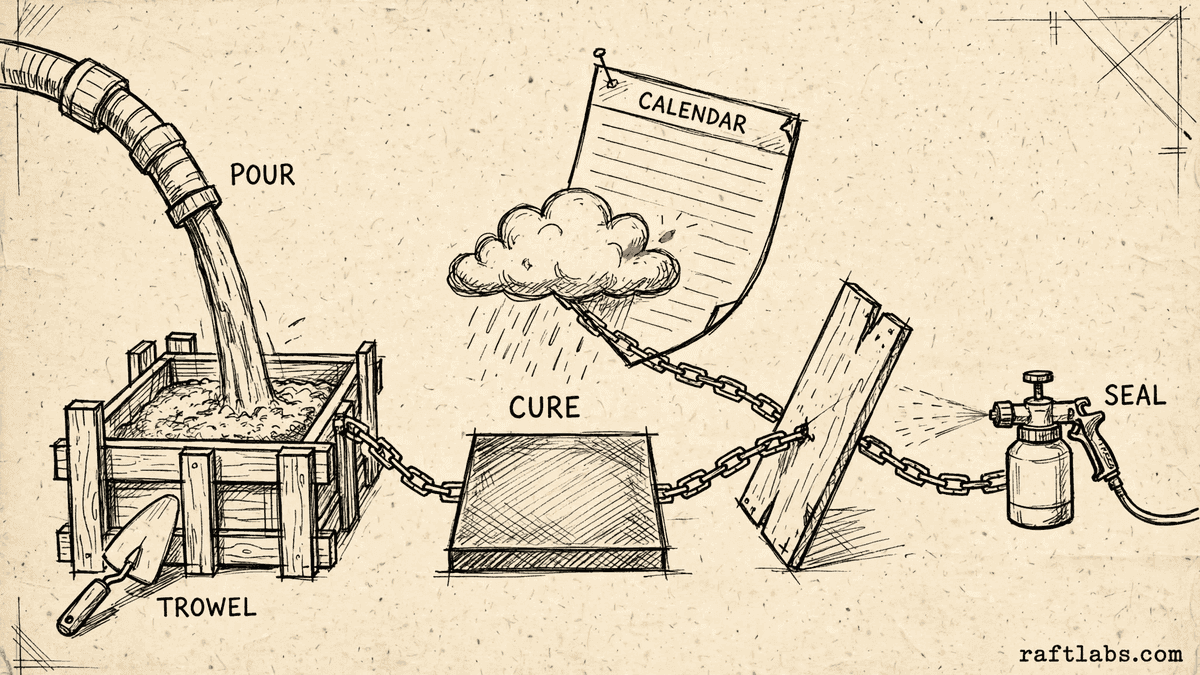
A pour links estimating, forming, the truck, curing, stripping and sealing into one chain. We turn that chain into software your office and crews can run, so a rain delay moves every step together instead of breaking the week by hand.
Bring one stuck workflow. Leave with a build, buy, repair, or wait recommendation.
Trusted by
























The brief
Start with what is not working.
Good software decisions begin with the constraint, not a list of features or a preferred technology.
Rain moves one pour, and the crew, pump, truck, cure, strip and seal dates all have to be moved by hand.
The bid was priced one way, but yards, pump time and crew hours are tracked somewhere else, so margin is a guess until the job closes.
A generic job board treats forming, pouring and finishing as one appointment, when each day needs a different crew and a different check.
Plain answer
Concrete contractor software manages a pour as a chain, not a single appointment: estimating by cubic yard and finish tier, scheduling forming, pouring, curing, stripping and sealing around weather, and costing every yard, pump hour and crew hour against the price agreed with the customer.
What to remember
- A pour is a chain of linked steps, so moving the pour day should move curing, stripping and sealing with it.
- Cost every job per cubic yard placed, with pump, reinforcement and crew hours tracked against the same price the customer agreed.
- Finish tiers such as broom, stamped and exposed aggregate need their own price per square foot on the same estimate.
- Use a maintained product when it already handles the pour chain cleanly; own custom software when your chain is the way you win and keep margin.
Fit
Custom software should fit the pour, not the other way round.
The case is real when your team keeps rebuilding the pour plan outside the software you already pay for.
Your jobs run as linked steps over several days, and one delay forces hours of manual rescheduling.
You price by the yard and by finish tier, and you need actual cost per yard placed on every job.
You can name one person who owns the workflow and what done looks like for the first release.
A maintained product already handles your estimate, pour chain and costing with reasonable setup.
Your work is mostly single-visit jobs with no curing or follow-on steps to coordinate.
The brief is a feature list with no job, crew or customer result attached to it.
Not sure which side you are on? Use the first call to make that decision. A useful answer may be to buy, connect, repair, or wait.
Start with the pour week, not the software.
A concrete job looks simple on a calendar and complicated everywhere else. Monday is excavation and forming, when the wooden mould that gives the slab its shape is set and levelled. An inspection may need to pass before any concrete arrives. The pour itself waits on a weather window, a ready-mix truck and a pump, and it cannot be paused halfway. After the pour, the concrete needs curing time, the period when it hardens and gains strength, before forms are stripped and sealer can go on.
When software treats that week as one appointment, the real plan moves elsewhere. It lives in a spreadsheet for yards, a group chat for crew changes, and one person who remembers which jobs still need stripping or sealing. A rain delay then becomes an afternoon of phone calls, because every downstream step has to be found and moved by hand.
This page is about concrete work specifically. It is different from asphalt paving contractor management, where phased paving and tonnage work can often be rescheduled phase by phase. With concrete, the pour starts a timed chain, so the software has to keep the whole chain together.
Custom software makes sense when one owned system holds the estimate, the pour chain and the costing together better than a product, a spreadsheet or a process fix. The first release should complete one valuable path, from a priced estimate to a finished, costed pour, not replace every tool at once.
Where concrete jobs lose money and time.
The screens matter less than the rules underneath: how yards are counted, how finish options are priced, and what moves when the weather moves.
Estimates priced by yard and finish
Price from the measured area and depth, with waste allowed for uneven ground, and show broom, stamped and exposed aggregate options at their own price per square foot on the same estimate. The customer chooses a level; your team sees what that choice costs to deliver.
A pour chain, not a calendar entry
Forming, inspection, pour, curing, stripping and sealing sit as linked steps with their own days and crews. Move the pour and the steps after it move too, with the truck, pump and customer updated from the same record.
Per-yard costing while the job is open
Track yards ordered and placed, reinforcement, pump time, delivery charges and crew hours against the price as the job runs. You see margin per cubic yard placed while there is still time to act, not weeks after the invoice is paid.
Builder and repeat work in one record
For contractors pouring for builders, keep the builder schedule, purchase order and work order tied to the same job record, from release to sign-off and invoice. A builder change to a pour date should reach your crew plan without a second round of copying.
Site records crews will actually complete
Crew leads record hours, yards placed, delays and photos from the site, including when signal is poor. The office can find what happened on a pour months later without relying on memory or a paper ticket that never made it back.
Which one is yours?
Bring it to a 30-minute call. Leave with a build, buy, repair, or wait recommendation in writing. Free, whether or not we ever work together.
Scope
What the first release should cover.
Start with one complete path and the connections that path cannot work without. Add the rest only when the first path is earning its keep.
Estimate to pour
One path from site measure to priced estimate to scheduled pour chain, so the numbers on the quote are the same numbers the schedule and the order use. This is where custom software development earns its place over a generic job board.
Office and field in one system
The office works in a browser through web application development, while crews use phones on site through mobile app development for the pour plan, hours and photos. Both sides see the same job record.
Home services and field context
Concrete contractors sit inside the wider home services and field service world for leads, reviews and repeat customers. Custom software should connect to that work where it helps, not duplicate the tools that already handle it well.
Proof
The fifth attempt became a product customers could keep using.
UrShipper had already worked with four development vendors. Its founder describes the communication and decisions during the recovery.
The case study documents a 14-week recovery, five carrier connections, a Shopify fulfilment workflow, and client-reported results. It is one comparable project, not a promise that every inherited codebase can follow the same plan.
Read the UrShipper case studyWhich workflow is costing you the most right now?
Bring it to a 30-minute call. Leave with a build, buy, repair, or wait recommendation in writing. Free, whether or not we ever work together.
How it works
Close one expensive risk before opening the next.
Each stage answers a buyer question and leaves behind a decision you can inspect. The next stage only opens when the expensive uncertainty in the current one is small enough to accept.
- 01Understand
Trace one real pour
Where does the plan break when weather, the plant or the crew changes?
Follow one job from the first measure to the paid invoice. Include forming, inspection, the truck and pump bookings, curing, stripping, sealing, and every workaround your team uses when one of those steps moves.
Decision produced
A map of one job from estimate to final invoice, with the linked steps, owners, systems and failure points named.Risk closed
Automating the calendar view while the real chain still lives in calls and spreadsheets. - 02Shape
Choose the first useful release
What needs to exist together for one priced, scheduled and costed pour to work?
Choose the shape from the way the work happens. Name who prices, who schedules, who records on site, what the plant and pump records must carry, and what the office needs to cost the job.
Decision produced
The first-release boundary, the users it serves, the connections it needs, and a clear definition of done for the estimate to pour path.Risk closed
A small feature list that quietly depends on several crews, suppliers and office screens. - 03Prove
Review working software
Does it hold up when a pour moves and the numbers change?
Review against the agreed workflow, not a tour of finished screens. Test the rain delay, the changed delivery slot, the short crew and the missing information, because those are the days the software has to earn its keep.
Decision produced
Working checkpoints tested with a real job: price it, move it for rain, record the pour, and cost it at the end.Risk closed
Discovering during a live pour week that the chain does not move together. - 04Transfer
Release, measure, and hand over
Did margin and coordination improve, and can another capable team operate it?
Start with a controlled set of jobs. Compare time spent rescheduling, costing accuracy and completion of follow-on steps with the starting point before adding the next workflow.
Decision produced
A controlled release, comparison with the starting point, operating notes, account ownership map, and a recommendation for what should happen next.Risk closed
Measuring activity instead of margin per yard, or depending on the original vendor to keep the system running.
What it costs
Every project starts at $10000.
The first phase turns the costliest patched workflow into a scoped build with written acceptance criteria.
Starting investment
Starts at $10000
Workflow complexity, systems to connect, data migration, and user roles set the scope. After a 30-minute call, you get a written build, buy, repair, or wait recommendation plus first-phase direction. Free, whether or not you build with us.
Not ready to talk? Start here.
Four useful next paths: decide whether to own the software, estimate the cost range, understand what moves the price, or inspect a comparable recovery.
Run the build-vs-buy calculator
Compare the cost and operating trade-offs before turning a workflow into a development brief. The result gives you a clear starting point for the conversation, whether the answer points toward a product you can buy today or a system worth owning.
Estimate the cost range
Get a working cost range for your scope before you talk to any vendor.
Read the cost guide
See the scope factors that move price, timing, team shape, and long-term maintenance. The guide helps you arrive at any vendor conversation already knowing which choices push a quote up and which ones keep it contained.
Inspect a product recovery
See what changed when UrShipper moved from four failed vendor attempts to a controlled migration.
Work with us
Bring one stuck workflow. Leave with a decision.
In a 30-minute call, we will help you decide whether to buy, connect, repair, build, or wait. If custom software is not the sensible next move, that is still a useful answer.
- One named workflow owner and one complete path for the first phase.
- Scope, price, what 'done' looks like, and exclusions agreed before paid work starts.
- Code, cloud, data, and provider access remain under your control.
- Post-launch warranty cover for defects in the agreed scope.
Common questions
It is software shaped around how concrete work actually runs: an estimate based on cubic yards and finish, a schedule where forming, pouring, curing, stripping and sealing are linked steps, and job costing that tracks concrete, reinforcement, pump time and crew hours against the price. A cubic yard is the unit ready-mix is sold in, roughly a cube three feet on each side. Generic job software usually treats a job as one visit on one day, which is where it stops fitting concrete work.
Asphalt paving work is usually planned in phases around tonnage, milling, paving and striping, and a delayed phase can often be picked up without changing the material itself. Concrete is different because the pour starts a timed chain: once concrete is placed it begins to cure, meaning it hardens over the following days, and stripping forms and applying sealer can only happen after that curing step. A rain delay before the pour therefore shifts the cure, strip and seal steps downstream together. Software for concrete has to model that chain, not just a list of paving phases.
You start with the yards the job needs, worked out from length, width and depth, with an allowance for waste and uneven ground. Then you track what was actually placed, plus reinforcement, pump time, delivery charges and crew hours, all against the same job. At the end you can see the cost for each cubic yard placed and whether the price held. The point is simple: if the order, the invoice from the plant and the crew time live in three places, nobody knows the margin until long after the pour.
A finish tier is the level of surface work the customer chooses. A broom finish is the plain, textured surface dragged with a broom, and it is usually the base option. Stamped concrete is pressed with patterns to look like stone or brick and takes more labour and materials. Exposed aggregate shows the small stones at the surface and needs its own steps. Each tier should carry its own price per square foot on one estimate, so the customer can compare options side by side and your team prices the extra work instead of absorbing it.
In a well shaped system, you move the pour once and the linked steps move with it: the crew assignment, the pump booking, the ready-mix order, and the cure, strip and seal dates that follow the pour. The customer gets one clear update with the new dates, not a series of separate calls. What the software cannot do is make the weather decision for you. Your team still decides whether conditions are safe to pour; the system makes the consequences of that decision visible and handled in one move.
Most generic tools model a job as a single appointment with one crew and one start time. A concrete job is several days with different needs: excavation and forming first, an inspection before the pour on many jobs, the pour itself tied to a truck and a weather window, then curing time before forms come off or sealer goes on. When each of those days is forced into one record, office staff rebuild the real plan in spreadsheets and phone calls, and that rebuilt plan is the first thing to break when weather moves.
The pour record should carry the yards ordered, the mix the job needs in plain terms, the plant delivery slot, and the pump booking, all tied to the pour date. If the plant moves delivery or the pour moves, everyone sees the same updated record. The software does not control the plant or the pump company; it keeps your order, their slot and your crew plan in one place so a change is spotted before the truck is loaded, not after it arrives.
Buy when a maintained product already handles your estimate, pour chain, costing and customer updates with reasonable setup, and its way of counting jobs and users fits how you work. Check that point carefully, because a plan that counts each visit as a job can charge you several times for one pour with forming, inspection, pour and finish days. Build custom when your chain, your finish pricing or your builder work is the part no product models cleanly, and the repeated manual work has a clear cost.
Yes, for the parts designed for it. Crew leads should be able to see the pour plan, record hours, note yards placed and add site photos while offline, with the record syncing when signal returns and showing clearly what is saved, pending or in conflict. Offline use has to be planned for the exact screens crews need; it is not automatic for every part of a system, and it should be tested on a real site, not only in the office.
The first paid phase may cover a bounded audit, a small first release, or one complete path such as estimate to pour to costing. The final price depends on how deep the workflow goes, how many kinds of users it serves, what it needs to connect to, whether data needs moving over, and whether phones or tablets are involved. The agreed phase is priced in writing before it starts, and your own team screens are quoted as their own scope, not hidden in a single admin line.
Ask for the quote to name everyone who will use the system, including your own team. Customers see estimates and updates; your team lives in scheduling, costing, approvals and records of who changed what. When that second set of screens is quoted as one small line, it becomes the overrun. Our quotes name the workflow, what done looks like, the price and the exclusions before paid work starts, and any change in scope shows its effect on price and timing before it is approved.
You judge what you can see, not the code. Every checkpoint is working software you click through yourself, tested against the pour workflow agreed at the start: price a real job, move a pour for rain, and cost it at the end. Progress is reported in plain language: what changed, what is next, and what it costs. Because you own the code, the accounts and the operating notes throughout, another capable team can take over if you ever choose to move.