Mobile Bar Management Software
Mobile bar software for events priced by the guest, not by guesswork.
Your bookings sit in direct messages, your bartender schedules sit in a group chat, your money sits in a spreadsheet, and your contracts sit nowhere. We turn that patchwork into one system that prices each event by guest count, works out the crew, the stock, and the travel, and shows what each event actually made.
Bring one stuck workflow. Leave with a build, buy, repair, or wait recommendation.
Trusted by























The brief
Start with what is not working.
Good software decisions begin with the constraint, not a list of features or a preferred technology.
Bookings arrive in direct messages, schedules live in a group chat, and revenue lives in a spreadsheet.
Every quote is worked out by hand, so the same event gets priced two different ways.
Nobody can say what a busy weekend actually made until the receipts are counted weeks later.
Plain answer
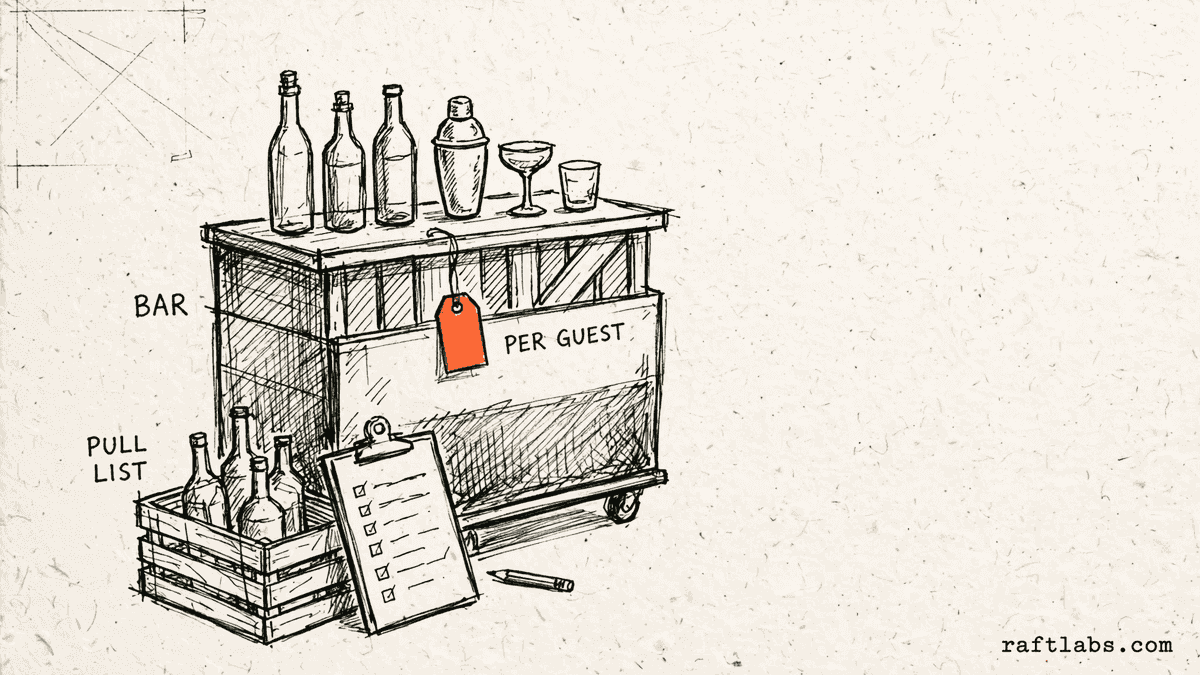
Mobile bar management software is a system made for mobile bar and mobile bartending companies. It prices each event by guest count and hours, works out how many bartenders the event needs, turns the drink menu into shopping and pull lists, adds travel fees, and keeps bookings, contracts, staff, and profit on one event record.
What to remember
- Use this when the same quoting, staffing, and stock problems repeat at every event.
- The first release should cover one complete path, from first enquiry to final profit figure.
- Per-guest prices, bartender counts by guest count, and travel rules should live in the system, not in one person's memory.
- The code, accounts, data, and operating notes should stay usable by another capable team.
Fit
Custom software should earn its keep.
A wish list is not enough. The case is real when the same problems show up in hand-built quotes, short crews, and weekends nobody can cost.
Your quotes are worked out by hand, and the price depends on who did the sums that day.
Bookings, schedules, money, and contracts live in separate apps that staff copy between by hand.
Your company can name one person who owns the workflow and say what 'done' looks like for the first release.
A ready-made product already prices per guest, counts your bartenders, and fits how your events run.
The real problem is an unsettled pricing policy that changes from event to event.
The brief is a feature list with no event, client, or result attached to it.
Not sure which side you are on? Use the first call to make that decision. A useful answer may be to buy, connect, repair, or wait.
Start with the event, not the software.
A mobile bar rarely has one software problem. It has six small ones. Bookings arrive in direct messages. The bartender schedule lives in a group chat. The money lives in a spreadsheet. The contract, if there is one, lives nowhere anyone can find on the day. Each app does its own part well enough. The cost sits in the gaps between them, where a person copies, remembers, or chases.
Drink service exposes those gaps faster than most event work. A price depends on the guest count, the hours, and whether the client supplies the alcohol or you do. The crew size depends on what is being poured. The shopping list depends on the recipes on the menu, scaled to the room. When those rules live in one person's head, the company has a single point of failure holding a cocktail shaker. When a guest count moves after the quote and nobody updates the stock list, the bar runs short in front of the client.
A second product hides inside the first. Clients see the booking page and the invoice. Your team lives in the other screens: setting prices, holding dates, chasing deposits, fixing schedules, counting stock, and working out what the weekend made. Quotes that squeeze all of that into one small line are where budgets break, so we scope your team's screens as their own job, with their own users, from the start.
Custom mobile bar management software makes sense when one system can hold the whole event, from the first enquiry to the final profit figure, better than the patchwork does. The first release should cover one complete path. It should not try to replace every app in the business at once.
Start where the money leaks.
The screens are only part of the job. The real scope is your pricing rules, your staffing bands, your recipes, who can see and change what, and what happens when the guest count moves.
Quotes priced per guest, not rebuilt by hand
Set a price per guest for each package, with extra hours, add-ons, and a minimum charge for small events. The client enters a guest count and sees the price work itself out. Your team sends the same quote the same way, every time.
Bartender counts that follow the guest count
Your staffing bands live in the system: so many guests pouring beer and wine calls for this crew, the same room on a full cocktail menu calls for that one. A booking shows the crew it needs as soon as it lands, and a changed guest count changes the crew before the event, not during it.
Dry hire and licensed supply kept apart
Dry hire means the client buys the alcohol and you bring the bar, the crew, and everything else. Licensed supply means you provide the alcohol under your own licence or permit. The event record states which model applies, holds the paperwork for it, and prices the two models differently, because their costs are different.
Shopping and pull lists from the menu
Each drink carries its recipe. A confirmed event scales the recipes to the guest count and turns them into a shopping list of what to buy and a pull list of what to load from your own stock. Change the menu or the numbers and both lists change with it.
Travel fees and profit on the same record
The venue address sets the travel fee by your own distance or zone rules, so far events stop being quoted like near ones. After the event, the same record holds the price, the stock bought, the staff hours, and the travel, and shows what the event made.
Which one is yours?
Bring it to a 30-minute call. Leave with a build, buy, repair, or wait recommendation in writing. Free, whether or not we ever work together.
The work
One record for every kind of bar event.
Weddings, corporate work, and dry hire events stress a system in different ways. The same rule applies to all of them: one event record that every screen reads from.
Weddings and private parties
The client books online, signs the contract, and pays the deposit without a week of messages. The guest count they give drives the price, the crew, and the stock lists at once, so what they booked is what arrives.
Corporate and recurring bookings
Repeat clients keep their venues, menus, and terms on one record, so a new date starts from the last event instead of from a blank enquiry. Several options can go out in one proposal, and the client picks and books in one step.
Dry hire events
When the client supplies the alcohol, the record flips the work around: your shopping list becomes the list you send the client to buy from, and your pull list covers the bar, tools, ice, and mixers you bring. Nothing arrives twice, and nothing is missing because each side assumed the other had it.
Busy weekends and second bars
Several events on one day pull from the same stock room and the same crew pool. The system shows where the bars, the equipment, and the bartenders already are before a new booking is accepted, so a sold-out item cannot be promised twice.
The office side
Deposits, payment plans, refunds, and who changed what sit in screens your team uses all day. These screens get their own scope and their own users, because they are where mistakes and disputes are settled.
Proof
The fifth attempt became a product customers could keep using.
UrShipper had already worked with four development vendors. Its founder describes the communication and decisions during the recovery.
The case study documents a 14-week recovery, five carrier connections, a Shopify fulfilment workflow, and client-reported results. It is one comparable project, not a promise that every inherited codebase can follow the same plan.
Read the UrShipper case studyWhich part of the patchwork costs you the most?
Bring it to a 30-minute call. Leave with a build, buy, repair, or wait recommendation in writing. Free, whether or not we ever work together.
How it works
Close one expensive risk before opening the next.
Each stage answers a buyer question and leaves behind a decision you can inspect. The next stage only opens when the expensive uncertainty in the current one is small enough to accept.
- 01Understand
Trace one real event
Where do the price, the crew, and the stock actually go wrong?
Follow one event and one crew from start to finish. Include the enquiry in a message thread, the quote rebuilt in a spreadsheet, the schedule settled in a group chat, and the stock counted from memory the night before.
Decision produced
A map of one event from first enquiry to final profit figure, with the workarounds, the hand-offs, and the cost of each gap.Risk closed
Paying to automate the visible symptom while the expensive gap stays where it was. - 02Shape
Choose the first useful release
What needs to exist together for one complete event to run through the system?
Choose the shape from the way the work happens. Name who uses it, where they use it, which records it needs, and which result the first release must complete: a priced quote, a booked crew, a stocked bar, or a closed event with its profit shown.
Decision produced
The first-release boundary: the users, the pricing rules, the staffing bands, the recipes, the connections, and a clear definition of done.Risk closed
A small-looking feature list that quietly depends on several screens, rules, and owners. - 03Prove
Review working software
Does it price and staff a real event the way your best quote does?
Review the software against real events, not a tour of finished screens. Price an event with a changed guest count, a second bar, and a far venue, and compare the quote, the crew, and the lists with what your team would have produced by hand.
Decision produced
Working checkpoints tested with your own packages, your own recipes, and your own recent events.Risk closed
Discovering the pricing gaps after crews already depend on the system. - 04Transfer
Release, measure, and hand over
Did the new system close the gap it was bought for, and can another capable team run it?
Start with one kind of event or one crew. Compare quote accuracy, crew gaps, stock shortages, and time from event end to profit figure against the old way before adding the next workflow.
Decision produced
A controlled release, a comparison with the starting point, operating notes, and an account ownership map.Risk closed
Measuring activity instead of the business result, or depending on the original vendor to keep the system running.
What it costs
Every project starts at $10000.
The first phase turns the costliest patched workflow into a scoped first release with what 'done' looks like agreed in writing.
Starting investment
Starts at $10000
Workflow complexity, systems to connect, data migration, and user roles set the scope. After a 30-minute call, you get a written build, buy, repair, or wait recommendation plus first-phase direction. Free, whether or not you build with us.
Not ready to talk? Start here.
Four useful next paths: see the wider custom software picture, the web and phone surfaces a mobile bar system usually needs, or the client records at its centre.
See the full custom software picture
How to decide between buying, repairing, and owning software, and what the first release should cover.
Plan the office screens
The browser-based screens your office team uses for quotes, bookings, contracts, and event money.
Plan the crew screens
The phone screens bartenders use at the venue: the event, the menu, the pull list, and the schedule.
Put client records in order
One record for every client, enquiry, event, and payment, shaped around how your company sells.
Work with us
Bring one stuck workflow. Leave with a decision.
In a 30-minute call, we will help you decide whether to buy, connect, repair, build, or wait. If custom software is not the sensible next move, that is still a useful answer.
- One named workflow owner and one complete path for the first phase.
- Scope, price, what 'done' looks like, and exclusions agreed before paid work starts.
- Code, cloud, data, and provider access remain under your control.
- Post-launch warranty cover for defects in the agreed scope.
Common questions
It is a system made for the way mobile bars work. A mobile bar sells drink service at someone else's venue, so every event turns on guest count, hours, the drink menu, how many bartenders the event needs, what stock to buy and load, and how far the crew travels. Generic booking tools treat that event like any other appointment. Mobile bar management software prices by the guest, keeps the booking, the contract, the staff schedule, the stock lists, and the profit on one event record.
Event catering software runs food: menus, kitchen quantities, and the event order the kitchen and service teams work from. This page is about drink service only. The record here carries per-guest drink pricing, bartender counts, drink recipes scaled into shopping lists, whether the client supplies the alcohol or you do, and travel to the venue. If your pain is food and kitchen work, the event catering management page is the right one. If your pain is quoting, staffing, and stocking a bar that moves, this page is.
Yes. You set your price per guest for each package you sell, and the system does the sums when a client enters a guest count and the hours of service. Extra hours, add-ons such as glassware or a second bar, and a minimum charge for small events are added by the same rules every time. The client sees a price that updates as they choose, and your team stops rebuilding the same quote by hand in a spreadsheet.
You set your own staffing bands once, by guest count and by what is being served. A beer and wine event needs fewer hands than a full cocktail menu, and a short, busy service window needs more hands than a long, slow one. When a booking lands in a band, the event record shows the bartender count that band calls for, plus a barback where your rules ask for one. Change the guest count and the count updates, so nobody discovers at the venue that the crew is one person short.
Dry hire means the client buys the alcohol and you provide the bar, the bartenders, the tools, the ice, and the mixers. Licensed supply means you buy and provide the alcohol yourselves, under whatever licence or permit your area requires for that kind of event. The two models carry different costs, different paperwork, and different risk, so the event record states which model applies before anything is quoted. The software records the model and the documents you hold. It does not decide what the law allows; that call stays with you, the venue, and your local rules.
Each drink on your menu carries its recipe: what goes in it and how much. When an event is confirmed, the system scales those recipes by the guest count and the hours of service, then turns them into two lists. The shopping list says what to buy, in bottles, cases, and bags. The pull list, which is the list your crew packs from your own stock room, says what to load for that event. When the menu or the guest count changes, both lists change with it, instead of being recounted by hand the night before.
You set the rule once: a free distance around your base, then a charge by distance or by zone beyond it, and a limit past which you do not travel. The client enters the venue address while booking, and the fee is worked out from that address and added to the quote. Nobody looks up the distance for each enquiry, and a far venue is never quoted at the price of a near one.
Yes. Each bartender sees their own events on a phone: the venue, the start time, the package, the drink menu, and the pull list for the bar. You control what each person sees, so pricing and client contact details can stay with the office. When an event moves or the guest count changes, the change appears on the schedule at once instead of being buried under a weekend of messages.
Every event record carries its money in one place: the price charged, the deposit paid, the stock bought for it, the staff hours, and the travel cost. When the event closes, the record shows what it made. That is the figure a spreadsheet gives you weeks later, after someone gathers the receipts. Here it is ready when the next similar enquiry arrives, so you can tell which packages and which event types earn their keep.
Buy an existing product when it prices per guest the way you price, handles your staffing bands and your supply models, and its monthly cost makes sense. Have one made when the ready-made tools keep getting your operation wrong: your package tiers, your dry hire and licensed work side by side, your travel zones, or profit figures your accountant can use. If your rules are still changing every week, settle them first and decide after.
Every project starts at $10000. The first phase covers one complete path, such as enquiry through booking to the profit figure for the event, with the scope and the price agreed in writing before paid work starts. The final price depends on how many pricing and staffing rules you carry, how many kinds of users the system serves, what it needs to connect to, and whether your records need moving over from spreadsheets or another tool.
You judge what you can see, not the code. Every checkpoint is working software you click through yourself, tested against the workflow agreed at the start. Progress is reported in plain language: what changed, what is next, and what it costs. Because you own the code, the accounts, and the operating notes throughout, nothing about the work is locked inside our heads. Our job is to make the work checkable; your job is to check it against your business.
You own the software made for you and control where it lives, the accounts, the client records, and the event history. Outside services and ready-made parts keep their own licence terms. The operating notes and handover material stay current so another capable team can take over.