Foundation Repair Management Software
Foundation repair software for the way foundation jobs actually run.
Inspections live in photo folders, estimates live in spreadsheets, and warranties live in a filing cabinet. We turn that scattered record into one system built around your inspections, your pier counts, and your properties.
Bring one stuck workflow. Leave with a build, buy, repair, or wait recommendation.
Trusted by























The brief
Start with what is not working.
Good software decisions begin with the constraint, not a list of features or a preferred technology.
Inspection photos sit in a shared folder that nobody can match to a job or a line item.
Per-pier costs are worked out in a spreadsheet, so margin is a guess until the job closes.
Lifetime warranties are tracked per property on paper, and a transfer means digging for files.
Plain answer
Foundation repair software manages the full job record for a foundation repair company: photo-documented structural inspections, tiered repair-method estimates priced per pier, multi-day crew work, deposit and progress draws, and transferable lifetime warranties tracked per property. RaftLabs builds it around your methods, your price book, and your warranty terms.
What to remember
- Use this when inspection evidence, estimates, and warranty records live in three different places.
- The first release should complete one path, from inspection to signed estimate to paid draw.
- Photos belong on the line item or job phase they prove, not in a general notes field.
- Warranties belong to the property, not the person, so a sale of the house does not break the record.
- Quote the office screens as their own scope: warranty lookup, draw approvals, and engineer documents are a second product, not a single admin-panel line.
Fit
Custom software should earn its maintenance burden.
A feature request is not enough. The case is real when the same constraint shows up in time, errors, margin, or warranty risk.
Inspection photos, estimates, and job costs live in different places and staff copy between them by hand.
Your repair methods, tier pricing, or warranty terms are how you win work, and a standard product flattens them.
The company can name a workflow owner and what 'done' looks like for the first release.
A maintained product fits your inspection and warranty workflow with reasonable configuration.
The team wants software to settle an undecided pricing or warranty policy.
The brief is a feature list with no job, user, or business result attached.
Not sure which side you are on? Use the first call to make that decision. A useful answer may be to buy, connect, repair, or wait.
Start with the job record, not the software.
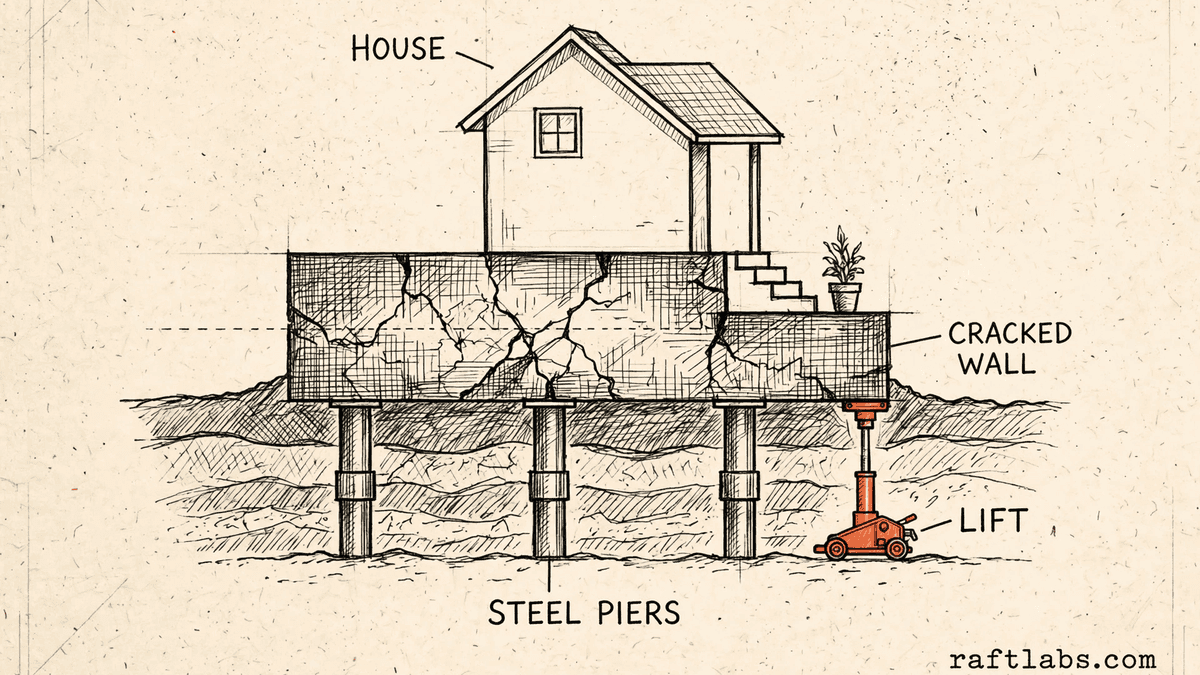
A foundation repair problem usually starts as a records problem. The inspector photographs cracks, bowing walls, and sticking doors at the house. The estimate gets built later, back at the office, from memory and a phone camera roll. The pier count changes on site. The warranty ends up in a folder with the signed contract. Each step works on its own. Together they leak time and margin.
Take one signed job. The homeowner asks what the second draw covers. The office checks the contract, then calls the crew lead, then looks for the phase photos. A realtor calls about a pre-sale inspection that has to close in two weeks, and the report from the first visit cannot be found. A warranty call comes in on a house that was sold last year, and nobody can say quickly what was installed or what the warranty covers.
A second product hides inside the first. Homeowners see an estimate and a portal. Your team lives in another set of screens: warranty lookup, draw approvals, engineer documents, pier and material counts, and a record of who changed what. Quotes that squeeze all of that into an admin panel line item are where budgets most often break, so we quote your team's screens as their own job, with their own users, from the start.
Custom foundation repair software makes sense when one owned system can hold the whole job record better than a general tool, a spreadsheet, and a photo folder combined. The first release should take the smallest useful path from inspection to result. It should not replace every tool at once.
We start where it hurts.
The screens are only one part of the job. The real scope includes the inspection record, the price book, the draws, the warranty file, and who can see and change what.
Inspections that lose their evidence
Build the inspection record around the photos and measurements taken at the house, tied to the wall, crack, or area they show, so the estimate written later rests on evidence instead of memory.
Estimates priced per pier, in tiers
Price each repair method from your own price book: pier type and count, sections, materials, and crew hours, presented as clear tiers the homeowner can compare on the spot.
Draws that drift from the work done
Tie deposit, progress, and completion draws to the phase they pay for, with the photos that prove the phase is done, so billing questions get answered from the record.
Warranties nobody can find
Hold every warranty against the property, with what was installed and the terms attached, so a transfer or a claim years later takes minutes to answer. Companies weighing a general platform first can compare it with field service management software and build only the part it cannot cover.
Job costs known only at month end
Record actual pier sections, materials, and crew hours against the quoted figures while the job runs, so margin shows up per job instead of as a surprise in the accounts.
Which one is yours?
Bring it to a 30-minute call. Leave with a build, buy, repair, or wait recommendation in writing. Free, whether or not we ever work together.
Workflows
Built around the foundation job, start to finish.
Each workflow below is a candidate for the first release. The rule stays the same: complete one path properly before adding the next.
Photo-documented structural inspections
The inspector works through the house in order: exterior and interior cracks, wall movement, floor levels, moisture readings, and drainage. Every photo and note lands on the area it describes. The finished inspection becomes the base for the estimate, the engineer packet where one is needed, and the before record the warranty file will rely on years later.
Tiered repair-method estimates
One inspection produces more than one honest option. A stabilization-only tier, a pier tier at the affected corners, and a full tier with crack repair and waterproofing can sit side by side, each with its own scope, price, and warranty terms. The homeowner signs the tier they chose, and that signed scope is what production and billing follow.
Per-pier job costing
Piers are where foundation margin is made or lost. The job record counts quoted piers against installed piers, depth and sections against plan, and crew hours against the estimate. When a job needs more piers than quoted, the change is recorded and approved before the extra work is billed, not argued about after.
Milestone draws and payments
Multi-day projects bill in stages. The deposit, each progress draw, and the final balance follow the contract stages, and each stage carries its phase photos and sign-off. The office can see billed, paid, and owed across every open job without rebuilding the picture from invoices and text messages.
Transferable lifetime warranties per property
The warranty record belongs to the address. It holds the systems installed, the pier map, the terms, and the evidence. A sale of the house transfers the warranty in the same record. A claim opens with the full history in front of your team, which is what makes a lifetime promise cheap to keep and easy to defend.
Waterproofing and drainage work
Many foundation companies also sell interior drainage, sump systems, membranes, and crawl space work. Those jobs share the same inspection, photo, and warranty needs, with their own materials and stages. One job record can hold both trades, so a combined foundation and waterproofing job is estimated, billed, and warranted as one project.
Proof
The fifth attempt became a product customers could keep using.
UrShipper had already worked with four development vendors. Its founder describes the communication and decisions during the recovery.
The case study documents a 14-week recovery, five carrier connections, a Shopify fulfilment workflow, and client-reported results. It is one comparable project, not a promise that every inherited codebase can follow the same plan.
Read the UrShipper case studyWhich workflow is costing you the most right now?
Bring it to a 30-minute call. Leave with a build, buy, repair, or wait recommendation in writing. Free, whether or not we ever work together.
How it works
Close one expensive risk before opening the next.
Each stage answers a buyer question and leaves behind a decision you can inspect. The next stage only opens when the expensive uncertainty in the current one is small enough to accept.
- 01Understand
Trace one real job
Where does the job record break between inspection and warranty?
Follow one job from the first call to the closed warranty record. Include the photo folders, the spreadsheet where pier costs are worked out, the paper contract, and every place a person retypes the same address or count.
Decision produced
A map of the inspection, estimate, production, billing, and warranty steps, with the owners, systems, and gaps worth fixing first.Risk closed
Paying to automate the visible symptom while the expensive gap stays in the warranty file or the pier count. - 02Shape
Choose the first useful release
What needs to exist together for one complete path to work?
Choose the path from the way your team already works. Name who inspects, who prices, who approves draws, and who answers warranty calls, then scope the screens each of them needs.
Decision produced
The first-release boundary, most often inspection to signed estimate, with the users, the price book rules, what 'done' looks like, and the exclusions in writing.Risk closed
A small-looking feature list that quietly depends on the price book, the warranty terms, and three office roles nobody named. - 03Prove
Review working software
Will it hold up on a real inspection, not a tidy demo?
Review the product against the agreed workflow. Run a past job through it end to end and compare the estimate, the draws, and the warranty record with what your team produced by hand.
Decision produced
Working checkpoints tested with a real property, real pier counts, your actual price book, and the people who will run inspections and billing.Risk closed
Discovering at the first live job that photos land in the wrong place or a tier price cannot be built the way your inspectors sell it. - 04Transfer
Release, measure, and hand over
Did the new system shorten the path from inspection to paid draw, and can another capable team operate it?
Move one crew or one service line first. Compare estimate turnaround, draw errors, and the time a warranty lookup takes with the old way before adding the next workflow.
Decision produced
A controlled release, comparison with the starting point, operating notes, account ownership map, and a recommendation for what should happen next.Risk closed
Measuring development activity instead of estimate turnaround, billing accuracy, or warranty lookup time.
What it costs
Every project starts at $10K.
The first phase turns the costliest patched workflow into a scoped build with written acceptance criteria.
Starting investment
Starts at $10K
Workflow complexity, systems to connect, data migration, and user roles set the scope. After a 30-minute call, you get a written build, buy, repair, or wait recommendation plus first-phase direction. Free, whether or not you build with us.
Not ready to talk? Start here.
Four useful next paths: decide whether to own the software, estimate the cost range, understand what moves the price, or inspect a comparable recovery.
Run the build-vs-buy calculator
Compare the cost and operating trade-offs before turning a workflow into a development brief.
Estimate the cost range
Get a working cost range for your scope before you talk to any vendor.
Read the cost guide
See the scope factors that move price, timing, team shape, and long-term maintenance.
Inspect a product recovery
See what changed when UrShipper moved from four failed vendor attempts to a controlled migration.
Work with us
Bring one stuck workflow. Leave with a decision.
In a 30-minute call, we will help you decide whether to buy, connect, repair, build, or wait. If custom software is not the sensible next move, that is still a useful answer.
- One named workflow owner and one complete path for the first phase.
- Scope, price, what 'done' looks like, and exclusions agreed before paid work starts.
- Code, cloud, data, and provider access remain under your control.
- Post-launch warranty cover for defects in the agreed scope.
Frequently asked questions
Straight answers to what buyers ask before they scope. Still stuck? .
It is the system a foundation repair company uses to run a job from first call to warranty. It holds the inspection record with photos and measurements, the estimate with repair methods and pier counts, the crew schedule, the deposit and progress draws, and the warranty tied to the property. Generic field service tools handle the call and the invoice. They rarely handle the structural record underneath the job.
A general tool is built around a service call that opens and closes in a day. Foundation work is a multi-day project with an inspection, an engineer report in some cases, a pier plan, staged billing, and a warranty that can outlast the sale of the house. If your team keeps a second system of spreadsheets and photo folders to cover those parts, the general tool is not covering the job.
Yes, and that is the point of building it. Each photo can carry the property, the area of the house, the crack or wall it shows, a timestamp, the inspector, and the estimate line or job phase it supports. Before, during, and after photos stay in order, so an engineer, a homeowner, or your own warranty team can see what was found and what was done without hunting through a shared folder.
The estimate counts piers the way your crew installs them. Each pier line can hold the pier type, the depth reached, sections used, materials, and crew hours, priced from your own price book. When the job closes, the actual sections and hours sit next to the quoted figures, so you can see which jobs made money and which ones lost it, pier by pier, instead of guessing at the end of the month.
Yes. Many foundation companies sell in tiers: a lower-cost fix such as foam injection to level a slab, a mid-tier fix such as steel push piers at the affected corners, and a full fix such as helical piers with crack repair and waterproofing. The system can present those tiers side by side from the same inspection record, each with its own scope, price, and warranty terms, so the homeowner compares methods rather than comparing you with another company.
The job is billed in stages that match the contract: a deposit at signing, a progress draw when a phase is complete, and the balance at closeout. Each draw is tied to the phase evidence, including photos, so the office can show what the payment covers. The system tracks what has been billed, what has been paid, and what is still owed on every open job.
The warranty is recorded against the property, not just the customer who signed. The record holds what was installed, where, the warranty terms, and the inspection and photo evidence behind it. When the house changes hands, the warranty transfers to the new owner in the same record, and your team can answer a warranty call in minutes instead of searching paper files or an old spreadsheet.
Yes. Engineer reports, pier layout drawings, permit documents, and warranty certificates can be attached to the job record and to the estimate they support. Your team defines which documents a job needs before it can move to the next stage, and the record shows what is missing instead of relying on someone remembering.
Buy an existing product when it handles your inspection, estimating, and warranty workflow with reasonable setup and its pricing makes sense. Build custom when your repair methods, tier pricing, or warranty terms are the way you win work and the product forces you to work around them, or when a critical connection to your accounting or phone system cannot be done cleanly. If your methods are still changing every few months, wait and settle them first.
The first paid phase may cover a bounded audit, a proof of concept, or a small first release that completes one path, such as inspection to estimate. The final price depends on how many kinds of users it serves, what it needs to connect to, whether records need moving over from spreadsheets and photo folders, and how much of the office workflow is in scope. The agreed phase is priced in writing before it starts.
Ask for the quote to name everyone who will use the system, including your own team. Every platform has two products: what homeowners see, and what your people use all day: warranty lookup, draw approvals, document checks, managing users, and a record of who did what. When that second product is quoted as an admin panel on a single line, it becomes the overrun. Our quotes treat your team's screens as their own scope, with their own users.
You judge what you can see, not the code. Every checkpoint is working software you click through yourself, tested against the workflow agreed at the start: run a real inspection through it, build a real estimate, bill a real draw. Progress is reported in plain language: what changed, what is next, and what it costs. Because you own the code, the accounts, and the operating notes throughout, nothing about the work is locked inside our heads.
Yes. Takeover starts with an audit: where your job records live now, how your price book and warranty records are organized, who can see and change what, and what would break if a tool was switched off. Records worth keeping get moved over in a planned step. Only the parts blocking reliable work get replaced.
You own the code built for you and control where it lives, the cloud accounts, the data, analytics, and third-party subscriptions. Outside services and open-source pieces keep their own licence terms. The operating notes and handover material stay current so another capable team can take over.