Radiology Information Systems: What a RIS Does, How It Differs from PACS, and When You Need One
A radiology information system manages scheduling, exam tracking, and reporting for an imaging department. Here is what it does, how it differs from PACS, what HL7 and DICOM integration involves, and what a dedicated build costs.

In this article
Short answer
A radiology information system (RIS) manages scheduling, orders, and reporting. It works alongside a PACS, which stores and displays images, and often an EHR holding the full clinical record. RIS and PACS exchange data via HL7 and DICOM Modality Worklist. A RIS build for HIPAA workflows costs $40,000-$160,000. RaftLabs builds RIS software integrating PACS and EHR via HL7 and DICOM.
Key takeaways
- A radiology information system (RIS) manages the scheduling, exam tracking, and reporting workflow for an imaging department, while a PACS stores and delivers the images themselves.
- Most imaging departments run RIS and PACS as separate systems that share data through HL7 messaging: the RIS sends orders and receives results, and PACS handles image storage and retrieval.
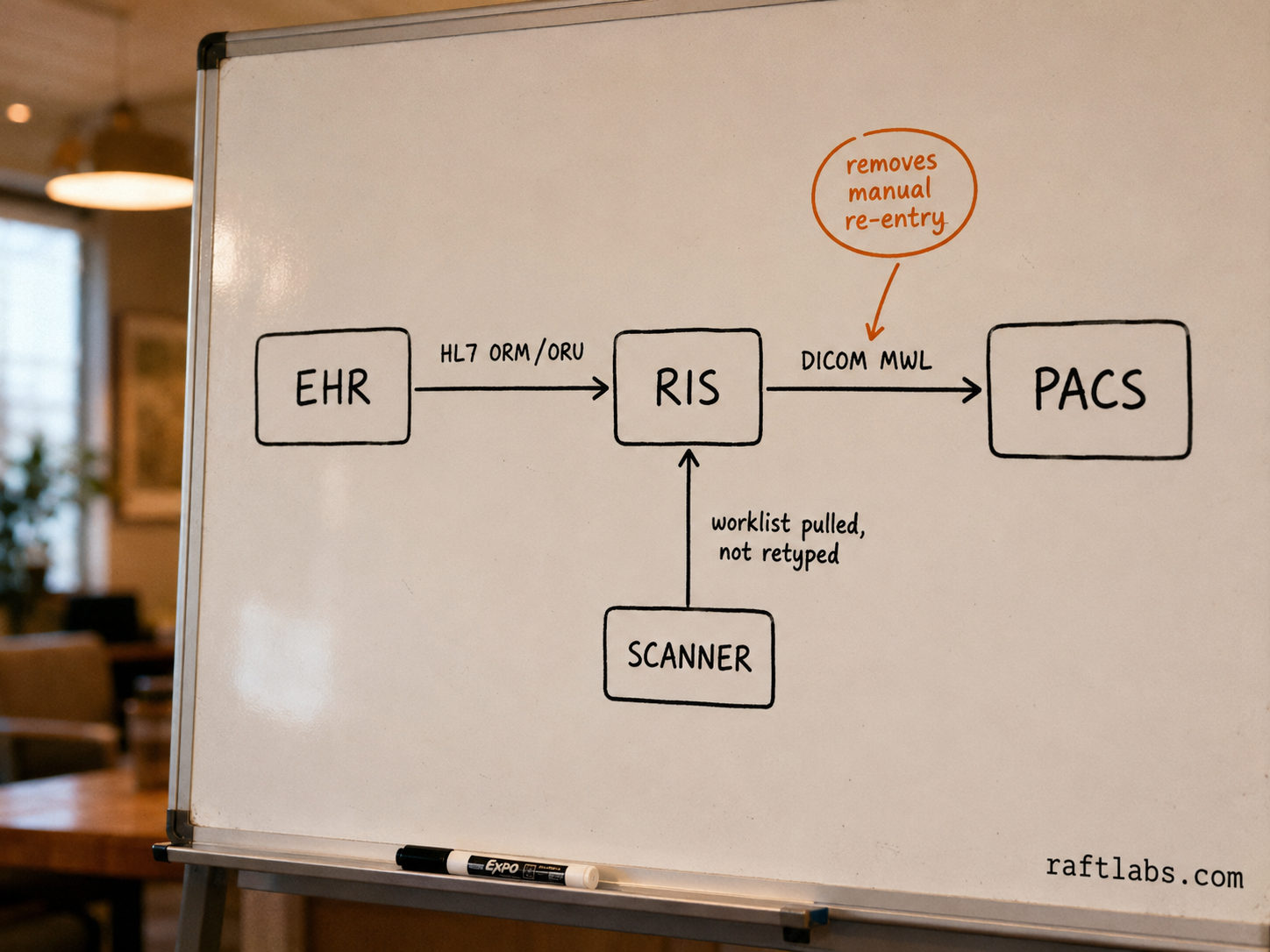
- DICOM Modality Worklist pulls scheduling data from the RIS directly onto the imaging equipment, which removes manual re-entry of patient and exam details at the scanner.
- A dedicated RIS build scoped for HIPAA-compliant imaging workflows runs $40,000 to $160,000 depending on module count and integration scope, per RaftLabs' healthcare-platform cost model.
- Bundled EHR radiology modules cover general workflows well; a dedicated RIS earns its cost once exam volume, sub-specialty routing, or reporting complexity outgrows what the EHR module was built to handle.
Ask most people outside radiology what a RIS is, and you'll get a blank look, even from people who work in health IT. Ask a radiology department manager, and you'll get a very specific answer. It's the system that tells the front desk who's scheduled, tells the technologist what's next, tells the radiologist what's waiting to be read, and tells billing what to charge for.
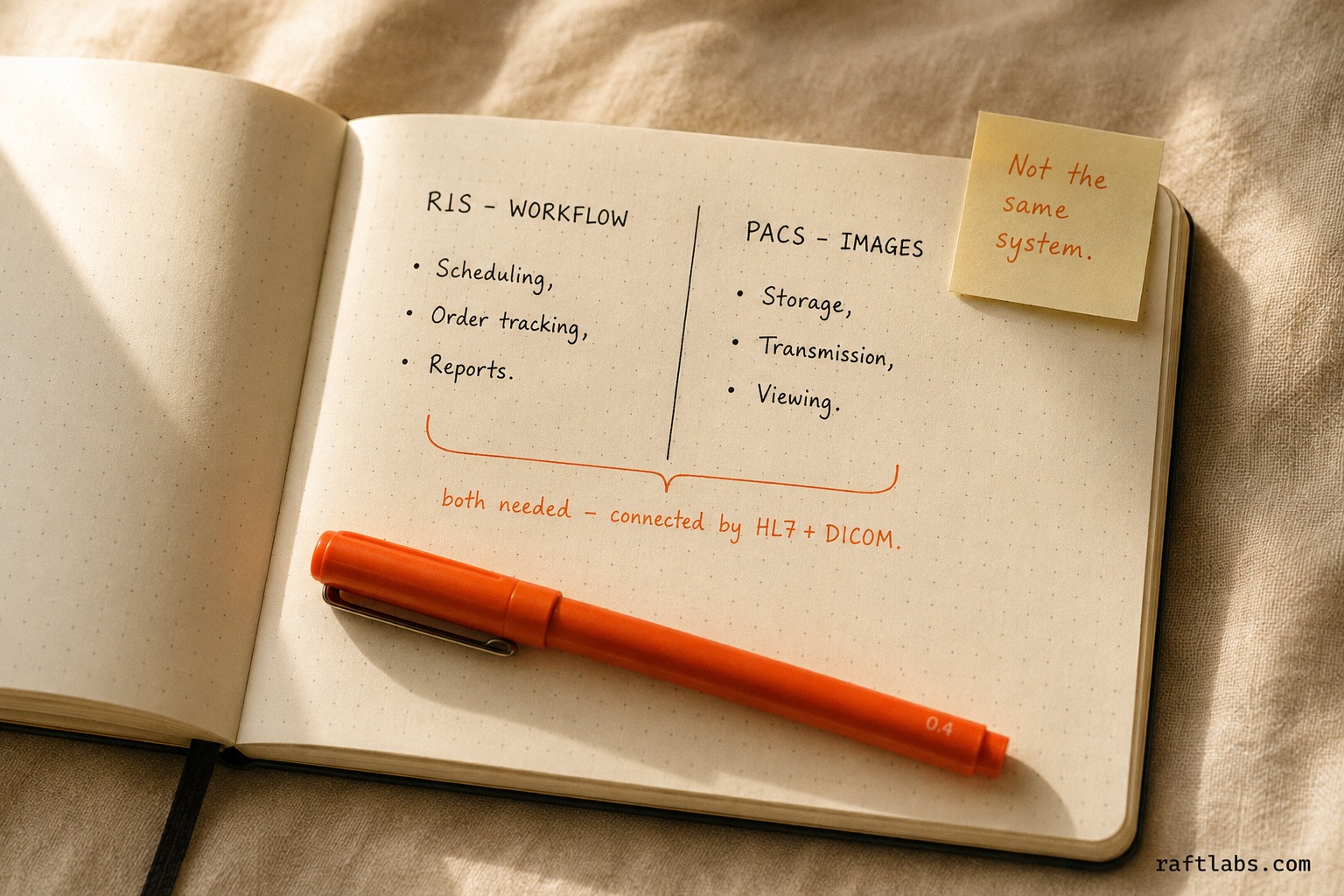
A radiology information system (RIS) is the workflow and data layer for an imaging operation. It is not the system that stores the images. That confusion, RIS versus PACS, is the single most common point of friction when teams start scoping imaging software, so this guide addresses it directly before going further.
What is a radiology information system?
A RIS manages four things: patient scheduling for imaging exams, order tracking as an exam moves through the department, structured radiology reporting, and the billing data tied to each completed exam.
Concretely, a RIS handles scheduling: booking exam slots against equipment availability, technologist schedules, and patient prep requirements like contrast or fasting instructions. It handles order and exam tracking, showing the state of every exam as it moves from ordered to scheduled to in-progress to reported, visible to front desk staff and technologists at once. It handles reporting, whether structured or dictated, often with voice recognition, routed to the referring physician once a radiologist signs it. And it handles the billing data, the CPT and ICD-10 codes tied to each completed exam, handed off to a billing system or clearinghouse.
What it does not do is store or render the actual medical images. A CT scan, an MRI series, an X-ray: those live in a PACS. The RIS knows an exam happened and what the report said. The PACS knows what the images look like.
RIS vs PACS: the difference that trips people up
Because both systems sit inside the same imaging workflow and often come from the same vendor, teams frequently treat "RIS" and "PACS" as interchangeable. They're not, and the distinction matters when you're scoping a build or an integration.
| RIS | PACS | |
|---|---|---|
| Manages | Scheduling, order status, reporting, billing data | Image storage, transmission, and display |
| Primary users | Front desk, schedulers, technologists, billing staff | Radiologists, referring physicians |
| Core data | Patient demographics, exam orders, report text | DICOM image files |
| Standard for exchange | HL7 (ORM/ORU messages) | DICOM |
| Without the other system | No image storage or viewing | No scheduling, tracking, or reporting workflow |
The two systems are complementary, not competing. A functioning imaging operation needs both, whether as two separate best-of-breed products connected by an interface, or as a single combined RIS/PACS product from one vendor. Some vendors sell RIS and PACS bundled together specifically to remove the integration step. That convenience trades off against locking both systems to one vendor's roadmap.
Core RIS modules
A production RIS is built from a small set of modules that have to work together without dropping data between them.
| Module | What it does |
|---|---|
| Scheduling | Books exam slots against equipment, room, and technologist availability; handles prep instructions and patient reminders |
| Order and exam tracking | Tracks each exam's status from order through completion, visible to every role in the department |
| Reporting | Structured or dictated radiology reports, voice recognition support, referring-physician routing |
| Technologist worklist | The day's assigned exams per technologist, per modality (X-ray, CT, MRI, ultrasound) |
| Billing and coding | CPT/ICD-10 code assignment tied to the completed exam and report |
| Referring physician portal | Order placement and report delivery for outside physicians who send patients for imaging |
Scheduling and order tracking are where most of the department's daily friction lives. A radiology department runs on precise timing: the scanner is booked in fixed slots, the technologist needs the right prep information before the patient arrives, and a missed handoff between scheduling and the technologist worklist means a wasted appointment slot. That's the part of a RIS that pays for itself fastest when it's built around your department's actual exam mix, rather than a generic template.
Reporting is where sub-specialty complexity shows up. A general radiology group and a group that reads mostly mammography or musculoskeletal imaging need different structured-reporting templates, different turnaround-time tracking, and sometimes different critical-result notification rules. Off-the-shelf RIS reporting modules cover the common cases; sub-specialty groups often need the templates adjusted.
Bundled-in-EHR vs. dedicated RIS
Most organizations don't start by asking "should we build a RIS." They start with an EHR that already includes some radiology functionality, and the real question is whether that's enough. (If you're weighing a custom EHR build in the first place, our EHR system development guide covers that decision in more depth.)
When the EHR's radiology module is enough. Say you're a hospital-based imaging department tied to one EHR, with general-purpose imaging volume and standard reporting needs. The EHR's built-in radiology module (Epic's, for instance, is called Radiant) usually covers scheduling, order entry, and results delivery without standing up a separate system. That's the simpler, lower-cost path, and it's the right default until a specific limitation shows up.
When a dedicated RIS earns its cost. A separate RIS becomes worth the investment when one or more of these is true:
You operate multiple imaging sites on different EHRs, and you need one workflow layer that sits across all of them.
Your exam mix includes sub-specialty reporting (mammography, interventional, teleradiology) that the EHR's generic radiology module doesn't support well.
You're a freestanding imaging center or outpatient radiology group with no EHR of record, only referring physicians who send orders in.
Your reporting turnaround-time and critical-result notification rules are complex enough that the EHR module's built-in tracking doesn't match your compliance needs.
The decision isn't about technical sophistication. It's about whether your imaging workflow is a supporting function inside a broader clinical system, or the core operation of the business. Freestanding imaging centers and multi-site radiology groups are usually in the second category.
Integration standards: HL7 and DICOM
A RIS doesn't operate in isolation. It has to talk to the EHR that originated the order, the PACS that will hold the images, and often a billing system downstream. Two standards carry that traffic.
HL7 messaging. Health Level Seven (HL7) is the messaging standard for clinical data exchange, and radiology workflow runs on two specific message types. ORM (Order Message) carries the imaging order from the EHR to the RIS: patient details, exam type, ordering physician, clinical indication. ORU (Observation Result) carries the finished report back from the RIS to the EHR once a radiologist signs it. Between those two messages, the RIS also exchanges status updates with the PACS as the exam moves through scheduling, acquisition, and reading.
DICOM. Digital Imaging and Communications in Medicine (DICOM) is the standard for the images themselves, and for the imaging equipment's interaction with the RIS. The piece that matters most for RIS integration is DICOM Modality Worklist (MWL). The RIS publishes the day's scheduled exams, and the imaging equipment (the CT scanner, the MRI, the X-ray unit) pulls that worklist directly, pre-populating patient and exam details instead of making a technologist retype them at the console. That single feature eliminates a meaningful source of patient-mismatch errors in imaging departments that don't have it.
Getting RIS integration right means implementing both standards correctly, not treating one as optional. A RIS that sends clean HL7 ORM/ORU messages but has no DICOM MWL connection still forces manual re-entry at every scanner. A RIS with MWL but weak HL7 result delivery leaves reports stuck instead of reaching the referring physician.
What a RIS build costs
Costs depend heavily on scope: how many modules you need, how many systems you're integrating against, and whether you're building from scratch or extending an existing platform.
For a dedicated RIS scoped as a HIPAA-compliant healthcare platform, a minimum viable build covering scheduling, order tracking, and basic reporting runs $40,000 to $90,000 with a team of 4 to 6 people over 16 to 20 weeks. A full-featured build that adds sub-specialty reporting templates, a referring-physician portal, billing integration, and HL7/DICOM connections to an existing EHR and PACS runs $90,000 to $160,000 over 20 to 26 weeks.
These figures assume a team that includes engineers, a product manager, and QA, working at RaftLabs' standard delivery rate. They don't include third-party costs: PACS licensing if you don't already have one, HL7 interface engine licensing if your integration volume needs one, or ongoing hosting.
The largest scope driver isn't the RIS itself. It's the number of systems it has to talk to. A RIS connecting to one EHR and one PACS is a contained integration project. A RIS connecting to three referring-physician EHRs, two PACS instances from different vendors, and a billing clearinghouse is a substantially larger integration effort, even if the RIS's own feature set doesn't change.
Build vs. buy vs. extend
Before committing to a custom RIS, it's worth checking whether a narrower move solves the actual problem.
Extend the EHR's radiology module when the gap is one specific capability: a missing report template, a missing worklist view. Most EHR platforms with radiology modules expose developer APIs for exactly this kind of extension, and it's far cheaper than a standalone system.
Buy an off-the-shelf RIS or RIS/PACS bundle when your workflow is standard and you're a single-site operation. Established RIS vendors cover general imaging workflows well, and the licensing cost is usually lower than a custom build for a single site.
Build a dedicated RIS when your imaging workflow spans multiple sites or multiple EHRs, or when sub-specialty reporting needs don't fit a generic template. The same goes when imaging is the core of the business, not a department inside a larger clinical system.
RaftLabs and radiology software
RaftLabs builds healthcare software, including radiology workflow systems and the EHR integrations that connect them to existing clinical platforms. Our work in healthcare covers clinical workflow tools built around HIPAA technical safeguards from the start, not retrofitted after the fact.
If you're scoping a dedicated RIS, or you have a RIS and PACS that need a cleaner HL7 and DICOM connection to your EHR, the useful first step is a scoping conversation. We'll want to understand your exam volume, your current systems, and where the workflow actually breaks before we talk about what to build.
Ask an AI
Get an instant summary of this post from your preferred AI assistant.
Common questions
- A radiology information system (RIS) is software that manages the administrative and clinical workflow of a radiology department or imaging center: patient scheduling, exam order tracking, technologist worklists, report generation, and billing data. It does not store the medical images themselves. That is the job of a PACS. A RIS is the workflow and data layer that coordinates everything around an imaging exam, from the order being placed to the final report reaching the referring physician.
- A RIS manages workflow and data: scheduling, order status, exam tracking, and radiology reports. A PACS (Picture Archiving and Communication System) stores, transmits, and displays the actual medical images - X-rays, CT scans, MRIs, ultrasounds. The two systems are complementary and typically exchange data continuously: the RIS sends the PACS an order and patient context, and the PACS confirms image availability back to the RIS so the report workflow can proceed.
- Almost every functioning imaging operation needs both, in some form. A PACS without a RIS has no scheduling or reporting workflow attached to the images. A RIS without a PACS has nowhere to route the actual imaging data. Some vendors bundle RIS and PACS into a single product (a RIS/PACS), which reduces integration overhead but limits your choice of best-of-breed components. Larger imaging networks often run them as separate best-of-breed systems connected through HL7 and DICOM.
- For many general-purpose imaging workflows, yes. EHR platforms like Epic ship a radiology module (Epic's is called Radiant) that covers scheduling, order entry, and results delivery without a separate system. This works well for hospital-based imaging tied to one EHR. A dedicated RIS becomes worth building or buying separately when you run multiple imaging sites on different EHRs, need sub-specialty routing logic the EHR module doesn't support, or operate as a freestanding imaging center with no EHR of record.
- RIS integration runs on two standards. HL7 messaging handles the data exchange between the RIS, the EHR, and the PACS: ORM messages carry orders, and ORU messages carry results and reports. DICOM handles the imaging side, most importantly through DICOM Modality Worklist (MWL), which pushes the day's scheduled exams from the RIS directly onto the imaging equipment so technologists don't retype patient details at the scanner. A working RIS integration needs both standards implemented correctly, not just one.