Cemetery Management Software
Plot sales, burial records, and perpetual care in one cemetery record.
Your office holds ledgers and deed binders, your map lives on the wall, and your grounds crew gets its day by phone. We turn that scattered cemetery work into one system: plots sold and owned on a live map, burials recorded against their plot, perpetual care money in its own ledger, and grounds work the office can actually see.
Bring one cemetery problem. Leave with a build, buy, repair, or wait recommendation.
Trusted by



















The brief
Start with what is not working.
Good software decisions begin with the constraint, not a list of features or a preferred technology.
Plot availability lives on a hand-drawn map, so the office answers from memory and walks rows to check what is free.
Burial records, deeds, and billing live in separate ledgers, so one family question starts three searches.
Grounds work is assigned by phone and paper, so nobody can see what is done, what is waiting, or what is overdue.
Plain answer
Cemetery management software gives a cemetery operator one record for the whole grounds: plot sales and ownership, deeds and certificates, interment scheduling, burial records linked to a plot map, perpetual care funds and billing, and grounds work orders. Families and staff search one archive by name, date, or plot, instead of ledgers, hand-drawn maps, and spreadsheets.
What to remember
- One cemetery record holds plots, burials, care funds, and grounds work in the same system.
- Availability is read from the map, not walked row by row.
- Every burial record links to its plot, deed, and ownership history.
- Perpetual care money has its own ledger, separate from daily billing.
- Families find graves and settle balances without a phone call to the office.
- This page is for standalone cemetery operators; funeral homes that also run a cemetery use the cemetery module on the funeral software page.
The first decision is not what to build.
It is whether software is the right answer at all. We use four possible recommendations before discussing a development scope.
- 01
Buy
Choose a maintained product when it handles the core workflow and the remaining gaps can be solved with configuration, a connector, or a small process change. Paying for software you do not have to maintain is often the better trade.
- 02
Repair
Keep the existing product when users still get value from it and the code can be understood safely. Start with evidence: where the code lives, how your data is organized, what is tested, which outside services it depends on, who can access what, and how updates go live.
- 03
Build
Own the system when the workflow shapes margin, customer experience, speed, or a product customers pay for. Start with one complete path and the system connections that path cannot work without.
- 04
Wait
Do not turn a changing policy into permanent software. Stabilise the rules, name the workflow owner, and measure the cost of the current process before paying for a product.
Not sure which path is yours? Bring it to a 30-minute call. Leave with the answer in writing.
Fit
Cemetery software should earn its maintenance burden.
A feature request is not enough. The case is real when the same constraint shows up in time, errors, margin, or family experience.
Plots, burials, care funds, and grounds work live in separate ledgers, maps, and spreadsheets.
Families wait days for answers the record should give in a search.
The cemetery can name a workflow owner and what 'done' looks like for the first release.
A maintained product fits with reasonable configuration and process change.
The team wants software to settle an unresolved policy on sales, care funds, or records.
The brief is a feature list with no user, transaction, or business result attached.
Not sure which side you are on? Use the first call to make that decision. A useful answer may be to buy, connect, repair, or wait.
Start with the grounds, not the software.
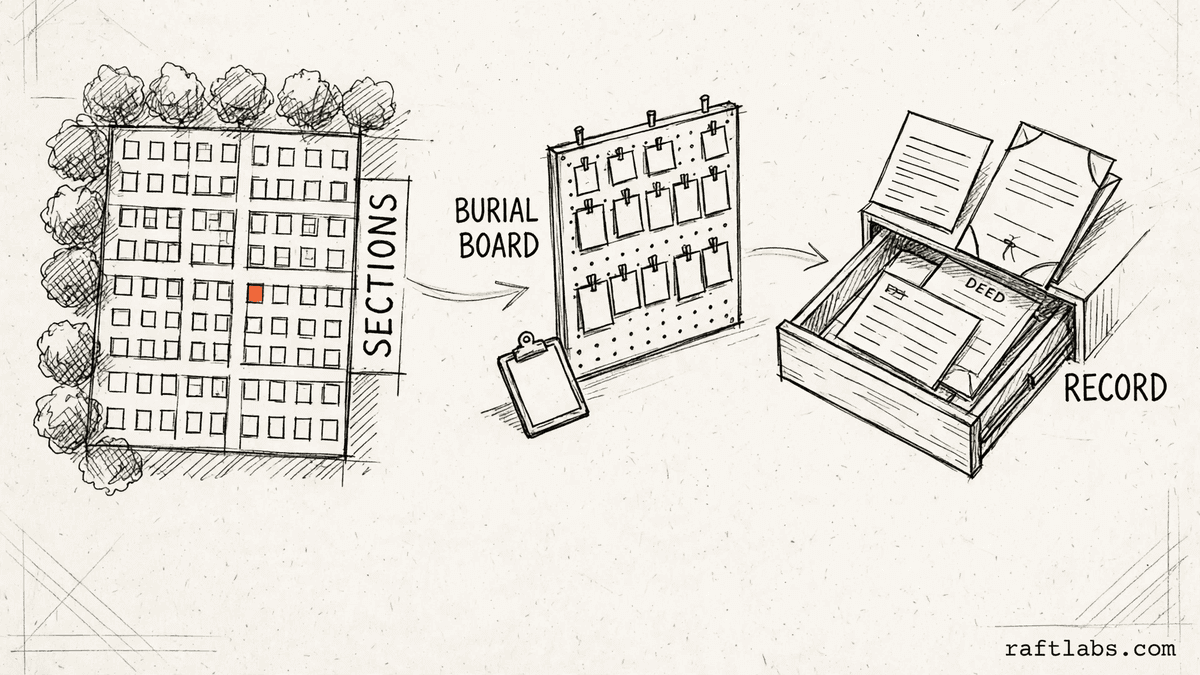
A cemetery problem usually starts as a records problem. The office holds ledgers and deed binders. The map lives on the wall. The grounds crew gets its day by phone. A family asking where a grandparent is buried, or whether two adjacent plots are free, starts a search through paper that can take days. Answers live in people's heads, and leave when they do.
A second product hides inside the first. Families see one search result; your team lives in another: sales contracts, deeds, trust ledgers, work orders, permits, and a record of who changed what. Quotes that squeeze all of that into an "admin panel" line item are where budgets most often break. On a real system, your team's screens are routinely the most underestimated part of the build, so we quote them as their own job, with their own users, from the start.
Cemetery software makes sense when one owned system can remove that constraint better than a product, connector, or process change. The first release should take the smallest useful path from trigger to result: an interment booked, prepared, and recorded against its plot, for example. It should not replace every ledger at once.
One record for the whole grounds.
The interface is only one part of the job. The real scope includes the rules, the data, the connections to your other systems, what happens when things fail, who can see and change what, and who runs it after release.
Plot sales and ownership
Availability from the map, so a plot is never sold twice. Sales create the ownership record with the deed and certificate attached, and the history stays with the plot: owner, payments, transfers, and renewals.
Burial records on the map
Each burial record links to its plot and section, and the map shows the same information visually. Staff search by name, date, or plot, and families can be walked to a grave from the map.
Perpetual care funds and billing
Care money in its own ledger: contributions, installments, balances, and reports the board and the auditor can read, kept separate from daily billing.
Interment scheduling
An interment booked against a plot with its date, service details, staff, equipment, and permits in one place, and the burial record completed against the same plot when the service is done.
Grounds work orders
Grave preparation, marker installation, landscaping, and repairs assigned to crews and tied to their plots, with completion, photos, and notes recorded against the work order.
Which one is yours?
Bring it to a 30-minute call. Leave with a build, buy, repair, or wait recommendation in writing. Free, whether or not we ever work together.
Which cemetery workflow is costing you the most right now?
Bring it to a 30-minute call. Leave with a build, buy, repair, or wait recommendation in writing. Free, whether or not we ever work together.
Let the work pick the shape.
The way people work should decide the form of the software. Start with where the user works, which device they have, what data they need, and how fast the system must respond. Those facts tell us what belongs in the first release.
Mobile app
Work on the grounds: crews see the day's work orders, record completion and photos, and check a plot on the map from a phone. When in doubt, this is the surface that decides whether the grounds team uses the system at all.
Web app
Work done across roles and sites. The office manages sales, records, care funds, work orders, and reports in a browser: no installs, no versions, no device limits.
One product may need several surfaces. Each one should support the same complete workflow, not start another feature list.
How it works
From ledgers and maps to one cemetery record
The first phase follows one interment from booking to completed burial record, and proves the record before it grows.
- Understand01
Trace the real workflow
Follow one plot and one family from first enquiry to completed burial record. Include the workarounds, manual judgement, duplicate entry, waiting, and failure paths that a tidy process diagram usually misses.
- Shape02
Choose the first useful release
Choose the shape from the way the work happens, not from a preferred technology. Name the user, the device, the data, the system connections, who can access what, the exceptions, and the result the first release must complete.
- Prove03
Review working software
Review the product against the agreed workflow, not a tour of finished screens. Record changed assumptions and test what happens when data is missing, access is wrong, or a connected system fails.
- Transfer04
Release, measure, and hand over
Move a controlled set of plots or records first. Compare time, errors, completion, or another agreed measure with the starting point before adding the next workflow.
What stays out of the black box
These are operating conditions to put in the engagement, not claims to take on faith.
The scope names one complete workflow
The user, the trigger, the decisions, the data, the exceptions, and what 'done' looks like. A screen list is not enough.
Progress is visible in working software
Reviews against the product at agreed checkpoints, while there is still time to act.
A scope change has a price before it has code
A new workflow or system connection shows its effect on cost and timing before anyone approves it.
Ownership exists throughout, not only at handover
Code, cloud, data, and provider access stay visible and under your control from day one.
The work is checkable without being technical
Checkpoints are working software you use yourself, reported in plain language.
Build or buy
| Buy an existing product | Build custom software | |
|---|---|---|
| Best fit | Handles your workflow with reasonable setup, and its pricing makes sense | The way you work is itself the advantage |
| Manual work | Configuration and process changes can remove the constraint | Repeated manual work has a measurable cost |
| Connections | Existing connections work with reasonable setup | A critical connection to your other systems cannot be done cleanly any other way |
| Platform route | Configure an established product when its plot, record, trust, and permission model fits | Own custom software only when the differentiating process, client product, system network, or cost of constraint justifies build and support |
Work with us
Bring one cemetery problem. Leave with a decision.
In a 30-minute call, we will help you decide whether to buy, connect, repair, build, or wait. If custom software is not the sensible next move, that is still a useful answer.
- One named workflow owner and one complete path for the first phase.
- Scope, price, what 'done' looks like, and exclusions agreed before paid work starts.
- Code, cloud, data, and provider access remain under your control.
- Post-launch warranty cover for defects in the agreed scope.
Frequently asked questions
Straight answers to what buyers ask before they scope. Still stuck? .
It gives a cemetery operator one record for the whole grounds: plot sales and ownership, deeds and certificates, interment scheduling, burial records linked to a plot map, perpetual care funds and billing, and grounds work orders. Families and staff search one archive by name, date, or plot, instead of opening ledger after ledger.
The funeral software page carries a cemetery section framed as a module for funeral homes that also run a cemetery: an extension of the funeral case record. This page is the other buyer. A standalone cemetery operator's core business is plot sales, trust accounting, and grounds work, not funeral cases, so the system is built around the cemetery's own record: plots, deeds, interments, care funds, and work orders, with no funeral case record underneath.
Each burial record links to its plot and section, and the map shows the same information visually. Availability is read from the map instead of walked row by row. Staff search the archive by name, date, or plot, and a family can be walked to a grave from the map instead of starting a search through paper.
The care fund gets its own ledger: contributions, installments, balances, and reports the board and the auditor can read. It stays separate from daily billing so care money is never mixed with operating money. Your cemetery defines the fund rules; the software holds the record, the balances, and the history.
Yes, where the cemetery chooses to open it. A public grave search map lets a family find a burial by name or plot, and a family portal can show memorial pages, certificates on file, and balances without a phone call to the office. The office controls what is public and what stays staff-only.
Availability comes from the map, so a plot is never sold twice. A sale creates the ownership record with the deed and certificate attached, and the history stays with the plot: who owns it, what was paid, whether it was transferred, and whether a right was renewed. Pre-need sales run on the same record with payment plans and contracts.
An interment is booked against a plot with its date, service details, staff, equipment, and permits in one place. The grounds crew sees the preparation work it creates, and the burial record is completed against the same plot when the service is done, so the schedule and the record never drift apart.
Paper records are imported and checked before go-live: each ledger entry becomes a record linked to its plot, and imported records stay distinguishable from records verified since. Nothing is thrown away in the move. If a record cannot be matched to a plot, it goes to a review list for staff to resolve, not into the live archive by guesswork.
Cost follows scope, and scope is fixed and priced before work starts. A first phase covers one complete workflow, such as interment scheduling from booking to completed burial record, rather than the whole grounds at once. What that phase includes, what it excludes, and what 'done' looks like are agreed in writing first, so the price does not move when the work starts.
Yes. Crews see the day's work orders on a phone: grave preparation, marker installation, landscaping, and repairs, each tied to its plot. They record completion, photos, and notes against the work order, and the office sees the same day what is done, what is waiting, and what is overdue.