Systems integration for AI agents: APIs, data, and permissions
An agent demo needs one prompt. A working agent needs clean connections to your systems, the right data at the right moment, and permissions narrow enough to trust.

In this article
Short answer
Systems integration for AI agents connects an agent to your existing systems through APIs, webhooks, or an MCP server, with one clear source of truth for each kind of data. Safe integration gives the agent the narrowest access its job needs, confirms writes with a person, records every action, and handles slow or failed systems without guessing.
Key takeaways
- Integration is the real work behind an agent. The model is one part. The connections, data rules, and permissions decide whether it can be trusted at work.
- Name one source of truth for each kind of data before connecting anything. Two systems that both claim to hold the truth will produce confident, conflicting answers.
- Give the agent its own narrow access, never a broad staff login. Separate reading from writing, and ask a person to confirm changes that matter.
- Plan for failure from the start: retries that do not duplicate work, clear errors, and a record of every action the agent took.
- Model Context Protocol can present a small, typed set of tools to an agent. It sits on top of your APIs. It does not replace them.
A demo agent answers from sample data. A working agent answers from your systems, on your customers, under your rules. The gap between those two is integration work, and it is where most agent projects are won or lost.
This page explains that work in plain terms: how an agent connects, which data it should trust, and how much power it should hold.
The short answer
Connect the agent through controlled paths such as APIs or an MCP server. Name one source of truth for each kind of data. Give the agent narrow, separate access for reading and writing. Record every action. Plan what happens when a system is slow, down, or returns conflicting information.
Three parts, not one
People often talk about integration as a single task. It helps to split it into three questions your team can answer separately.
First, how does the agent reach the system? Second, which information should it trust? Third, what is it allowed to do once it gets there?
An agent can pass the first question and fail the other two. It can connect cleanly, then quote an outdated price from a copied spreadsheet. It can read the right record, then change records it was never meant to touch.
How an agent connects to a system
The cleanest connection is an API the system already offers. The agent asks for a specific record, the system answers, and both sides follow written rules.
Other controlled paths can work too. A webhook can tell the agent when something changes, such as a payment arriving. An event stream can carry updates in order. A read-only database view can answer reporting questions without opening the full database.
What matters is control. Each path needs a named owner, a clear input and output, and limits on how often it can be called.
Where no controlled path exists, be careful. Screen scraping and shared staff logins break often and hide who did what. If a key system has no usable connection, that limit should shape the scope, not be worked around quietly.
For the protocol route in detail, read our MCP server development guide and the comparison of MCP and direct API integration. The protocol itself is documented at the Model Context Protocol site.
Which data the agent should trust
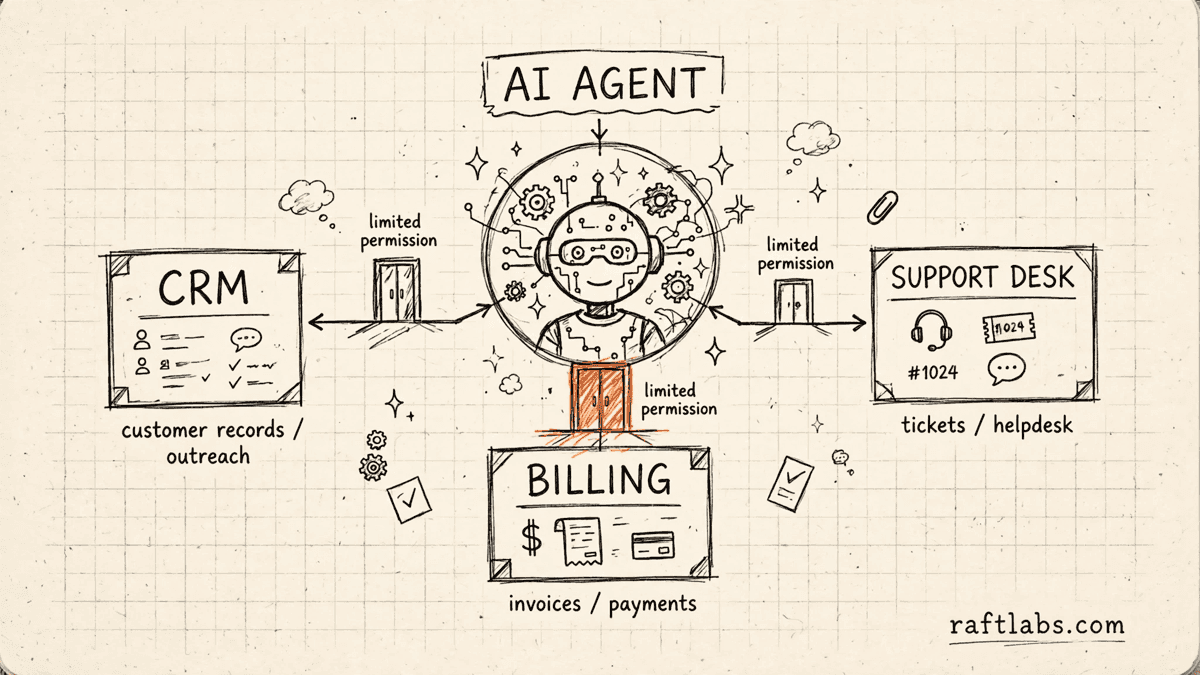
Every business has data in more than one place. Customer details may sit in a CRM, a billing platform, and a support tool at the same time.
Before connecting anything, name one source of truth for each kind of data. The CRM holds contact details. The billing platform holds payment status. The support tool holds open tickets.
Write that map down. When two systems disagree, the agent follows the map instead of picking the answer that looks most recent.
Also decide what the agent may repeat. Some fields are safe to show a customer. Others, such as internal notes or another customer record, must never leave the system. Our MCP server development page describes this as redaction and field control, and the same rule applies to any connection route.
Freshness matters too. Ask how old data can be before the agent should check again. A stock level from yesterday can cause a promise you cannot keep.
Permissions: the part that decides trust
Permissions answer a simple question. If the agent makes a mistake, how much damage can it do?
Start narrow. Give the agent its own identity, separate from any person. Let it act on behalf of the signed-in user where the work is personal, so one customer can never reach another customer record.
Separate reading from writing. Many useful agents only need to read and summarise. Add writing one action at a time, starting with low-risk changes.
For changes that matter, show a preview and ask a person to confirm. The agent can draft a refund, prepare an update, or queue a message. A person clicks approve. That pattern appears across our AI agent development work because it keeps speed without handing over judgement.
Set limits as well. Cap how many records one run can change. Block destructive actions, such as deleting records, unless a named owner has approved that exact action.
What happens when things fail
Connected systems fail in ordinary ways. They time out, return errors, or answer twice.
A careful integration expects this. Retries carry a marker so the same action is not performed twice. Errors are shown plainly instead of being hidden behind a confident answer. Partial work is recorded, so a person can see what completed and what did not.
Test these cases before launch, not after the first incident. Try a slow system, a missing record, a duplicate request, and text from a connected system that tries to give the agent new instructions. That last case matters: content inside your systems is data, not orders. The OWASP guidance for LLM applications treats this prompt injection risk as a leading concern for connected agents.
The record of every action
If an agent can act, it must leave a record. Each entry should show who asked, what the agent did, which system it touched, what changed, and when.
That record serves three audiences. Your team uses it to debug. Your customers get a straight answer when they question a change. Your compliance reviewers get evidence instead of assurances.
Decide how long records are kept and who can see them. Those are business decisions, and they belong in the scope, not in a default setting nobody chose.
A practical order of work
Start with one workflow and one or two systems. Map the source of truth for the data that workflow needs. Agree the read actions first, then add one write action with confirmation.
Test with real cases, including the awkward ones your team handles each week. Widen access only after the record and the failure handling have proved themselves.
This is the same bounded approach we use in custom software development and in agent work generally: a small, checkable first release, then growth on evidence.
When to get help
Bring in help when the systems are old, the data is sensitive, or the agent will change records that affect money or customers. Those projects need integration design, permission design, and testing as one piece of work.
RaftLabs scopes that work in writing before it starts, with projects from $10K and a fixed scope and price. Clients own 100% of the code. Tell us the systems involved, and we will tell you plainly what can connect, what cannot, and what to do first.
Ask an AI
Get an instant summary of this post from your preferred AI assistant.
Frequently asked questions
Straight answers to what buyers ask before they scope. Still stuck? .
- It is the work of connecting an agent to the systems it needs, such as a CRM, a billing platform, or an internal database, so it can read current information and take approved actions. It covers the connection method, which system holds the truth for each kind of data, who the agent acts as, what it may read or change, and how each action is recorded.
- A supported API is the cleanest path, and webhooks, event streams, database views, and file exchanges can also work. What matters is a controlled path with clear rules. If a system offers no controlled path, the honest options are to add one, to limit the agent to systems that do, or to keep that part of the work with people.
- An API is the business system interface itself. An MCP server presents a small, selected set of tools from that system in a form an AI client can discover and use, with identity, permission, and audit rules around each tool. Our guide to MCP compared with direct API integration explains when each route fits.
- Only the access its named job needs. Start with reading. Add writing one action at a time, with a preview and a person confirming changes that affect money, customers, or records. Never give an agent a broad account that can reach data its job never touches.
- The agent should pause, say plainly that the system did not answer, and avoid inventing a result. Retries need protection against doing the same action twice. The failure, and what the agent did next, should appear in the action record so your team can follow up.
- Record who asked, what the agent did, which system it touched, what changed, and when. Link each entry to the person and the request behind it. That record is how you answer a customer dispute, a compliance question, or a simple what happened here from your own team.