Cloud Migration Strategy: The Business Leader's Guide
Most cloud migrations fail not because of technology but because of strategy. Here's how to build a cloud migration plan that delivers real business outcomes - not just infrastructure changes.

In this article
Short answer
A successful cloud migration strategy starts with a clear business case - cost reduction, scalability, or disaster recovery - before any technical work begins. The most common approach is the 6 Rs framework: Rehost (lift and shift), Replatform (minor optimizations), Repurchase (switch to SaaS), Refactor (rebuild for cloud-native), Retire (decommission), or Retain (keep on-premises). Most mid-sized businesses use a mix of these strategies across their application portfolio. Realistic migration timelines run 6-18 months, and initial costs often increase before dropping as optimization kicks in.
Key takeaways
- Cloud migrations fail most often because of a missing business case, not missing technology. Define the measurable outcome before the first server moves.
- The 6 Rs framework - Rehost, Replatform, Repurchase, Refactor, Retire, Retain - gives every application a clear migration strategy. Most portfolios use all six.
- Cloud costs often increase in the first 6-12 months before decreasing. Budget for this transition period or you'll face pressure to abandon the migration too early.
- AWS, Azure, and GCP are near-equivalent for most business applications. Choose based on existing Microsoft or Google licenses, your team's skills, and which platform your software vendors support.
- The 90-day kickoff: discovery and inventory (days 1-30), proof of concept with your lowest-risk application (days 31-60), migration plan and business case sign-off (days 61-90).
Cloud migration projects fail more often than they succeed.
Not because the technology doesn't work. AWS, Azure, and GCP are extraordinarily capable platforms. Not because the cost savings aren't real - they can be, eventually. They fail because the project gets treated as an IT infrastructure upgrade instead of a business transformation with real costs, real risks, and real success criteria.
We've seen companies migrate 80% of their workloads to the cloud and then spend two years wondering why their infrastructure bill is higher than before. We've seen CIOs champion cloud migration projects that end in partial rollbacks because no one defined what "done" actually looked like.
This guide is for business leaders - not cloud architects - who are evaluating a cloud migration or are already in one and need to understand how to make it succeed.
Why most cloud migrations fail
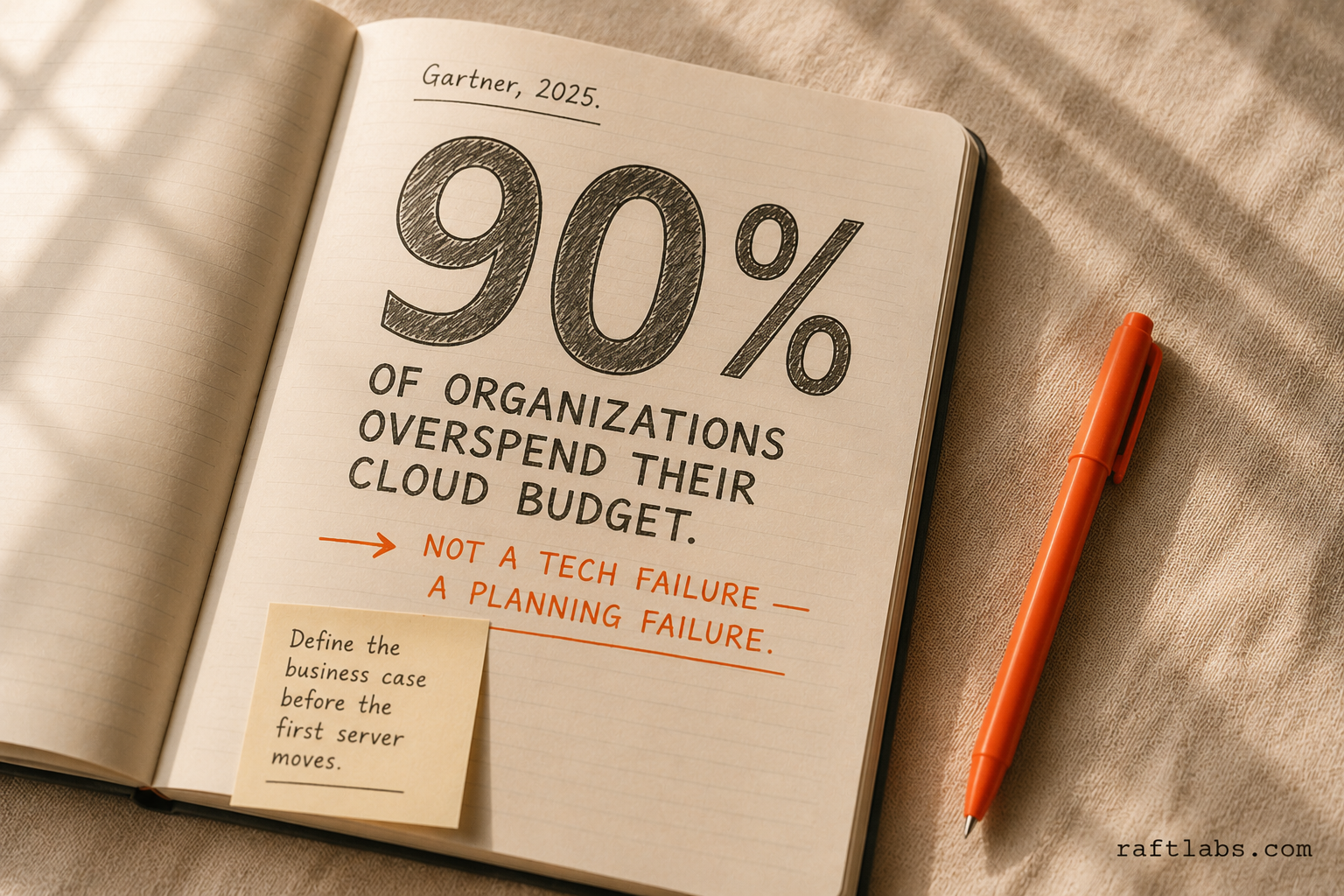
According to IDC's Cloud Pulse research, close to half of cloud buyers spent more on cloud than expected in 2023, with 59% anticipating similar overruns in 2024. A separate KPMG survey found that 79% of cloud initiatives exceed their expected budgets. That's not a technology failure. It's a planning failure.
Here are the four root causes we see repeatedly.
No business case. The migration gets approved because "cloud is the future" or because a competitor did it. Nobody defined the measurable business outcome: cost reduction target, scalability goal, disaster recovery objective, or compliance requirement. Without a defined outcome, there's no way to know if the migration is working - so it never officially fails, it just quietly underperforms forever.
Lift-and-shift with cloud pricing. Companies move their servers to the cloud as-is and discover that cloud pricing doesn't map to on-premises pricing. An on-premises server that cost $15,000 upfront over 4 years now costs $1,200/month - before you've optimized anything. The cost advantage of cloud comes from right-sizing, automation, and elasticity. None of that exists in a pure lift-and-shift.
No plan for the transition period. During migration, you run two environments: your existing setup and the cloud. That means paying for both. This transition period - often 6-12 months - is when costs spike. Companies that don't plan for it hit the first bill and start looking for a way out.
IT owns the project, business doesn't. Cloud migration touches budgets, vendor contracts, security policies, compliance requirements, and productivity. When IT owns the project alone, decisions get made on technical merit instead of business priority. The applications that move first should be the ones where moving offers the clearest business value - not the ones that are technically easiest to migrate.
Should you migrate to the cloud? The business case test
Before you plan anything, run the business case test. If you can answer all four of these questions with specific, measurable answers, you have a legitimate business case for migration.
Question 1: What's the specific business outcome you're pursuing?
Not "cloud is more modern." Specific: reduce infrastructure costs by 30%, eliminate the $180,000/year data center lease, enable your product to scale to 10x current users without manual intervention, or achieve SOC 2 Type II certification.
Question 2: What's the total cost of staying on-premises for the next 3 years?
Include hardware refresh cycles, data center costs or colocation fees, staff time for maintenance, licensing renewals, and the cost of your current disaster recovery (or lack of it). This is your "do nothing" baseline.
Question 3: What's the honest total cost of migration?
Include professional services, internal engineer time, parallel infrastructure during transition, staff training, and at least 12 months of cloud costs before optimization savings kick in. Many companies discover the break-even point is 18-24 months out, not 6.
Question 4: What's your risk tolerance for the transition period?
Migration means moving things that are currently working. There will be incidents. There may be downtime. Data will need to be migrated carefully. Your team will learn new tools under production pressure. What's your appetite for that, and what's your fallback plan?
If you can answer all four with specific numbers, proceed to strategy. If you can't, spend another month gathering data. A $500,000 migration decision deserves more than a gut feel.
The 6 cloud migration strategies (the 6 Rs)
Every application in your portfolio needs a migration strategy. The 6 Rs framework gives each application one of six options. Most companies use all six across a portfolio - rarely does everything get one treatment.
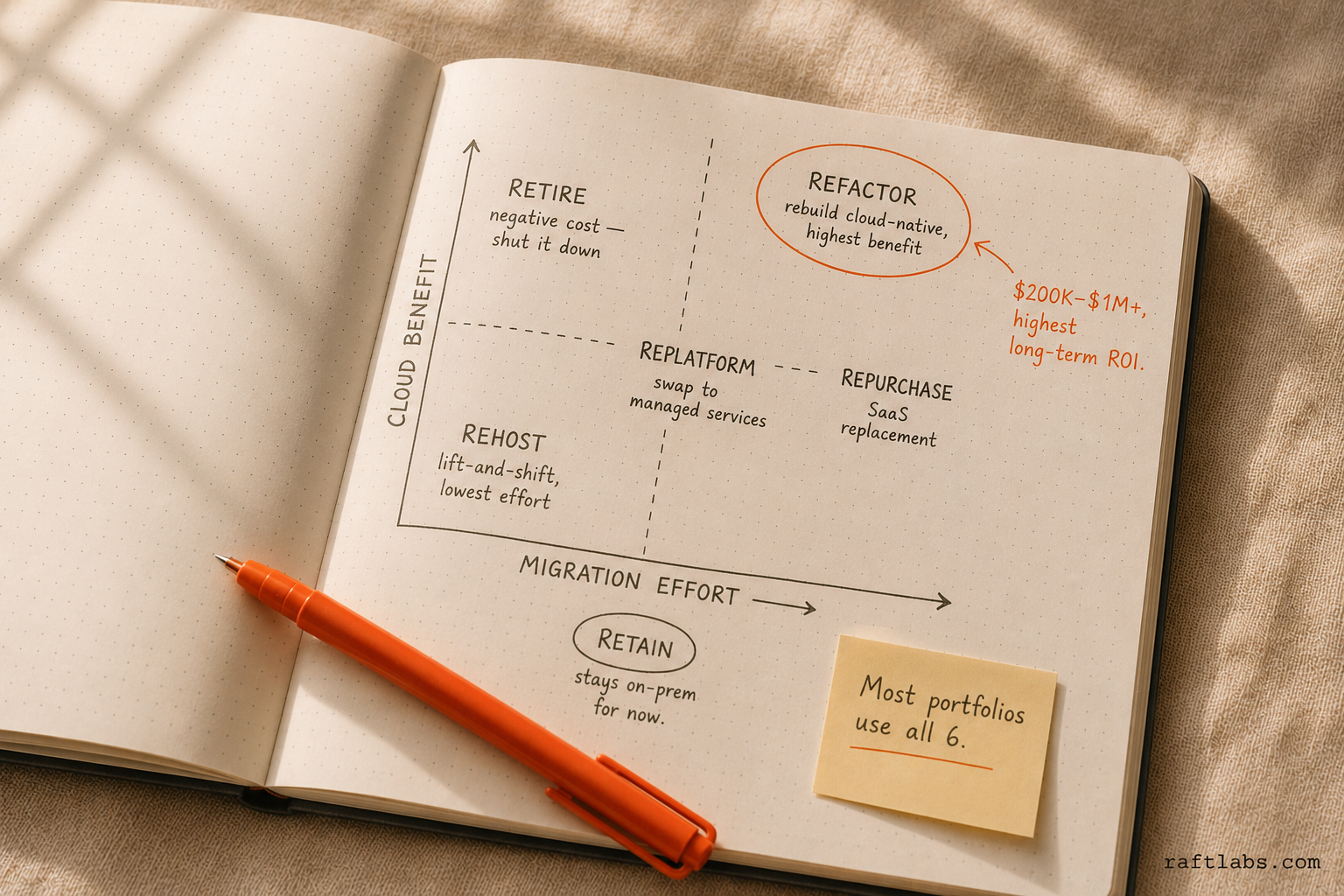
1. Rehost (Lift and Shift) Move the application to the cloud exactly as it is. Your virtual machines become cloud instances. Same OS, same software, same configuration.
Best for: Applications that work fine and don't need optimization. Legacy systems you plan to retire in 2-3 years. Applications with complex compliance that you can't change right now. Cost: Lowest migration cost, highest ongoing cloud cost. The economics improve only if you get into right-sizing and reserved instances.
2. Replatform (Lift, Tinker, and Shift) Move to the cloud with minor optimizations - switching from self-managed databases to managed database services (like AWS RDS instead of running your own MySQL), or swapping a self-managed message queue for a cloud-native equivalent.
Best for: Applications where the main business logic stays the same but you want to reduce operational overhead. A common example: move your app as-is, but let AWS manage the database so you don't maintain a DBA. Cost: Moderate migration effort. Operational savings kick in faster than pure rehost because you're reducing management overhead.
3. Repurchase (Drop and Shop) Instead of migrating your current application, switch to a SaaS product that replaces it. Your on-premises CRM becomes Salesforce. Your self-hosted HR system becomes Workday.
Best for: Applications where you're maintaining complexity that a vendor could manage better. Especially common for email, HR, ERP, and CRM systems that have mature SaaS alternatives. Cost: No migration engineering cost, but SaaS licensing replaces infrastructure costs. Run a 3-year total cost comparison before assuming repurchase is cheaper.
4. Refactor (Re-architect) Rebuild the application to take advantage of cloud-native capabilities - containers, serverless functions, managed data stores, auto-scaling. This is the most expensive and most impactful option.
Best for: Applications that are central to your business, have significant scalability or performance requirements, and will run for 5+ more years. Cost: Highest migration cost ($200,000-$1M+ for complex applications), highest long-term benefit. You're not just moving infrastructure - you're modernizing the application itself.
5. Retire The migration exercise often reveals applications nobody uses anymore. Shut them down. Stop paying for them.
Best for: Applications with low or no active users, applications that duplicate functionality of other systems, or systems that exist because "it's always been there." Cost: Negative cost - you save money immediately.
6. Retain (Revisit) Some applications genuinely stay on-premises for now. Regulatory requirements, hardware dependencies, performance requirements that cloud can't match cost-effectively, or vendor software that doesn't support cloud deployment.
Best for: Manufacturing control systems, applications with physical hardware dependencies, regulated data that can't leave a specific geography, or applications mid-upgrade cycle. Cost: Zero migration cost. But revisit this list every 12 months - "retain" is a temporary status, not a permanent one.
Cloud migration costs: what you'll actually pay
The honest version.
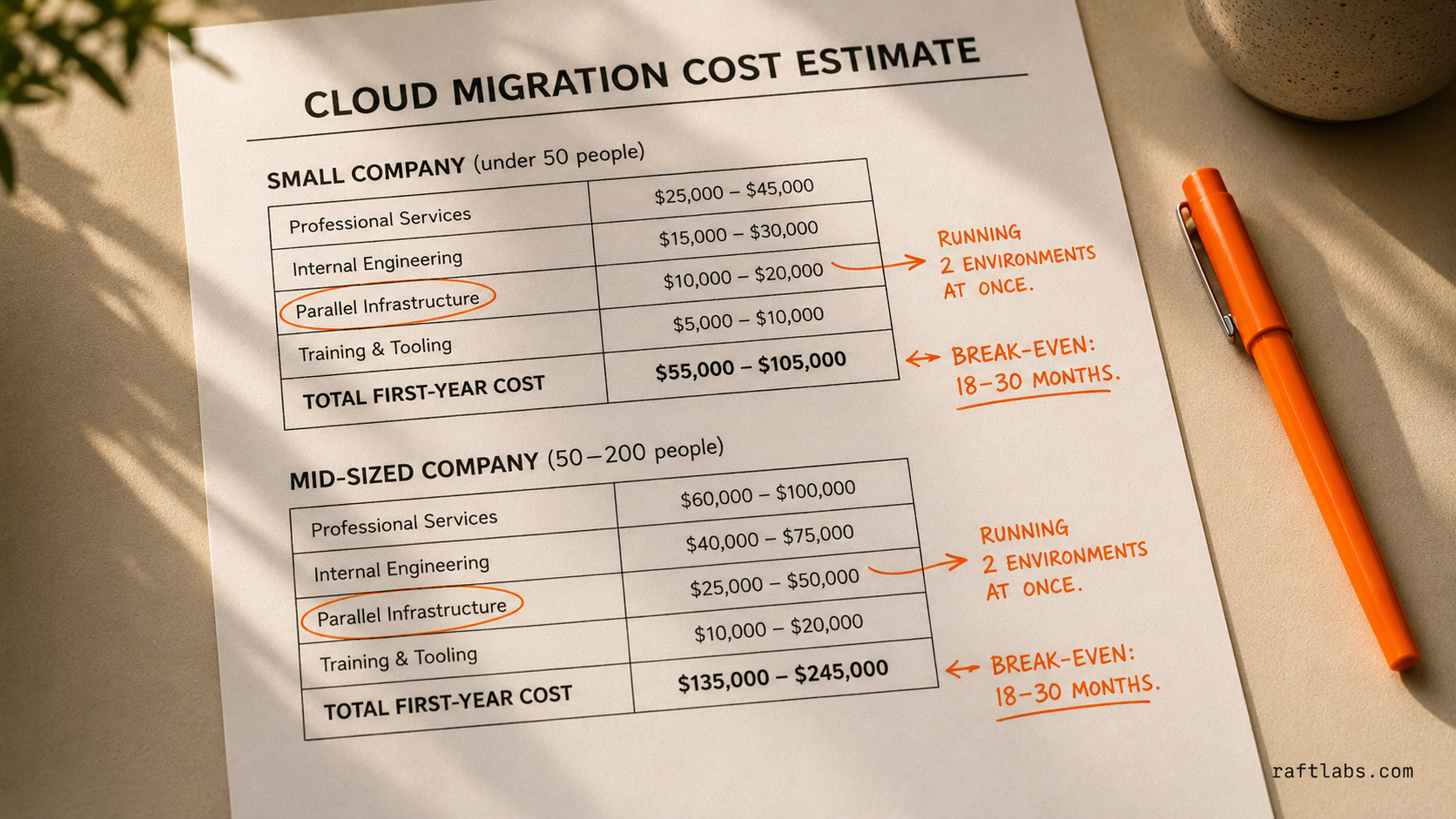
Small company (under 50 people), basic lift-and-shift:
Migration professional services: $30,000-$80,000
Internal engineer time: 3-6 months of 1-2 engineers at reduced productivity
Parallel infrastructure during transition: 3-6 months at 1.5-2x your current infrastructure cost
Training and tooling: $5,000-$20,000
Total first-year cost: $100,000-$250,000
Break-even vs. staying on-premises: typically 18-24 months
Mid-sized company (50-200 people), mixed portfolio:
Migration professional services: $150,000-$400,000
Internal engineering time: 6-12 months of 3-5 engineers
Parallel infrastructure: 6-12 months at elevated cost
Security, compliance, and tooling: $30,000-$80,000
Total migration cost: $300,000-$700,000
Break-even: 18-30 months, depending on optimization effort post-migration
What reduces the cost:
Higher percentage of applications on the Retire strategy (you're paying less now)
Aggressive right-sizing within 90 days of migration (reserved instances and savings plans can cut compute costs 40-60%)
SaaS replacement for non-core applications (no migration engineering needed)
A phased approach that staggers the parallel infrastructure window
What blows the budget:
Running parallel environments longer than planned
Discovering compliance requirements mid-migration that require rework
Application dependencies that weren't discovered in the inventory phase
Microsoft licensing surprises (Windows Server, SQL Server, and Office 365 licensing on the cloud is complex and often more expensive than anticipated)
How to build a cloud migration roadmap
A migration roadmap is built in phases, not as a single project plan. Here's the structure that works.

Phase 0: Discovery and Inventory (4-6 weeks) Map every application in your portfolio. For each one: who uses it, what it connects to, what data it holds, how critical it is to operations, and what its current cost is (infrastructure, licensing, maintenance). This is the foundation everything else rests on. Skip it and you'll spend the rest of the project discovering surprises.
Output: A prioritized application inventory with a recommended 6R strategy for each application.
Phase 1: Foundation (4-8 weeks) Set up the cloud infrastructure before migrating anything. This means your networking (VPCs, VPNs, connectivity to on-premises systems), security baseline (IAM roles, encryption policies, logging), and the tools you'll use to manage and monitor cloud workloads. You're building the landing zone.
Output: A cloud environment that's ready to receive workloads, with security and governance in place.
Phase 2: Pilot Migration (8-12 weeks) Migrate one or two low-risk applications using the strategies you've chosen. This proves the process works, trains your team, and surfaces the surprises - dependency issues, licensing complications, performance differences - before you're migrating business-critical systems.
Output: 1-2 applications running in production in the cloud. Your team has operated the environment through at least one incident.
Phase 3: Wave Migrations (3-12 months) Migrate applications in prioritized waves. Group applications by dependency (migrate the database before the application that uses it), by business priority (migrate the cost centers before the mission-critical systems), and by complexity (save the refactors for later waves).
Output: Majority of target workloads running in the cloud.
Phase 4: Optimization (Ongoing) Right-size your cloud resources, implement reserved instances for predictable workloads, review unused resources monthly, and tune auto-scaling policies. This is where the cost savings actually materialize. Phase 4 never ends - cloud cost optimization is an ongoing practice.
The hidden risks - and how to handle them
Cost overrun. The most common risk. Handle it by setting a cloud budget before migration starts, reviewing cloud spend weekly during migration, right-sizing resources within 30 days of each migration, and purchasing reserved instances after 60 days of stable usage data.
Downtime and data loss. Plan every data migration with a tested rollback procedure. Never migrate a production database without a point-in-time backup and a validated restore process. Schedule critical data migrations during off-peak windows with your operations team standing by.
Security and compliance gaps. Cloud environments require a different security posture than on-premises. Your network perimeter is gone - identity becomes the new perimeter. Implement IAM policies, encryption at rest and in transit, and cloud security posture management (CSPM) tools from day one in Phase 1, not after you've migrated.
Application dependencies you didn't know about. The inventory phase exists to find these. But surprises still happen. Build 20-30% contingency time into every migration wave to handle the dependency you didn't know was there.
Staff resistance. Operations and IT teams sometimes resist cloud migration because it changes their jobs. The best mitigation: involve them early, train them on cloud operations before migration starts, and give them ownership of the cloud environment they're building. People who build a thing protect a thing.
AWS vs. Azure vs. GCP: the business lens
The honest answer: for 80% of business applications, AWS, Azure, and GCP are technically interchangeable. The differences that matter to a business leader are not about raw capability. Gartner forecasts worldwide public cloud end-user spending to total $723 billion in 2025, up 21.5% year-over-year, a scale of investment that has driven all three major providers to near-parity on core infrastructure capabilities.
Choose AWS if:
Your team has AWS experience or your key vendors support AWS best
You want the largest ecosystem of third-party integrations and tooling
You're starting fresh with no existing cloud commitments
Choose Azure if:
Your business runs on Microsoft products (Office 365, Teams, Active Directory, SQL Server)
You have existing Microsoft enterprise agreements - Azure credits often come included
You're in an industry where Microsoft's compliance certifications matter (healthcare, government)
Choose Google Cloud (GCP) if:
Your team uses Google Workspace and deep Google integration adds value
You have significant data analytics or ML workloads (GCP's BigQuery and AI/ML tooling are the strongest of the three)
You're negotiating on price and have real pricing power - GCP is often the most aggressive on pricing
Multi-cloud: Don't start with multi-cloud. Most businesses that try to split workloads across two cloud providers in their first migration end up with twice the operational complexity and twice the cost. Pick one, master it, then consider multi-cloud only if you have a specific business reason (vendor lock-in concerns at large scale, geographic requirements, cost arbitrage for specific workloads).
The 90-day cloud migration kickoff
If you've decided to move forward, here's how to spend the first 90 days.
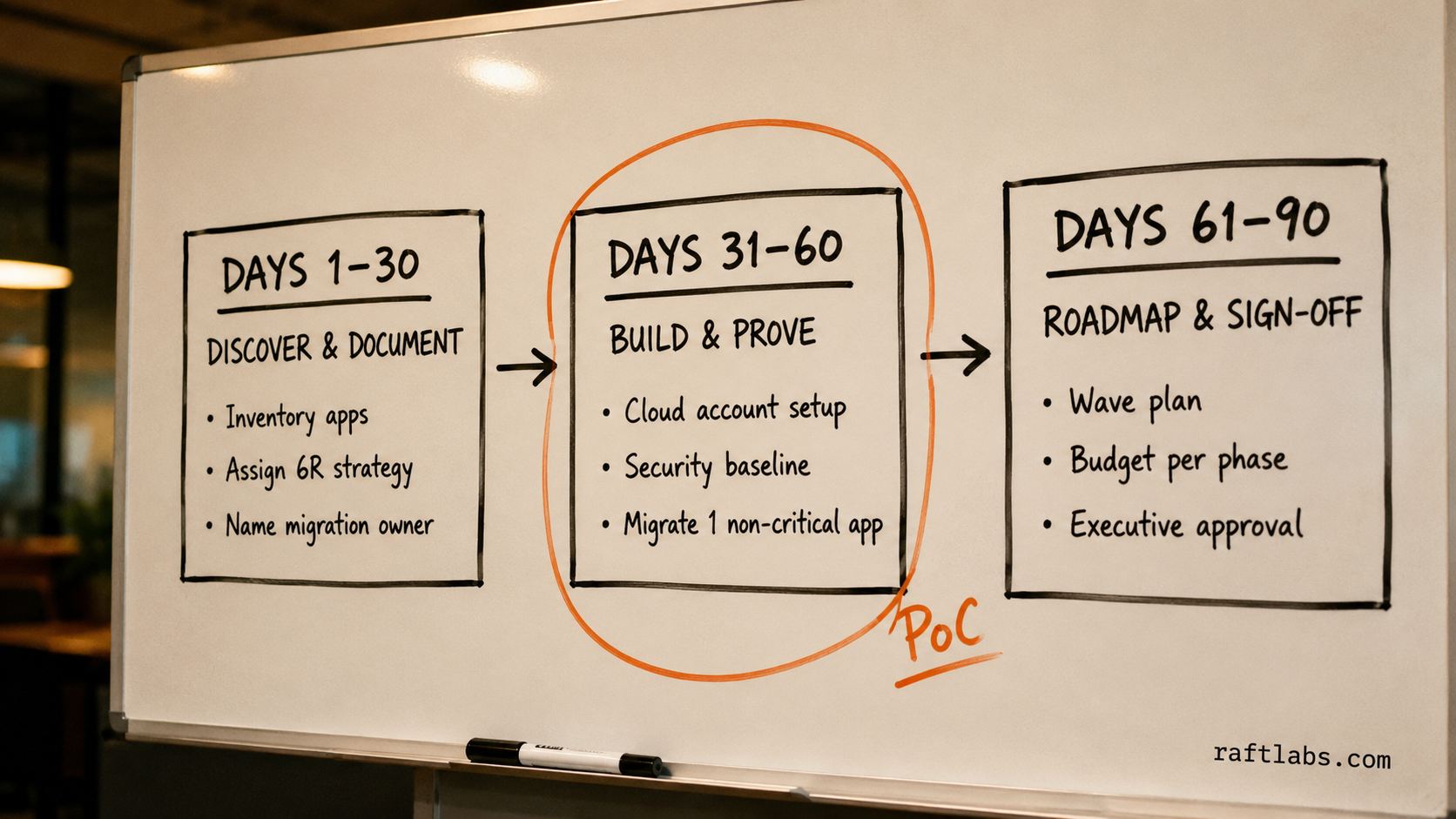
Days 1-30: Discover and document. Inventory every application. Assign a 6R strategy to each. Calculate the total cost of your current environment. Identify your regulatory and compliance requirements. Appoint a migration owner - a senior technical leader who reports to the business, not just IT.
Days 31-60: Build the foundation and run a proof of concept. Set up your cloud account, networking, and security baseline. Pick one non-critical application and migrate it. Not to prove it's possible - to learn what you don't know yet. Document every surprise. This PoC is your training ground.
Days 61-90: Build the roadmap and get sign-off. Based on the inventory and PoC learnings, produce a phased migration roadmap with wave plans, budget estimates per phase, risk register, and success metrics. Get executive sign-off on the roadmap and the budget - not just the concept. A cloud migration without committed budget approval is a project that will get paused at the first cost spike.
The real difference between migrations that work and migrations that don't
Every successful cloud migration we've seen started with a committed business case and a named business owner. Every failed or stalled migration started with IT saying "we should move to the cloud" and a CEO nodding without understanding the commitment.
Cloud migration is a business project. It changes your vendor relationships, your security posture, your team's skill requirements, and your cost structure. It takes 12-24 months and significant investment before you see the full benefit. That's not a reason to avoid it - McKinsey estimates more than $1 trillion in run-rate EBITDA value is available to Fortune 500 companies through cloud adoption by 2030, and Gartner projects that more than half of enterprise IT spending will have shifted to the cloud by 2025. The companies that get the strategy right end up with lower infrastructure costs, better scalability, and faster deployment cycles.
But it requires treating it like the business transformation it is, not an IT project you check in on quarterly.
If you're evaluating a migration and want a second opinion on your business case and approach, our application modernization team works through exactly this kind of decision with clients before any code or infrastructure moves.
Ask an AI
Get an instant summary of this post from your preferred AI assistant.
Common questions
- A cloud migration strategy is the plan that determines which applications move to the cloud, in what order, using which migration approach, and with what expected business outcomes. The strategy answers who does what, what the budget is, what the risk tolerance is, and how success gets measured. Without a documented strategy, cloud migrations turn into ad-hoc infrastructure projects that go over budget and under-deliver.
- The 6 Rs are six migration approaches: Rehost (move the application as-is, also called lift-and-shift), Replatform (make minor cloud optimizations without changing architecture), Repurchase (switch to a SaaS product instead of migrating the old system), Refactor (rebuild the application to be cloud-native), Retire (decommission the application entirely), and Retain (keep the application on-premises for now). Most migrations use all six - each application in your portfolio gets assigned one of these strategies.
- A cloud migration for a 50-200 person company typically takes 6-18 months from kickoff to final workload migration. Simple lift-and-shift migrations run faster (3-6 months). Migrations that involve refactoring applications for cloud-native architecture can run 18-24 months. Large enterprise portfolios with hundreds of applications may take 2-4 years with multiple workstreams running in parallel.
- Cloud migration costs vary widely. A small company (under 50 people) doing a basic lift-and-shift might spend $50,000-$150,000 in professional services and face 20-30% higher infrastructure costs during the transition. A mid-sized company (100-500 people) with a mixed portfolio should budget $200,000-$800,000 in migration services plus 3-6 months of elevated cloud costs before optimization kicks in. Large enterprise migrations commonly run $1M-$5M+ over 2-3 years.
- Cost overrun is the most common risk - Gartner has cited that 80% of companies that migrate to the cloud overspend in their first year. The root causes are running cloud and on-premises infrastructure in parallel longer than planned, failing to right-size cloud resources, and licensing surprises (particularly around Microsoft products). The second biggest risk is data security and compliance: ensuring that data in motion and at rest in the cloud meets your regulatory requirements before you flip the switch.
- RaftLabs guides cloud migration strategy starting with a diagnostic to assess what the business actually needs before recommending a direction. Our 12-week delivery sprints move from decision to production deployment on a fixed timeline and fixed price. 4.9/5 on Clutch.