AI agent observability: how to see what your agent actually did
Most teams watch their AI agents but cannot explain a single bad answer. This guide covers what to record, what to alert on, and how to turn traces into fixes.

In this article
Short answer
AI agent observability means recording every step an agent takes, so you can replay a bad outcome and find where it went wrong. Record the prompt, the tools called, the data returned, the cost, and the final answer for each run. Then review failures weekly and turn the worst ones into fixed tests.
Key takeaways
- Observability answers one question: what did the agent do, step by step, on this specific run?
- According to LangChain, 57% of organizations run agents in production and 89% use observability, but only 52% run offline evaluations.
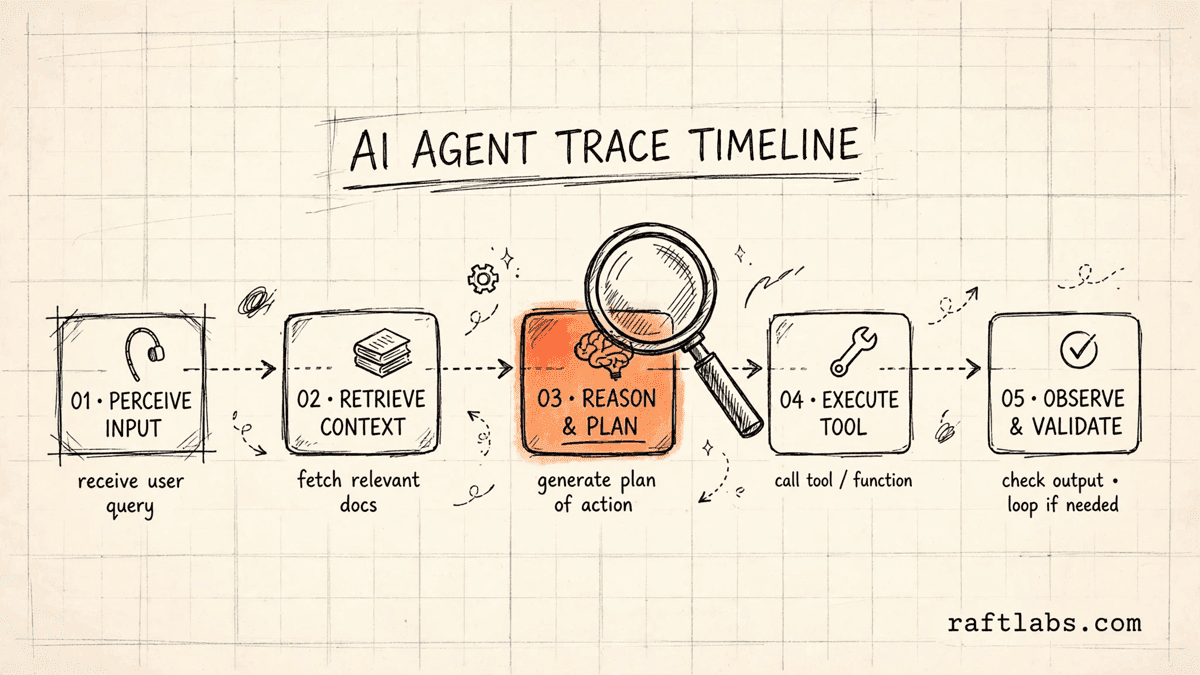
- A useful trace holds the input, each tool call, each data result, the timing, the cost, and the final answer.
- Alerts should fire on outcomes your customers feel, such as failed tasks and repeated retries, not on every odd reply.
- Watching alone does not improve quality. Turn real failures into fixed test cases and check them before every change.
An agent gives a customer the wrong answer. Your team opens the dashboard. The dashboard says the system is healthy. Nobody can show what the agent read, which tool it called, or why it chose that answer. That gap is the problem observability solves.
The short answer
AI agent observability means recording every step an agent takes, so you can replay a bad outcome and find where it went wrong. Record the prompt, the tools called, the data returned, the cost, and the final answer for each run. Then review failures weekly and turn the worst ones into fixed tests.
Why agents are harder to watch than normal software
Normal software follows a fixed path. If a form fails, the same steps fail again when you repeat them. An agent chooses its own path each time. It can call a tool, read the result, change its mind, and try something else.
That freedom is the point of an agent. It is also why a simple uptime chart tells you almost nothing. A run can finish on time, cost the normal amount, and still give a wrong or unhelpful answer.
So the record has to show the work, not just the outcome. Think of it like a delivery log. You do not just want to know that a parcel arrived. You want each handoff, so you can find the one place it went astray.
What the current numbers say
Adoption is no longer the question. According to the LangChain State of Agent Engineering report, 57% of organizations run agents in production and 89% use observability, but only 52% run offline evaluations.
Read those three numbers together. Most teams with agents in production are watching them. Far fewer test them on a fixed set of tasks before a change goes live. Watching tells you a failure happened. Testing tells you whether your fix worked and whether it broke something else.
That gap shapes this whole guide. Observability is the starting point, not the finish line. Our companion guide on testing and evaluating agents covers the testing side in full.
What to record on every run
Keep this list small enough that your team will actually keep it complete.
The input, exactly as the user or system sent it
The instructions and settings the agent ran under
Each tool call, in order, with the data it sent
Each tool result, in order, with the data that came back
The time each step took and what the whole run cost
The final answer, and whether a person stepped in
A link to the task, order, or customer record the run served
Two habits make these records useful. First, give every run one clear ID, so a support ticket can point to a single trace. Second, decide in advance how you handle private data inside traces. Traces often hold customer text, so they need the same care as any other customer record.
How to read a trace when something goes wrong
Start at the end. Read the final answer and name the exact fault. Was a fact wrong? Was a step skipped? Did the agent answer a different question from the one asked?
Then walk backwards, step by step. Find the first step where the run left the right path. A wrong final answer often starts earlier, with a tool result the agent read too quickly or a piece of data that was already out of date.
This matters because the fix depends on the cause. A wrong data source needs a data fix. A skipped step needs a clearer instruction or a required check. A tool error needs a retry rule or a handoff. If you only fix the final wording, the same fault returns in new words.
Which alerts are worth your attention
Alert on what customers feel. A short starter set covers most teams:
Task failure rate rises above its normal level
The agent retries the same step again and again
A run takes far longer than a typical run
Cost per task jumps without a matching rise in work done
Human handoffs spike on one kind of request
Resist adding an alert for every unusual reply. Too many alerts train a team to ignore all of them. Review the alert list monthly and remove any alert nobody has acted on.
The weekly review that makes this pay off
Observability earns its cost in one meeting. Once a week, pick the worst real failures from your traces. Group them by cause, not by customer. Most weeks, a few causes explain most failures.
Fix the top cause first. Then save each failure as a fixed test case, with the input and the result you expect. Before the next change goes live, run those cases again. This is how watching turns into steady improvement instead of a growing pile of logs.
For a worked view of how those checks fit together, see our AI agent development service and our wider AI development service.
A note on proof and limits
RaftLabs rates 4.9 on Clutch, and clients own 100% of the code we write for them. That ownership matters here. Your traces, your test cases, and the records of what your agent did belong to your business, in systems your team can keep and inspect.
We have not published a measured result for observability work itself, so this guide makes no such claim. It gives you the practice. The results depend on your agent, your data, and how honestly the failures get reviewed.
Where to start this week
Pick one agent. Turn on complete traces for it. Read ten real runs, including at least three failures. Write down the first wrong step in each failure. You will know within an hour whether your problem is data, instructions, tools, or handoffs, and that answer tells you what to fix first.
Ask an AI
Get an instant summary of this post from your preferred AI assistant.
Frequently asked questions
Straight answers to what buyers ask before they scope. Still stuck? .
- It is a record of everything an agent did on a run. You can see the request it received, the steps it took, the tools it used, and the answer it gave. When a customer reports a bad result, you can replay that exact run instead of guessing what happened.
- Observability watches live work as it happens. Evaluation tests the agent on a fixed set of questions before a change goes live. You need both. Observability finds real failures, and evaluation checks that a fix works and that nothing else broke.
- Record the input, the plan or reasoning steps the system exposes, each tool call and its result, how long each step took, what the run cost, and the final answer. Keep the record linked to the customer or task it served, with private data handled under your normal privacy rules.
- LangChain reports that 57% of organizations run agents in production and 89% use observability, while only 52% run offline evaluations. Watching is now common. Testing before release is still the weaker habit.
- Start with task failure rate, repeated retries of the same step, runs that take far longer than usual, sudden cost increases per task, and human handoffs. These signals point to outcomes customers feel. Add finer alerts only after the basics are stable.
- No. Start by saving complete traces in one place your team actually reviews. A platform helps once volume grows, but the habit matters more than the tool. If nobody reads the traces, a new dashboard will not fix that.