Test Driven Development with AI: Proven Workflow That Saved 2.5 Days
How RaftLabs cut new project setup from 3 days to 30 minutes using RaftStack CLI and a spec-driven TDD workflow with Claude Code. Full breakdown of the approach.

In this article
Short answer
RaftLabs reduced project setup from 3 days to under 30 minutes using RaftStack CLI and a spec-first TDD workflow with Claude Code. Write the specification and failing tests before asking AI to write code. This constrains AI output to what tests require and cuts review time by over 30%.
Key takeaways
- RaftLabs built RaftStack CLI to cut project initialization from 2-3 days to under 30 minutes. The trick was encoding standards into a single command, not documenting them and hoping developers read the docs.
- Asking AI to write tests before implementation is the single most impactful change you can make. Tests written after code validate what the code does, not what it should do.
- Context isolation is what prevents tests from inheriting the bugs already in the code. Keep implementation out of Claude's context window when writing tests.
- RaftLabs reduced code-review style comments from roughly 35% of all comments to under 5% after adopting this workflow.
- A CLAUDE.md file in each repo encodes TDD rules once. Every developer gets the same workflow automatically, with no enforcement overhead.
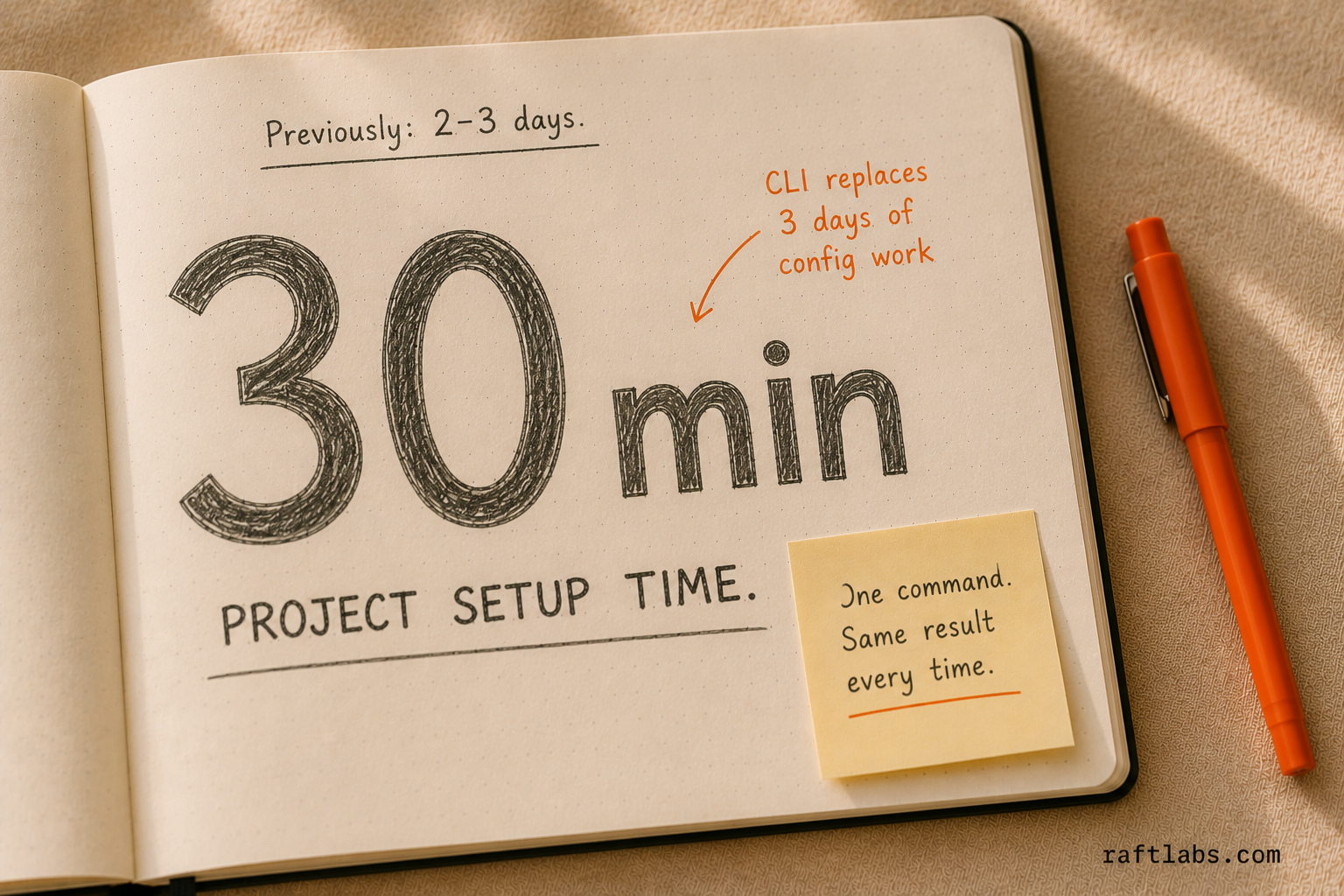
We cut new project setup at RaftLabs from 2-3 days to under 30 minutes. This article documents exactly how: we built RaftStack CLI, an internal tool that standardizes repo configuration, then applied that same discipline to AI-assisted development through a spec-driven, test-first workflow with Claude Code.
The result was consistent, high-quality code output across every developer on the team, regardless of individual coding style or experience level. Here is the full workflow and how you can apply it.
Whether you are a tech lead dealing with inconsistent codebases, an engineering manager looking to scale team practices, or a developer curious about effective AI integration in development workflows, this breakdown offers practical steps you can apply today.
The Problem: Why Repository Setup Became a Bottleneck
Understanding the full scope of the problem explains why we chose this approach.
The Manual Setup Reality
When a new project kicked off at RaftLabs, a developer would create a fresh repository and begin copying configuration files from an existing reference project. ESLint configurations, Prettier settings, TypeScript configs, Husky hooks, commitlint rules. The full stack of tooling.
On paper, a one-hour task. In practice, it consistently consumed 2-3 days. The reference project might run an older ESLint version. Its TypeScript config might include settings specific to that project's architecture. Husky hooks might reference scripts that do not exist in the new project's package.json.
Developers would copy files, hit errors, debug, modify configurations, and iterate until things worked. This process burned days and introduced configuration drift. Each new project ended up with slightly different settings, making context-switching between projects harder.
The Consistency Crisis
After a year, we audited our repositories and found no two projects had identical configurations. Some used tabs, others spaces. Some enforced strict TypeScript null checks, others did not. Commit message formats varied widely. Some projects had thorough pre-commit hooks, others had none.

This inconsistency created four real problems:
Onboarding friction: new developers had to learn the specific conventions of each project
Code review waste: reviewers spent time on style issues rather than logic
Cross-project hesitation: developers avoided contributing to unfamiliar repositories
Tooling drift: updates had to be applied manually to each project
The Traceability Gap
Despite using Asana for project management, there was no enforced link between commits and tasks. Developers sometimes added task references manually, but there was no consistency. Connecting code changes to original requirements often required detective work weeks later.
The Solution: RaftStack CLI
The only way to solve this was to codify our standards into tooling. Rather than documenting conventions and hoping developers followed them, we built a CLI that applies configurations automatically.
Design Philosophy
RaftStack CLI was built on four principles:
- Declarative over imperative: developers choose what they want; the CLI handles how to implement it
- Modular application: each configuration applies independently
- Idempotent operations: running the CLI multiple times produces the same result
- Minimal assumptions: works with any npm-based project structure
Core Features
Asana Commit Linking confirms every commit references an Asana task. This creates automatic traceability between code changes and project management. When investigating a bug six months later, any developer can immediately understand the context behind any commit. The format is standardized: [ASANA-12345] Your commit message here.
Pre-push Validation runs build processes and validations before code reaches the remote repository. This catches broken builds before they enter CI, reducing failed builds and the associated context-switching costs.
Branch Naming Conventions produce consistent branch names that encode the type of work being done. This makes repository navigation intuitive and supports automated workflows that key off branch names.
Code Quality Tools apply standard ESLint, Prettier, and TypeScript configurations. These are versioned and maintained centrally, so updates propagate to all projects at once.
Implementation Approach
Rather than building from scratch, RaftStack CLI coordinates existing tools. It uses Husky for Git hooks, commitlint for message validation, and standard linting tools for code quality. The CLI's value is in curation and configuration, not in reimplementing existing functionality.
Installation is straightforward for any npm-based project:
npx @raftlabs/raftstack
The CLI presents an interactive menu where developers select which configurations to apply. Each selection is independent, so teams can adopt RaftStack incrementally.
Extending Standardization to AI-Assisted Development
With repository setup standardized, we turned to a newer problem: wildly inconsistent results from AI-assisted coding.
The Chaos of Unstructured AI Usage
Like many engineering teams, we encouraged developers to use Claude Code to accelerate development. The theory was sound. The reality was more complicated.
Without a standard workflow, AI usage was essentially random. Each developer had their own approach:
Some asked Claude to write entire features in one shot, resulting in 1,000+ line files with no clear structure
Others wrote code manually and only used AI for debugging
Some provided extensive context; others gave minimal direction
Test coverage ranged from thorough to non-existent
The result: code quality varied dramatically depending on who wrote it and how they happened to use AI that day. Code reviews became rewrites rather than refinements. The promise of AI-accelerated development was undermined by output inconsistency.
The Root Cause: Implementation-First Thinking
We analyzed patterns in our AI-assisted code and identified the core problem: Claude Code, like most developers, defaults to implementation-first thinking. When asked to build a feature, it writes the implementation immediately. Tests, if added at all, come afterward and often only cover the happy path. Research from Google on code review practices found that test coverage written after implementation is 30-40% less likely to catch behavioral regressions than tests written against a specification first.
This approach has four problems:
Edge cases get ignored: AI focuses on making the basic functionality work
Tests validate implementation rather than requirements: tests written after code often assert what the code does, not what it should do
No design pressure: without tests driving design, code trends toward monolithic structures
Context pollution: when implementation is in the context window, AI's test writing reflects implementation details rather than requirements
The Spec-Driven TDD Workflow for Claude Code
Our solution was a structured workflow that forces test-driven development when using Claude Code. The key insight: AI assistance works best when it has clear, verifiable targets. Tests provide exactly that.
The Red-Green-Refactor Cycle with AI
Traditional TDD follows a simple cycle: write a failing test (red), write minimal code to make it pass (green), then refactor. We adapted this for AI-assisted development:
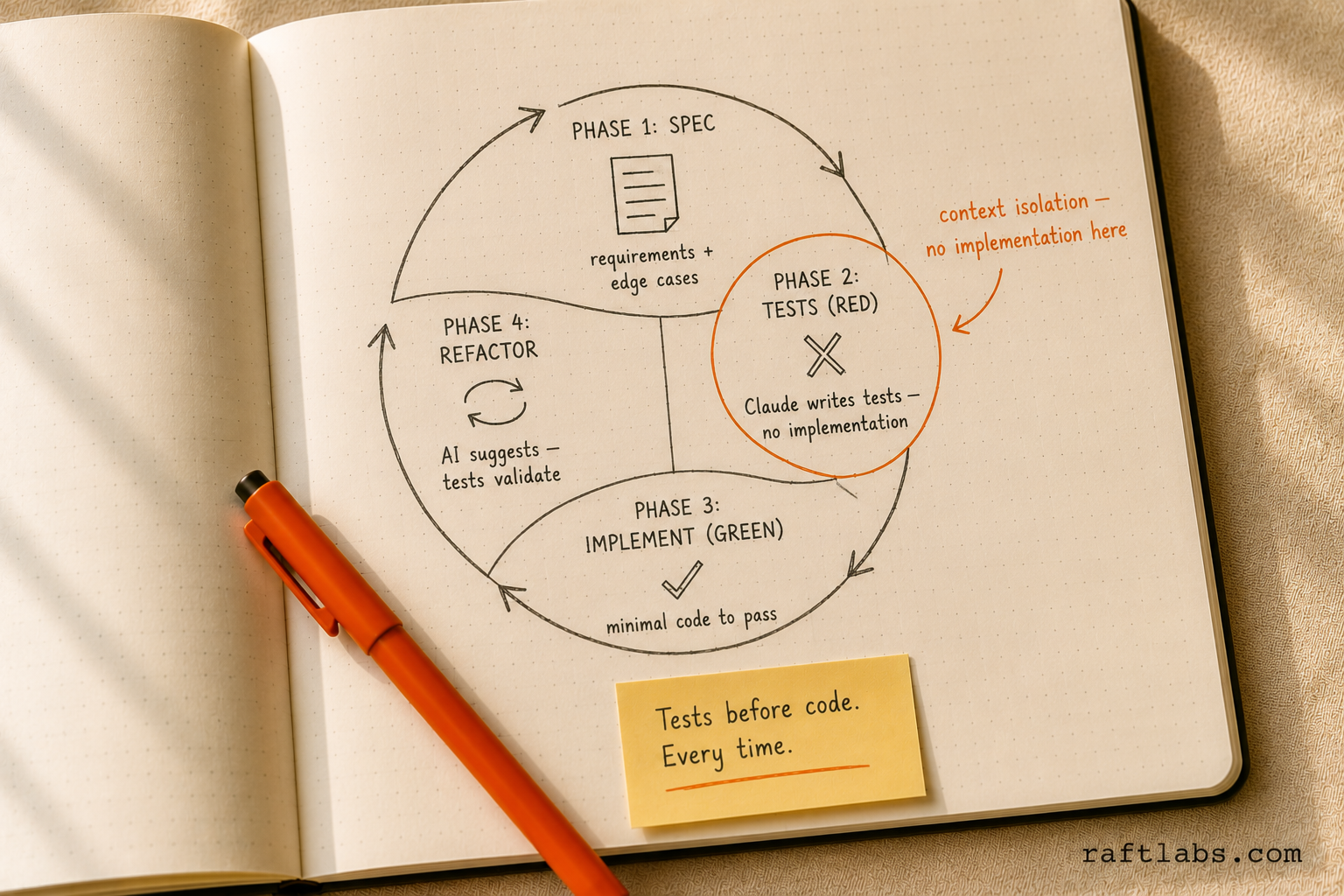
Phase 1: Specification. Before any coding begins, create a specification document that defines what you are building. This includes requirements, acceptance criteria, and explicitly enumerated edge cases. This specification becomes the contract that constrains all subsequent work.
Phase 2: Test writing (Red). With the specification complete, prompt Claude to write thorough tests. Critically, this happens before any implementation exists. Claude is explicitly told that implementation does not exist yet, preventing it from making assumptions about how the code will work. Run these tests to confirm they fail as expected.
Phase 3: Implementation (Green). Only after tests are written and committed do you ask Claude to implement the feature. The instruction is specific: write the minimal code necessary to make the tests pass. This constraint prevents over-engineering and confirms the implementation is driven by requirements, not assumptions.
Phase 4: Refactoring. With passing tests providing a safety net, refactor confidently. Claude can suggest improvements, and you can verify that refactoring does not break functionality by running the test suite.
Context Isolation: The Key to Consistent Results
A critical aspect of our workflow is context isolation. When Claude is writing tests, implementation code should not be in the context window. When it is writing implementation, it should focus only on making tests pass, not on what a "good" implementation might look like independent of the tests.
We achieve this through structured prompting and, in more advanced setups, through Claude Code's sub-agent capabilities. Each phase gets exactly the context it needs and nothing more.
The practical outcome is significant: two developers using this workflow on the same feature will produce remarkably similar code. The tests constrain the solution space, and the minimal-implementation requirement prevents stylistic divergence.
CLAUDE.md Configuration
We codify the TDD workflow in each project's CLAUDE.md file, which Claude Code reads automatically. This file includes:
Testing conventions and frameworks used in the project
Explicit instruction to follow TDD methodology
Quality standards for code structure and documentation
Commands for running tests and validating changes
By baking these instructions into the project itself, we confirm that any developer using Claude Code in the repository follows the same workflow automatically. Same philosophy as RaftStack CLI: encode standards in tooling, not documentation.
Three Approaches Side-by-Side
To understand the value, here is how the same feature plays out under three different workflows.
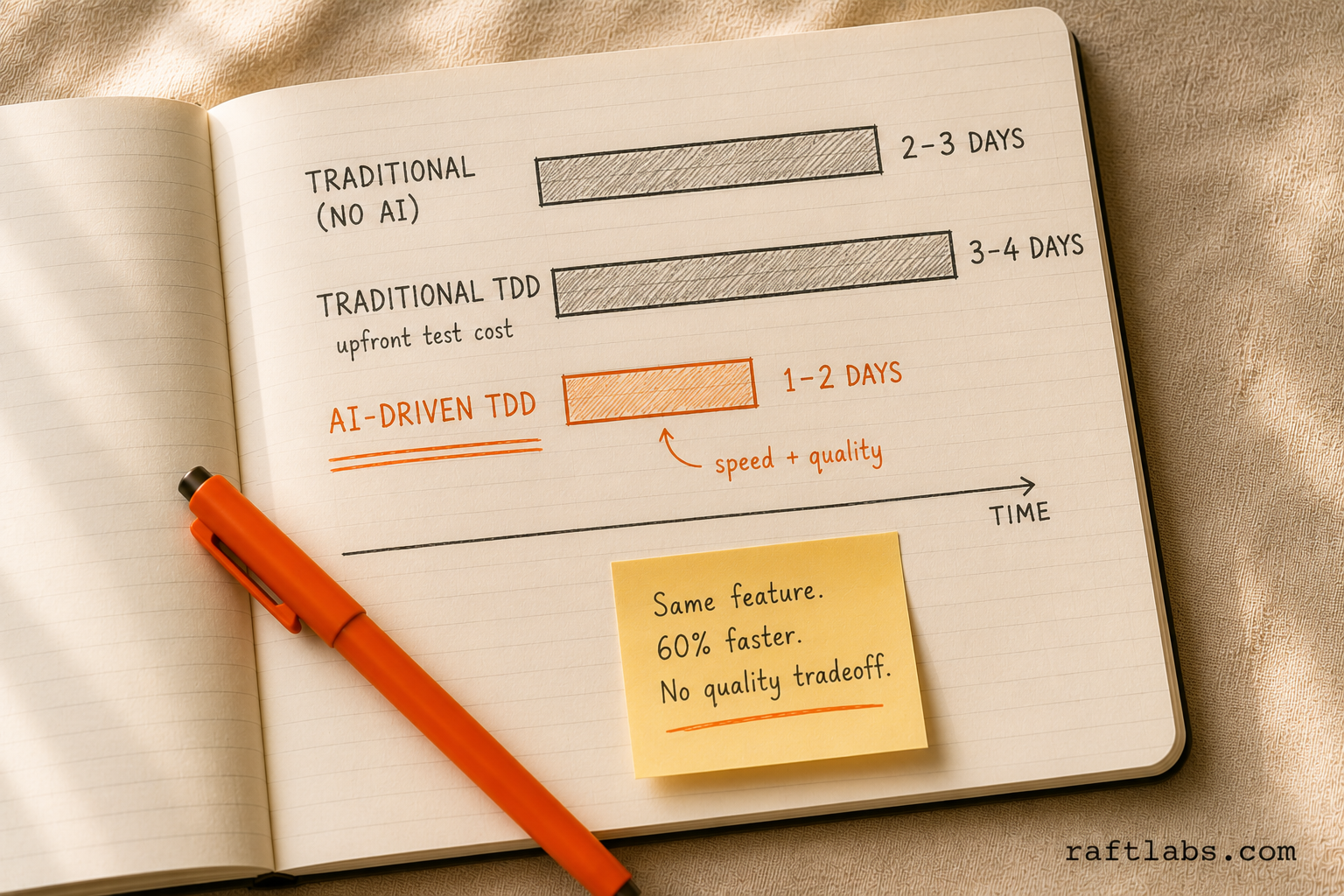
Scenario: Building a User Authentication Module
Traditional Development (No TDD, No AI)
Developer reads requirements
Writes implementation based on understanding
Tests manually in development environment
Discovers edge cases through bug reports
Writes tests after bugs are found (if at all)
Timeline: 2-3 days for initial implementation, ongoing bug fixes. Common issues: Missed edge cases, inconsistent error handling, difficult to refactor.
Traditional TDD (No AI)
Developer writes specification
Manually writes thorough test cases
Writes minimal implementation to pass tests
Refactors with test safety net
Timeline: 3-4 days (testing overhead upfront). Common issues: Perceived slowness, inconsistent test quality across team members.
AI-Driven TDD (Our Approach)
Developer writes specification
Claude generates test suite based on spec
Developer reviews and refines tests
Claude writes minimal implementation to pass tests
Refactor with AI suggestions and test validation
Timeline: 1-2 days. Benefits: Speed of AI plus quality of TDD, consistent outputs across team, thorough edge case coverage.
Also Read: AI Application Development Complete Guide
How Different AI Coding Assistants Fit This Workflow
| Feature | Claude Code (Our Choice) | GitHub Copilot | Cursor | ChatGPT/GPT-4 |
|---|---|---|---|---|
| Context Awareness | Excellent: reads project files including CLAUDE.md | Good: inline suggestions based on current file | Excellent: full codebase context | Limited: requires manual context copying |
| Test-First Support | Native: can be explicitly instructed to write tests before implementation | Weak: tends to suggest implementation first | Moderate: can follow instructions but requires prompting | Good: follows instructions but requires conversation management |
| Spec Understanding | Excellent: can work from detailed specifications | Limited: works best with code context | Good: can interpret specifications | Excellent: strong at understanding requirements |
| Context Isolation | Strong: sub-agent capabilities allow separate contexts for test/implementation phases | N/A: no concept of phases | Moderate: requires manual prompt engineering | Moderate: requires careful conversation threading |
| Consistency Across Team | High: CLAUDE.md produces same behavior for all developers | Variable: depends on individual usage patterns | Moderate: configurable but requires setup | Low: each developer has separate conversations |
| Local Development Integration | Excellent: CLI tool with full terminal access | Excellent: IDE integration | Excellent: IDE integration | Poor: separate web interface |
| Cost | Usage-based API pricing | Subscription per developer | Subscription per developer | Subscription or API pricing |
The critical factor for us was consistency and workflow enforcement. Claude Code's ability to read and follow the CLAUDE.md file means every developer gets the same TDD workflow automatically. The sub-agent capabilities also make context isolation cleaner. We can explicitly separate the test-writing phase from the implementation phase without manual discipline.
That said, the principles apply to other tools. The key is enforcing the spec → test → implement → refactor sequence through disciplined prompting, regardless of which AI assistant you use.
Results and Impact
The combination of RaftStack CLI and the TDD workflow produced measurable improvements.
Quantitative Improvements
| Metric | Before | After |
|---|---|---|
| Project setup time | 2-3 days | < 30 minutes |
| Configuration consistency | ~15% identical | 100% identical |
| Commit traceability | ~40% linked | 100% linked |
| Code review style comments | ~35% of all comments | < 5% of all comments |
| AI-generated code quality variance | High (developer-dependent) | Low (consistent) |
According to McKinsey's 2023 Developer Productivity Report, developers using AI coding tools with structured workflows save 20-45% of time on repetitive tasks compared to unstructured usage. Our results align with that range.
"The teams that see the biggest productivity gains from AI coding tools are not the ones using the most powerful models. They are the ones with the clearest development contracts: explicit specs, defined test criteria, and structured review checkpoints.". Martin Fowler, Chief Scientist at Thoughtworks, from his 2024 essay on AI-assisted development practices.
Qualitative Observations
Faster onboarding: New developers contribute to any project immediately. There are no project-specific conventions to learn because all projects use the same standards.
Confident refactoring: With test coverage driven by TDD, developers refactor aggressively. The test suite catches regressions immediately.
Better code reviews: Reviewers focus on logic, architecture, and edge cases rather than formatting and style. Reviews are faster and more useful.
Predictable AI assistance: Claude Code became a reliable tool rather than a lottery. Developers plan their work around it. This predictability increased adoption and trust.
Lessons Learned and Recommendations
Start with Pain Points, Not Perfection
We did not try to standardize everything at once. RaftStack started with commit message validation because that was the biggest immediate problem. As developers experienced the benefit, adoption of additional features followed naturally.
Make the Right Way the Easy Way
The CLI succeeds because following standards is easier than not following them. Developers do not need to remember conventions or look up documentation. They run one command and get the correct setup. The same applies to the TDD workflow. The structured approach reduces cognitive load compared to ad-hoc AI prompting.
Version Your Standards
Configurations in RaftStack are versioned. When we update ESLint rules or add new pre-commit hooks, we roll out changes incrementally and roll back if needed. This gives us confidence to iterate on standards without fear of breaking existing projects.
AI Workflows Need Constraints
The counterintuitive lesson: more constraints produce better outputs. Giving Claude free rein produces unpredictable results. Constraining it with tests, specifications, and explicit phase boundaries produces consistent, high-quality code. Think of it like directions: "go somewhere interesting" produces random results; "go to the coffee shop on Main Street" gets you exactly where you need to be.
Mistakes We Made Implementing AI-Driven TDD (So You Don't Have To)
Mistake #1: Letting Claude See Implementation While Writing Tests
What Happened: We asked Claude to write tests for existing code. This seemed efficient. We had code that needed test coverage, so why not generate tests for it?
The Problem: Tests written this way validated what the code did, not what it should do. If the implementation had bugs, the tests codified those bugs.
The Solution: Strict context isolation. When writing tests, Claude's context includes only the specification and requirements. Never the implementation.
Warning Sign: If your tests consistently pass on the first run without any code changes, they are probably validating existing behavior rather than driving development.
Mistake #2: Writing Vague Specifications
What Happened: We assumed Claude's intelligence would compensate for underspecified requirements. Brief specs like "build a user login endpoint" produced different implementations from different developers.
The Problem: Claude filled in blanks based on common patterns, which was not always what we needed. Edge cases got handled inconsistently.
The Solution: Explicit, enumerated specifications. Document expected behavior, edge cases, error conditions, and security requirements in detail before any code is written.
Warning Sign: If you frequently say "that's not what I meant" during code review, your specifications are not detailed enough.
Mistake #3: Skipping the Test Review Step
What Happened: Since Claude was generating test suites quickly, we just ran the tests to confirm they failed, then moved straight to implementation.
The Problem: AI-generated tests sometimes include redundant cases, miss important edge cases that were not explicit in the spec, or use testing patterns inconsistent with the rest of the codebase.
The Solution: Mandatory human review of generated tests before proceeding to implementation. A developer reads through the test suite and asks: "Do these tests validate our actual requirements? Are there gaps?" This review takes 5-10 minutes and catches issues that would take hours to debug later.
Mistake #4: Allowing One-Shot Feature Implementation
What Happened: Developers would prompt Claude with "build the entire user authentication system" and let it generate hundreds of lines of code at once.
The Problem: Large, single-shot implementations required significant rework. Claude made architectural decisions that did not align with our patterns and created monolithic files.
The Solution: Iterative, small-batch development. Break features into small, testable units. Write tests for one unit, implement it, commit, then move to the next.
Warning Sign: If your Git commits routinely include 500+ lines of changes, you are batching too large.
Mistake #5: Treating AI Output as Final Code
What Happened: We sometimes treated Claude's implementation as production-ready code that just needed to pass tests.
The Problem: AI-generated code often works but lacks nuance from deep context about the system. Variable names may be generic, error messages unclear, or performance characteristics suboptimal.
The Solution: Always include a refactoring phase. With tests providing safety, developers refine the AI-generated implementation: improve naming, add comments where complexity requires it, optimize performance-critical paths.
Anti-Patterns to Avoid When Prompting AI
The "Magic Prompt" Fallacy: Spending excessive time crafting the perfect prompt. The workflow (spec → test → implement → refactor) matters more than prompt optimization. A mediocre prompt within a good workflow outperforms a perfect prompt with no workflow.
Context Dumping: Copying your entire codebase into the prompt hoping AI will understand everything. Too much irrelevant context degrades performance. Provide focused, relevant context only.
Test After Debugging: Writing implementation, debugging it manually until it works, then asking Claude to generate tests for the debugged code. This defeats the purpose of TDD entirely.
Inconsistent Workflow: Following TDD on some features but not others, or following it on Monday and abandoning it under deadline pressure on Friday. The workflow only works when it is habitual.
How to Know If Your AI Workflow Is Not Working
Code Review Gridlock: If reviews consistently require major rewrites of AI-generated code, your specifications are not detailed enough or your prompting strategy is not aligned with your quality standards.
Test Suite Does Not Catch Bugs: If bugs reach production that tests should have caught, your test generation process needs review.
Inconsistent Code Quality: If quality varies significantly between features or developers, your workflow is not standardized enough.
Developer Frustration: If developers say "AI slows me down" or "I could have written this faster myself," they are likely not following the workflow correctly or the workflow needs refinement for your context.
Getting Started with RaftStack
RaftStack is available as a public npm package. Try it immediately on any npm-based project:
npx @raftlabs/raftstack
For the TDD workflow, start with these steps:
- Create a CLAUDE.md file in your project root with explicit TDD instructions
- Document your testing conventions so Claude knows which frameworks and patterns to use
- Train your team on the spec → test → implement → refactor workflow
- Review early outputs carefully to establish expectations and refine prompting strategies
Conclusion
RaftStack CLI solved our immediate repository standardization problem, cutting setup time from days to minutes and eliminating configuration drift. The more significant insight was recognizing that the same principles apply to AI-assisted development. By constraining Claude Code with structured workflows, specifications, and test-first methodology, we turned it from an unpredictable assistant into a reliable tool that produces consistent, high-quality code.
The combination creates a multiplier effect. Developers spend less time on setup and more time on valuable work. Code reviews focus on substance rather than style. AI assistance accelerates development without sacrificing quality. Every developer on the team produces code that meets the same standard, regardless of experience level or personal coding style.
If your team is dealing with similar challenges, try RaftStack and experiment with structured AI workflows. The investment in tooling and process pays dividends in every project that follows.
Ready to Standardize Your Development Workflow?
RaftLabs helps engineering teams build scalable, consistent development practices. Whether you need help implementing tooling like RaftStack, establishing AI-assisted development workflows, or building custom solutions for your team's specific challenges, we can help. Talk to our team about your current workflow and where it breaks down.
Ask an AI
Get an instant summary of this post from your preferred AI assistant.
Common questions
- Yes. RaftStack applies at the monorepo root or to individual packages. For most setups, apply it at the root to get consistency across all packages. The CLI detects workspace configurations and adjusts its behavior. Projects with 5 or more packages benefit most from root-level application.
- The current implementation validates task IDs against Asana's format. The underlying commitlint infrastructure is configurable. Teams using Jira, Linear, or other tools can modify the validation regex to match their task ID format. Adding support for additional platforms is on the roadmap.
- Yes. The principles (specification before coding, test-first approach, context isolation, minimal implementation) apply to GitHub Copilot, Cursor, or any other tool. Claude Code's sub-agent capabilities make context isolation cleaner, but similar results are achievable with disciplined prompting in other tools.
- Start with bug fixes rather than new features. Write a test that reproduces the bug, then fix it. The test confirms the bug never returns. Once developers experience that benefit, they apply TDD to new features willingly. AI-assisted test writing also removes much of the time cost that makes TDD feel burdensome.
- Most developers reach a comfortable pace within one week of regular use. The structured phases reduce cognitive load. Instead of deciding how to approach each AI interaction, developers follow a known sequence. Output quality and speed improve rapidly once developers learn what makes an effective specification.