AI in product development: a practical guide for teams that ship
Discover how real teams are using AI to ship MVPs in weeks, cut costs, and avoid hallucination disasters, while competitors quietly fall behind.

In this article
Short answer
AI in product development cuts MVP timelines from 16-20 weeks to 12-14 and saves $15K-40K per sprint. RaftLabs has shipped AI-augmented products since 2015. The 85% failure rate comes from skipping data quality, monitoring, and hallucination mitigation, not from the technology itself.
Key takeaways
- AI in product development is already practical and helps teams ship MVPs in 12-14 weeks instead of 16-20.
- AI boosts speed, cuts $15K-40K per sprint, and can reduce post-launch bugs by up to 70 percent when testing is automated.
- AI is best for pattern recognition at scale and high-volume analysis while humans keep control of judgment, strategy and final decisions.
- Hallucination risk is managed with constrained generation, automated validation, human review and strong production monitoring.
- The recommended approach is to start with one high-cost repetitive problem, apply AI with safeguards, measure results and then expand.
By 2027, 80% of product development teams will be using AI-augmented tools. That's according to Gartner, and right now in early 2026, we're watching it happen.
But here's the thing nobody's saying out loud: most of these AI implementations are going to fail.
Not because the technology is bad. The technology works. Teams fail because they're trying to solve the wrong problems, or because they skipped the boring infrastructure work that actually makes AI useful in production.
60-70% of AI features in products don't survive the first six months. The reasons are almost always the same: poor data quality, latency that makes the feature unusable, or users who don't trust what the AI outputs and route around it. None of these are AI problems. They're planning problems.
We've been building AI-powered products since 2015. For startups racing to launch. For scaleups trying to move faster without tripling their engineering team. We've shipped the stuff that works and watched the proof-of-concepts that died in staging.
This isn't a think piece about AI's potential. This is about what's working right now for teams shipping real software to real users.
Who this guide is for (and who it isn't)
There's no shortage of AI content right now, but most of it is not written for the people who actually have to make the call.
This is for operators. Decision-makers accountable for timelines, budgets, hiring plans, and shipped product. If you are weighing AI against real constraints - runway, roadmap pressure, technical debt, team capacity - this is written for you.
Who this guide is for
You're a CTO trying to figure out if AI is worth the investment or just expensive theater.
You're a product manager watching competitors ship faster and wondering how they're doing it.
You're a founder who needs to launch in 8 weeks, not 6 months, and cannot afford to hire 5 more engineers.
You're an engineering leader who has to choose between technical debt and falling behind.
Who this isn't for
Anyone hunting for AI theory or academic papers about "transformation potential."
People who want to "explore emerging technologies" without shipping anything.
Teams still in the idea stage who have not launched a product yet.
Anyone who gets annoyed when you cite specific numbers and talk about tradeoffs.
Why read this?
We're not here to sell you a story. We're here to show you the math.
Time first. The difference between 12 to 14 weeks and 16 to 20 weeks is not just a few calendar pages. It is the difference between launching into momentum and launching into catch-up mode.
Now money. When AI handles the repetitive, structured work, teams regularly save $15K to $40K per sprint. That is budget you can redirect into core features, better UX, or simply extending runway.
Quality is where it gets interesting. With AI-powered testing set up properly, up to 70% fewer bugs make it to production. That means fewer emergency patches, fewer customer apologies, and fewer engineers stuck fixing what should have been caught earlier.
Here's the part most vendors skip. Sometimes AI is the wrong choice. Sometimes the overhead, the risk, or the complexity does not justify it. We will tell you that too.
Where AI actually solves real problems
Product teams hit three walls. Doesn't matter how talented your engineers are, these walls slow everyone down.
1. Velocity
Your senior developers are spending 60% of their time on work that doesn't need a senior developer. Boilerplate code. Documentation updates. Debugging the same edge case pattern for the hundredth time.
That's a $150K/year engineer doing work you could hire someone for $60K to handle. Except you can't hire someone because the work requires understanding your codebase, even if it doesn't require senior judgment.
2. Pattern recognition
You've got hundreds of thousands of user interactions sitting in your analytics. Your PM reviews a small sample and calls it user research. Makes some decisions based on gut feel mixed with limited data points.
Meanwhile, competitors using AI are finding patterns across entire datasets - the patterns showing exactly why users behave certain ways. They're fixing issues faster and iterating based on full insights.
3. Scale
Your manual QA process works great at 50 test cases. At 500 test cases, it's struggling. At 5,000, it's completely broken.
Teams that automated their testing months ago are shipping more frequently with fewer bugs. You're still trying to hire another QA engineer who'll take three months to onboard.
These aren't theoretical future problems. This is what's costing you market share right now, this quarter.
What is AI in product development?
AI in product development means using technologies like machine learning (ML), natural language processing (NLP), and generative AI to make every stage of building a software product faster, smarter, and more efficient.
Instead of relying only on manual work, AI supports your team across the entire product lifecycle:
User research and analysis: extract insights from customer feedback and market data
Product design: generate wireframes, user flows, and UX suggestions
Development: assist with code generation, documentation, and refactoring
Testing and QA: automatically detect bugs and edge cases
Post-launch optimization: analyze user behavior and recommend improvements
What this means for your business
When applied correctly, AI helps product teams:
Launch MVPs in 12-14 weeks instead of 16-20
Reduce $15K-$40K per sprint by automating repetitive tasks
Cut post-launch bugs by up to 70% through smarter testing and validation
Free up developers to focus on architecture, scalability, and complex problem-solving
AI handles the structured, repetitive, and data-heavy work, so your product team can focus on innovation, strategy, and building features that actually differentiate your product.
If you're exploring AI in product development, you're likely looking for one thing: faster delivery without compromising quality. That's exactly where AI creates measurable impact.
Check out: Our AI development services to build your AI product as per your business needs.
How AI in product development works
AI isn't one magic tool. It's a set of different capabilities that plug into different stages of building products. Here's where it creates impact you can measure.
| Product phase | Traditional approach | With AI assistance | Primary AI capabilities used |
|---|---|---|---|
| Research & requirements | 12-14 weeks of manual interviews, documentation, and analysis | 3-5 weeks with automated insight extraction and requirement clustering | NLP, sentiment analysis, large language models (LLMs) |
| Ideation & validation | Weeks to months of concept testing and feedback cycles | Days to weeks using rapid concept generation and simulation | Generative AI models, synthetic user testing |
| Design & prototyping | Full design cycle with multiple manual revisions | 50-60% faster with AI-generated layouts and automated consistency checks | AI design assistants, UX pattern recognition |
| Build & test | Standard development velocity with manual unit and regression testing | 35-55% faster on clearly defined features with AI-assisted coding and automated test generation | Code generation tools, AI-driven QA/testing |
| Launch & iterate | 3-4 days to detect and analyze issues post-release | Issue detection within hours using real-time monitoring | AI monitoring systems, predictive analytics |
1. Research & requirements
The traditional approach: your PM interviews 10-15 users over two weeks, reads through support tickets when they have time, and makes priority calls based on gut instinct mixed with limited data.
AI changes the equation by processing massive amounts of user feedback at once.
According to McKinsey, companies using AI for customer insight analysis can process 10-50x more data points than manual analysis, identifying patterns that would take weeks or months to spot manually.
AI systems can analyze support tickets, NPS surveys, product analytics, sales call transcripts, community forums, and competitor review sites all at once. What previously required weeks of manual categorization can happen in days.
For a deeper look at how teams structure this across the full build cycle, our guide to AI application development covers the eight-step process from data strategy through deployment.
The pattern recognition capability matters a lot here. Users often describe the same need using completely different language across channels. One segment might call something "bulk editing," another "batch operations," while a third just describes the workflow without naming the feature.

Manual review misses these connections. AI catches them.
Compare timelines: 3-5 weeks for AI-powered research versus 12-14 weeks doing traditional user interviews and analysis. But this only holds if your data is clean. If your product analytics track anonymous pageviews but not authenticated user sessions, AI will optimize for the wrong audience.
When it's NOT worth implementing: If your product has fewer than 500 monthly active users, the pattern signal is too weak. You'll get better insights from 10 structured user interviews than from any AI analysis of thin data.
2. Ideation & validation
Most product teams ideate by committee. Someone suggests a feature. The room debates it for an hour. You build whatever the loudest person wanted.
AI enables rapid concept testing before committing engineering resources.
Generative models can create mockups and variations. Predictive models can estimate market fit based on similar products and actual user behavior patterns. You validate concepts with synthetic testing before burning real engineering time.
Tools like Figma AI and Adobe Firefly let teams generate dozens of design variations in the time it previously took to create one. The designer still makes all final decisions, but AI handles the repetitive exploration work.
The timeline advantage: weeks instead of months to find winning concepts through rapid iteration.
When it's NOT worth implementing: When the concept requires deep domain knowledge to evaluate - medical protocols, legal compliance, financial regulations - synthetic testing produces misleading confidence. Real subject matter expert review is faster and more reliable.
3. Design and prototyping
AI-assisted design tools generate UI variations that already match your design system. You're not staring at a blank Figma canvas. You're starting with multiple variations that already follow your brand guidelines.
The more useful part is automated consistency checks. Your design system says buttons should be 44px minimum for mobile touch targets. AI scans every screen and flags violations before the code review happens, before anyone writes CSS.
Industry data shows design-to-prototype timelines dropping 50-60% with AI assistance. The designer makes every single decision. AI handles the repetitive parts.
When it's NOT worth implementing: Teams with fewer than three active design projects per month won't recoup the setup cost of AI design tools. Manual Figma is faster for one-off projects.
Ship your MVP in 12 weeks We'll build your production-ready AI-powered MVP in 12-14 weeks with full hallucination mitigation. Not a prototype. Get your project timeline
4. Test and build
This is where you save the most engineering time.
Code generation handles the boring stuff: CRUD operations, API endpoint boilerplate, database migrations, test scaffolding.
Real numbers from industry studies: 35-55% faster for well-defined feature work when using tools like GitHub Copilot. That's not 35-55% faster on everything. AI doesn't replace architecture decisions or complex business logic. It's faster on pieces that follow predictable patterns.
Automated testing is the bigger win. AI generates test cases based on code changes. It catches edge cases humans miss. It runs regression testing continuously.
Research from Google's engineering team shows teams using AI-powered testing tools reducing critical bugs by 60-75% in production environments - but only after the team invested 3-4 weeks building a solid test infrastructure first. Teams who skipped that setup phase saw quality drop because AI generated tests for the happy path and ignored edge cases.
The cost math: $4,800-6,000/month for full AI tooling versus $25,000/month for a QA engineer. The AI tests more thoroughly and faster.
When it's NOT worth implementing: Legacy codebases without clear module boundaries produce AI code that's technically correct but architecturally incoherent. If your codebase has no tests and no documentation, spend two sprints cleaning it up before introducing AI code generation. Otherwise you're accelerating the creation of technical debt, not reducing it.
If your team is weighing these costs before committing to a full build, our AI-powered MVP service validates the core assumption in 6-8 weeks before you invest in the full testing infrastructure.
5. Launch and iterate
Post-launch is where AI becomes your unfair advantage.
Real-time user behavior analysis spots problems in hours, not weeks. Predictive performance monitoring catches issues before users notice them. Automated A/B test analysis tells you what's working without waiting weeks for statistical significance.
AI-powered monitoring systems analyze user session recordings, error logs, and performance metrics at once. Issues that would take 3-4 days to identify through traditional analytics get flagged within hours.
According to Datadog's 2025 report on observability, teams using AI-enhanced monitoring reduce mean time to detection (MTTD) by 65% on average.
When it's NOT worth implementing: AI monitoring is overkill for products with fewer than 1,000 daily active users. At that scale, a simple alerting setup on error rates and latency gives you everything you need for a fraction of the cost.
Also Read: Top AI software development companies in 2026 comparison guide
Benefits of AI in product development
Generic benefits are worthless. Here are the specific advantages with numbers from production environments.
1. Speed: ship MVPs in 8-12 weeks instead of 16-20 weeks
This timeline difference comes from compounding advantages across the development cycle. Faster research, automated testing, AI-assisted coding, and rapid prototyping all stack together.
We've measured this across our own projects at RaftLabs. AI-augmented development consistently delivers feature-complete MVPs in roughly half the traditional timeline.
2. Cost: save $15K-40K per sprint on automatable work
Break it down: $8K on code generation and testing automation. $7K on design and documentation. $5K on user research and analysis. $5K-20K on reduced rework because you caught issues earlier.
That's per two-week sprint. Multiply by 26 sprints per year.
3. Quality: up to 70% reduction in post-launch bugs
This comes from AI-powered testing catching edge cases that slip through manual QA. According to research from Meta's engineering team, full AI testing coverage can reduce production bugs by 60-75% depending on the application type.
The bugs still exist in the code. AI just finds them before your users do.
4. Scale: run 10 times more experiments per quarter
Traditional A/B testing means running 3-5 experiments at once. AI-powered experimentation platforms let you run 30-50 simultaneously, with automated analysis and winner selection.
Booking.com has published case studies showing they run thousands of experiments simultaneously using AI-powered systems. While that scale isn't realistic for most teams, 10x improvement over manual testing is achievable.
For teams building an AI-powered SaaS product where experimentation is a competitive moat, we've written a practical breakdown of how to architect the AI layer to support this from day one.
5. Intelligence: find patterns across massive datasets
Your PM cannot manually analyze hundreds of thousands of user interactions. Physically impossible.
AI can. It finds correlations between feature usage and churn that you'd never spot manually. That single insight can save products from building entirely wrong roadmaps.
This pattern intelligence is especially high-stakes for healthcare technology products, where AI-identified patterns in patient behavior translate directly into clinical outcomes, not just engagement metrics.
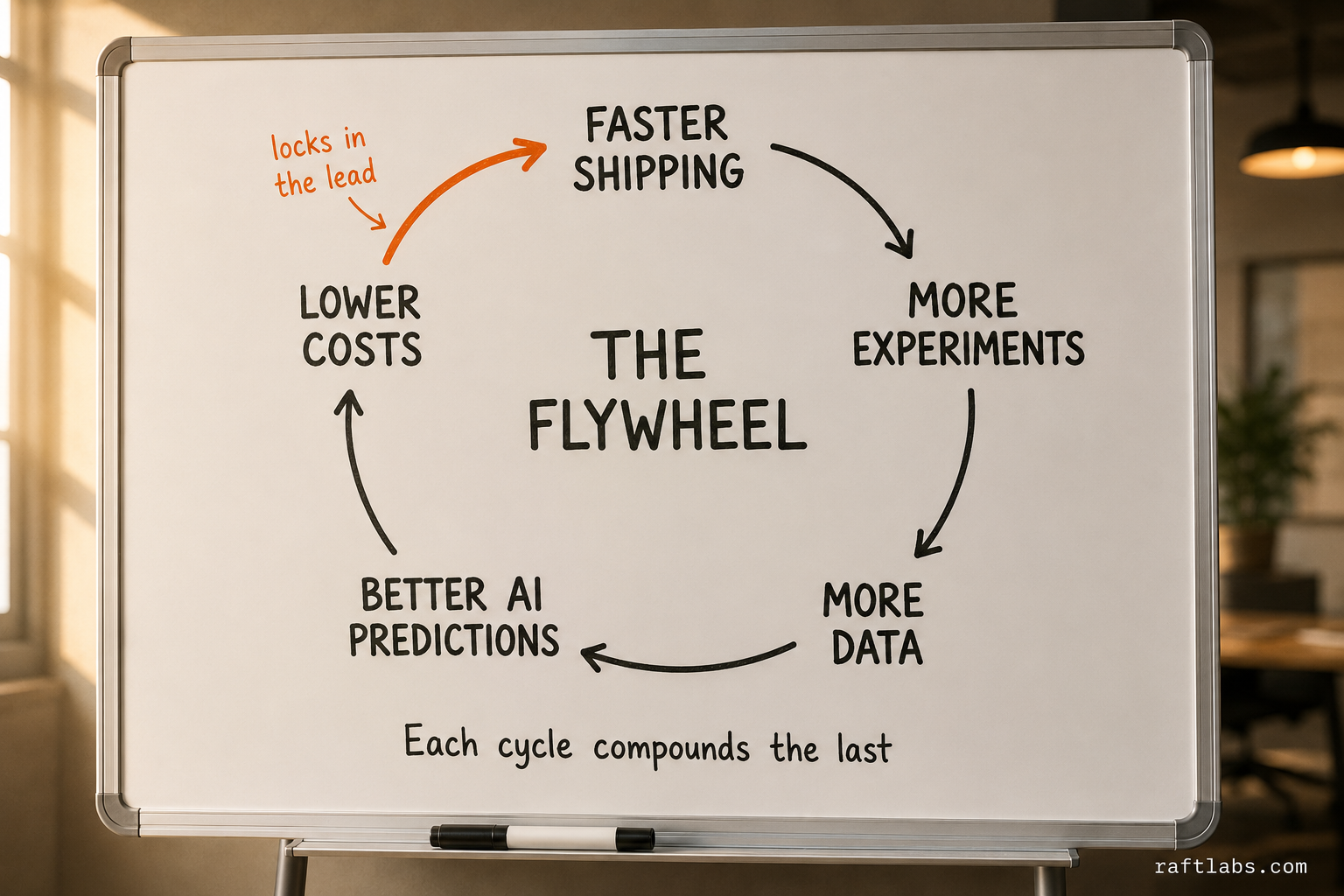
These benefits compound on each other. The speed advantage lets you run more experiments. More experiments generate more data. More data makes AI predictions more accurate. Better predictions increase quality and reduce cost.
That's the flywheel competitors can't match once you're ahead.
Also Read: Top Voice AI agent development companies in 2026.
AI in product development use cases
Theory is cheap. Here's what AI looks like in real production environments across different functions.
1. Product design
Netflix published a case study showing how they used AI to analyze viewing patterns and UI interactions across millions of users to optimize their interface design. The AI identified that certain UI elements were being ignored by 70%+ of users while critical functions required too many clicks.
By redesigning based on AI-discovered usage patterns rather than user surveys alone, they improved engagement metrics significantly. The key insight: what users say they want and what they actually do are often very different.
This pattern holds across industries. AI analyzing actual behavior patterns - heatmaps, click paths, session recordings - reveals design opportunities that traditional user research misses.
Traditional redesign cycles take 10-16 weeks. AI-powered analysis and rapid prototyping can compress this to 4-6 weeks.
2. Software development
GitHub's analysis of Copilot usage across thousands of developers shows that AI coding tools are most effective for:
CRUD operations and standard API patterns (55% faster)
Test generation and boilerplate code (60% faster)
Documentation writing (40% faster)
Refactoring existing code (35% faster)
The tool performs worse on complex business logic and novel algorithms where creativity and deep domain knowledge matter most.
Timeline comparison for standard API development: 3-4 days with AI assistance versus 8-10 days traditionally. The engineer still reviews every line and adds custom logic. AI eliminates the boilerplate.
We recently built an AI-powered voice interview system that handles phone-based screening interviews. The AI conducts natural conversations, asks follow-up questions, and provides structured analysis. The development involved building conversational AI that could handle unpredictable human responses while maintaining interview structure.
Using AI-assisted development tools helped us ship the core functionality 40% faster than traditional development would have required, particularly for the NLP processing and response generation components.
3. Infrastructure & operations optimization
For SaaS products, operational efficiency means smart infrastructure and resource allocation.
AWS published research showing that AI-powered predictive scaling can reduce infrastructure costs by 30-45% compared to manual provisioning or simple rule-based autoscaling.
The AI analyzes historical patterns, user behavior forecasts, and external signals (like scheduled marketing campaigns) to predict load 24-48 hours in advance.
The result: no more overprovisioning during slow periods (wasted money), no more underprovisioning during traffic spikes (degraded performance), and complete automation of a task that previously required ongoing manual attention.
4. Healthcare technology
We built an AI-powered remote patient monitoring system that analyzes patient vitals and behavioral patterns to predict health deterioration before it becomes critical.
The AI processes continuous data streams from wearables and home monitoring devices, identifying subtle patterns that human reviewers would miss. It flags anomalies for healthcare provider review, reducing false alarms while catching real issues earlier.
The development challenge involved building reliable AI models that work with noisy real-world sensor data and can explain their reasoning to medical professionals who need to trust the alerts.
Traditional rule-based monitoring systems generate 10-15 false alarms for every real issue. We built an AI-powered system that reduced false positives by 65% while maintaining 95%+ sensitivity for genuine health concerns.
5. Decision support systems
We developed a voice-enabled decision-making platform for distributed teams to collaborate on complex decisions asynchronously. The AI processes voice conversations, extracts key discussion points, identifies areas of agreement and disagreement, and structures the decision-making process.
The system uses natural language processing to understand context and sentiment, helping teams make better decisions faster when they can't all be in the same room.
The AI handles the tedious work of transcription, summarization, and pattern recognition across multiple conversations, letting team members focus on actual decision-making rather than process management.
6. Sentiment analysis
Customer feedback lives everywhere. Support tickets. NPS surveys. Social media. App store reviews. Sales call notes. Community forums.
According to Zendesk, companies processing feedback with AI can analyze 100% of customer interactions versus the 3-5% that manual review typically covers.
Amazon published insights on how they use AI to process millions of customer reviews, identifying emerging issues with products within hours instead of weeks. The system categorizes issues, detects emerging problems, and flags urgent concerns automatically.
What previously required 3+ hours daily of manual categorization can be reduced to 15-20 minutes of reviewing AI-generated insights and flagged priorities.
The systems can catch payment issues, UX problems, or emerging bugs 3-5 days earlier than manual processes, preventing escalation and reducing revenue impact.
These use cases share a pattern: AI handles volume and pattern recognition. Humans handle judgment and strategy.
That division of labor works in production.
But AI isn't right for every problem.
When not to use AI
Most vendors won't tell you this because they're trying to sell you AI for everything possible.
We'll tell you because we want you to succeed, not waste money on tools that don't fit your problem.
1. Skip AI when your data is garbage
AI amplifies patterns in your data. If your data is incomplete, biased, or just flat-out wrong, AI makes the problem worse faster.
If your analytics track pageviews but not authenticated user behavior, AI will optimize for anonymous traffic patterns that don't represent your actual customers at all.
Fix your instrumentation first. Implement AI second.
2. Skip AI for simple problems
Building a basic CRUD app with standard authentication? Traditional development is faster and cheaper.
AI shines when there's pattern recognition involved or when there's scale. If your problem doesn't have either of those, you're adding complexity for zero benefit.
A $5,000 AI implementation to solve a $1,000 problem is just bad business.
3. Skip AI when token costs exceed the value you're getting
Running large language models costs money per API call. If you're using AI to process millions of small requests, do the math first.
AI-powered email categorization might cost $8,000/month in API fees to replace a $300/month email filtering tool that works fine.
Sometimes the old solution is just cheaper.
4. Skip AI when you're solving for optics
If the actual goal is "we need AI in our pitch deck," don't build anything.
Investors and customers see through AI theater. They want results, not buzzwords.
Build AI when it solves a real problem your team or customers actually have. Not because it sounds impressive in a fundraising deck.
The decision framework
Does this problem involve pattern recognition at scale?
Is it repetitive work that's consuming expensive human time?
Do you have clean data to train on?
If yes to all three, AI probably makes sense.
If no to any one of those, seriously question whether traditional approaches are better.
AI implementation audit Get an audit identifying your 3 highest-ROI AI opportunities with risk assessment and cost estimates. Request free audit
Solving product innovation challenges with AI
Product teams face three innovation problems that kill momentum no matter how talented the team is or how much budget you have.
1. Challenge: slow feedback loops
You ship a feature. Wait two weeks for meaningful usage data. Analyze it. Decide on changes. Ship again.
That cycle takes 4-6 weeks minimum. Competitors running faster loops learn what works and capture users while you're still analyzing.
AI solution: real-time user insight engines
These process behavior data as it happens. You know within 24-48 hours if a feature is driving engagement or getting ignored.
According to product analytics research from Amplitude, teams using AI-powered analytics reduce feedback loop time by 60-75% compared to traditional analytics review cycles.
That acceleration means running 4-5 learning cycles in the time competitors run one.
2. Challenge: resource constraints
You have 6 engineers. Your roadmap needs 9. Hiring takes 3-4 months and costs $150K+ per senior developer.
By the time they're productive, you've lost the market window.
AI solution: engineering force multiplication
Your existing team outputs significantly more because AI handles code generation, testing, documentation, and analysis.
Research from Microsoft on GitHub Copilot shows developers complete tasks 55% faster on average when using AI assistance effectively.
Teams can gain 40-50% effective capacity without adding headcount - the same engineers cover more ground because repetitive work is handled by AI.
3. Challenge: competitive pressure
Every competitor is moving faster. Standing still means falling behind. You need to iterate faster without sacrificing quality or burning out your team.
AI solution: 3x iteration velocity
This comes from stacking the benefits. Faster testing means more experiment cycles. Automated analysis means faster decisions. Code generation means faster implementation.
The compound effect: shipping 12-15 meaningful product updates per quarter versus 4-5 traditionally.
These aren't future possibilities. These are advantages product teams are using right now to win markets.
The question isn't whether AI helps innovation.
The question is whether you're comfortable letting your competitors have this advantage while you don't.
Also Read: Top 10 Conversational AI development service companies
AI hallucination mitigation in production environments
Every CTO we talk to has the same fear.
What happens when AI generates something completely wrong and it ships to users?
That fear is valid. Large language models hallucinate. They generate confident-sounding nonsense. They fabricate API endpoints that don't exist. They reference functions you never wrote.
In a demo, that's funny. In production, that costs real money.
Here's how we stop hallucinations from reaching users in AI-powered development workflows.
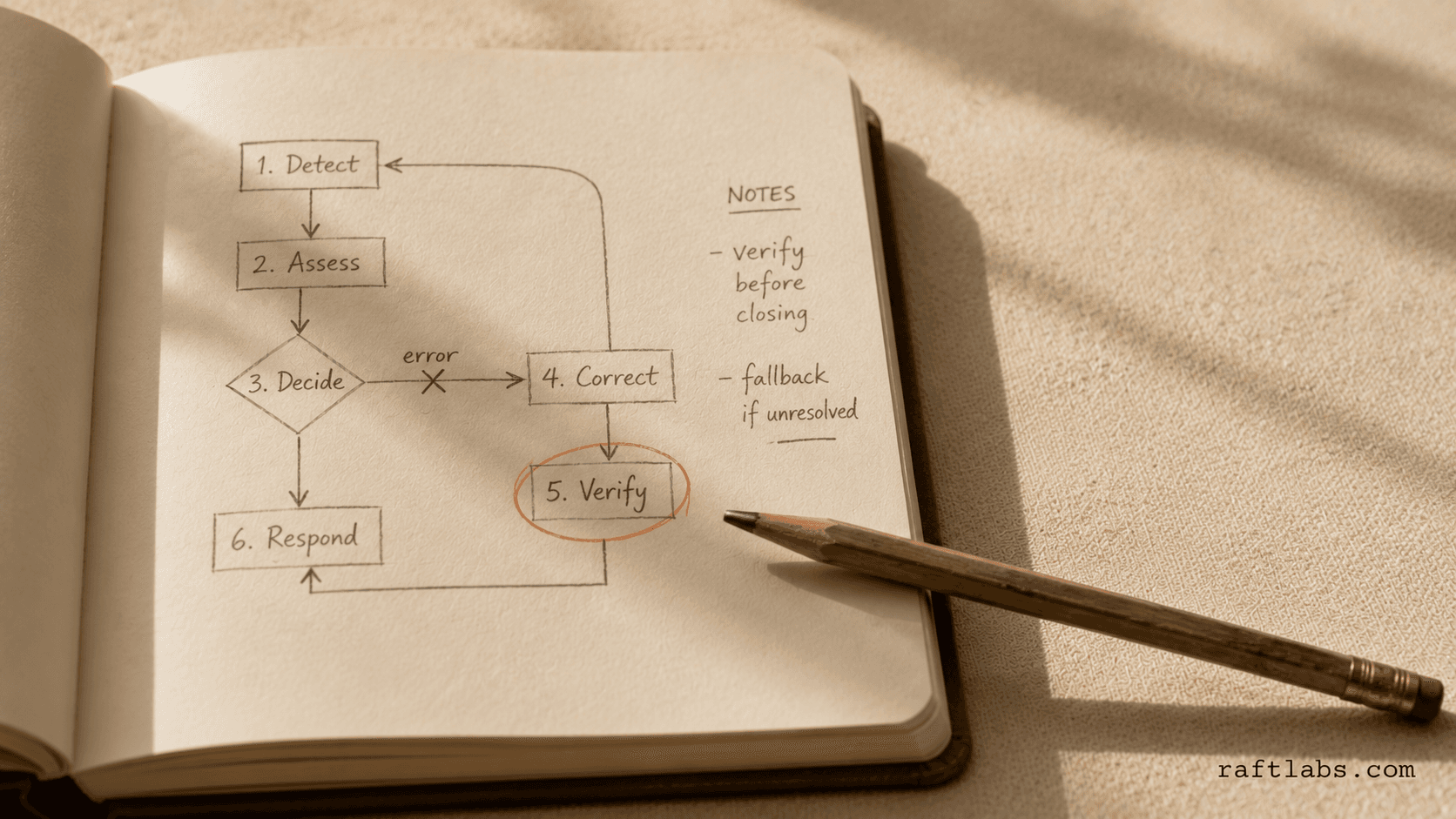
Layer 1: Constrained generation
Don't give AI free rein to generate whatever it wants. Constrain outputs to known patterns.
For API code, the AI can only use endpoints from validated API specs. For database queries, it only accesses approved schemas. For UI components, it pulls from established design system libraries.
The constraint: AI can recombine existing valid elements. It cannot invent new ones.
Research from Anthropic on Claude's constitutional AI shows that constrained generation reduces hallucination rates by 70-85% compared to unconstrained outputs.
This eliminates the majority of hallucination risk immediately.
Layer 2: Validation gates
Every single AI output runs through automated validation before a human even sees it.
Code gets compiled and tested. API responses get schema validation. Generated documentation gets cross-referenced against actual codebases.
Anything that fails validation gets flagged and regenerated with tighter constraints.
In production systems using this approach, validation gates typically catch 90-95% of remaining hallucinations before they reach human review.
The gates add 15-30 seconds per AI generation. That's acceptable overhead for eliminating hallucination risk.
Layer 3: Human review with context
Every AI-generated artifact gets reviewed by a human who has full context on what the AI was trying to accomplish.
The reviewer isn't checking if the AI did something creative. They're checking if it solved the specific problem correctly.
Use diff-based review: show the human exactly what AI changed or generated, why it made those changes, and what the expected behavior is.
This makes review 3-4x faster than reviewing from scratch while maintaining quality standards.
Layer 4: Production monitoring
Even with three layers of protection, assume something will slip through eventually.
Production monitoring detects anomalous behavior in AI-influenced features. If a code path generated by AI starts throwing unexpected errors or exhibiting unusual patterns, it gets flagged for immediate human investigation.
According to Honeycomb's research on observability, AI-enhanced monitoring can detect anomalies 5-10x faster than traditional threshold-based alerting.
The cost of mitigation
These four layers add $3,200-5,500 per project in tooling and process overhead.
Compare that to one production hallucination potentially costing $20K-100K in incident response, lost revenue, and reputation damage.
The tradeoff is obvious.
You stop hallucinations from reaching users by constraining what AI can do, validating what it produces, reviewing with full context, and monitoring behavior in production.
Teams that skip these layers to "move fast" end up moving slow while fixing the problems they created.
Token cost optimization: keeping AI budgets under control
Most teams think about the development cost when implementing AI. They forget to calculate the operational cost.
Token-based pricing means every API call to a large language model costs money. At scale, that adds up shockingly fast.
We've watched companies get hit with $15K/month AI bills when they were expecting $3K.
Here's how to keep token costs under control without sacrificing AI capabilities.
Strategy 1: Model right-sizing
You don't need GPT-4 for everything.
Analysis of AI workloads across production systems shows that 60-70% of tasks work fine with smaller, cheaper models.
Code formatting? Use a specialized code model at $0.002 per 1K tokens instead of a general LLM at $0.03 per 1K tokens.
Sentiment classification? Use a fine-tuned small model at $0.0004 per 1K tokens.
Research from OpenAI shows that properly matching models to tasks can reduce costs by 60-75% with minimal quality impact.
Strategy 2: Prompt optimization
Shorter prompts cost less but can reduce output quality. Longer prompts cost more but produce better results.
The optimization point: find the minimum prompt length that maintains quality.
Run A/B tests on prompts, comparing output quality versus token cost. Often, removing 30-40% of prompt verbosity has no quality impact at all.
That's 30-40% cost savings immediately.
Strategy 3: Caching and reuse
Many AI operations are repetitive. If you're generating test cases for similar code patterns, cache the results. If you're analyzing user feedback with common phrases, store and reuse the analysis.
Studies on LLM usage patterns show that 50-70% of requests contain significant overlap with previous requests, making them candidates for caching.
Effective caching can reduce operational costs by 40-60%.
Strategy 4: Batch processing
API calls have overhead. Processing 100 items in one batch call is significantly cheaper than 100 individual calls.
Batch AI operations wherever possible, especially for non-real-time tasks like overnight analysis jobs.
Batching typically reduces costs by 15-25% while also reducing API rate limit issues.
Strategy 5: Fallback hierarchies
Start with the cheapest model that might work. Only escalate to expensive models if the cheap one fails validation.
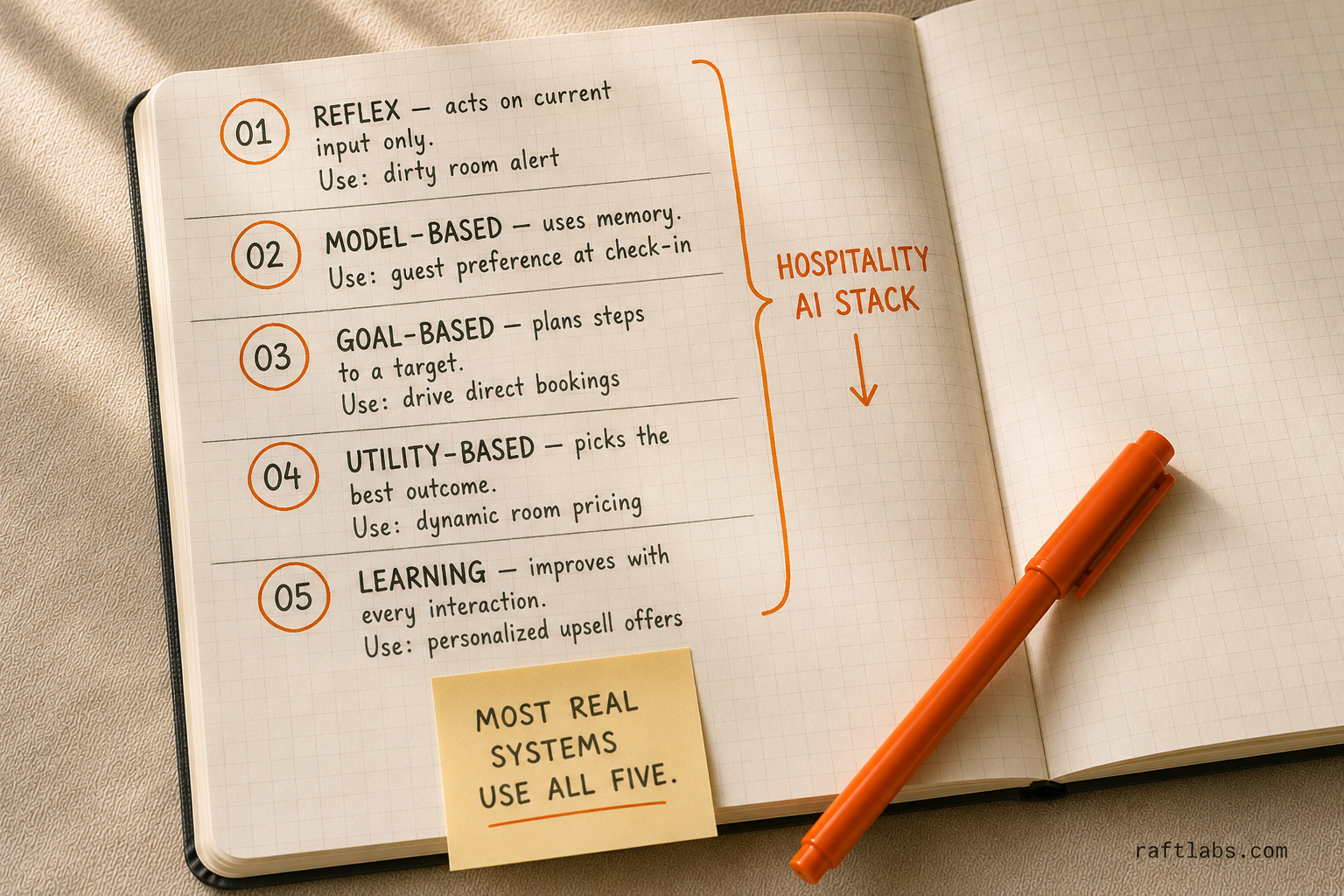
This creates a natural cost hierarchy: 75-85% of tasks use cheap models, 10-15% use mid-tier, 5-10% use expensive models for complex edge cases.
Implementation: Try a small model first. If output doesn't pass validation, escalate to a larger model.
Most tasks don't need the largest models. Only escalate when necessary.
The monitoring framework
Track these metrics weekly:
- Cost per operation type (don't just look at total spend).
- Model utilization ratios (which models handle what percentage). Cache hit rates (are you wasting money on repeat operations).
- Failed operations (wasted money on outputs that got rejected).
- Cost per business outcome (dollars spent per feature shipped, bug caught, insight generated).
Research from Scale AI shows that teams monitoring and optimizing these metrics reduce AI operational costs by 50-70% within the first quarter of implementation.
The bottom line on costs.
Unoptimized AI implementations cost 3-5x more than optimized ones.
A well-architected AI system with proper model selection, caching, batching, and monitoring keeps operational costs predictable and reasonable.
Budget $2K-6K/month for most product development AI workflows. Not $10K-20K.
What's coming: AI in product development over the next 18-24 months
Three trends are reshaping how product teams will work. Not theoretical trends - trends already starting in early 2026.
Increased use of agentic AI
Agentic AI is the shift from "AI that suggests" to "AI that does."
Instead of a tool saying, "Here are five potential bugs," it says, "I found these five bugs, fixed them, and opened a pull request for review."
One is advisory. The other is operational. That difference changes how teams work.
Current state in early 2026
Right now, agentic AI is real but narrow. It excels at well-defined, bounded tasks: code formatting, test generation, refactoring within clear limits, and documentation updates.
What it cannot do is make high-level system architecture decisions or guide product tradeoffs. Tools like Devin and GitHub's experimental agent features show early promise, but they perform best in constrained environments with strong guardrails and heavy human oversight.
The 2026-2027 projection
The next stage is expanded scope. Agents will handle full feature implementations for straightforward CRUD operations. You provide the requirements. The AI generates the code, writes tests, updates documentation, and submits a pull request.
The human role shifts. Developers spend more time reviewing, refining, and making sure the output aligns with business goals, rather than starting from scratch.
Gartner predicts that by late 2027, roughly 30% of new application features will be initially drafted by agentic AI systems.
When it's ready for your stack
Timing matters. If your codebase has clear standards, full tests, and well-documented architecture, you can start experimenting with agentic tools in Q3-Q4 2026.
If your codebase is messy, undocumented, or inconsistent, agentic AI will amplify the problems. The smarter move is to clean up your foundations first. Agents perform best in structured environments, and preparation now determines how much you can safely automate later.
The through line is simple: agentic AI isn't about replacing developers. It's about shifting where their time goes. The question is whether your systems are mature enough to let them.
Rise of low-code/no-code platforms
AI-powered low-code platforms promise "build apps without engineers."
The marketing is way ahead of reality.
The truth
These platforms are excellent for prototypes and internal tools. They're not suitable for production applications at scale.
They create technical debt. They limit customization. They often cost more than traditional development once you factor in all the workarounds and limitations.
Forrester's analysis shows that 60-70% of complex applications started on low-code platforms eventually get rebuilt with traditional code after hitting platform limitations.
Where they fit in serious product teams
Rapid prototyping before committing engineering resources. Internal admin tools. Proof-of-concept builds for testing market demand.
But not your core product.
Average cost of rebuilding after low-code limitations are hit: $120K-200K according to industry surveys.
Use low-code strategically. Not as a development replacement.
Focus on responsible and ethical AI
This isn't about ethics as PR. This is about avoiding expensive mistakes.
Bias in AI decisions costs real money.
An AI recommendation engine that systematically ignores a customer segment costs you revenue. A biased AI hiring tool creates legal exposure. A content moderation system that fails loses you users.
Real-world surveys show that 36% of companies report AI bias has hurt their business and, among those, over 60% say they lost revenue and customers because of biased systems.
Implementation checklist for responsible AI
Audit training data for bias in collection and representation
Monitor model outputs for unexpected patterns in different user segments
Build kill switches to disable AI features if problems emerge
Document decision-making logic for regulatory compliance
Regular third-party audits of AI systems
The EU AI Act, effective 2026, imposes significant penalties for high-risk AI systems that don't meet transparency and fairness requirements. US regulation is coming.
Getting this wrong is expensive. Getting it right builds trust with users and protects your business.
What to do now
AI in product development isn't about replacing your team. It's about removing the friction that slows them down.
The teams winning right now ship MVPs in 12-14 weeks instead of 16-20. They run 10 experiments where competitors run 3. They catch problems in hours instead of days. They're doing it without doubling headcount. And they're controlling hallucination risk and token costs through systematic mitigation.
That advantage compounds over time. Six months from now, the gap between teams using AI effectively and teams ignoring it will be wide enough that catching up becomes nearly impossible.
The decision framework:
Start with the problems costing you the most money or time right now.
User research taking 8 weeks? Start there. Testing backlog causing delays? Start there. Manual work consuming senior engineering time? Start there.
Pick one problem. Implement AI to solve it with proper hallucination mitigation and cost controls. Measure the result. Then expand.
What to do this week:
Audit where your team spends time on repetitive work. Calculate what that time actually costs. Find one high-cost, repeatable process where AI could help.
That's your starting point.
At RaftLabs, we've built AI-powered products since 2015. We know what works in production and what dies in proof-of-concepts. We've implemented hallucination mitigation across our projects with solid validation systems. We optimize token costs to keep AI budgets predictable.
We ship production-ready software in 8-12 weeks, not quarters.
If you're the person who needs to ship faster without adding headcount or risking expensive AI failures, we should talk.
Ask an AI
Get an instant summary of this post from your preferred AI assistant.
Common questions
- Most teams see measurable ROI within 12-14 weeks for targeted implementations like automated testing or code generation. Broader implementations, like a full AI-assisted development workflow, show ROI in 4-6 months. The key metric is whether you're shipping features faster or reducing time spent on repetitive tasks. If yes, calculate the developer time saved and compare it to the implementation cost. Also factor in prevented hallucination incidents (average cost per incident: $20K-$100K) when calculating total ROI.
- Your existing developers can handle AI tools after 2-4 weeks of training. You just need one person (doesn't have to be full-time) who owns the AI toolchain, monitors performance, optimizes costs, and maintains validation gates. Budget 20% of one senior engineer's time for this role.
- Code review everything AI generates. Set clear standards for what AI can touch (boilerplate, tests, documentation) versus what requires human development (business logic, architecture, security). Monitor AI-generated code quality over time. If quality drops, audit your prompts and training. Implement the four-layer hallucination mitigation strategy: constrained generation, validation gates, human review with context, and production monitoring. AI creates technical debt when teams skip review processes, not because AI itself is problematic.
- Four common mistakes. Implementing AI without defining success metrics (how will you know it worked?). Trying to solve too many problems at once instead of starting focused. Skipping the infrastructure work (data quality, monitoring, cost controls, hallucination mitigation) because it's not exciting. Ignoring token costs until the first $15K monthly bill arrives. Fix these four issues and most AI implementations succeed.
- Track these metrics. Sprint velocity (features shipped per sprint). Bug density (bugs per 1000 lines of code). Time-to-resolution for issues. Developer time spent on repetitive tasks. Experiment cycle time. Hallucination rate (AI outputs failing validation). Token cost per outcome. Compare pre-AI and post-AI numbers. If you're not measuring, you can't prove ROI or optimize performance.